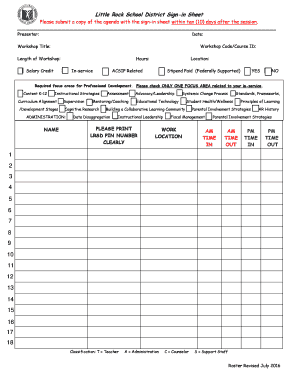
Little Rock School District Sign in Sheet 2 4 5 6 9 10 15 16 18 Profdev Lrsd Form


What is the Little Rock School District Sign in Sheet 2 4 5 6 9 10 15 16 18 Profdev Lrsd
The Little Rock School District Sign in Sheet 2 4 5 6 9 10 15 16 18 Profdev Lrsd is a document designed for educators and staff within the Little Rock School District to record attendance at professional development sessions. This form serves as a formal record of participation, ensuring that educators receive proper credit for their professional learning activities. It typically includes sections for the participant's name, date, session title, and signature, facilitating accurate tracking of attendance and engagement in ongoing education.
How to use the Little Rock School District Sign in Sheet 2 4 5 6 9 10 15 16 18 Profdev Lrsd
Using the Little Rock School District Sign in Sheet is straightforward. Participants should fill out their name and the date at the beginning of the session. As the session progresses, they will enter the title of the professional development activity. At the conclusion of the session, each participant must sign the sheet to confirm their attendance. This process helps maintain an organized record of who attended each session, which is essential for both compliance and recognition of professional development efforts.
Steps to complete the Little Rock School District Sign in Sheet 2 4 5 6 9 10 15 16 18 Profdev Lrsd
Completing the Little Rock School District Sign in Sheet involves several key steps:
- Begin by writing your full name on the designated line.
- Enter the date of the professional development session.
- Fill in the title of the session or activity you are attending.
- At the end of the session, sign your name to confirm your attendance.
These steps ensure that all necessary information is captured accurately, making it easier for the district to manage professional development records.
Key elements of the Little Rock School District Sign in Sheet 2 4 5 6 9 10 15 16 18 Profdev Lrsd
The key elements of the Little Rock School District Sign in Sheet include:
- Name: The full name of the participant.
- Date: The specific date of the professional development session.
- Session Title: The name of the professional development activity.
- Signature: A signature to verify attendance.
These elements are crucial for maintaining accurate records and ensuring compliance with district policies regarding professional development.
Legal use of the Little Rock School District Sign in Sheet 2 4 5 6 9 10 15 16 18 Profdev Lrsd
The Little Rock School District Sign in Sheet is used legally to document attendance at professional development sessions. This documentation is important for fulfilling district requirements and can serve as evidence of participation in case of audits or evaluations. Proper use of this form helps ensure that educators receive credit for their professional learning, which can be essential for career advancement and compliance with state educational standards.
Quick guide on how to complete little rock school district sign in sheet 2 4 5 6 9 10 15 16 18 profdev lrsd
Complete Little Rock School District Sign in Sheet 2 4 5 6 9 10 15 16 18 Profdev Lrsd effortlessly on any device
Online document management has gained popularity among businesses and individuals. It offers an ideal environmentally friendly substitute for conventional printed and signed documents, allowing you to access the appropriate form and securely save it online. airSlate SignNow equips you with all the tools necessary to create, modify, and eSign your documents swiftly without delays. Manage Little Rock School District Sign in Sheet 2 4 5 6 9 10 15 16 18 Profdev Lrsd on any device with airSlate SignNow Android or iOS applications and enhance any document-driven process today.
How to alter and eSign Little Rock School District Sign in Sheet 2 4 5 6 9 10 15 16 18 Profdev Lrsd with ease
- Select Little Rock School District Sign in Sheet 2 4 5 6 9 10 15 16 18 Profdev Lrsd and click Get Form to begin.
- Utilize the tools we supply to finish your form.
- Emphasize important sections of the documents or black out sensitive information with tools that airSlate SignNow provides specifically for that purpose.
- Create your signature with the Sign tool, which takes seconds and holds the same legal validity as a traditional wet ink signature.
- Review the information and click on the Done button to save your changes.
- Select your preferred method to send your form, whether by email, SMS, or invitation link, or download it to your computer.
Forget about lost or misplaced documents, tedious form searches, or errors that require new document prints. airSlate SignNow addresses your document management needs in just a few clicks from any device of your choice. Edit and eSign Little Rock School District Sign in Sheet 2 4 5 6 9 10 15 16 18 Profdev Lrsd and ensure effective communication at any stage of your form preparation process with airSlate SignNow.
Create this form in 5 minutes or less
Create this form in 5 minutes!
How to create an eSignature for the little rock school district sign in sheet 2 4 5 6 9 10 15 16 18 profdev lrsd
How to create an electronic signature for a PDF online
How to create an electronic signature for a PDF in Google Chrome
How to create an e-signature for signing PDFs in Gmail
How to create an e-signature right from your smartphone
How to create an e-signature for a PDF on iOS
How to create an e-signature for a PDF on Android
People also ask
-
What is the Little Rock School District Sign in Sheet 2 4 5 6 9 10 15 16 18 Profdev Lrsd?
The Little Rock School District Sign in Sheet 2 4 5 6 9 10 15 16 18 Profdev Lrsd is a digital tool designed to streamline the sign-in process for professional development events within the Little Rock School District. It allows educators to easily record attendance and manage participant information efficiently.
-
How can I access the Little Rock School District Sign in Sheet 2 4 5 6 9 10 15 16 18 Profdev Lrsd?
You can access the Little Rock School District Sign in Sheet 2 4 5 6 9 10 15 16 18 Profdev Lrsd through the airSlate SignNow platform. Simply create an account, and you will be able to utilize the sign-in sheet along with other document management features.
-
What are the pricing options for the Little Rock School District Sign in Sheet 2 4 5 6 9 10 15 16 18 Profdev Lrsd?
The pricing for the Little Rock School District Sign in Sheet 2 4 5 6 9 10 15 16 18 Profdev Lrsd is competitive and varies based on the subscription plan you choose. airSlate SignNow offers flexible pricing tiers to accommodate different needs, ensuring you get the best value for your investment.
-
What features does the Little Rock School District Sign in Sheet 2 4 5 6 9 10 15 16 18 Profdev Lrsd offer?
The Little Rock School District Sign in Sheet 2 4 5 6 9 10 15 16 18 Profdev Lrsd includes features such as customizable templates, real-time tracking of attendance, and easy integration with other tools. These features enhance the efficiency of managing professional development sessions.
-
How does the Little Rock School District Sign in Sheet 2 4 5 6 9 10 15 16 18 Profdev Lrsd benefit educators?
Educators benefit from the Little Rock School District Sign in Sheet 2 4 5 6 9 10 15 16 18 Profdev Lrsd by saving time on administrative tasks and ensuring accurate attendance records. This allows them to focus more on teaching and professional growth.
-
Can the Little Rock School District Sign in Sheet 2 4 5 6 9 10 15 16 18 Profdev Lrsd integrate with other software?
Yes, the Little Rock School District Sign in Sheet 2 4 5 6 9 10 15 16 18 Profdev Lrsd can seamlessly integrate with various educational and administrative software. This integration helps streamline workflows and enhances overall productivity.
-
Is there customer support available for the Little Rock School District Sign in Sheet 2 4 5 6 9 10 15 16 18 Profdev Lrsd?
Absolutely! airSlate SignNow provides dedicated customer support for users of the Little Rock School District Sign in Sheet 2 4 5 6 9 10 15 16 18 Profdev Lrsd. You can signNow out via email, chat, or phone for assistance with any questions or issues.
Get more for Little Rock School District Sign in Sheet 2 4 5 6 9 10 15 16 18 Profdev Lrsd
Find out other Little Rock School District Sign in Sheet 2 4 5 6 9 10 15 16 18 Profdev Lrsd
- How Do I Sign Nebraska Charity Form
- Help Me With Sign Nevada Charity PDF
- How To Sign North Carolina Charity PPT
- Help Me With Sign Ohio Charity Document
- How To Sign Alabama Construction PDF
- How To Sign Connecticut Construction Document
- How To Sign Iowa Construction Presentation
- How To Sign Arkansas Doctors Document
- How Do I Sign Florida Doctors Word
- Can I Sign Florida Doctors Word
- How Can I Sign Illinois Doctors PPT
- How To Sign Texas Doctors PDF
- Help Me With Sign Arizona Education PDF
- How To Sign Georgia Education Form
- How To Sign Iowa Education PDF
- Help Me With Sign Michigan Education Document
- How Can I Sign Michigan Education Document
- How Do I Sign South Carolina Education Form
- Can I Sign South Carolina Education Presentation
- How Do I Sign Texas Education Form