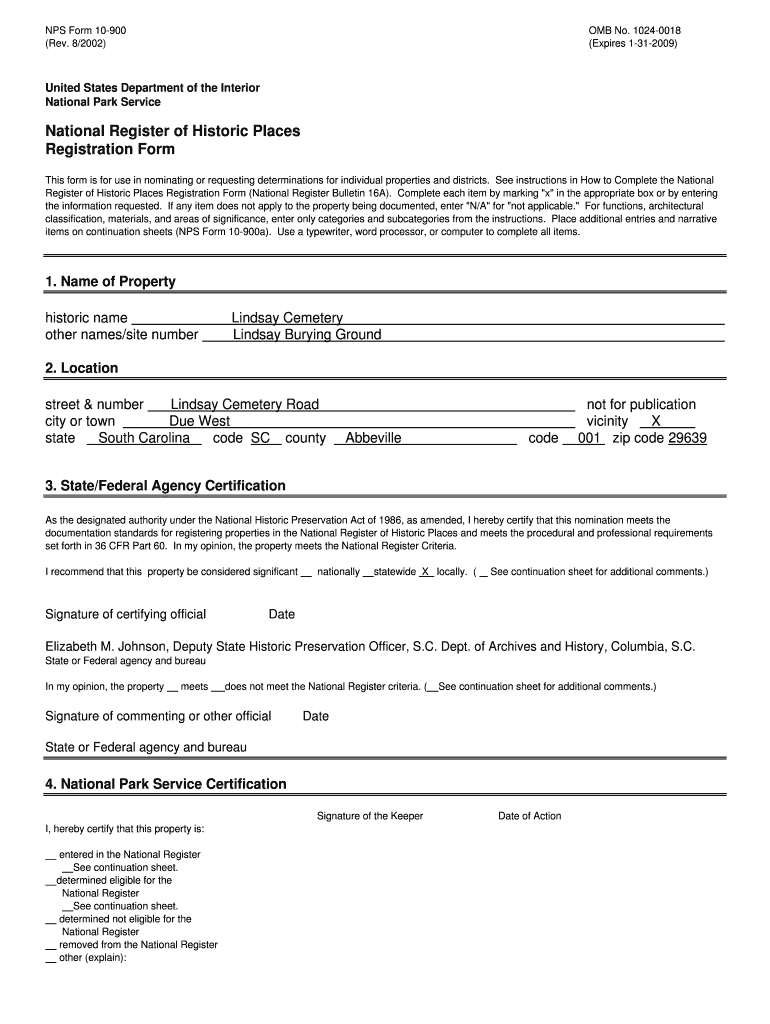
1024 0018 Expires 1 31 United States Department of the Interior National Park Service National Register of Historic Places Regis Form


What is the Expires 1 31 United States Department Of The Interior National Park Service National Register Of Historic Places Registration Form
The Expires 1 31 form is an official document issued by the United States Department of the Interior, specifically the National Park Service. This form is designed for use in nominating or requesting determinations for individual properties to be listed in the National Register of Historic Places. The National Register serves as an important tool for preserving the historical and cultural heritage of the United States, recognizing properties that hold significance in American history, architecture, archaeology, and culture.
How to use the Expires 1 31 Form
Using the form involves several key steps. First, gather all necessary information about the property you wish to nominate, including its historical significance and architectural features. Next, complete the form by providing detailed descriptions, photographs, and any supporting documentation that illustrates the property's importance. Once completed, the form should be submitted to the appropriate state historic preservation office for review. It is essential to follow the guidelines provided by the National Park Service to ensure a thorough and accurate nomination process.
Steps to complete the Expires 1 31 Form
Completing the form requires careful attention to detail. The following steps outline the process:
- Research the property’s history and significance.
- Gather supporting materials, including photographs and maps.
- Fill out the form, ensuring all sections are completed accurately.
- Review the form for completeness and clarity.
- Submit the form to the state historic preservation office.
Key elements of the Expires 1 31 Form
Several key elements must be included when completing the form. These elements typically include:
- Property name and location.
- Ownership information.
- A description of the property’s historical significance.
- Architectural details and features.
- Photographic documentation.
Eligibility Criteria
To be eligible for nomination using the form, a property must meet specific criteria set by the National Park Service. These criteria generally include:
- The property must be at least fifty years old.
- It must possess integrity of location, design, setting, materials, workmanship, feeling, and association.
- The property must be associated with significant events, activities, or individuals in American history.
Form Submission Methods
The form can be submitted through various methods, depending on state guidelines. Common submission methods include:
- Online submission through the state historic preservation office's website.
- Mailing a physical copy of the completed form and supporting documents.
- In-person submission at designated offices.
Quick guide on how to complete 1024 0018 expires 1 31 united states department of the interior national park service national register of historic places
Accomplish [SKS] effortlessly on any gadget
Digital document management has become increasingly popular among businesses and individuals. It offers an excellent eco-friendly substitute for traditional printed and signed documents, as you can acquire the appropriate template and securely archive it online. airSlate SignNow equips you with all the tools necessary to create, modify, and eSign your documents promptly without delays. Manage [SKS] on any gadget with the airSlate SignNow Android or iOS applications and simplify any document-related task today.
The simplest way to adjust and eSign [SKS] seamlessly
- Obtain [SKS] and click Get Form to begin.
- Utilize the tools we offer to fill out your form.
- Emphasize relevant sections of your documents or redact sensitive information with tools that airSlate SignNow provides specifically for that purpose.
- Create your signature using the Sign feature, which takes seconds and holds the same legal significance as a traditional handwritten signature.
- Review all the details and click on the Done button to save your changes.
- Select how you want to send your form, via email, SMS, or invitation link, or download it to your computer.
Eliminate concerns about lost or misplaced documents, tedious form searching, or errors that necessitate printing new document copies. airSlate SignNow addresses your document management needs in just a few clicks from your chosen device. Modify and eSign [SKS] while ensuring exceptional communication at every stage of the form preparation process with airSlate SignNow.
Create this form in 5 minutes or less
Create this form in 5 minutes!
How to create an eSignature for the 1024 0018 expires 1 31 united states department of the interior national park service national register of historic places
How to create an electronic signature for a PDF online
How to create an electronic signature for a PDF in Google Chrome
How to create an e-signature for signing PDFs in Gmail
How to create an e-signature right from your smartphone
How to create an e-signature for a PDF on iOS
How to create an e-signature for a PDF on Android
People also ask
-
What is the 1024 0018 Expires 1 31 United States Department Of The Interior National Park Service National Register Of Historic Places Registration Form?
The 1024 0018 Expires 1 31 United States Department Of The Interior National Park Service National Register Of Historic Places Registration Form is a crucial document for nominating or requesting determinations for individual properties. This form is essential for those looking to preserve historical sites and ensure they receive the recognition they deserve.
-
How can airSlate SignNow help with the 1024 0018 Expires 1 31 form?
airSlate SignNow provides an easy-to-use platform for completing and eSigning the 1024 0018 Expires 1 31 United States Department Of The Interior National Park Service National Register Of Historic Places Registration Form. Our solution streamlines the process, allowing users to fill out the form digitally and securely send it for signatures.
-
What are the pricing options for using airSlate SignNow?
airSlate SignNow offers various pricing plans to accommodate different business needs. Each plan provides access to features that simplify the completion of documents like the 1024 0018 Expires 1 31 United States Department Of The Interior National Park Service National Register Of Historic Places Registration Form, ensuring you find a solution that fits your budget.
-
What features does airSlate SignNow offer for document management?
airSlate SignNow includes features such as customizable templates, secure eSigning, and document tracking. These tools enhance the management of important documents like the 1024 0018 Expires 1 31 United States Department Of The Interior National Park Service National Register Of Historic Places Registration Form, making it easier to keep everything organized and accessible.
-
Can I integrate airSlate SignNow with other applications?
Yes, airSlate SignNow offers integrations with various applications, enhancing your workflow. This means you can easily connect tools you already use with the 1024 0018 Expires 1 31 United States Department Of The Interior National Park Service National Register Of Historic Places Registration Form, streamlining your document processes.
-
What are the benefits of using airSlate SignNow for historical property nominations?
Using airSlate SignNow for historical property nominations simplifies the process of completing the 1024 0018 Expires 1 31 United States Department Of The Interior National Park Service National Register Of Historic Places Registration Form. The platform ensures that your submissions are timely, secure, and compliant with necessary regulations.
-
Is airSlate SignNow secure for handling sensitive documents?
Absolutely! airSlate SignNow prioritizes security, employing advanced encryption and compliance measures to protect your documents. This is particularly important when dealing with forms like the 1024 0018 Expires 1 31 United States Department Of The Interior National Park Service National Register Of Historic Places Registration Form, which may contain sensitive information.
Get more for 1024 0018 Expires 1 31 United States Department Of The Interior National Park Service National Register Of Historic Places Regis
- Uncontested adult children form
- Control number az 00llc form
- Uncontested without children form
- North carolina no fault agreed uncontested divorce package for form
- Petitioner for form
- We are terminating your tenancy and shall evict you from the following property form
- Complaint for ejectment florida law help form
- In the court of county state of georgia state of form
Find out other 1024 0018 Expires 1 31 United States Department Of The Interior National Park Service National Register Of Historic Places Regis
- How Can I Electronic signature Florida Rental house lease agreement
- How Can I Electronic signature Texas Rental house lease agreement
- eSignature Alabama Trademark License Agreement Secure
- Electronic signature Maryland Rental agreement lease Myself
- How To Electronic signature Kentucky Rental lease agreement
- Can I Electronic signature New Hampshire Rental lease agreement forms
- Can I Electronic signature New Mexico Rental lease agreement forms
- How Can I Electronic signature Minnesota Rental lease agreement
- Electronic signature Arkansas Rental lease agreement template Computer
- Can I Electronic signature Mississippi Rental lease agreement
- Can I Electronic signature Missouri Rental lease contract
- Electronic signature New Jersey Rental lease agreement template Free
- Electronic signature New Jersey Rental lease agreement template Secure
- Electronic signature Vermont Rental lease agreement Mobile
- Electronic signature Maine Residential lease agreement Online
- Electronic signature Minnesota Residential lease agreement Easy
- Electronic signature Wyoming Rental lease agreement template Simple
- Electronic signature Rhode Island Residential lease agreement Online
- Electronic signature Florida Rental property lease agreement Free
- Can I Electronic signature Mississippi Rental property lease agreement