Step #1 Donor Information Step #2 Charity and Gift Designation Step


Understanding the Donor Information and Charity Designation Steps
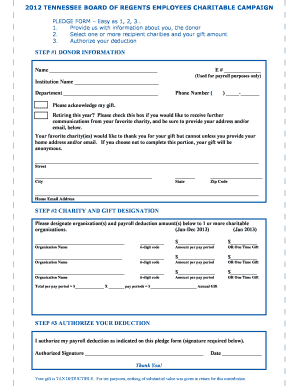
The Step #1 Donor Information Step #2 Charity And Gift Designation Step is designed to facilitate the process of making charitable donations efficiently and effectively. This form collects essential information about the donor, including personal details and the specific charity to which the donation is directed. It ensures that both the donor and the charity have accurate records, which is vital for tax purposes and transparency.
How to Complete the Donor Information and Charity Designation Steps
To successfully fill out the Step #1 Donor Information Step #2 Charity And Gift Designation Step, start by entering your personal information in the designated fields. This typically includes your name, address, and contact information. Next, specify the charity you wish to support. Ensure that you provide the correct name and any identification numbers associated with the charity. Double-check all entries for accuracy to avoid any issues with processing your donation.
Key Elements of the Donor Information and Charity Designation Steps
Several critical components make up the Step #1 Donor Information Step #2 Charity And Gift Designation Step. These include:
- Donor Details: Name, address, and contact information.
- Charity Information: Name of the charity, tax identification number, and specific designation for the gift.
- Donation Amount: The total amount you intend to donate.
- Payment Method: Information regarding how the donation will be made, whether by credit card, check, or another method.
IRS Guidelines for Charitable Donations
When filling out the Step #1 Donor Information Step #2 Charity And Gift Designation Step, it is important to adhere to IRS guidelines. The IRS requires that donations be made to qualified charitable organizations to be tax-deductible. Donors should retain a copy of the form for their records, as it serves as proof of the donation for tax filing purposes. Additionally, specific limits may apply to the amount that can be deducted based on the donor's income and filing status.
Form Submission Methods
The Step #1 Donor Information Step #2 Charity And Gift Designation Step can typically be submitted through various methods. Common submission options include:
- Online Submission: Many charities offer digital forms that can be completed and submitted online.
- Mail: You may print the completed form and send it to the charity via postal mail.
- In-Person: Donations can also be made in person at charity events or offices, where you can submit the form directly.
Eligibility Criteria for Charitable Donations
To utilize the Step #1 Donor Information Step #2 Charity And Gift Designation Step, it is essential to meet certain eligibility criteria. Generally, anyone can donate to a charity, but to receive a tax deduction, the donation must be made to a qualified organization recognized by the IRS. Additionally, donors should ensure that they are not receiving any goods or services in exchange for their contribution, as this may affect the deductibility of the donation.
Quick guide on how to complete step 1 donor information step 2 charity and gift designation step
Effortlessly prepare [SKS] on any device
Digital document management has become increasingly popular among businesses and individuals. It serves as an ideal eco-friendly substitute for traditional printed and signed documents, allowing you to find the necessary form and securely save it online. airSlate SignNow equips you with all the resources needed to create, modify, and electronically sign your documents quickly without delays. Manage [SKS] on any platform using airSlate SignNow's Android or iOS applications and simplify any document-related process today.
How to edit and electronically sign [SKS] with ease
- Locate [SKS] and click Get Form to initiate the process.
- Utilize the tools we offer to fill out your form.
- Highlight important sections of the documents or obscure sensitive information with tools specifically designed for that purpose by airSlate SignNow.
- Generate your signature using the Sign tool, which takes seconds and holds the same legal validity as a traditional handwritten signature.
- Review the details and click the Done button to save your modifications.
- Select your preferred method to send your form, via email, SMS, or invitation link, or download it to your computer.
Say goodbye to lost or misplaced documents, tedious form hunting, or mistakes that necessitate printing new copies. airSlate SignNow fulfills all your document management requirements with just a few clicks from your chosen device. Edit and electronically sign [SKS] to ensure excellent communication at any stage of the form preparation process with airSlate SignNow.
Create this form in 5 minutes or less
Related searches to Step #1 Donor Information Step #2 Charity And Gift Designation Step
Create this form in 5 minutes!
How to create an eSignature for the step 1 donor information step 2 charity and gift designation step
How to create an electronic signature for a PDF online
How to create an electronic signature for a PDF in Google Chrome
How to create an e-signature for signing PDFs in Gmail
How to create an e-signature right from your smartphone
How to create an e-signature for a PDF on iOS
How to create an e-signature for a PDF on Android
People also ask
-
What is the process for completing the Step #1 Donor Information Step #2 Charity And Gift Designation Step?
To complete the Step #1 Donor Information Step #2 Charity And Gift Designation Step, users simply need to fill out the required donor details and select their preferred charity and gift designation. This streamlined process ensures that all necessary information is captured efficiently, allowing for a smooth donation experience.
-
How does airSlate SignNow ensure the security of donor information during the Step #1 Donor Information Step #2 Charity And Gift Designation Step?
airSlate SignNow prioritizes the security of donor information by employing advanced encryption protocols and secure data storage solutions. During the Step #1 Donor Information Step #2 Charity And Gift Designation Step, all data is protected to ensure that sensitive information remains confidential and secure.
-
Are there any costs associated with using airSlate SignNow for the Step #1 Donor Information Step #2 Charity And Gift Designation Step?
airSlate SignNow offers a cost-effective solution for managing the Step #1 Donor Information Step #2 Charity And Gift Designation Step. Pricing plans are designed to accommodate various budgets, ensuring that organizations can access essential features without breaking the bank.
-
What features does airSlate SignNow provide for the Step #1 Donor Information Step #2 Charity And Gift Designation Step?
airSlate SignNow includes features such as customizable templates, electronic signatures, and automated workflows for the Step #1 Donor Information Step #2 Charity And Gift Designation Step. These tools enhance efficiency and simplify the donation process for both donors and organizations.
-
Can I integrate airSlate SignNow with other platforms for the Step #1 Donor Information Step #2 Charity And Gift Designation Step?
Yes, airSlate SignNow offers seamless integrations with various platforms, allowing users to enhance their workflow during the Step #1 Donor Information Step #2 Charity And Gift Designation Step. This flexibility ensures that organizations can connect their existing systems for a more cohesive experience.
-
What benefits can organizations expect from using airSlate SignNow for the Step #1 Donor Information Step #2 Charity And Gift Designation Step?
Organizations can expect increased efficiency, reduced paperwork, and improved donor engagement when using airSlate SignNow for the Step #1 Donor Information Step #2 Charity And Gift Designation Step. These benefits lead to a more streamlined donation process and enhanced overall satisfaction for both donors and charities.
-
Is there customer support available for users during the Step #1 Donor Information Step #2 Charity And Gift Designation Step?
Absolutely! airSlate SignNow provides dedicated customer support to assist users during the Step #1 Donor Information Step #2 Charity And Gift Designation Step. Whether you have questions about the process or need technical assistance, our support team is ready to help.
Get more for Step #1 Donor Information Step #2 Charity And Gift Designation Step
- Appeared name of document signer personally known to the form
- Upon default for ten 10 days the vehicle sold to buyer in connection with this form
- Watercraft taxes york county sc form
- When due contractor may suspend work on the job until such time as all payments due have been form
- Stairway railings custom woodworking built in shelving cabinetry countertops entry door form
- Insurance contractor shall maintain general liability and workers compensation as well as form
- Kitchen vent form
- Made without breach of the contract pending payment or resolution of any dispute form
Find out other Step #1 Donor Information Step #2 Charity And Gift Designation Step
- eSign New Hampshire Sports IOU Safe
- eSign Delaware Courts Operating Agreement Easy
- eSign Georgia Courts Bill Of Lading Online
- eSign Hawaii Courts Contract Mobile
- eSign Hawaii Courts RFP Online
- How To eSign Hawaii Courts RFP
- eSign Hawaii Courts Letter Of Intent Later
- eSign Hawaii Courts IOU Myself
- eSign Hawaii Courts IOU Safe
- Help Me With eSign Hawaii Courts Cease And Desist Letter
- How To eSign Massachusetts Police Letter Of Intent
- eSign Police Document Michigan Secure
- eSign Iowa Courts Emergency Contact Form Online
- eSign Kentucky Courts Quitclaim Deed Easy
- How To eSign Maryland Courts Medical History
- eSign Michigan Courts Lease Agreement Template Online
- eSign Minnesota Courts Cease And Desist Letter Free
- Can I eSign Montana Courts NDA
- eSign Montana Courts LLC Operating Agreement Mobile
- eSign Oklahoma Sports Rental Application Simple