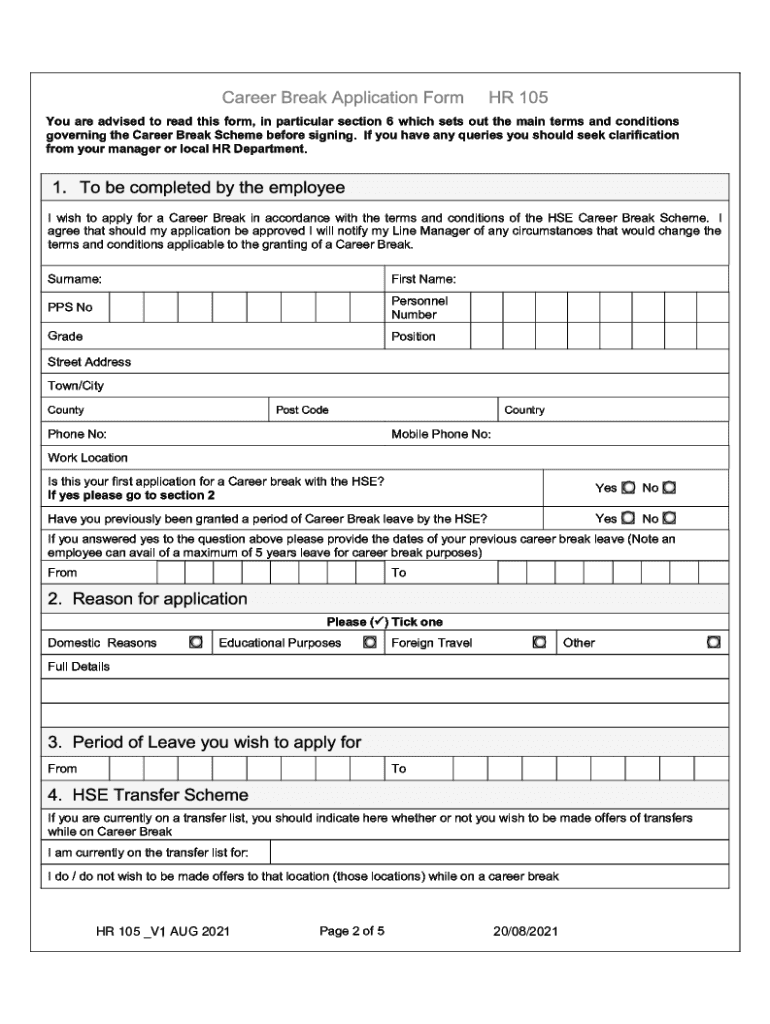
HR 105 Employee Application Form for Request of Career Break


Understanding the HSE Career Break Form
The HSE career break form, also known as the HR 105 Employee Application Form for Request of Career Break, is a crucial document for employees seeking a temporary leave of absence from their job. This form allows employees to formally request a career break for various reasons, such as personal development, family responsibilities, or health-related issues. Understanding the purpose and implications of this form is essential for employees considering a career break, as it outlines the necessary steps and criteria for approval.
How to Complete the HSE Career Break Form
Filling out the HSE career break form requires careful attention to detail. Employees should start by providing their personal information, including their name, employee ID, and department. Next, they need to specify the duration of the requested career break and the reason for the request. It is important to be clear and concise in explaining the reason, as this can impact the approval process. Additionally, employees may need to provide supporting documentation, depending on the nature of their request.
Eligibility Criteria for the HSE Career Break
To qualify for a career break using the HSE career break form, employees must meet specific eligibility criteria. Typically, employees should have completed a minimum duration of service with their employer, often ranging from one to three years. Furthermore, the request for a career break must align with company policies and be submitted within designated timeframes. Understanding these criteria is vital for employees to ensure their application is considered valid.
Submission Methods for the HSE Career Break Form
Employees can submit the HSE career break form through various methods, depending on their employer's policies. Common submission methods include online submission via the company’s HR portal, mailing a physical copy to the HR department, or delivering it in person. Each method may have different processing times, so employees should choose the one that best suits their needs and follow up to confirm receipt.
Key Elements of the HSE Career Break Form
The HSE career break form includes several key elements that employees must complete. These elements typically consist of personal details, the requested duration of the break, the reason for the request, and any necessary supporting documents. Additionally, there may be sections for supervisor recommendations or HR comments. Ensuring that all sections are filled out accurately can facilitate a smoother approval process.
Application Process and Approval Timeline
The application process for the HSE career break form involves several steps. After submission, the HR department reviews the request, which may include discussions with the employee's supervisor. The approval timeline can vary, but employees should expect to receive feedback within a few weeks. It is advisable for employees to plan their career break accordingly, taking into account this timeline and any potential delays.
Quick guide on how to complete hr 105 employee application form for request of career break
Effortlessly Prepare HR 105 Employee Application Form For Request Of Career Break on Any Device
Digital document management has become increasingly favored by businesses and individuals alike. It offers an ideal eco-friendly alternative to conventional printed and signed documents, as you can obtain the necessary form and securely save it online. airSlate SignNow equips you with all the resources you need to create, edit, and electronically sign your documents swiftly without delays. Manage HR 105 Employee Application Form For Request Of Career Break on any device using airSlate SignNow's Android or iOS applications and streamline any document-related operation today.
How to Edit and Electronically Sign HR 105 Employee Application Form For Request Of Career Break with Ease
- Find HR 105 Employee Application Form For Request Of Career Break and then click Get Form to begin.
- Utilize the tools we provide to complete your form.
- Emphasize relevant sections of the documents or redact sensitive data using the tools that airSlate SignNow provides specifically for this purpose.
- Generate your signature with the Sign tool, which takes mere seconds and holds the same legal validity as a traditional handwritten signature.
- Review the information carefully and then click on the Done button to save your changes.
- Select your preferred method for sharing your form, whether by email, SMS, or invitation link, or download it to your computer.
Eliminate concerns about lost or misplaced files, tedious form searching, or errors that necessitate printing new document copies. airSlate SignNow meets all your document management needs in just a few clicks from any device you prefer. Edit and electronically sign HR 105 Employee Application Form For Request Of Career Break to ensure excellent communication at every step of the document preparation process with airSlate SignNow.
Create this form in 5 minutes or less
Create this form in 5 minutes!
How to create an eSignature for the hr 105 employee application form for request of career break
How to create an electronic signature for a PDF online
How to create an electronic signature for a PDF in Google Chrome
How to create an e-signature for signing PDFs in Gmail
How to create an e-signature right from your smartphone
How to create an e-signature for a PDF on iOS
How to create an e-signature for a PDF on Android
People also ask
-
What is the HSE career break form?
The HSE career break form is a document that allows employees to apply for a career break from their current position within the Health Service Executive. This form is essential for ensuring that the process is formalized and that all necessary approvals are obtained. Using airSlate SignNow, you can easily fill out and eSign this form, streamlining the application process.
-
How can I access the HSE career break form?
You can access the HSE career break form through the airSlate SignNow platform, which provides a user-friendly interface for document management. Simply log in to your account, search for the form, and you can fill it out online. This eliminates the need for physical paperwork and speeds up the submission process.
-
Is there a cost associated with using the HSE career break form on airSlate SignNow?
Using the HSE career break form on airSlate SignNow is part of our subscription plans, which are designed to be cost-effective for businesses of all sizes. We offer various pricing tiers to suit different needs, ensuring that you can manage your documents without breaking the bank. Check our pricing page for more details on plans and features.
-
What features does airSlate SignNow offer for the HSE career break form?
airSlate SignNow offers several features for the HSE career break form, including eSigning, document templates, and real-time tracking. These features help you manage your application efficiently and ensure that all parties involved can sign the document quickly. Additionally, you can store and retrieve your forms easily within the platform.
-
How does using the HSE career break form benefit employees?
Using the HSE career break form through airSlate SignNow benefits employees by simplifying the application process and reducing the time spent on paperwork. The digital format allows for quick edits and immediate submission, ensuring that your request is processed faster. This efficiency can lead to a smoother transition during your career break.
-
Can I integrate the HSE career break form with other tools?
Yes, airSlate SignNow allows for seamless integration with various tools and applications, enhancing your workflow. You can connect the HSE career break form with project management software, CRM systems, and more. This integration helps keep all your documents organized and accessible in one place.
-
What security measures are in place for the HSE career break form?
airSlate SignNow prioritizes the security of your documents, including the HSE career break form. We implement advanced encryption and secure access protocols to protect your sensitive information. You can trust that your data is safe while using our platform for document management.
Get more for HR 105 Employee Application Form For Request Of Career Break
- Philippine board of ophthalmology form
- 12 step prayer book pdf form
- Waitlist form lily pads child care lilypadschildcare
- 1382 form california pdf
- Fattura proforma online
- Saudi arabia visa application form sample 356511851
- Navy special request chit 42398962 form
- Sample of ghana police clearance certificate form
Find out other HR 105 Employee Application Form For Request Of Career Break
- How Do I eSignature Oregon Plumbing PPT
- How Do I eSignature Connecticut Real Estate Presentation
- Can I eSignature Arizona Sports PPT
- How Can I eSignature Wisconsin Plumbing Document
- Can I eSignature Massachusetts Real Estate PDF
- How Can I eSignature New Jersey Police Document
- How Can I eSignature New Jersey Real Estate Word
- Can I eSignature Tennessee Police Form
- How Can I eSignature Vermont Police Presentation
- How Do I eSignature Pennsylvania Real Estate Document
- How Do I eSignature Texas Real Estate Document
- How Can I eSignature Colorado Courts PDF
- Can I eSignature Louisiana Courts Document
- How To Electronic signature Arkansas Banking Document
- How Do I Electronic signature California Banking Form
- How Do I eSignature Michigan Courts Document
- Can I eSignature Missouri Courts Document
- How Can I Electronic signature Delaware Banking PDF
- Can I Electronic signature Hawaii Banking Document
- Can I eSignature North Carolina Courts Presentation