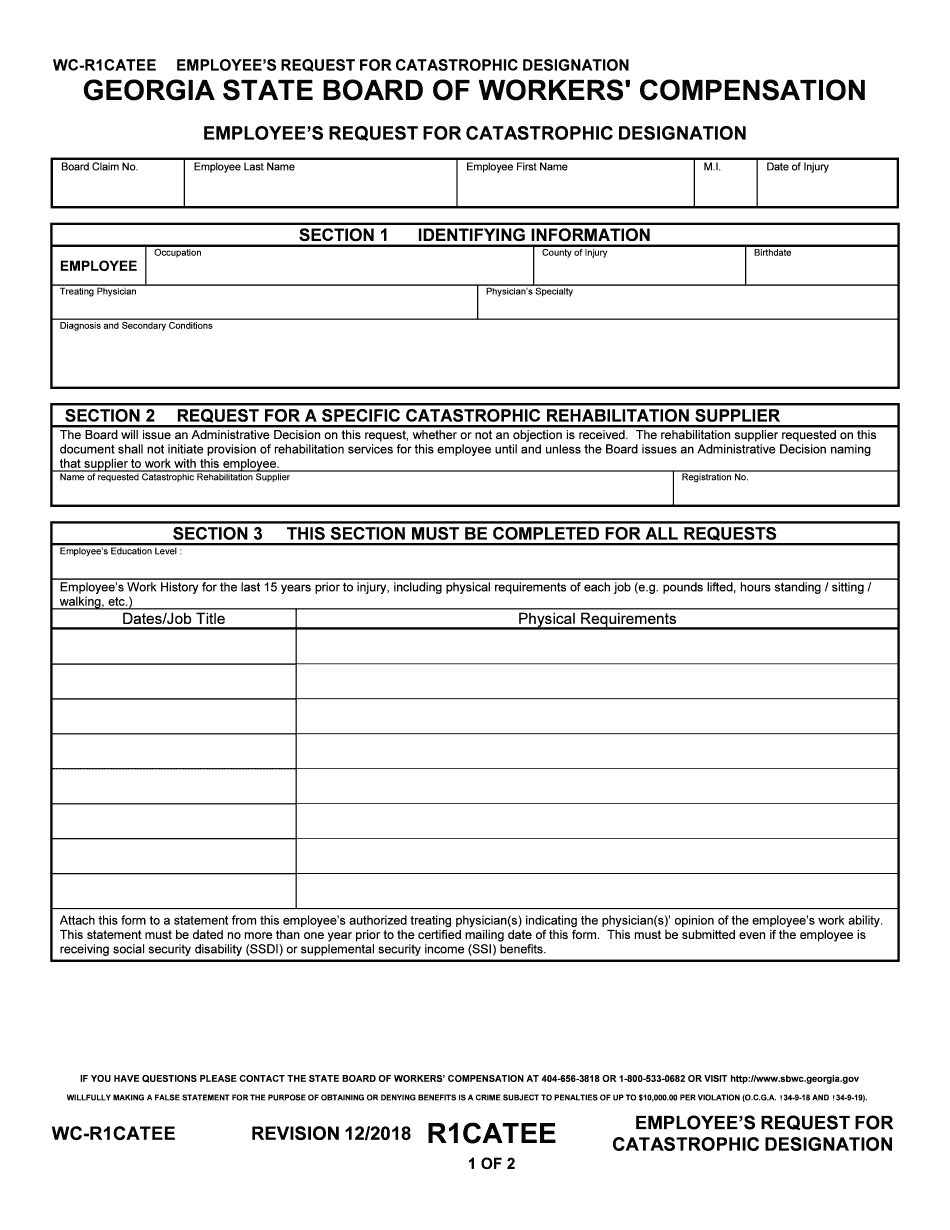
Catastrophic Designation 2018-2026


What is the Catastrophic Designation
The Catastrophic Designation refers to a specific classification in Georgia's workers' compensation system. This designation is intended for employees who have suffered severe injuries that result in significant impairment or disability. By obtaining this designation, employees may be eligible for enhanced benefits, which can provide crucial support during their recovery process. Understanding this designation is essential for both employers and employees to navigate the complexities of workers' compensation effectively.
How to Obtain the Catastrophic Designation
To obtain the Catastrophic Designation in Georgia, employees must follow a structured process. Initially, they need to file a request for the designation with their employer or the insurance carrier. This request typically includes detailed medical documentation that supports the claim of catastrophic injury. Once submitted, the employer or insurance company will review the request and may require additional information or a medical evaluation. It is important to ensure that all documentation is complete and accurate to avoid delays in processing.
Steps to Complete the Catastrophic Designation
Completing the Catastrophic Designation requires a series of steps that ensure compliance with Georgia's regulations. First, gather all necessary medical records and documentation that demonstrate the severity of the injury. Next, fill out the Georgia form catastrophic accurately, providing all required information. After completing the form, submit it to the appropriate party, such as the employer or insurance provider. Finally, follow up to confirm that the request has been received and is being processed, as timely communication can help expedite the approval.
Key Elements of the Catastrophic Designation
The Catastrophic Designation includes several key elements that define its scope and eligibility. These elements typically encompass the type and extent of the injury, the impact on the employee's ability to work, and the necessary medical treatment required. Additionally, the designation may involve specific criteria outlined by the Georgia State Board of Workers' Compensation, which must be met for approval. Understanding these elements is vital for employees seeking to secure their rights under the workers' compensation system.
Legal Use of the Catastrophic Designation
The legal use of the Catastrophic Designation is governed by state laws and regulations that outline the rights and responsibilities of both employees and employers. This designation serves as a legal acknowledgment of the severity of an employee's injury, granting them access to specific benefits. It is crucial for employees to understand their legal rights and the implications of the designation, as it can affect their compensation and the support they receive during recovery. Employers must also be aware of their obligations under the law to ensure compliance and avoid potential legal issues.
Eligibility Criteria
Eligibility for the Catastrophic Designation in Georgia is based on specific criteria that assess the nature and impact of an employee's injury. Generally, employees must demonstrate that their injury results in a permanent impairment that significantly limits their ability to perform work-related tasks. This may include conditions such as severe spinal injuries, traumatic brain injuries, or other debilitating conditions. Meeting these criteria is essential for employees to qualify for the designation and access the associated benefits.
Quick guide on how to complete physicians specialty
Complete Catastrophic Designation seamlessly on any device
Digital document management has become prevalent among businesses and individuals. It serves as an excellent eco-friendly alternative to traditional printed and signed documents, allowing you to access the correct template and securely store it online. airSlate SignNow provides you with all the necessary tools to create, modify, and eSign your documents quickly without any delays. Manage Catastrophic Designation on any platform with airSlate SignNow's Android or iOS applications and simplify any document-related process today.
How to edit and eSign Catastrophic Designation with ease
- Locate Catastrophic Designation and click Get Form to begin.
- Utilize the tools we offer to complete your form.
- Highlight pertinent sections of the documents or obscure sensitive information with tools that airSlate SignNow offers specifically for this purpose.
- Create your eSignature using the Sign tool, which takes mere seconds and holds the same legal validity as a conventional wet ink signature.
- Review all the information and click on the Done button to save your changes.
- Select how you wish to deliver your form: via email, SMS, invite link, or download it to your computer.
Eliminate concerns about lost or misplaced files, tedious form searches, or mistakes that necessitate printing new document copies. airSlate SignNow meets your document management needs in just a few clicks from any device of your choice. Edit and eSign Catastrophic Designation to ensure effective communication at every step of your form preparation process with airSlate SignNow.
Create this form in 5 minutes or less
Create this form in 5 minutes!
How to create an eSignature for the physicians specialty
How to make an electronic signature for the Physicians Specialty online
How to generate an eSignature for the Physicians Specialty in Chrome
How to generate an electronic signature for signing the Physicians Specialty in Gmail
How to make an electronic signature for the Physicians Specialty right from your mobile device
How to create an electronic signature for the Physicians Specialty on iOS
How to make an electronic signature for the Physicians Specialty on Android devices
People also ask
-
What is Catastrophic Designation in airSlate SignNow?
Catastrophic Designation in airSlate SignNow refers to a specific classification that allows users to manage and process critical documents efficiently. This designation ensures that essential agreements are handled with priority, streamlining the eSigning process for urgent transactions.
-
How can Catastrophic Designation benefit my business?
Utilizing Catastrophic Designation through airSlate SignNow can signNowly enhance your business operations by allowing you to prioritize important documents. This ensures that time-sensitive agreements are executed promptly, improving overall workflow and client satisfaction.
-
What features support Catastrophic Designation in airSlate SignNow?
airSlate SignNow includes several features that support Catastrophic Designation, such as customizable workflows and real-time notifications. These tools help you to manage urgent documents effectively, ensuring that all necessary parties are alerted and engaged in the signing process.
-
Is there a cost associated with Catastrophic Designation in airSlate SignNow?
Catastrophic Designation is included in the pricing plans of airSlate SignNow, which offers various tiers based on your business needs. By choosing the appropriate plan, you can access the benefits of Catastrophic Designation along with all other powerful features of the platform.
-
Can I integrate Catastrophic Designation with other applications?
Yes, airSlate SignNow allows for seamless integration of Catastrophic Designation with various applications, including CRM and document management tools. This ensures that your workflow remains uninterrupted and that critical documents are managed within your existing systems.
-
How does Catastrophic Designation improve document security?
The Catastrophic Designation feature in airSlate SignNow enhances document security by prioritizing the handling of sensitive agreements. This ensures that critical documents are not only processed quickly but also protected with advanced encryption and compliance features.
-
Are there any training resources for using Catastrophic Designation?
airSlate SignNow provides comprehensive training resources and support for users implementing Catastrophic Designation. These resources include tutorials, webinars, and a dedicated support team to help you maximize the benefits of this feature.
Get more for Catastrophic Designation
- Cancellation contract template form
- Application for vocational and employment services mrs 2910 application for vocational and employment services mrs 2910 form
- Change of address authorization form instructions
- Temper of the times form
- Fraud warning not applicable in az fl md or va any person who knowingly and with intent to defraud any insurance company or form
- Companion life insurance medical doctor claim form
- Louisiana ocg model accounting system form
- Louisiana department of revenue taxpayer services form
Find out other Catastrophic Designation
- How To eSign Wisconsin Real Estate Contract
- How To eSign West Virginia Real Estate Quitclaim Deed
- eSign Hawaii Police Permission Slip Online
- eSign New Hampshire Sports IOU Safe
- eSign Delaware Courts Operating Agreement Easy
- eSign Georgia Courts Bill Of Lading Online
- eSign Hawaii Courts Contract Mobile
- eSign Hawaii Courts RFP Online
- How To eSign Hawaii Courts RFP
- eSign Hawaii Courts Letter Of Intent Later
- eSign Hawaii Courts IOU Myself
- eSign Hawaii Courts IOU Safe
- Help Me With eSign Hawaii Courts Cease And Desist Letter
- How To eSign Massachusetts Police Letter Of Intent
- eSign Police Document Michigan Secure
- eSign Iowa Courts Emergency Contact Form Online
- eSign Kentucky Courts Quitclaim Deed Easy
- How To eSign Maryland Courts Medical History
- eSign Michigan Courts Lease Agreement Template Online
- eSign Minnesota Courts Cease And Desist Letter Free