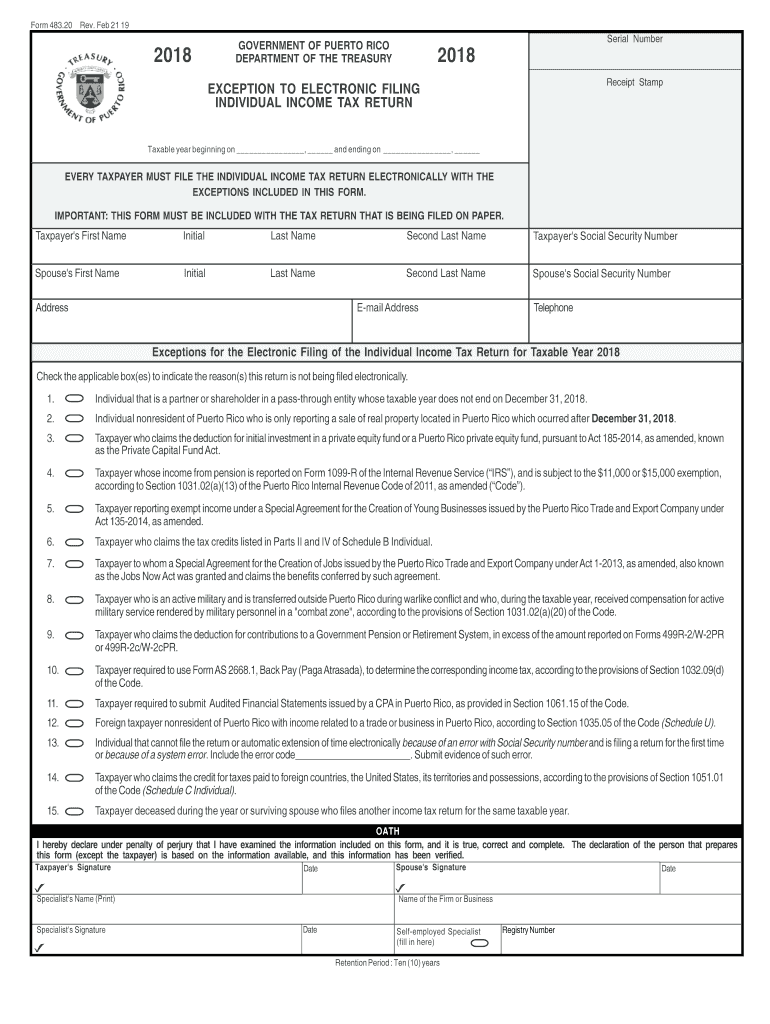
Form 482


What is the Form 482
The Puerto Rico tax return form 482, commonly referred to as Form 482, is a crucial document used for filing individual income taxes in Puerto Rico. This form is specifically designed for residents of Puerto Rico to report their income and calculate their tax liabilities. It is essential for ensuring compliance with local tax laws and regulations. The form must be completed accurately to reflect all sources of income, deductions, and credits applicable to the taxpayer's situation.
How to obtain the Form 482
To obtain the Puerto Rico tax return form 482 in English, individuals can visit the official website of the Puerto Rico Department of the Treasury. The form is typically available for download in PDF format, allowing users to print it out for completion. Additionally, physical copies of the form may be available at local tax offices or designated government agencies throughout Puerto Rico. It is advisable to ensure that the most current version of the form is used to avoid any compliance issues.
Steps to complete the Form 482
Completing the Puerto Rico tax return form 482 involves several important steps:
- Gather all necessary documents, including W-2 forms, 1099 forms, and any other income statements.
- Fill out personal information, including your name, address, and Social Security number.
- Report all sources of income accurately, ensuring that all figures are correct.
- Claim any eligible deductions and credits to reduce your taxable income.
- Calculate your total tax liability based on the information provided.
- Review the completed form for accuracy before submission.
Legal use of the Form 482
The Puerto Rico tax return form 482 is legally binding when completed and submitted according to the guidelines established by the Puerto Rico Department of the Treasury. To ensure its legal validity, the form must be signed by the taxpayer. Additionally, it is important to comply with all relevant tax laws and regulations to avoid potential penalties. Electronic signatures are accepted, provided they meet the necessary legal standards for eSignatures in Puerto Rico.
Form Submission Methods
There are several methods for submitting the Puerto Rico tax return form 482:
- Online Submission: Taxpayers can submit their completed form electronically through the Puerto Rico Department of the Treasury's online portal.
- Mail: The completed form can be mailed to the appropriate tax office, ensuring it is sent well before the filing deadline.
- In-Person: Taxpayers may also choose to submit their form in person at designated tax offices throughout Puerto Rico.
Filing Deadlines / Important Dates
It is crucial for taxpayers to be aware of the filing deadlines associated with the Puerto Rico tax return form 482. Typically, the deadline for filing individual income tax returns is April 15 of each year. However, this date may vary depending on specific circumstances, such as extensions or changes in tax law. Taxpayers should always verify the current deadlines to ensure timely submission and avoid penalties.
Quick guide on how to complete individual unique form dec 21 15 departamento de hacienda
Accomplish Form 482 effortlessly on any gadget
Digital document management has gained traction among businesses and individuals. It offers an ideal eco-friendly substitute for traditional printed and signed documents, allowing you to locate the necessary form and securely store it online. airSlate SignNow provides you with all the tools required to create, modify, and electronically sign your documents quickly and without holdups. Manage Form 482 across any platform using airSlate SignNow Android or iOS applications and simplify any document-related task today.
The easiest method to modify and eSign Form 482 without any hassle
- Find Form 482 and click on Get Form to begin.
- Utilize the tools we offer to complete your document.
- Emphasize signNow sections of the documents or redact sensitive data with tools specifically designed for that purpose by airSlate SignNow.
- Generate your signature using the Sign feature, which takes mere seconds and holds the same legal standing as a traditional handwritten signature.
- Review the information and click the Done button to save your updates.
- Choose how you wish to deliver your form, whether by email, SMS, invitation link, or download it to your computer.
Say goodbye to lost or misplaced documents, tedious form searches, and errors that require printing new document copies. airSlate SignNow meets your document management needs in just a few clicks from any device you prefer. Alter and eSign Form 482 while ensuring effective communication at every stage of the form preparation process with airSlate SignNow.
Create this form in 5 minutes or less
Create this form in 5 minutes!
How to create an eSignature for the individual unique form dec 21 15 departamento de hacienda
How to make an electronic signature for your Individual Unique Form Dec 21 15 Departamento De Hacienda in the online mode
How to create an electronic signature for your Individual Unique Form Dec 21 15 Departamento De Hacienda in Google Chrome
How to create an electronic signature for putting it on the Individual Unique Form Dec 21 15 Departamento De Hacienda in Gmail
How to make an electronic signature for the Individual Unique Form Dec 21 15 Departamento De Hacienda right from your smartphone
How to create an electronic signature for the Individual Unique Form Dec 21 15 Departamento De Hacienda on iOS
How to generate an electronic signature for the Individual Unique Form Dec 21 15 Departamento De Hacienda on Android OS
People also ask
-
What is Form 482 and how is it used in the eSigning process?
Form 482 is a crucial document utilized in various business transactions that require electronic signatures. With airSlate SignNow, you can easily create, send, and eSign Form 482, ensuring compliance and streamlining your workflow. This digital solution simplifies the eSigning process, making it more efficient and user-friendly.
-
How does airSlate SignNow enhance the signing experience for Form 482?
airSlate SignNow enhances the signing experience for Form 482 by providing a user-friendly interface and customizable templates. Users can quickly upload their Form 482 documents, add signature fields, and send them for signing in just a few clicks. This seamless process helps businesses save time and reduce errors associated with traditional signing methods.
-
What are the pricing options for using airSlate SignNow for Form 482?
airSlate SignNow offers flexible pricing plans designed to accommodate various business needs when handling Form 482. You can choose from monthly or annual subscriptions, with options for teams and enterprises to ensure you get the best value. Each plan includes features tailored for efficient document management and eSigning.
-
Can I integrate airSlate SignNow with other software for handling Form 482?
Yes, airSlate SignNow can be seamlessly integrated with a variety of software applications to streamline your Form 482 processes. This includes CRM systems, cloud storage services, and project management tools, allowing you to manage documents more effectively. These integrations help centralize your workflow and improve collaboration across your team.
-
What security measures does airSlate SignNow have for Form 482?
airSlate SignNow prioritizes the security of your documents, including Form 482, with advanced encryption and secure cloud storage. We comply with industry standards and regulations to ensure that your sensitive information remains protected throughout the eSigning process. This commitment to security helps you confidently manage your documents.
-
Can I track the status of my Form 482 after sending it for signature?
Absolutely! airSlate SignNow provides real-time tracking for your Form 482 documents once they are sent for signature. You can easily see who has signed, who still needs to sign, and receive notifications when the signing process is complete. This feature enhances transparency and helps you manage deadlines effectively.
-
Is it possible to add multiple signers to Form 482 using airSlate SignNow?
Yes, you can easily add multiple signers to your Form 482 in airSlate SignNow. This feature allows you to specify the order in which signers receive the document, ensuring a smooth signing process. With just a few clicks, you can invite all necessary parties to collaborate on the form.
Get more for Form 482
Find out other Form 482
- eSign North Dakota IT Project Proposal Template Online
- eSignature New Jersey Last Will and Testament Online
- eSignature Pennsylvania Last Will and Testament Now
- eSign Arkansas Software Development Agreement Template Easy
- eSign Michigan Operating Agreement Free
- Help Me With eSign Nevada Software Development Agreement Template
- eSign Arkansas IT Consulting Agreement Computer
- How To eSignature Connecticut Living Will
- eSign Alaska Web Hosting Agreement Computer
- eSign Alaska Web Hosting Agreement Now
- eSign Colorado Web Hosting Agreement Simple
- How Do I eSign Colorado Joint Venture Agreement Template
- How To eSign Louisiana Joint Venture Agreement Template
- eSign Hawaii Web Hosting Agreement Now
- eSign New Jersey Joint Venture Agreement Template Online
- eSign Missouri Web Hosting Agreement Now
- eSign New Jersey Web Hosting Agreement Now
- eSign Texas Deposit Receipt Template Online
- Help Me With eSign Nebraska Budget Proposal Template
- eSign New Mexico Budget Proposal Template Now