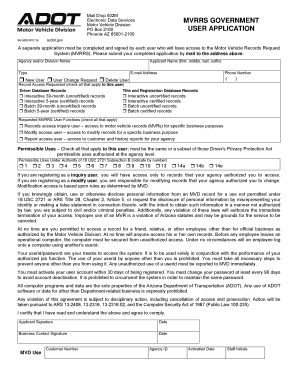
Mvrrs Government User Application 2014


What is the Mvrrs Government User Application
The Mvrrs Government User Application is a specialized form utilized by government entities to manage and streamline various administrative processes. This application is designed to facilitate user access to specific government services and resources, ensuring that users can efficiently navigate the requirements necessary for compliance and participation in government programs. The Mvrrs application is particularly relevant for organizations and individuals seeking to engage with government systems effectively.
How to use the Mvrrs Government User Application
Using the Mvrrs Government User Application involves several straightforward steps. First, users must gather all necessary information and documentation required for the application. This typically includes identification details, organizational information, and any specific data pertinent to the services being accessed. Once the information is collected, users can fill out the application form, ensuring that all fields are completed accurately. After completing the form, users should review it for any errors before submitting it through the designated channels, which may include online submission or mailing the form to the appropriate government office.
Steps to complete the Mvrrs Government User Application
Completing the Mvrrs Government User Application involves a series of methodical steps:
- Gather required documents, such as identification and organizational details.
- Access the application form, either online or in a physical format.
- Fill out the form, ensuring all necessary fields are completed.
- Review the application for accuracy and completeness.
- Submit the application through the specified method, whether online or by mail.
Following these steps carefully can help ensure a smooth application process.
Eligibility Criteria
Eligibility for the Mvrrs Government User Application typically depends on the specific services or programs being accessed. Generally, applicants must be affiliated with a government entity, organization, or have a legitimate reason for requiring access to government services. It is essential to review the specific eligibility requirements outlined for the program associated with the Mvrrs application to ensure compliance and successful application submission.
Required Documents
When applying for the Mvrrs Government User Application, several documents may be required to verify the applicant's identity and eligibility. Commonly required documents include:
- Government-issued identification (e.g., driver's license, passport)
- Organizational documents (if applicable, such as articles of incorporation)
- Proof of residency or business location
- Any additional documentation specified by the government agency overseeing the application
Having these documents ready can expedite the application process.
Form Submission Methods
The Mvrrs Government User Application can typically be submitted through various methods, depending on the specific requirements of the government agency involved. Common submission methods include:
- Online submission via the agency's designated portal
- Mailing the completed form to the appropriate government office
- In-person submission at designated government locations
It is advisable to check the specific submission guidelines provided by the agency to ensure compliance with their requirements.
Create this form in 5 minutes or less
Find and fill out the correct mvrrs government user application
Create this form in 5 minutes!
How to create an eSignature for the mvrrs government user application
How to create an electronic signature for a PDF online
How to create an electronic signature for a PDF in Google Chrome
How to create an e-signature for signing PDFs in Gmail
How to create an e-signature right from your smartphone
How to create an e-signature for a PDF on iOS
How to create an e-signature for a PDF on Android
People also ask
-
What is the mvrrs government user application?
The mvrrs government user application is a specialized tool designed to streamline document management for government entities. It allows users to send, sign, and manage documents efficiently, ensuring compliance with government regulations. This application is tailored to meet the unique needs of government users.
-
How does the mvrrs government user application enhance productivity?
The mvrrs government user application enhances productivity by automating the document signing process. Users can quickly send documents for eSignature, reducing turnaround times signNowly. This efficiency allows government employees to focus on more critical tasks rather than paperwork.
-
What are the pricing options for the mvrrs government user application?
Pricing for the mvrrs government user application varies based on the number of users and features required. airSlate SignNow offers competitive pricing tailored for government agencies, ensuring a cost-effective solution. For detailed pricing information, it's best to contact our sales team directly.
-
What features does the mvrrs government user application offer?
The mvrrs government user application includes features such as customizable templates, secure eSigning, and real-time tracking of document status. Additionally, it provides robust security measures to protect sensitive government information. These features are designed to facilitate seamless document workflows.
-
Can the mvrrs government user application integrate with other software?
Yes, the mvrrs government user application can integrate with various software solutions commonly used in government operations. This includes CRM systems, document management tools, and more. These integrations help streamline processes and enhance overall efficiency.
-
What are the benefits of using the mvrrs government user application?
Using the mvrrs government user application offers numerous benefits, including improved efficiency, reduced paper usage, and enhanced security for sensitive documents. It also simplifies compliance with government regulations, making it easier for agencies to manage their documentation. Overall, it supports a more sustainable and effective workflow.
-
Is the mvrrs government user application secure?
Absolutely, the mvrrs government user application prioritizes security with advanced encryption and compliance with industry standards. It ensures that all documents are securely stored and transmitted, protecting sensitive government information. Users can trust that their data is safe while using our application.
Get more for Mvrrs Government User Application
- Application georgia secretary of state sos georgia form
- In the circuit court eighteenth judicial circuit form
- Swimm pool maintenance contract template form
- Syllabus contract template form
- System integration contract template form
- Tablet contract template form
- T shirt design contract template form
- Take over car payments contract template form
Find out other Mvrrs Government User Application
- eSignature Michigan Startup Cost Estimate Simple
- eSignature New Hampshire Invoice for Services (Standard Format) Computer
- eSignature Arkansas Non-Compete Agreement Later
- Can I eSignature Arizona Non-Compete Agreement
- How Do I eSignature New Jersey Non-Compete Agreement
- eSignature Tennessee Non-Compete Agreement Myself
- How To eSignature Colorado LLC Operating Agreement
- Help Me With eSignature North Carolina LLC Operating Agreement
- eSignature Oregon LLC Operating Agreement Online
- eSignature Wyoming LLC Operating Agreement Online
- eSignature Wyoming LLC Operating Agreement Computer
- eSignature Wyoming LLC Operating Agreement Later
- eSignature Wyoming LLC Operating Agreement Free
- How To eSignature Wyoming LLC Operating Agreement
- eSignature California Commercial Lease Agreement Template Myself
- eSignature California Commercial Lease Agreement Template Easy
- eSignature Florida Commercial Lease Agreement Template Easy
- eSignature Texas Roommate Contract Easy
- eSignature Arizona Sublease Agreement Template Free
- eSignature Georgia Sublease Agreement Template Online