External Training Request Form


Understanding the External Training Request Form
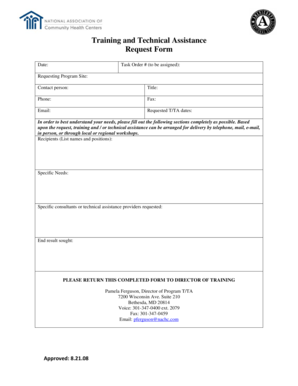
The External Training Request Form is a crucial document used by organizations to formally request approval for employees to attend training programs outside the company. This form ensures that training opportunities align with organizational goals and budgets. It typically includes sections for employee information, training details, and justification for the request. By utilizing this form, companies can maintain a structured approach to professional development while tracking training expenses and outcomes.
Steps to Complete the External Training Request Form
Filling out the External Training Request Form involves several key steps to ensure all necessary information is provided. Start by entering the employee's name, position, and department. Next, detail the training program, including the title, location, and dates. It's important to include a brief description of the training and its relevance to the employee's role. Finally, provide a justification for the training, outlining how it will benefit both the employee and the organization. Ensure all required signatures are obtained before submission.
How to Obtain the External Training Request Form
The External Training Request Form can typically be obtained through the human resources department or the company’s internal document management system. Many organizations also provide a digital version of the form that can be filled out and submitted electronically. If the form is not readily available, employees may request it directly from their manager or HR representative to ensure they have the most current version.
Key Elements of the External Training Request Form
Several key elements are essential for the External Training Request Form to be effective. These include:
- Employee Information: Name, position, and department of the requesting employee.
- Training Details: Name of the training program, provider, location, and dates.
- Justification: A clear explanation of how the training will benefit the employee and the organization.
- Cost Breakdown: Estimated costs associated with the training, including registration fees, travel, and accommodations.
- Approval Signatures: Required signatures from the employee’s supervisor and HR to validate the request.
Form Submission Methods
Submitting the External Training Request Form can be done through various methods, depending on the organization's policies. Common submission methods include:
- Online Submission: Many organizations allow employees to submit the form electronically through an internal portal.
- Email: The completed form can be sent via email to the appropriate supervisor or HR representative.
- In-Person Submission: Employees may also choose to print the form and submit it directly to their manager or HR.
Legal Use of the External Training Request Form
Using the External Training Request Form correctly is important for compliance with company policies and legal standards. Organizations should ensure that the form is used to document training requests in a consistent manner. This helps in maintaining transparency and accountability in professional development expenditures. Additionally, retaining records of submitted forms can be beneficial for audits and evaluations of training effectiveness.
Create this form in 5 minutes or less
Create this form in 5 minutes!
How to create an eSignature for the external training request form
How to create an electronic signature for a PDF online
How to create an electronic signature for a PDF in Google Chrome
How to create an e-signature for signing PDFs in Gmail
How to create an e-signature right from your smartphone
How to create an e-signature for a PDF on iOS
How to create an e-signature for a PDF on Android
People also ask
-
What is an External Training Request Form?
An External Training Request Form is a document used by organizations to streamline the process of requesting training from external providers. This form helps in collecting necessary information about the training needs, ensuring that all relevant details are captured efficiently.
-
How can I create an External Training Request Form using airSlate SignNow?
Creating an External Training Request Form with airSlate SignNow is simple. You can use our intuitive drag-and-drop interface to design your form, add fields for necessary information, and customize it to fit your organization's needs. Once created, you can easily share it with your team or external training providers.
-
What are the benefits of using an External Training Request Form?
Using an External Training Request Form helps streamline the training request process, ensuring that all requests are documented and tracked efficiently. It reduces the chances of miscommunication and helps in organizing training needs, ultimately leading to better training outcomes for your organization.
-
Is there a cost associated with using the External Training Request Form feature?
airSlate SignNow offers competitive pricing plans that include access to the External Training Request Form feature. Depending on your organization's needs, you can choose a plan that fits your budget while providing all the necessary tools for effective document management and eSigning.
-
Can I integrate the External Training Request Form with other tools?
Yes, airSlate SignNow allows for seamless integration with various third-party applications. You can connect your External Training Request Form with tools like CRM systems, project management software, and more, enhancing your workflow and ensuring that all training requests are managed efficiently.
-
How does airSlate SignNow ensure the security of my External Training Request Form?
airSlate SignNow prioritizes security by implementing advanced encryption and compliance measures. Your External Training Request Form and all associated data are protected, ensuring that sensitive information remains confidential and secure throughout the signing process.
-
Can I track the status of my External Training Request Form?
Absolutely! airSlate SignNow provides real-time tracking for your External Training Request Form. You can monitor when the form is sent, viewed, and signed, allowing you to stay updated on the status of your training requests and follow up as needed.
Get more for External Training Request Form
Find out other External Training Request Form
- eSignature Louisiana Courts Cease And Desist Letter Online
- How Can I Electronic signature Arkansas Banking Lease Termination Letter
- eSignature Maryland Courts Rental Application Now
- eSignature Michigan Courts Affidavit Of Heirship Simple
- eSignature Courts Word Mississippi Later
- eSignature Tennessee Sports Last Will And Testament Mobile
- How Can I eSignature Nevada Courts Medical History
- eSignature Nebraska Courts Lease Agreement Online
- eSignature Nebraska Courts LLC Operating Agreement Easy
- Can I eSignature New Mexico Courts Business Letter Template
- eSignature New Mexico Courts Lease Agreement Template Mobile
- eSignature Courts Word Oregon Secure
- Electronic signature Indiana Banking Contract Safe
- Electronic signature Banking Document Iowa Online
- Can I eSignature West Virginia Sports Warranty Deed
- eSignature Utah Courts Contract Safe
- Electronic signature Maine Banking Permission Slip Fast
- eSignature Wyoming Sports LLC Operating Agreement Later
- Electronic signature Banking Word Massachusetts Free
- eSignature Wyoming Courts Quitclaim Deed Later