ReferenceReferenceShort Term Disability Claim Form AnthemShort Term Disability Claim Form Anthem


What is the Reference Short Term Disability Claim Form Anthem
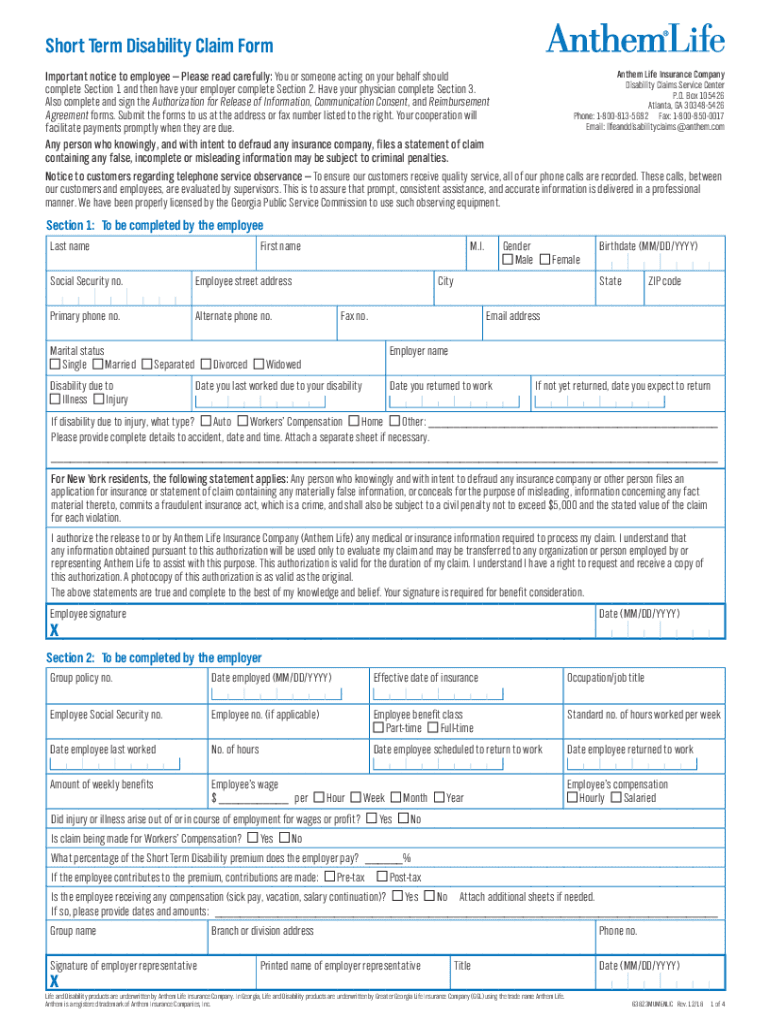
The Reference Short Term Disability Claim Form Anthem is a crucial document used by employees to apply for short-term disability benefits. This form is designed to collect necessary information regarding the claimant's medical condition, employment details, and the duration of the disability. It ensures that the claim is processed efficiently and that the applicant receives the benefits they are entitled to during their recovery period.
How to obtain the Reference Short Term Disability Claim Form Anthem
To obtain the Reference Short Term Disability Claim Form Anthem, individuals can typically access it through their employer's human resources department or the Anthem website. Employers may provide the form as part of their employee benefits package. Additionally, Anthem customer service can assist in providing the correct form and any additional information required for submission.
Steps to complete the Reference Short Term Disability Claim Form Anthem
Completing the Reference Short Term Disability Claim Form Anthem involves several key steps:
- Begin by filling out personal information, including your name, address, and contact details.
- Provide your employer's information and your job title.
- Detail the nature of your disability, including the date it began and any relevant medical information.
- Attach supporting documents, such as medical records or notes from your healthcare provider.
- Review the form for accuracy before submitting it to ensure all required fields are completed.
Key elements of the Reference Short Term Disability Claim Form Anthem
Several key elements are essential in the Reference Short Term Disability Claim Form Anthem:
- Personal Information: This section requires the claimant's full name, address, and contact information.
- Employer Details: Information about the employer, including company name and address, is necessary.
- Disability Information: Claimants must describe the nature of their disability, including dates and medical details.
- Supporting Documentation: Attachments such as medical records or physician statements are often required.
Eligibility Criteria
Eligibility for benefits under the Reference Short Term Disability Claim Form Anthem typically includes several criteria:
- The claimant must be an active employee with coverage under the short-term disability plan.
- The disability must be medically documented and prevent the individual from performing their job duties.
- There may be a waiting period before benefits begin, which varies by plan.
Form Submission Methods
The Reference Short Term Disability Claim Form Anthem can be submitted through various methods, including:
- Online Submission: Many employers allow electronic submission through their HR portals.
- Mail: Claimants can send the completed form and supporting documents via postal mail to the designated address.
- In-Person: Some employers may accept in-person submissions at their HR office.
Create this form in 5 minutes or less
Create this form in 5 minutes!
How to create an eSignature for the referencereferenceshort term disability claim form anthemshort term disability claim form anthem
How to create an electronic signature for a PDF online
How to create an electronic signature for a PDF in Google Chrome
How to create an e-signature for signing PDFs in Gmail
How to create an e-signature right from your smartphone
How to create an e-signature for a PDF on iOS
How to create an e-signature for a PDF on Android
People also ask
-
What is the ReferenceReferenceShort Term Disability Claim Form Anthem?
The ReferenceReferenceShort Term Disability Claim Form Anthem is a document required for filing short-term disability claims with Anthem. This form helps streamline the claims process, ensuring that all necessary information is provided for a timely review and approval.
-
How can airSlate SignNow assist with the ReferenceReferenceShort Term Disability Claim Form Anthem?
airSlate SignNow simplifies the process of completing and submitting the ReferenceReferenceShort Term Disability Claim Form Anthem. With our eSigning capabilities, you can fill out the form electronically, sign it, and send it directly to Anthem, all in one seamless workflow.
-
Is there a cost associated with using airSlate SignNow for the ReferenceReferenceShort Term Disability Claim Form Anthem?
Yes, airSlate SignNow offers various pricing plans to accommodate different business needs. Our cost-effective solution ensures that you can manage the ReferenceReferenceShort Term Disability Claim Form Anthem without breaking the bank, providing excellent value for your investment.
-
What features does airSlate SignNow offer for the ReferenceReferenceShort Term Disability Claim Form Anthem?
airSlate SignNow provides features such as customizable templates, secure eSigning, and document tracking for the ReferenceReferenceShort Term Disability Claim Form Anthem. These tools enhance efficiency and ensure that your claims are processed quickly and securely.
-
Can I integrate airSlate SignNow with other applications for the ReferenceReferenceShort Term Disability Claim Form Anthem?
Absolutely! airSlate SignNow offers integrations with various applications, allowing you to streamline your workflow when handling the ReferenceReferenceShort Term Disability Claim Form Anthem. This means you can connect with your existing systems for a more cohesive experience.
-
What are the benefits of using airSlate SignNow for the ReferenceReferenceShort Term Disability Claim Form Anthem?
Using airSlate SignNow for the ReferenceReferenceShort Term Disability Claim Form Anthem provides numerous benefits, including increased efficiency, reduced paperwork, and enhanced security. Our platform ensures that your documents are handled with care, making the claims process smoother.
-
How secure is the airSlate SignNow platform for the ReferenceReferenceShort Term Disability Claim Form Anthem?
Security is a top priority at airSlate SignNow. Our platform employs advanced encryption and compliance measures to protect your data while you complete the ReferenceReferenceShort Term Disability Claim Form Anthem, ensuring that your sensitive information remains confidential.
Get more for ReferenceReferenceShort Term Disability Claim Form AnthemShort Term Disability Claim Form Anthem
- Superior court of the state of delaware courts delaware form
- Af form 1055
- Opening day balance sheet form
- Procedural writing graphic organizer form
- Forms of verification huntsville hospital huntsvillehospital
- Social needs screening tool patient short form
- Beaverton police crime report form
- Xyzs of oscilloscopes table of contents application note tektronix form
Find out other ReferenceReferenceShort Term Disability Claim Form AnthemShort Term Disability Claim Form Anthem
- How Do I eSign Idaho Finance & Tax Accounting Form
- Can I eSign Illinois Finance & Tax Accounting Presentation
- How To eSign Wisconsin Education PDF
- Help Me With eSign Nebraska Finance & Tax Accounting PDF
- How To eSign North Carolina Finance & Tax Accounting Presentation
- How To eSign North Dakota Finance & Tax Accounting Presentation
- Help Me With eSign Alabama Healthcare / Medical PDF
- How To eSign Hawaii Government Word
- Can I eSign Hawaii Government Word
- How To eSign Hawaii Government Document
- How To eSign Hawaii Government Document
- How Can I eSign Hawaii Government Document
- Can I eSign Hawaii Government Document
- How Can I eSign Hawaii Government Document
- How To eSign Hawaii Government Document
- How To eSign Hawaii Government Form
- How Can I eSign Hawaii Government Form
- Help Me With eSign Hawaii Healthcare / Medical PDF
- How To eSign Arizona High Tech Document
- How Can I eSign Illinois Healthcare / Medical Presentation