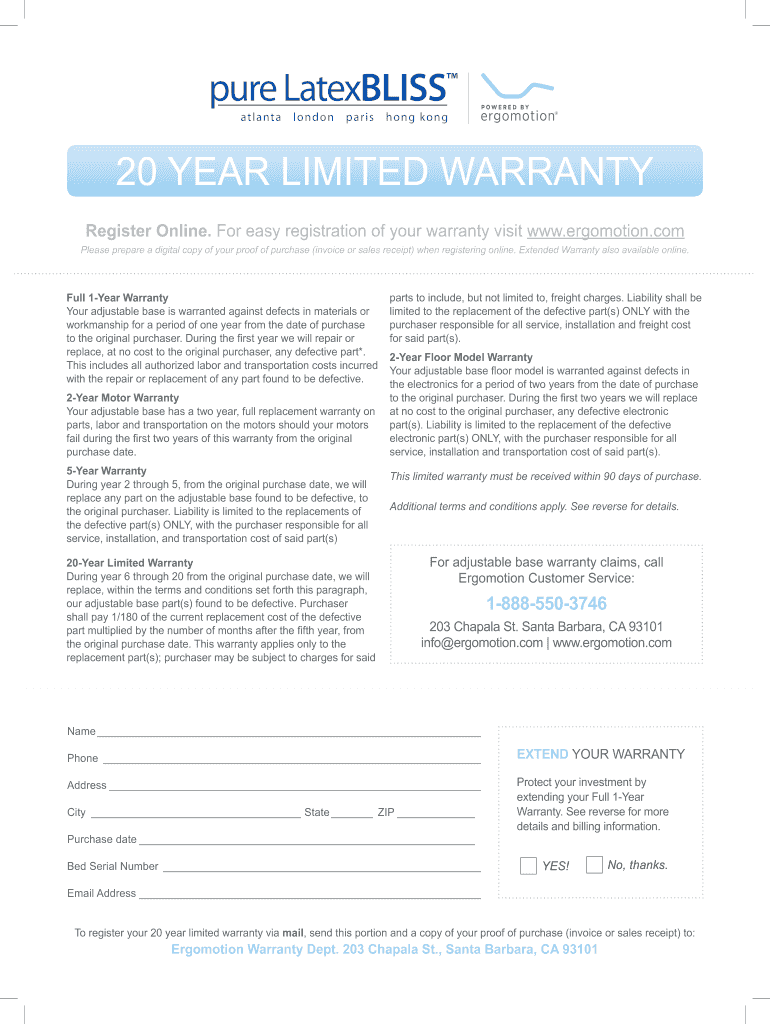
Ergomotion Warranty Registration 2013-2026


What is the Ergomotion Warranty Registration
The Ergomotion warranty registration is a formal process that allows customers to register their adjustable bases and related products for warranty coverage. This registration ensures that customers are protected under the warranty terms provided by Ergomotion, which typically includes coverage for defects in materials and workmanship. By completing the registration, users can access support and replacement parts if needed, enhancing the longevity and functionality of their products.
How to use the Ergomotion Warranty Registration
To use the Ergomotion warranty registration, customers should follow a straightforward process. First, gather the necessary information, including the product model number, purchase date, and proof of purchase. Next, visit the official Ergomotion website or the designated warranty registration portal. Fill out the required fields accurately to ensure proper documentation. Once submitted, customers should receive a confirmation of their registration, which is essential for any future warranty claims.
Steps to complete the Ergomotion Warranty Registration
Completing the Ergomotion warranty registration involves several key steps:
- Collect necessary information, such as the product's model number and purchase details.
- Access the warranty registration form on the Ergomotion website.
- Fill out the form with accurate information, ensuring all required fields are completed.
- Submit the form and keep a copy of the confirmation for your records.
By following these steps, customers can ensure their warranty is registered correctly, providing peace of mind for future support.
Legal use of the Ergomotion Warranty Registration
The legal use of the Ergomotion warranty registration is essential for ensuring that customers can claim their warranty rights. By registering, customers agree to the terms outlined in the warranty policy, which typically includes stipulations regarding the duration of coverage and the process for filing a claim. It is important to keep the registration information updated, especially if there are changes in ownership or contact details, to maintain the validity of the warranty.
Key elements of the Ergomotion Warranty Registration
Several key elements are vital for the Ergomotion warranty registration:
- Product Information: Model number and purchase date.
- Proof of Purchase: Receipt or invoice confirming the purchase.
- Customer Information: Name, address, and contact details.
- Registration Confirmation: Acknowledgment received post-registration.
These elements ensure that the warranty registration process is comprehensive and that customers have the necessary documentation for future claims.
How to obtain the Ergomotion Warranty Registration
Obtaining the Ergomotion warranty registration is a simple process. Customers can access the registration form through the Ergomotion website. It is advisable to have all relevant information ready before starting the registration process. If customers encounter difficulties, they can reach out to Ergomotion's customer support for assistance. This ensures that all necessary steps are followed correctly, allowing for a smooth registration experience.
Quick guide on how to complete ergomotion warranty registration
Complete Ergomotion Warranty Registration effortlessly on any device
Managing documents online has gained traction among companies and individuals. It serves as a superb environmentally friendly alternative to conventional printed and signed documents, allowing you to access the correct form and safely store it online. airSlate SignNow provides all the tools you require to create, edit, and eSign your documents swiftly and without delays. Handle Ergomotion Warranty Registration on any platform using airSlate SignNow's Android or iOS applications and enhance any document-driven process today.
The easiest method to modify and eSign Ergomotion Warranty Registration with ease
- Obtain Ergomotion Warranty Registration and click on Get Form to begin.
- Utilize the tools we provide to complete your form.
- Mark important sections of your documents or obscure sensitive information with tools that airSlate SignNow offers specifically for that purpose.
- Create your signature using the Sign tool, which only takes seconds and carries the same legal significance as a traditional wet ink signature.
- Review the information and click on the Done button to save your changes.
- Choose your preferred method to send your form—via email, SMS, or invite link, or download it to your computer.
Put an end to lost or misplaced files, tedious form searching, or errors that necessitate printing new document copies. airSlate SignNow fulfills your document management needs in just a few clicks from any device of your choice. Edit and eSign Ergomotion Warranty Registration and maintain effective communication at every stage of the form preparation process with airSlate SignNow.
Create this form in 5 minutes or less
Create this form in 5 minutes!
How to create an eSignature for the ergomotion warranty registration
The best way to make an eSignature for your PDF document in the online mode
The best way to make an eSignature for your PDF document in Chrome
The way to make an electronic signature for putting it on PDFs in Gmail
The best way to generate an electronic signature straight from your mobile device
How to make an electronic signature for a PDF document on iOS devices
The best way to generate an electronic signature for a PDF document on Android devices
People also ask
-
What is the process for Ergomotion Warranty Registration?
The Ergomotion Warranty Registration process is straightforward. After purchasing your Ergomotion product, visit our website and navigate to the warranty registration section. Fill out the required information, including your purchase details, and submit your registration to ensure your warranty is active.
-
How long does the warranty last after Ergomotion Warranty Registration?
Once you complete the Ergomotion Warranty Registration, your warranty typically lasts for up to five years from the date of purchase. This warranty covers defects in materials and workmanship, providing you with peace of mind for years to come.
-
Are there any fees associated with Ergomotion Warranty Registration?
No, the Ergomotion Warranty Registration is completely free of charge. We believe in providing our customers with a hassle-free experience, ensuring that they can easily register their warranty without any additional costs.
-
What benefits do I get from completing the Ergomotion Warranty Registration?
By completing the Ergomotion Warranty Registration, you gain access to full warranty coverage, allowing for repairs or replacements if needed. Additionally, registering ensures you receive updates on product recalls or safety notices, keeping you informed about your Ergomotion product.
-
Can I register my warranty online for Ergomotion products?
Yes, you can easily register your warranty online for Ergomotion products. Simply visit our website, fill out the Ergomotion Warranty Registration form, and submit it to activate your warranty quickly and efficiently.
-
What information do I need for Ergomotion Warranty Registration?
To complete your Ergomotion Warranty Registration, you will need your product's model number, purchase date, and retailer information. Having this information ready will streamline the registration process, allowing you to activate your warranty without delays.
-
How do I know if my Ergomotion Warranty Registration was successful?
After submitting your Ergomotion Warranty Registration, you should receive a confirmation email within a few minutes. If you do not receive this confirmation, please check your spam folder or contact our customer support for assistance.
Get more for Ergomotion Warranty Registration
- Ssa 1699 fillable 2010 form
- Ssa advance notification of representative payment form 1991
- Electronic w 2 filing users handbook 2011 form
- Social security administration form ssa 3368 2008
- Social security govform 7050 2010
- Form ssa1020b ocr sm 2009
- Social security administration name change form
- Ssa 795 2009 form
Find out other Ergomotion Warranty Registration
- How Can I eSignature New Jersey Police Document
- How Can I eSignature New Jersey Real Estate Word
- Can I eSignature Tennessee Police Form
- How Can I eSignature Vermont Police Presentation
- How Do I eSignature Pennsylvania Real Estate Document
- How Do I eSignature Texas Real Estate Document
- How Can I eSignature Colorado Courts PDF
- Can I eSignature Louisiana Courts Document
- How To Electronic signature Arkansas Banking Document
- How Do I Electronic signature California Banking Form
- How Do I eSignature Michigan Courts Document
- Can I eSignature Missouri Courts Document
- How Can I Electronic signature Delaware Banking PDF
- Can I Electronic signature Hawaii Banking Document
- Can I eSignature North Carolina Courts Presentation
- Can I eSignature Oklahoma Courts Word
- How To Electronic signature Alabama Business Operations Form
- Help Me With Electronic signature Alabama Car Dealer Presentation
- How Can I Electronic signature California Car Dealer PDF
- How Can I Electronic signature California Car Dealer Document