Wageworks Com 2010-2026


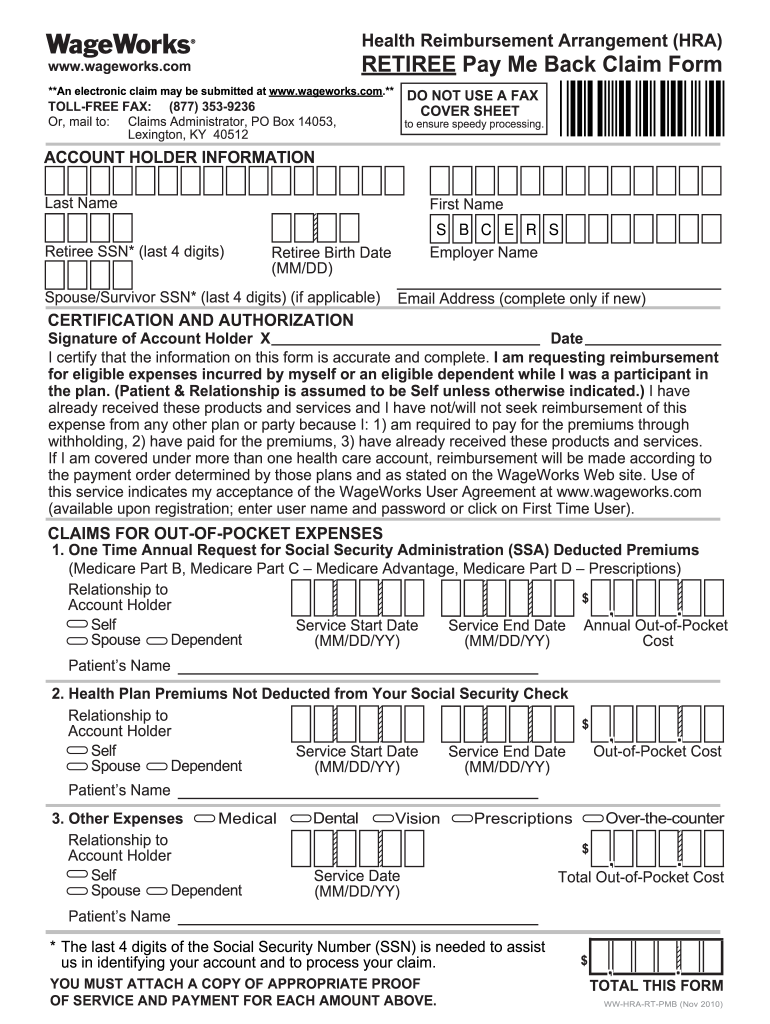
What is the Wageworks Pay Me Back Claim Form?
The Wageworks pay me back claim form is a document used by individuals to request reimbursement for eligible medical expenses under their Health Reimbursement Account (HRA) or Flexible Spending Account (FSA). This form allows users to detail their incurred expenses and submit them for review and reimbursement. It is essential for ensuring that individuals can access their benefits efficiently and effectively.
Steps to Complete the Wageworks Pay Me Back Claim Form
Completing the Wageworks pay me back claim form involves several straightforward steps:
- Gather all necessary documentation, including receipts for eligible expenses.
- Fill out the claim form with your personal information, including your name, address, and account details.
- Detail each expense, including the date of service, type of service, and amount paid.
- Attach copies of your receipts and any other required documentation to support your claim.
- Review the completed form for accuracy before submission.
- Submit the form either online through the Wageworks portal, by mail, or in person, depending on your preference.
Required Documents for Submission
When submitting the Wageworks pay me back claim form, it is crucial to include the following documents:
- Completed pay me back claim form.
- Receipts for all claimed expenses, clearly showing the date, service, and amount.
- Any additional documentation required by your specific plan, such as explanation of benefits (EOB) statements.
Form Submission Methods
The Wageworks pay me back claim form can be submitted through various methods, ensuring flexibility for users:
- Online: Submit your claim through the Wageworks online portal for quick processing.
- Mail: Print the completed form and send it along with your receipts to the designated address provided on the form.
- In-Person: Some users may have the option to submit their claims directly at designated locations, depending on their employer's plan.
Eligibility Criteria for Reimbursement
To be eligible for reimbursement through the Wageworks pay me back claim form, expenses must meet certain criteria:
- Expenses must be incurred for eligible medical services, treatments, or products as defined by the IRS.
- Claims must be submitted within the time frame specified by your HRA or FSA plan.
- Receipts must be itemized and clearly indicate that payment was made.
Filing Deadlines and Important Dates
It is important to adhere to filing deadlines when submitting the Wageworks pay me back claim form. Key dates include:
- The end of the plan year, which may vary based on your employer's specific HRA or FSA plan.
- Grace periods, if applicable, allowing additional time to submit claims after the plan year ends.
- Specific deadlines for submitting claims, typically outlined in your plan documentation.
Quick guide on how to complete me back form
The optimal method to acquire and endorse Wageworks Com
Across your entire organization, ineffective procedures related to paper approvals can consume a signNow amount of productive time. Endorsing documents such as Wageworks Com is an inherent aspect of operations in any enterprise, which is why the efficiency of each agreement's lifecycle critically impacts the overall performance of the organization. With airSlate SignNow, authorizing your Wageworks Com can be as straightforward and swift as possible. This platform offers you the latest version of virtually any document. Even better, you can sign it instantly without the need to install additional software on your device or print any physical copies.
Steps to acquire and endorse your Wageworks Com
- Browse our collection by category or use the search feature to locate the document you require.
- View the document preview by clicking on Learn more to ensure it's the correct one.
- Press Get form to start editing immediately.
- Fill out your document and insert any necessary information using the toolbar.
- Once completed, click the Sign option to endorse your Wageworks Com.
- Select the signature method that suits you best: Draw, Generate initials, or upload an image of your handwritten signature.
- Hit Done to finalize edits and move on to document-sharing options as needed.
With airSlate SignNow, you have everything required to manage your documentation effectively. You can find, complete, edit, and even share your Wageworks Com in a single tab without any complications. Optimize your workflows by employing a unified, intelligent eSignature solution.
Create this form in 5 minutes or less
FAQs
-
How do I go about getting cash back that was seized in a raid? I have proof the cash was won the night before at the casino. Cops gave me the wrong form to fill out.
How do I go about getting cash back that was seized in a raid? I have proof the cash was won the night before at the casino. Cops gave me the wrong form to fill out.Go to the police station front desk and request the correct form, bring what you were given and explain the problem. Either they will have what you need or can direct you to where you might need to go, which might be the court house or some other tier of administration. It just depends on how the county administration and filing is set up.If they can not sort it out then you need an attorney, sooner rather than later.The longer you wait, the harder this will be to recover.
-
How can I get my Instagram account back if I disabled it and now when I try to connect back, it tells me that the account was not found?
You can’t get it back.“If your account was deleted by you or someone with your password, there's no way to restore it. You can create a new account with the same email address you used before, but you may not be able to get the same username.”What can I do if my account has been disabled?If a service said it can, it is a scam, and will steal your info and or charge you money. Can’t be done.
-
During a B1/B2 visa interview, I was asked to fill out the DS-5535 form introduced recently and was told to send it back by email. The interviewer gave me back my passport (needed to fill the form). What experience have people had with this form?
It is a little bit on the privacy invasive side but nobody is forcing anyone to fill it out. If your visit to the US is important and you have nothing to hide, you just have to fill it out. If not, you chose not to travel to the USA.
-
How can I prepare for CA Final Group 1 in 2 months?
First of all the question is incomplete , you should specify your attempt number.If its your first attempt then its difficult not impossible. I have prepared both group in four month, result cleared 2nd group and 1 exemption in 1st group.Coming to answer part four subjects in two months is not that difficult if you have your basics cleared.The only thing you have to target is that you have to study minimum 12 hrs a day for two months, effectively 9 hours a day.Allocate 10 days to each subject or one or two more or less to particular subject according to your capacity and requirements. Make sure you study according to weightage of topics and you should complete topic and subject within allocated time, remember planning is the most important part.You can also prepare theoretical subject in day time and do practice of practical subject after evening. This also will help you to refresh your mind when you get bored of studying a same subject whole day.So now 20 days left for your first revision i.e 4 days each subject. Just refer it what you have studied in your first study, try to recapitulate things. Do write one practice paper each day for the subject you have taken for revision in evening. Do refer P.M and RTP in your revision. You have to complete revision two days before exams, beleive me you can do it.I have done revision of 8 subjects in just 28 days.I could have written topicwise but every one has different caliber or different grip over topic or subject.Remember, first plan your work then work your plan , Success will be yours.All the best.
-
Can I fill out the GATE exam form with a back paper?
Yes anyone can fill up GATE exam provided that at the time of interview you should have passed the eligible degree on the basis of Which you applied.if you are not passed that exam you will not be entertained.But if you want to go to PSU through get than they need that your marks should be above there minimum criterion.
-
I am terrified of single-payer systems as implemented in socialist countries. Can this happen in the US? Was Obama trying to give everyone healthcare all along?
Edit: This story about Aetna being successfully sued for 25M USD only happens in America and is, in my view the main argument why being scared of “single payer systems” is ill advised.Lets start by making sure we have the same understanding of things:Single payer = where one entity (usually a government entity) uses a pool of funds paid into by the whole community/country to pay the health care providers (doctors/nurses/pharma) for the services they provide to the community.Socialism = a political and economic theory of social organization which advocates that the means of production, distribution, and exchange should be owned or regulated by the community as a whole.Socialist country = as defined above would be countries like Mainland China, the former soviet union, cuba, vietnam, depending on how you look at it North Korea…Socialism (bis): Often used by political parties who propose a society where the richer pay a larger tax in order to support infrastructure and policies that also support the lower income portion of the population.Although to a lesser extent than most advanced nations, the US is a Socialist(bis) nation. Less so than most countries in Europe, but you do have medicaid and host of services offered by the government.My first question to you is which of the two definitions are you using?For the sake of the argument I am going to assume you are using definition (bis) which includes countries like Denmark, Finland, Australia, Japan, France, Italy, Germany, Netherlands, Belgium, Greece, Canada.Within Single Payer there are many ways to do it and two levels:Reference: List of countries with universal health care - WikipediaFree Health care: Free health care refers to a publicly funded health care that provides primary services free of charge or a nominal fee to all its citizens, with no exclusions based on income or wealth.[3]Universal Health Care: Universal health care, sometimes referred to as universal health coverage, universal coverage, or universal care, usually refers to a health care system that provides healthcare and financial protection to more than 90% of the citizens of a particular country.[4]There are 118 countries who provide both Free and universal health care.These include: All of the countries I listed above as examples of “socialist (Bis)” countries, as well as other countries such as Vanuatu, Palau, Uruguay, Chile etc etc.There are 43 countries that provide neither of these. ie if you are sick you are on your own or at the mercy of the free market.These include Iran, Iraq, China (a socialist country in the real sense of the word), Turkmenistan etc … with two exceptions, all poor countries who are behind in their development. Exception 1 is China…(although one can debate as to exactly how advanced it is). Exception 2 is the United States of America.So only 25% of countries provide neither universal nor free healthcare… And with the exception of the US, they are all poor countries (if one thinks a majority of Chinese people are still in poverty)Over 50% of countries provide both. Do you see mass demonstrations in the news about health care being bad in 50% of the world?The fact that 50% of the world (including a large number of democracies) are voting for policies and to keep single payer systems alone is an indication. Now please go on the net, and do some research, and tell me what percentage of the world outside of the US is looking at the US health care system and saying “maybe we should do like them”… (ie the perception the US system is better than the one they have now). While you will for sure find many many pages about how they wish their system to be improved, I challenge you to find information on a country in which people are voting for law makers who propose to change to the “multi payer “ system the US has… In fact I challenge you to find a law maker outside of the US who is even suggesting (never mind pushing for policy) their country should move from single payer to multi payer. Does that tell you anything? Do you think their might be a reason for that?Now lets look at the results. The point of the health care system is to keep you alive and healthy so lets look at track records:I don’t know about you but I think children are important. So what is better to help children: Single payer or not? According to your logic (ie single payer is bad), countries with single payer should have a higher mortality rate and those without should have a lower mortality rate for children. Here is how the CDC (US organisation) ranks infant mortality rates in the world: US… 27!!!!! BEHIND Poland Hungary and Slovakia, all of which are signNowly less wealthy countries than the US. Please also note that EVERY SINGLE country ranked above the US on that list has both free and universal health care / single payer. (https://www.cdc.gov/nchs/data/nv...)But maybe infants/children are not important to you. Lets look at life expectancy:The US is 31 !!… behind countries like Slovenia, Chile and Costa Rica… not exactly known for being paradise of wealth and health on earth (with all due respect to these countries which I happen to like)List of countries by life expectancy - WikipediaMaybe you say, I’m not interested in living long. OK lets go to how does the World Health Organisation rank national health care systems ? Keep in mind the WHO (as it is known) incurs strong influence from he US.US Ranking : 37… BEHIND Morocco (Single Payer, Universal) and Colombia (Single Payer, Universal and Free)!!!World Health Organization's Ranking of the World's Health SystemsI challenge you to find one … 1… one ranking where the US health care system (or lack therein of) comes in the top 10 for positive outcomes for the population at large.So, I’m sorry but what is scaring you exactly?Please tell us so we can look at it.Thank youEdit: Let me add the economic side to it.“The U.S. spent $8,233 on health per person in 2010. Norway, the Netherlands and Switzerland are the next highest spenders, but in the same year, they all spent at least $3,000 less per person. The average spending on health care among the other 33 developed OECD countries was $3,268 per person”Health Costs: How the U.S. Compares With Other CountriesSo look at this way: not only is multi payer system inferior to single payer at keeping you alive longer and keeping children healthy and alive longer, it also costs about TWO TIMES MORE per person than Switzerland (ranked 20) , Netherlands (ranked 17) and Norway (ranked 11). Which implies the top ten countries pay less than half what the US pays per person to be in top 10 except the US is 37 out of 200 countries…So lets put it this way: Your multi payer health care system actually performs in such a way you spend twice as much as #11,17,and 20, and nearly 3 times over the global average to make it to #37 BEHIND THIRD WORLD COUNTRIES, as shown by the infant mortality rate and life expectancy rate. Think about it this way: if you spent the same as the rest of the world, you would be #80 something…with every one of these countries having single payer…. And by the way, in the case of Single payer, when we say “costing them”, the government pays, so people are not going bankrupt because of health issues. In your case, it is YOU… paying and when you have cancer, diabetes, or some form of heart disease, it is you who will be paying much MORE than 8,000 dollars, where a single payer patient would be paying probably around $500 if you average out across the different systems (ie, the govt pays most of the bill and the individual is left with 10~30% depending on which country it is, a bit like a deductible if you like)…. So not only do you not seem to like to live long, and not seem to think it is important to give your kids the medical care they need to prevent them from dying at a higher rate, you also seem to like paying 12 times (when comparing what is paid by the patient) more for the privilege of not getting what people in other countries do get. So you are terrified of what?EDIT: This is one of many perfect examples of why single payer works much better:Girl has words for Aetna after brain surgery deniedThis ONLY happens in the US on a very very REGULAR basis. I might add when I was living in the US, my insurance denied a trip to the hospital for my then wife who was complaining about acute stomach pain. “wait till tomorrow” they said We went anyway. She was operated on immediately. She had peritonitis. She ran the risk of dying because I had to choose between paying thousands of dollars (I was billed 6,000 for the ambulance) or wait till the next day. A company who has a financial interest in making sure you don’t get treatment should not be allowed to make decisions on whether you need it or not.EDIT 2: Here is a graphic that says something: Notice less advanced and far less rich countries than the US have it too, and notice non of them are “Socialist” as defined in the dictionary and executed in the USSR or China.
-
What is it like to be raised by an Indian father?
I read a lot of amazing answers here and was compelled to write my story . So, here are a few stories about my dad ....1. His 'Dad Sense' is legendaryI had just returned home from my hostel and had a nearly invisible swelling on my head.Dad - What happened ,son?Me - Got hurt playing football , its just a little swelling. Dad - OkThat night ,at dinner...We are all sitting quietly at the table when he leans towards me and says..Dad - Now would be a good time to tell your mum about the bike accident.I nearly choke on my food....2 His priorities are entirely different...2008I am sitting in front of the computer , really depressed. He enters the room.Dad- What happened?Me - I didnt get through . (It was the AIPMT)Dad - Talks to me for an entire hour.2009 , Same time...I run towards his room screaming.Me - Dad, i cleared the exam (it was the AIPMT)Dad - Good (turns back to reading his book)Me - (Baffled at his lack of excitement)Dont you want to know my rank?Dad - (looks up)Son, Are you satisfied with the result.Me - Hell yeah...Dad - That settles it then.(Goes back to his book)3 His sense of humourLast week ,At Crusty Gourmet PizzaWe went out for dinner and had ordered two pizzas and coke. The waiter was already a bit irritated with us as it was nearly closing time.The pizza arrives and so do the drinks.Before we could start eating, Dad spills a glass of coke on the floor.Mum calls out to the waiter to get it cleaned.As the waiter approaches the table ,Dad picks up my glass, starts drinking from it and pats me on the back ,saying-'It's all right ,son. Everybody makes mistakes ''The waiter glares at me the whole time he is cleaning the table, Dad laughs all the way back home.Edit 1 - Here is a picture of us...
-
How do I prepare for CA final 1st group in 1 month?
I guess all the answers below will tell you what to do but in the end, it’s all you who have to do it all on your own. You will have to figure out what to study reading things here would be very easy but not when you sit to do them.Hey there, I won’t give you the crap that hey I got this rank and I think I am pretty much eligible for this answer that’s not a reason you give. dah!!!Below you will find the most experienced and best way to study so that you can get better than what you have been getting.You will see the image attached at the end and follow that schedule if you feel so this will help you in preparing and also give the decency of time.You might have to focus more on relaxing your mind and trying to regain what you have learned rather than playing and watching TV, watching TV is the most annoying thing to me as that not only wastes your time also make you think about it later on while preparing. (that’s what happens with me)Now coming back to schedule this will be the schedule that you will have to follow while preparing on your own rather than this what I would suggest is to you is to take an online institute class. Now why I would say Online institute classes because of the following reasons mentioned below-No traveling expensesBooks/E-booksOne year validity of courseActive doubt sessionChat support with facultyCall supportPractical sessionsAll these things are never provided or available in an Offline Institute, this will make things much easy and get you the most time to study and prepare.An online institute is a reason I am writing this here, to share my experience and knowledge with you.All this is possible if you only have a clear path which can only be provided with the help of a teacher or someone who has knowledge and experience about what you are studying which again a teacher/online institute. Every student needs a teacher in order to signNow some specific goals. It is not like that you cannot clear it without a teacher you can for sure but that will take its own time and still, there are not many chances but when there is someone to guide you around obviously the chances are more to succeed.Speaking from personal experience a faculty or an institute will help you not just in the education phase but also in many other difficult phases of life while you are studying.Takshila Learning Pvt LtdWebsite- www.takshilalearning .comAnd do remember to fill the form for the best knowledge and assistance along the website.Though there are many crash courses adn many other things but they won’t help you as much as an Online Institute and you can help yourself thus focus more on gaining knowledge.The exam is just a test to check to whether your knowledge is sufficient or not for a CA.Happy LearninggggggggggThanks
-
If you fill a bottle with water, and then pour it out without letting any air back in, why isn’t a vacuum formed inside the bottle?
With a regular bottle, “pour out without letting any air back in” is not possible. Take a bottle full of water and stick the opening into basin full of water. No air can get in, and water will not pour out of the bottle even if it upside down. Air pressure keeps it inside.However if your bottle is more than 10 meters long, then what you described becomes entirely possible. Air pressure at Earth surface can only hold up a column of water up to 10 meters. Anything higher will pour out, and you will get vacuum inside the bottle.
Create this form in 5 minutes!
How to create an eSignature for the me back form
How to make an eSignature for the Me Back Form in the online mode
How to make an electronic signature for your Me Back Form in Chrome
How to make an electronic signature for putting it on the Me Back Form in Gmail
How to make an electronic signature for the Me Back Form straight from your smartphone
How to create an electronic signature for the Me Back Form on iOS
How to create an eSignature for the Me Back Form on Android OS
People also ask
-
What is Wageworks Com and how does it relate to airSlate SignNow?
Wageworks Com is a platform that provides various employee benefits, including flexible spending accounts and health savings accounts. airSlate SignNow integrates seamlessly with Wageworks Com to streamline document management, allowing businesses to send and eSign important benefit-related documents efficiently and securely.
-
How much does airSlate SignNow cost compared to Wageworks Com?
airSlate SignNow offers competitive pricing plans that can be tailored to meet the needs of any business. Unlike some services like Wageworks Com, which may have additional fees for specific features, airSlate SignNow provides a straightforward pricing model that ensures you only pay for what you need.
-
What features does airSlate SignNow offer that can benefit Wageworks Com users?
airSlate SignNow provides a range of features designed to enhance productivity for Wageworks Com users, including customizable templates, document tracking, and advanced security measures. These features help ensure that all documents related to employee benefits are handled efficiently and securely.
-
Can airSlate SignNow integrate with Wageworks Com for document workflows?
Yes, airSlate SignNow can easily integrate with Wageworks Com, allowing for a seamless document workflow. This integration ensures that any documents needing eSignature are routed directly through Wageworks Com, saving time and reducing errors.
-
Is airSlate SignNow user-friendly for Wageworks Com customers?
Absolutely! airSlate SignNow is designed with user-friendliness in mind, making it easy for Wageworks Com customers to navigate and manage their documents. The intuitive interface enables users to quickly send, sign, and store documents without any technical expertise.
-
What are the benefits of using airSlate SignNow alongside Wageworks Com?
Using airSlate SignNow alongside Wageworks Com offers numerous benefits, including improved efficiency in document processing and enhanced compliance with legal requirements. By simplifying the eSignature process, businesses can focus more on core activities while ensuring timely submission of important documents.
-
Are there any mobile capabilities for users of Wageworks Com with airSlate SignNow?
Yes, airSlate SignNow provides robust mobile capabilities that allow Wageworks Com users to manage their documents on the go. Whether you need to send or eSign documents, our mobile app ensures you can do it anytime, anywhere, giving you flexibility and convenience.
Get more for Wageworks Com
- Application to relieve estate from form
- All of the signs your spouse may be cheatingaffaircare form
- Opm form 71 download fillable pdf request for leave or
- Sample of a board resolutionboardeffect form
- 049 pa code35335a seller property disclosure statement form
- Pennsylvania power of attorney formsdurable healthcare
- Assignment and assumption of lease and first amendment to form
- Sbrb member id form
Find out other Wageworks Com
- Sign Maine Plumbing LLC Operating Agreement Secure
- How To Sign Maine Plumbing POA
- Sign Maryland Plumbing Letter Of Intent Myself
- Sign Hawaii Orthodontists Claim Free
- Sign Nevada Plumbing Job Offer Easy
- Sign Nevada Plumbing Job Offer Safe
- Sign New Jersey Plumbing Resignation Letter Online
- Sign New York Plumbing Cease And Desist Letter Free
- Sign Alabama Real Estate Quitclaim Deed Free
- How Can I Sign Alabama Real Estate Affidavit Of Heirship
- Can I Sign Arizona Real Estate Confidentiality Agreement
- How Do I Sign Arizona Real Estate Memorandum Of Understanding
- Sign South Dakota Plumbing Job Offer Later
- Sign Tennessee Plumbing Business Letter Template Secure
- Sign South Dakota Plumbing Emergency Contact Form Later
- Sign South Dakota Plumbing Emergency Contact Form Myself
- Help Me With Sign South Dakota Plumbing Emergency Contact Form
- How To Sign Arkansas Real Estate Confidentiality Agreement
- Sign Arkansas Real Estate Promissory Note Template Free
- How Can I Sign Arkansas Real Estate Operating Agreement