Supplier Fact Sheet 2010-2026


What is the Supplier Fact Sheet
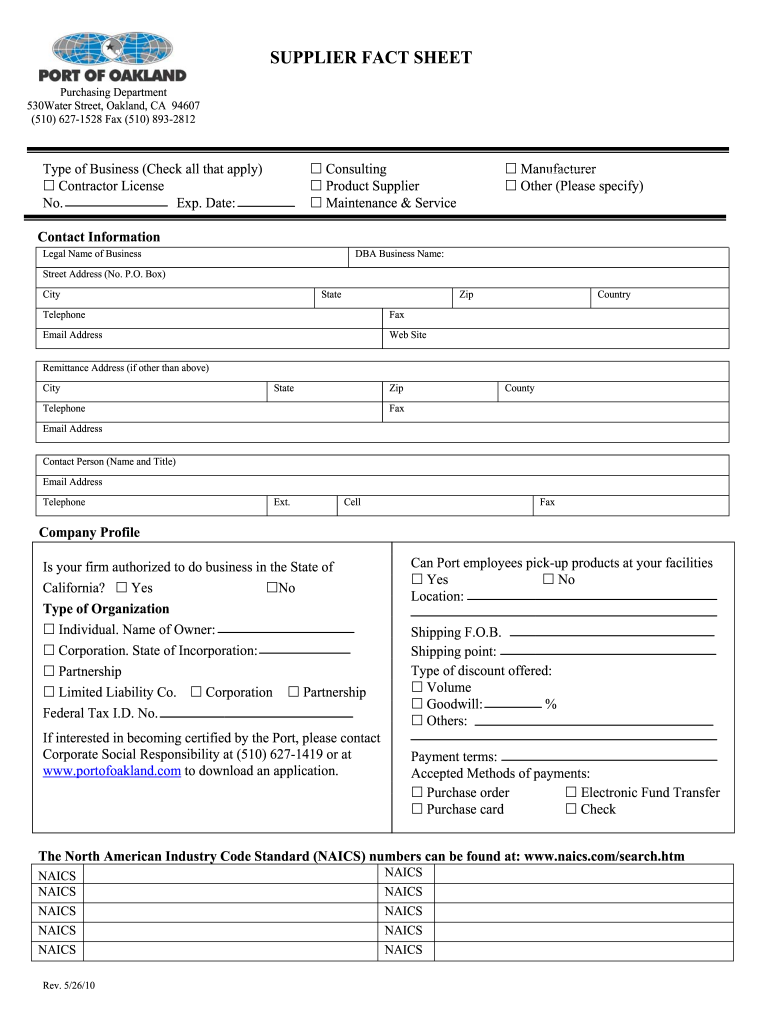
The Supplier Fact Sheet is a comprehensive document that provides essential information about a vendor or supplier. This sheet typically includes details such as the supplier's name, contact information, business structure, tax identification number, and payment terms. It serves as a vital resource for businesses to evaluate potential suppliers and maintain accurate records. The Supplier Fact Sheet can also help streamline communication and ensure that all necessary information is readily available for procurement processes.
How to use the Supplier Fact Sheet
Using the Supplier Fact Sheet effectively involves several key steps. First, gather all relevant information about the supplier, ensuring accuracy and completeness. Next, input this data into the designated fields of the Supplier Fact Sheet template. This may include sections for company details, product offerings, and compliance certifications. Once completed, the sheet can be shared with relevant departments within the organization, such as finance and procurement, to facilitate decision-making and supplier management.
Steps to complete the Supplier Fact Sheet
Completing the Supplier Fact Sheet requires careful attention to detail. Follow these steps:
- Begin by entering the supplier's basic information, including name, address, and contact details.
- Add the supplier's tax identification number and business structure (e.g., LLC, Corporation).
- Include payment terms and any relevant compliance certifications.
- Review the completed sheet for accuracy and completeness.
- Save the document in a secure location for easy access and future reference.
Key elements of the Supplier Fact Sheet
The Supplier Fact Sheet should contain several key elements to ensure it is informative and useful. Essential components include:
- Supplier Information: Basic details such as name, address, and contact information.
- Tax Identification Number: Necessary for tax reporting purposes.
- Business Structure: Indicates the legal entity type of the supplier.
- Payment Terms: Outlines how and when payments will be made.
- Compliance Certifications: Any relevant certifications that demonstrate adherence to industry standards.
Legal use of the Supplier Fact Sheet
The legal use of the Supplier Fact Sheet is crucial for maintaining compliance with regulations and ensuring that all vendor relationships are documented appropriately. It is important to ensure that the information provided is accurate and up-to-date, as inaccuracies can lead to legal issues or financial discrepancies. Additionally, businesses should retain these documents for record-keeping purposes, as they may be required for audits or regulatory reviews.
Examples of using the Supplier Fact Sheet
Examples of using the Supplier Fact Sheet include:
- Evaluating potential suppliers during the procurement process to ensure they meet business requirements.
- Maintaining accurate records for tax reporting and compliance purposes.
- Facilitating communication between departments by providing a centralized source of supplier information.
- Streamlining the onboarding process for new vendors by ensuring all necessary information is collected upfront.
Quick guide on how to complete port of oakland supplier fact sheet form
Control Supplier Fact Sheet anytime, anywhere
Your everyday business activities may need additional focus when managing state-specific business documents. Reclaim your working hours and minimize the costs related to paper-based processes with airSlate SignNow. airSlate SignNow provides you with an assortment of pre-uploaded business documents, including Supplier Fact Sheet, which you can utilize and share with your business associates. Handle your Supplier Fact Sheet seamlessly with robust editing and eSignature functionalities and send it directly to your recipients.
Steps to obtain Supplier Fact Sheet in just a few clicks:
- Choose a form pertinent to your location.
- Click Learn More to review the document and ensure its accuracy.
- Select Get Form to begin working on it.
- Supplier Fact Sheet will automatically launch in the editor. No further actions are required.
- Utilize airSlate SignNow’s advanced editing features to complete or modify the form.
- Select the Sign tool to create your signature and eSign your document.
- When you’re prepared, click on Done, save your changes, and access your document.
- Send the form via email or text, or use a link-to-fill option with your partners or allow them to download the documents.
airSlate SignNow signNowly reduces the time spent managing Supplier Fact Sheet and enables you to locate essential documents in one location. A comprehensive library of forms is sorted and designed to address vital business operations necessary for your company. The innovative editor minimizes the chance of errors, allowing you to easily correct mistakes and review your documents on any device before sending them out. Initiate your free trial today to discover all the benefits of airSlate SignNow for your daily business workflows.
Create this form in 5 minutes or less
FAQs
-
Does the IRS require unused sheets of a form to be submitted? Can I just leave out the section of a form whose lines are not filled out?
This is what a schedule C I submitted earlier looks like :http://onemoredime.com/wp-conten... So I did not submit page 2 of the schedule C - all the lines on page 2 (33 through 48) were blank.
-
How can I fill out Google's intern host matching form to optimize my chances of receiving a match?
I was selected for a summer internship 2016.I tried to be very open while filling the preference form: I choose many products as my favorite products and I said I'm open about the team I want to join.I even was very open in the location and start date to get host matching interviews (I negotiated the start date in the interview until both me and my host were happy.) You could ask your recruiter to review your form (there are very cool and could help you a lot since they have a bigger experience).Do a search on the potential team.Before the interviews, try to find smart question that you are going to ask for the potential host (do a search on the team to find nice and deep questions to impress your host). Prepare well your resume.You are very likely not going to get algorithm/data structure questions like in the first round. It's going to be just some friendly chat if you are lucky. If your potential team is working on something like machine learning, expect that they are going to ask you questions about machine learning, courses related to machine learning you have and relevant experience (projects, internship). Of course you have to study that before the interview. Take as long time as you need if you feel rusty. It takes some time to get ready for the host matching (it's less than the technical interview) but it's worth it of course.
-
How do I fill out the form of DU CIC? I couldn't find the link to fill out the form.
Just register on the admission portal and during registration you will get an option for the entrance based course. Just register there. There is no separate form for DU CIC.
-
How can I fill my JEE Advance 2019 form if my mark sheet of class 10 and class 12 are not available? I have given it for correction. How am I supposed to fill the form?
There is also the choice of uploading your Birth Certificate.On the first page it where your particulars are entered it asks for Class X marksheet only but when you submit that page, the next page (where you upload the photo) asks for Class X Marksheet or Birth Certificate.
Create this form in 5 minutes!
How to create an eSignature for the port of oakland supplier fact sheet form
How to make an electronic signature for your Port Of Oakland Supplier Fact Sheet Form in the online mode
How to make an eSignature for the Port Of Oakland Supplier Fact Sheet Form in Chrome
How to create an eSignature for signing the Port Of Oakland Supplier Fact Sheet Form in Gmail
How to create an eSignature for the Port Of Oakland Supplier Fact Sheet Form right from your smartphone
How to make an electronic signature for the Port Of Oakland Supplier Fact Sheet Form on iOS devices
How to make an electronic signature for the Port Of Oakland Supplier Fact Sheet Form on Android
People also ask
-
What is a Supplier Fact Sheet and how can airSlate SignNow help?
A Supplier Fact Sheet is a crucial document that provides essential information about a supplier, including their capabilities and offerings. With airSlate SignNow, businesses can easily create, send, and eSign Supplier Fact Sheets, ensuring that all necessary details are captured efficiently and securely.
-
How does airSlate SignNow improve the creation of Supplier Fact Sheets?
airSlate SignNow streamlines the process of creating Supplier Fact Sheets by offering customizable templates and intuitive editing tools. This allows businesses to quickly design professional documents that meet their specific needs, saving time and enhancing productivity.
-
Is airSlate SignNow affordable for small businesses looking to manage Supplier Fact Sheets?
Yes, airSlate SignNow offers cost-effective pricing plans that cater to businesses of all sizes, including small businesses. Our solutions for managing Supplier Fact Sheets are designed to provide maximum value without breaking the bank, ensuring that all companies can benefit from our eSigning capabilities.
-
What features does airSlate SignNow offer for managing Supplier Fact Sheets?
airSlate SignNow provides a range of features tailored for Supplier Fact Sheets, including customizable templates, bulk sending capabilities, and real-time tracking of document status. These features help ensure that your documents are processed quickly and efficiently.
-
Can I integrate airSlate SignNow with other tools for Supplier Fact Sheets?
Absolutely! airSlate SignNow integrates seamlessly with various business applications, including CRM systems and productivity tools. This means you can easily manage your Supplier Fact Sheets alongside your other business processes for improved efficiency.
-
What are the benefits of using airSlate SignNow for Supplier Fact Sheets?
Using airSlate SignNow for Supplier Fact Sheets offers numerous benefits, including faster document turnaround times, enhanced security, and reduced paper usage. Our platform empowers businesses to operate more sustainably while ensuring compliance and security in document management.
-
How secure is airSlate SignNow when handling Supplier Fact Sheets?
airSlate SignNow takes security seriously, employing advanced encryption and compliance measures to protect your Supplier Fact Sheets and sensitive information. Our platform meets industry standards to ensure that your documents are safe from unauthorized access.
Get more for Supplier Fact Sheet
- Type names of persons to receive homestead form
- Type the names and birth dates of all of your form
- Declaration of homestead state of california form
- Nus application form
- Fillable online marie stopes uk vasectomy referral form
- State board adjusts fcat grade form
- Rv park reservation form tulsa state fair
- Do not staple or paper clip ohio it 1140 rev form
Find out other Supplier Fact Sheet
- eSign Florida Land lease agreement Fast
- eSign Louisiana Land lease agreement Secure
- How Do I eSign Mississippi Land lease agreement
- eSign Connecticut Landlord tenant lease agreement Now
- eSign Georgia Landlord tenant lease agreement Safe
- Can I eSign Utah Landlord lease agreement
- How Do I eSign Kansas Landlord tenant lease agreement
- How Can I eSign Massachusetts Landlord tenant lease agreement
- eSign Missouri Landlord tenant lease agreement Secure
- eSign Rhode Island Landlord tenant lease agreement Later
- How Can I eSign North Carolina lease agreement
- eSign Montana Lease agreement form Computer
- Can I eSign New Hampshire Lease agreement form
- How To eSign West Virginia Lease agreement contract
- Help Me With eSign New Mexico Lease agreement form
- Can I eSign Utah Lease agreement form
- Can I eSign Washington lease agreement
- Can I eSign Alabama Non disclosure agreement sample
- eSign California Non disclosure agreement sample Now
- eSign Pennsylvania Mutual non-disclosure agreement Now