Observation Checklist 2011-2026


What is the classroom observation checklist?
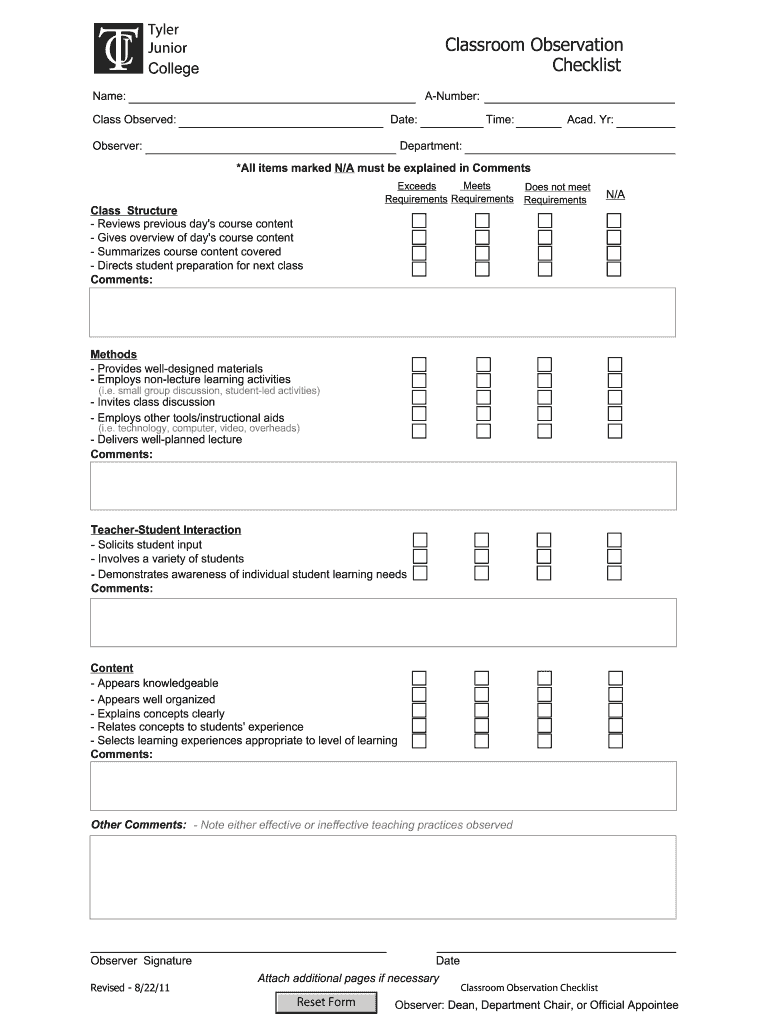
The classroom observation checklist is a structured tool designed to evaluate and enhance teaching practices within educational settings. This checklist typically includes various criteria that observers use to assess instructional strategies, classroom management, student engagement, and learning outcomes. By utilizing this checklist, educators can receive constructive feedback that supports professional development and improves overall teaching effectiveness.
How to use the classroom observation checklist
To effectively use the classroom observation checklist, follow these steps:
- Identify the specific goals of the observation, such as focusing on classroom management or instructional techniques.
- Distribute the checklist to observers, ensuring they understand the criteria and purpose of the evaluation.
- Conduct the observation while allowing observers to take notes based on the checklist items.
- After the observation, gather feedback from observers and discuss the findings with the teacher to identify areas for improvement.
Key elements of the classroom observation checklist
The key elements of a classroom observation checklist typically include:
- Instructional Strategies: Assessment of teaching methods and techniques used to engage students.
- Classroom Environment: Evaluation of the physical setup and overall atmosphere of the classroom.
- Student Engagement: Observation of how actively students participate in learning activities.
- Assessment Practices: Review of how student understanding is measured and addressed.
Steps to complete the classroom observation checklist
Completing the classroom observation checklist involves several steps:
- Prepare the checklist in advance, ensuring it aligns with the specific observation goals.
- Schedule the observation at a mutually convenient time for both the observer and the teacher.
- During the observation, systematically go through each item on the checklist, noting specific examples.
- After the observation, compile the notes and provide feedback based on the checklist findings.
Legal use of the classroom observation checklist
When using the classroom observation checklist, it is essential to adhere to legal and ethical standards. This includes obtaining consent from the teacher being observed and ensuring that the feedback process is constructive and supportive. Compliance with educational regulations, such as FERPA, which protects student privacy, is also crucial when discussing observations that may involve student interactions.
Examples of using the classroom observation checklist
Examples of using the classroom observation checklist can include:
- Peer observations where teachers assess each other's practices using the checklist to foster collaboration.
- Formal evaluations conducted by administrators to ensure teaching quality and provide targeted professional development.
- Self-assessment by teachers to reflect on their practices and identify personal growth areas.
Quick guide on how to complete observation checklist
Complete Observation Checklist effortlessly on any device
Web-based document management has gained signNow traction among companies and individuals alike. It offers an ideal environmentally friendly alternative to conventional printed and signed documents, as you can easily locate the appropriate template and securely save it online. airSlate SignNow equips you with all the necessary tools to create, edit, and eSign your documents swiftly and without interruption. Manage Observation Checklist on any device with airSlate SignNow Android or iOS applications and enhance any document-related activity today.
How to modify and eSign Observation Checklist seamlessly
- Obtain Observation Checklist and click on Get Form to begin.
- Utilize the tools we offer to complete your form.
- Emphasize important sections of your documents or redact sensitive information with tools specifically designed by airSlate SignNow for that purpose.
- Generate your signature using the Sign feature, which takes only a moment and carries the same legal validity as a conventional wet ink signature.
- Review all the details and click on the Done button to save your adjustments.
- Select your preferred method for submitting your form, whether it be via email, SMS, invitation link, or downloading it to your computer.
Eliminate concerns about lost or misplaced files, tedious form searches, or errors necessitating new document copies. airSlate SignNow manages all your document handling requirements in just a few clicks from your chosen device. Modify and eSign Observation Checklist and ensure superior communication at any phase of your form preparation process with airSlate SignNow.
Create this form in 5 minutes or less
Create this form in 5 minutes!
How to create an eSignature for the observation checklist
The way to create an electronic signature for a PDF document online
The way to create an electronic signature for a PDF document in Google Chrome
How to generate an eSignature for signing PDFs in Gmail
The best way to make an eSignature from your smart phone
The best way to create an eSignature for a PDF document on iOS
The best way to make an eSignature for a PDF file on Android OS
People also ask
-
What is a classroom observation checklist?
A classroom observation checklist is a structured tool used by educators to assess teaching practices and student engagement during lessons. It helps in providing feedback, identifying areas for improvement, and ensuring that educational standards are met. Utilizing a digital solution like airSlate SignNow can streamline the observation process and enhance collaboration.
-
How can airSlate SignNow enhance my classroom observation checklist?
airSlate SignNow allows you to create and customize your classroom observation checklist digitally, making it easy to share with colleagues. The platform facilitates real-time collaboration and feedback, ensuring everyone involved can access observations quickly. This flexibility helps educators streamline their evaluation process and focus on improving teaching quality.
-
Is airSlate SignNow cost-effective for educational institutions?
Yes, airSlate SignNow offers pricing plans tailored for educational institutions, providing a budget-friendly solution for managing documents and checklists. By using our platform for your classroom observation checklist, you can reduce administrative costs and enhance the efficiency of your observation processes. Contact us for more details on our educational pricing options.
-
Can I integrate airSlate SignNow with other educational tools?
Absolutely! airSlate SignNow supports integrations with various educational tools to simplify your workflow. Whether you're using learning management systems or other assessment platforms, incorporating your classroom observation checklist into these systems can improve communication and data management across your team.
-
What are the benefits of using a digital classroom observation checklist?
Using a digital classroom observation checklist streamlines the process of collecting and analyzing data on teaching performance. It allows for easy updates, sharing, and immediate feedback, facilitating professional development. Additionally, the ability to store data securely and access it from anywhere supports ongoing assessments and improvement strategies.
-
How does airSlate SignNow protect the data in my classroom observation checklist?
airSlate SignNow prioritizes data security by employing robust encryption and compliance with regulatory standards. Your classroom observation checklist is securely stored and managed, ensuring that sensitive information remains confidential. Users can trust our platform to handle their educational data with care.
-
Is training available for using the classroom observation checklist on airSlate SignNow?
Yes, airSlate SignNow offers comprehensive training resources to help users effectively utilize the classroom observation checklist feature. This includes tutorials, webinars, and customer support to ensure you get the most out of the platform. Our goal is to empower educators with the tools they need to conduct thorough observations.
Get more for Observation Checklist
- Fotm dc 451 fill online printable fillable blankpdffiller form
- Notice to judgment debtor how to claim exemptions from form
- Motion and order for judgment to be marked satisfied form
- Writs of executionloudoun county va official website form
- 462 358 restoration of privilege of driving motor vehicle form
- 372 1103 emergency custody orders for adult persons who form
- Subpoena for witness civil form
- Code of virginia jurisdiction consent for abortion va code form
Find out other Observation Checklist
- How Do I eSignature Arizona Real Estate PDF
- How To eSignature Arkansas Real Estate Document
- How Do I eSignature Oregon Plumbing PPT
- How Do I eSignature Connecticut Real Estate Presentation
- Can I eSignature Arizona Sports PPT
- How Can I eSignature Wisconsin Plumbing Document
- Can I eSignature Massachusetts Real Estate PDF
- How Can I eSignature New Jersey Police Document
- How Can I eSignature New Jersey Real Estate Word
- Can I eSignature Tennessee Police Form
- How Can I eSignature Vermont Police Presentation
- How Do I eSignature Pennsylvania Real Estate Document
- How Do I eSignature Texas Real Estate Document
- How Can I eSignature Colorado Courts PDF
- Can I eSignature Louisiana Courts Document
- How To Electronic signature Arkansas Banking Document
- How Do I Electronic signature California Banking Form
- How Do I eSignature Michigan Courts Document
- Can I eSignature Missouri Courts Document
- How Can I Electronic signature Delaware Banking PDF