508C BlueCare Plus HMO SNPSkilled Nursing Facility Request Fax Form BlueCare Plus HMO SNPSkilled Nursing Facility Request Fax Fo 2017-2026


Understanding the 508C BlueCare Plus HMO SNPSkilled Nursing Facility Request Fax Form
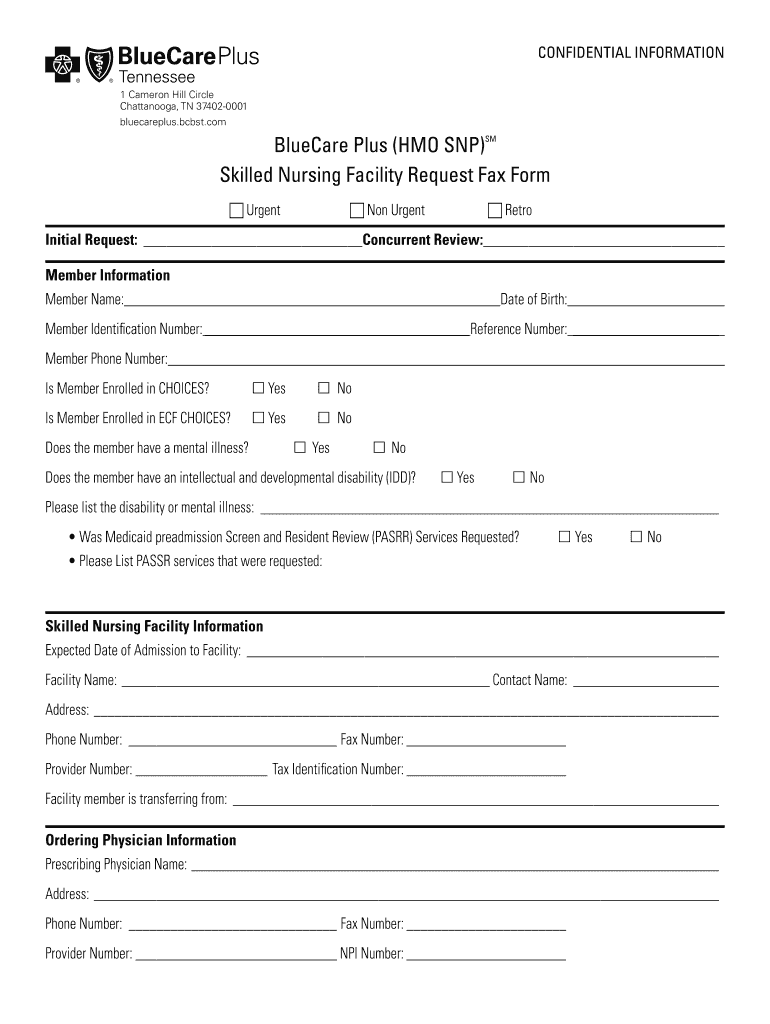
The 508C BlueCare Plus HMO SNPSkilled Nursing Facility Request Fax Form is a specialized document used to request services from skilled nursing facilities under the BlueCare Plus HMO plan. This form is essential for ensuring that patients receive appropriate care and coverage as per their health plan. It contains specific sections that must be completed accurately to facilitate the approval process.
Steps to Complete the 508C BlueCare Plus HMO SNPSkilled Nursing Facility Request Fax Form
Completing the 508C BlueCare Plus HMO SNPSkilled Nursing Facility Request Fax Form involves several key steps:
- Gather necessary patient information, including full name, date of birth, and insurance details.
- Provide details about the skilled nursing facility, including its name and address.
- Fill out the medical necessity section, detailing the reasons for the request.
- Include the physician's information and signature to validate the request.
- Review the form for accuracy and completeness before submission.
Legal Use of the 508C BlueCare Plus HMO SNPSkilled Nursing Facility Request Fax Form
The 508C BlueCare Plus HMO SNPSkilled Nursing Facility Request Fax Form is legally binding when completed correctly. It must comply with applicable healthcare regulations to ensure that the request is processed without legal issues. Proper signatures and documentation are essential for the form to be considered valid by healthcare providers and insurers.
Key Elements of the 508C BlueCare Plus HMO SNPSkilled Nursing Facility Request Fax Form
Important components of the 508C BlueCare Plus HMO SNPSkilled Nursing Facility Request Fax Form include:
- Patient identification information
- Details about the skilled nursing facility
- Medical necessity justification
- Healthcare provider's signature and credentials
- Date of the request
How to Obtain the 508C BlueCare Plus HMO SNPSkilled Nursing Facility Request Fax Form
The 508C BlueCare Plus HMO SNPSkilled Nursing Facility Request Fax Form can typically be obtained through various channels:
- Contacting BlueCare Plus customer service for a copy.
- Visiting the BlueCare Plus official website for downloadable forms.
- Requesting the form directly from the skilled nursing facility.
Examples of Using the 508C BlueCare Plus HMO SNPSkilled Nursing Facility Request Fax Form
Examples of scenarios where the 508C BlueCare Plus HMO SNPSkilled Nursing Facility Request Fax Form may be used include:
- A patient recovering from surgery requiring rehabilitation services.
- Individuals with chronic illnesses needing long-term care in a skilled nursing facility.
- Patients transitioning from hospital care to a skilled nursing facility for continued treatment.
Quick guide on how to complete 508c bluecare plus hmo snpskilled nursing facility request fax form bluecare plus hmo snpskilled nursing facility request fax
Complete 508C BlueCare Plus HMO SNPSkilled Nursing Facility Request Fax Form BlueCare Plus HMO SNPSkilled Nursing Facility Request Fax Fo effortlessly on any gadget
Digital document management has become favored by businesses and individuals alike. It serves as an ideal eco-friendly alternative to conventional printed and signed documents, allowing you to locate the correct form and securely store it online. airSlate SignNow offers all the tools necessary to create, modify, and electronically sign your documents rapidly without delays. Handle 508C BlueCare Plus HMO SNPSkilled Nursing Facility Request Fax Form BlueCare Plus HMO SNPSkilled Nursing Facility Request Fax Fo on any gadget with airSlate SignNow Android or iOS applications and enhance any document-centric process today.
The easiest method to modify and electronically sign 508C BlueCare Plus HMO SNPSkilled Nursing Facility Request Fax Form BlueCare Plus HMO SNPSkilled Nursing Facility Request Fax Fo with ease
- Locate 508C BlueCare Plus HMO SNPSkilled Nursing Facility Request Fax Form BlueCare Plus HMO SNPSkilled Nursing Facility Request Fax Fo and click Get Form to begin.
- Use the tools we offer to fill out your form.
- Highlight important sections of the documents or redact sensitive information with tools specially provided by airSlate SignNow.
- Create your eSignature using the Sign tool, which takes mere seconds and holds the same legal authority as a conventional wet ink signature.
- Review the details and then click the Done button to save your changes.
- Select how you wish to deliver your form, via email, SMS, or invitation link, or download it to your computer.
Eliminate concerns about lost or misfiled documents, monotonous form searching, or mistakes that necessitate printing new document copies. airSlate SignNow meets all your document management requirements in just a few clicks from any device you prefer. Edit and electronically sign 508C BlueCare Plus HMO SNPSkilled Nursing Facility Request Fax Form BlueCare Plus HMO SNPSkilled Nursing Facility Request Fax Fo and guarantee exceptional communication at every phase of the document preparation process with airSlate SignNow.
Create this form in 5 minutes or less
Create this form in 5 minutes!
How to create an eSignature for the 508c bluecare plus hmo snpskilled nursing facility request fax form bluecare plus hmo snpskilled nursing facility request fax
How to create an eSignature for your PDF document in the online mode
How to create an eSignature for your PDF document in Chrome
The best way to make an electronic signature for putting it on PDFs in Gmail
The best way to generate an eSignature from your mobile device
How to generate an electronic signature for a PDF document on iOS devices
The best way to generate an eSignature for a PDF file on Android devices
People also ask
-
What is the 508C BlueCare Plus HMO SNPSkilled Nursing Facility Request Fax Form?
The 508C BlueCare Plus HMO SNPSkilled Nursing Facility Request Fax Form is a specialized document used to request skilled nursing facility services through the BlueCare Plus HMO plan. It streamlines the process of obtaining necessary approvals and facilitates communication between healthcare providers and the insurance company.
-
How do I access the 508C BlueCare Plus HMO SNPSkilled Nursing Facility Request Fax Form?
You can easily access the 508C BlueCare Plus HMO SNPSkilled Nursing Facility Request Fax Form on our airSlate SignNow platform. Simply log in to your account, navigate to the forms section, and search for the 508C form to download or fill it out online.
-
Is there a cost associated with using the 508C BlueCare Plus HMO SNPSkilled Nursing Facility Request Fax Form?
Using the 508C BlueCare Plus HMO SNPSkilled Nursing Facility Request Fax Form through airSlate SignNow is part of our cost-effective eSigning solutions. SignNow offers various pricing plans, allowing you to choose the one that best fits your needs, with no hidden fees for using specific forms.
-
What are the benefits of using the 508C BlueCare Plus HMO SNPSkilled Nursing Facility Request Fax Form?
The 508C BlueCare Plus HMO SNPSkilled Nursing Facility Request Fax Form simplifies the submission process for skilled nursing facility requests. By using our platform, you can ensure faster processing times and a more organized workflow, improving communication between healthcare facilities and insurance providers.
-
Can I integrate the 508C BlueCare Plus HMO SNPSkilled Nursing Facility Request Fax Form with other software?
Yes, airSlate SignNow allows you to integrate the 508C BlueCare Plus HMO SNPSkilled Nursing Facility Request Fax Form with various third-party applications. Our platform supports integration with popular software like Google Drive, Dropbox, and many others, enhancing your document management capabilities.
-
How secure is the 508C BlueCare Plus HMO SNPSkilled Nursing Facility Request Fax Form on airSlate SignNow?
Security is a top priority at airSlate SignNow. The 508C BlueCare Plus HMO SNPSkilled Nursing Facility Request Fax Form is protected using advanced encryption methods, ensuring that all your sensitive information remains confidential and secure throughout the signing process.
-
Can I track the status of my 508C BlueCare Plus HMO SNPSkilled Nursing Facility Request Fax Form submission?
Absolutely! airSlate SignNow provides tracking features that allow you to monitor the status of your 508C BlueCare Plus HMO SNPSkilled Nursing Facility Request Fax Form submission in real-time. You will receive notifications when the form is viewed, signed, or completed.
Get more for 508C BlueCare Plus HMO SNPSkilled Nursing Facility Request Fax Form BlueCare Plus HMO SNPSkilled Nursing Facility Request Fax Fo
Find out other 508C BlueCare Plus HMO SNPSkilled Nursing Facility Request Fax Form BlueCare Plus HMO SNPSkilled Nursing Facility Request Fax Fo
- eSignature Louisiana Insurance Rental Application Later
- eSignature Maryland Insurance Contract Safe
- eSignature Massachusetts Insurance Lease Termination Letter Free
- eSignature Nebraska High Tech Rental Application Now
- How Do I eSignature Mississippi Insurance Separation Agreement
- Help Me With eSignature Missouri Insurance Profit And Loss Statement
- eSignature New Hampshire High Tech Lease Agreement Template Mobile
- eSignature Montana Insurance Lease Agreement Template Online
- eSignature New Hampshire High Tech Lease Agreement Template Free
- How To eSignature Montana Insurance Emergency Contact Form
- eSignature New Jersey High Tech Executive Summary Template Free
- eSignature Oklahoma Insurance Warranty Deed Safe
- eSignature Pennsylvania High Tech Bill Of Lading Safe
- eSignature Washington Insurance Work Order Fast
- eSignature Utah High Tech Warranty Deed Free
- How Do I eSignature Utah High Tech Warranty Deed
- eSignature Arkansas Legal Affidavit Of Heirship Fast
- Help Me With eSignature Colorado Legal Cease And Desist Letter
- How To eSignature Connecticut Legal LLC Operating Agreement
- eSignature Connecticut Legal Residential Lease Agreement Mobile