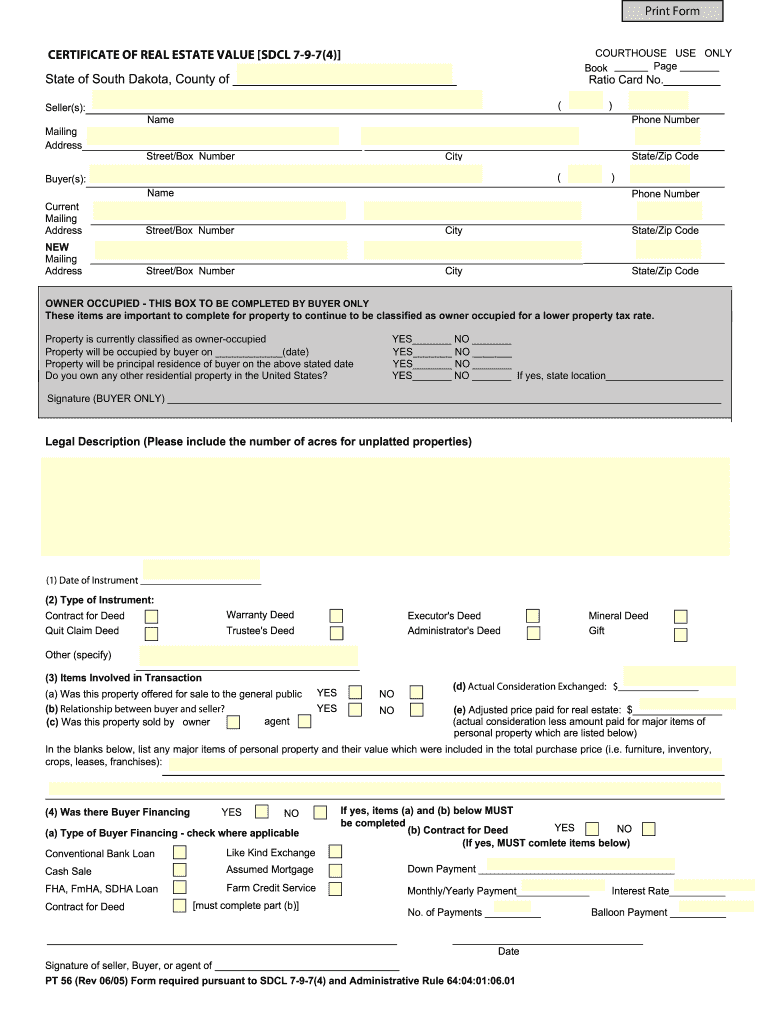
South Dakota Certificate of Real Estate Value 2005-2026


What is the South Dakota Certificate of Real Estate Value
The South Dakota Certificate of Real Estate Value is a crucial document used during real estate transactions in the state. This certificate provides essential information about the sale of real estate, including the sale price, property description, and the names of the buyer and seller. It is required by law to be filed with the county auditor's office when real estate is sold or transferred. The certificate helps ensure transparency in property transactions and assists in the accurate assessment of property taxes.
How to use the South Dakota Certificate of Real Estate Value
To effectively use the South Dakota Certificate of Real Estate Value, it must be completed accurately and submitted to the appropriate county office. This involves filling out the form with details such as the property address, sale price, and the parties involved in the transaction. Once completed, the certificate should be filed alongside other necessary documents related to the property transfer. Proper use of this certificate helps maintain compliance with state regulations and aids in the smooth processing of real estate transactions.
Steps to complete the South Dakota Certificate of Real Estate Value
Completing the South Dakota Certificate of Real Estate Value involves several key steps:
- Gather all necessary information about the property, including its legal description and sale price.
- Fill out the certificate form, ensuring all fields are completed accurately.
- Obtain signatures from both the buyer and seller to validate the document.
- Submit the completed certificate to the county auditor's office within the required timeframe.
Legal use of the South Dakota Certificate of Real Estate Value
The legal use of the South Dakota Certificate of Real Estate Value is mandated by state law. This document must be filed for all real estate transactions to ensure compliance with local regulations. Failure to file the certificate can result in penalties, including fines or complications in property transfer. It serves as a public record that helps maintain the integrity of the real estate market in South Dakota.
Key elements of the South Dakota Certificate of Real Estate Value
Key elements of the South Dakota Certificate of Real Estate Value include:
- Property address and legal description.
- Sale price of the property.
- Names and signatures of the buyer and seller.
- Date of the transaction.
- Certification by the seller that the information provided is accurate.
State-specific rules for the South Dakota Certificate of Real Estate Value
State-specific rules for the South Dakota Certificate of Real Estate Value outline the requirements for its use and submission. Each county may have additional regulations, so it is important to check with the local auditor's office for any specific guidelines. Generally, the certificate must be filed within a certain period following the transaction, and all information must be truthful and complete to avoid legal issues.
Quick guide on how to complete sdcl 7 9 74 form
Ensure Precision on South Dakota Certificate Of Real Estate Value
Managing agreements, handling listings, organizing meetings, and conducting viewings—real estate professionals navigate a variety of duties each day. Many of these tasks require extensive paperwork, such as South Dakota Certificate Of Real Estate Value, that must be completed according to specified timelines and with utmost precision.
airSlate SignNow is a comprehensive platform that enables users in the real estate sector to relieve the stress of paperwork and concentrate more on their clients’ objectives during the entire negotiation phase, empowering them to secure the most favorable conditions in the transaction.
Steps to complete South Dakota Certificate Of Real Estate Value with airSlate SignNow:
- Go to the South Dakota Certificate Of Real Estate Value page or utilize our library’s search features to find what you require.
- Select Retrieve form—you will be instantly directed to the editor.
- Begin completing the document by selecting fillable fields and entering your information.
- Add additional text and modify its settings if necessary.
- Click on the Sign option in the upper toolbar to create your signature.
- Explore other tools available for annotating and enhancing your document, such as drawing, highlighting, and adding shapes.
- Access the notes section and provide comments regarding your document.
- Conclude the process by downloading, sharing, or sending your document to the appropriate parties or entities.
Eliminate paper once and for all and enhance the homebuying experience with our user-friendly and powerful solution. Benefit from increased convenience when signNowing South Dakota Certificate Of Real Estate Value and various real estate documents online. Try our tool today!
Create this form in 5 minutes or less
FAQs
-
Can you add 5 odd numbers to get 30?
It is 7,9 + 9,1 + 1 + 3 + 9 = 30Wish you can find the 7,9 and 9,1 in the list of1,3,5, 7,9 ,11,13,151,3,5,7, 9,1 1,13,15
-
How do I fill a W-9 Tax Form out?
Download a blank Form W-9To get started, download the latest Form W-9 from the IRS website at https://www.irs.gov/pub/irs-pdf/.... Check the date in the top left corner of the form as it is updated occasionally by the IRS. The current revision should read (Rev. December 2014). Click anywhere on the form and a menu appears at the top that will allow you to either print or save the document. If the browser you are using doesn’t allow you to type directly into the W-9 then save the form to your desktop and reopen using signNow Reader.General purposeThe general purpose of Form W-9 is to provide your correct taxpayer identification number (TIN) to an individual or entity (typically a company) that is required to submit an “information return” to the IRS to report an amount paid to you, or other reportable amount.U.S. personForm W-9 should only be completed by what the IRS calls a “U.S. person”. Some examples of U.S. persons include an individual who is a U.S. citizen or a U.S. resident alien. Partnerships, corporations, companies, or associations created or organized in the United States or under the laws of the United States are also U.S. persons.If you are not a U.S. person you should not use this form. You will likely need to provide Form W-8.Enter your informationLine 1 – Name: This line should match the name on your income tax return.Line 2 – Business name: This line is optional and would include your business name, trade name, DBA name, or disregarded entity name if you have any of these. You only need to complete this line if your name here is different from the name on line 1. See our related blog, What is a disregarded entity?Line 3 – Federal tax classification: Check ONE box for your U.S. federal tax classification. This should be the tax classification of the person or entity name that is entered on line 1. See our related blog, What is the difference between an individual and a sole proprietor?Limited Liability Company (LLC). If the name on line 1 is an LLC treated as a partnership for U.S. federal tax purposes, check the “Limited liability company” box and enter “P” in the space provided. If the LLC has filed Form 8832 or 2553 to be taxed as a corporation, check the “Limited liability company” box and in the space provided enter “C” for C corporation or “S” for S corporation. If it is a single-member LLC that is a disregarded entity, do not check the “Limited liability company” box; instead check the first box in line 3 “Individual/sole proprietor or single-member LLC.” See our related blog, What tax classification should an LLC select?Other (see instructions) – This line should be used for classifications that are not listed such as nonprofits, governmental entities, etc.Line 4 – Exemptions: If you are exempt from backup withholding enter your exempt payee code in the first space. If you are exempt from FATCA reporting enter your exemption from FATCA reporting code in the second space. Generally, individuals (including sole proprietors) are not exempt from backup withholding. See the “Specific Instructions” for line 4 shown with Form W-9 for more detailed information on exemptions.Line 5 – Address: Enter your address (number, street, and apartment or suite number). This is where the requester of the Form W-9 will mail your information returns.Line 6 – City, state and ZIP: Enter your city, state and ZIP code.Line 7 – Account numbers: This is an optional field to list your account number(s) with the company requesting your W-9 such as a bank, brokerage or vendor. We recommend that you do not list any account numbers as you may have to provide additional W-9 forms for accounts you do not include.Requester’s name and address: This is an optional section you can use to record the requester’s name and address you sent your W-9 to.Part I – Taxpayer Identification Number (TIN): Enter in your taxpayer identification number here. This is typically a social security number for an individual or sole proprietor and an employer identification number for a company. See our blog, What is a TIN number?Part II – Certification: Sign and date your form.For additional information visit w9manager.com.
-
Mathematical Puzzles: What is () + () + () = 30 using 1,3,5,7,9,11,13,15?
My question had been merged with another one and as a result, I have added the previous answer to the present one. Hopefully this provides a clearer explanation. Just using the numbers given there, it's not possible, because odd + odd = even, even + odd = odd. 30 is an even number, the answer of 3 odd numbers must be odd, it's a contradiction. If what people say is true, then the question is wrongly phrased its any number of operations within those three brackets must lead to 30. Then it becomes a lot easier. Such as 15 + 7 + (7 + 1). That would give 30. But it assumes something that the question does not state explicitly and cannot be done that way. I still stick to my first point, it can't be done within the realm of math and just using three numbers, if not, then the latter is a way to solve it.EDIT: This question has come up many times, Any odd number can be expressed as the following, Let [math]n, m, p[/math] be an odd number, [math] n = 1 (mod[/math] [math]2), m = 1 (mod[/math] [math]2), p = 1 (mod[/math] [math]2)[/math][math]n+m+p = 1 + 1 + 1 (mod[/math] [math]2)[/math]Let's call [math]n+m+p[/math] as [math]x[/math][math]=> x = 3 (mod[/math] [math]2)[/math]Numbers in modulo n can be added, I'll write a small proof for it below, [math]a = b (mod[/math] [math]n), c = d (mod[/math] [math]n)[/math][math]a+c = b+d (mod[/math] [math]n)[/math]We can rewrite [math]b[/math] and [math]d[/math] in the following way, [math]n | (b - a) => b-a = n*p[/math] (for some integer p) [math]b = a + np[/math][math]b = a + np, d = c + nq[/math][math]b + d = a + np + c + nq[/math][math]b+d = a + c + n(p + q)[/math]Now we have shown that our result is true, moving forward, [math]3 = 1 (mod[/math] [math]2)[/math][math]x = 1 (mod[/math] [math]2)[/math]Therefore the sum of three odd numbers can never be even. It will always be congruent to 1 in mod 2.(This was what I wrote for a merged answer).Modular arithmetic - Link on modular arithmetic, the basic operations. Modular multiplicative inverse - The multiplicative inverse in modular operations.Congruence relationFermat's little theorem Modular exponentiation - As title suggests.Good luck!
-
Should I fill out the form of DU with 74% in the 12th class for merit-based colleges? Does it have any possibility?
For GENERAL it is a big no whether it be SCIENCE , ARTS or COMMERCE .
-
Why did my employer give me a W-9 Form to fill out instead of a W-4 Form?
I wrote about the independent-contractor-vs-employee issue last year, see http://nctaxpro.wordpress.com/20...Broadly speaking, you are an employee when someone else - AKA the employer - has control over when and where you work and the processes by which you perform the work that you do for that individual. A DJ or bartender under some circumstances, I suppose, might qualify as an independent contractor at a restaurant, but the waitstaff, bus help, hosts, kitchen aides, etc. almost certainly would not.There's always risk in confronting an employer when faced with a situation like yours - my experience is that most employers know full well that they are violating the law when they treat employees as independent contractors, and for that reason they don't tolerate questions about that policy very well - so you definitely should tread cautiously if you want to keep this position. Nonetheless, I think you owe it to yourself to ask whether or not the restaurant intends to withhold federal taxes from your checks - if for no other reason than you don't want to get caught short when it comes to filing your own return, even if you don't intend to challenge the policy.
-
I received my late husband's W-9 form to fill out for what I believe were our stocks. How am I supposed to fill this out or am I even supposed to?
You do not sound as a person who handles intricasies of finances on daily basis, this is why you should redirect the qustion to your family’s tax professional who does hte filings for you.The form itself, W-9 form, is a form created and approved by the IRS, if that’s your only inquiry.Whether the form applies to you or to your husband’s estate - that’s something only a person familiar with the situation would tell you about; there is no generic answer to this.
-
_+_+_+_+_ = 30. How do you fill in the blanks using 1, 3, 5, 7, 9, 11 or 13?
15 + 13 + (11-9) + (7-5) + (1-3) = 30
Create this form in 5 minutes!
How to create an eSignature for the sdcl 7 9 74 form
How to create an electronic signature for your Sdcl 7 9 74 Form online
How to create an eSignature for the Sdcl 7 9 74 Form in Chrome
How to generate an eSignature for putting it on the Sdcl 7 9 74 Form in Gmail
How to create an electronic signature for the Sdcl 7 9 74 Form right from your smartphone
How to generate an eSignature for the Sdcl 7 9 74 Form on iOS
How to make an electronic signature for the Sdcl 7 9 74 Form on Android
People also ask
-
What is the South Dakota Certificate Of Real Estate Value?
The South Dakota Certificate Of Real Estate Value is a document required for real estate transactions in South Dakota, providing essential information about the property being sold. This certificate ensures transparency in real estate dealings by detailing the sale price and property characteristics. Utilizing airSlate SignNow, you can easily manage and eSign this document, streamlining your transaction process.
-
How can airSlate SignNow help with the South Dakota Certificate Of Real Estate Value?
airSlate SignNow simplifies the process of completing and eSigning the South Dakota Certificate Of Real Estate Value. Our platform allows you to fill out the certificate digitally, ensuring accuracy and saving time. With our user-friendly interface, you can quickly send the document for signatures, making your real estate transactions more efficient.
-
Is there a cost associated with using airSlate SignNow for the South Dakota Certificate Of Real Estate Value?
Yes, while the South Dakota Certificate Of Real Estate Value itself may have associated fees, using airSlate SignNow offers a cost-effective solution for managing your documents. Our pricing plans are designed to fit various business needs, allowing you to choose the right level of service for your real estate transactions. Enjoy the benefits of digital signing without breaking the bank.
-
What features does airSlate SignNow offer for the South Dakota Certificate Of Real Estate Value?
airSlate SignNow provides several features to enhance your experience with the South Dakota Certificate Of Real Estate Value. You can easily fill out forms, add eSignatures, set signing orders, and track document status in real-time. These features make it easier to manage your real estate documents efficiently and securely.
-
Can I integrate airSlate SignNow with other applications for the South Dakota Certificate Of Real Estate Value?
Absolutely! airSlate SignNow offers integration capabilities with various applications, allowing you to streamline your workflow when handling the South Dakota Certificate Of Real Estate Value. Integrate with CRM systems, cloud storage solutions, and more to create a seamless experience for managing your real estate transactions.
-
What are the benefits of using airSlate SignNow for real estate transactions in South Dakota?
Using airSlate SignNow for your South Dakota Certificate Of Real Estate Value provides numerous benefits, including time savings, enhanced security, and improved document management. Our platform ensures that your documents are signed quickly and safely, reducing delays in your real estate transactions. Additionally, the convenience of eSigning from any device makes it easier to close deals faster.
-
Is airSlate SignNow secure for handling the South Dakota Certificate Of Real Estate Value?
Yes, airSlate SignNow prioritizes security when handling sensitive documents like the South Dakota Certificate Of Real Estate Value. We employ advanced encryption and security measures to protect your information and ensure compliance with industry standards. You can confidently manage your real estate documents, knowing that your data is secure.
Get more for South Dakota Certificate Of Real Estate Value
- Photographic letter of consent form
- Official request form 2013
- Accommodation request ashford university ashford form
- Ach vendor payment authorization agreement form
- Charter school application for ou sponsorship of john w rex form
- 2015 gccisd form
- Human form rider
- Minority community college transfer scholarshipmccts florida hr fiu form
Find out other South Dakota Certificate Of Real Estate Value
- Sign Colorado Business Operations LLC Operating Agreement Online
- Sign Colorado Business Operations LLC Operating Agreement Myself
- Sign Hawaii Business Operations Warranty Deed Easy
- Sign Idaho Business Operations Resignation Letter Online
- Sign Illinois Business Operations Affidavit Of Heirship Later
- How Do I Sign Kansas Business Operations LLC Operating Agreement
- Sign Kansas Business Operations Emergency Contact Form Easy
- How To Sign Montana Business Operations Warranty Deed
- Sign Nevada Business Operations Emergency Contact Form Simple
- Sign New Hampshire Business Operations Month To Month Lease Later
- Can I Sign New York Business Operations Promissory Note Template
- Sign Oklahoma Business Operations Contract Safe
- Sign Oregon Business Operations LLC Operating Agreement Now
- Sign Utah Business Operations LLC Operating Agreement Computer
- Sign West Virginia Business Operations Rental Lease Agreement Now
- How To Sign Colorado Car Dealer Arbitration Agreement
- Sign Florida Car Dealer Resignation Letter Now
- Sign Georgia Car Dealer Cease And Desist Letter Fast
- Sign Georgia Car Dealer Purchase Order Template Mobile
- Sign Delaware Car Dealer Limited Power Of Attorney Fast