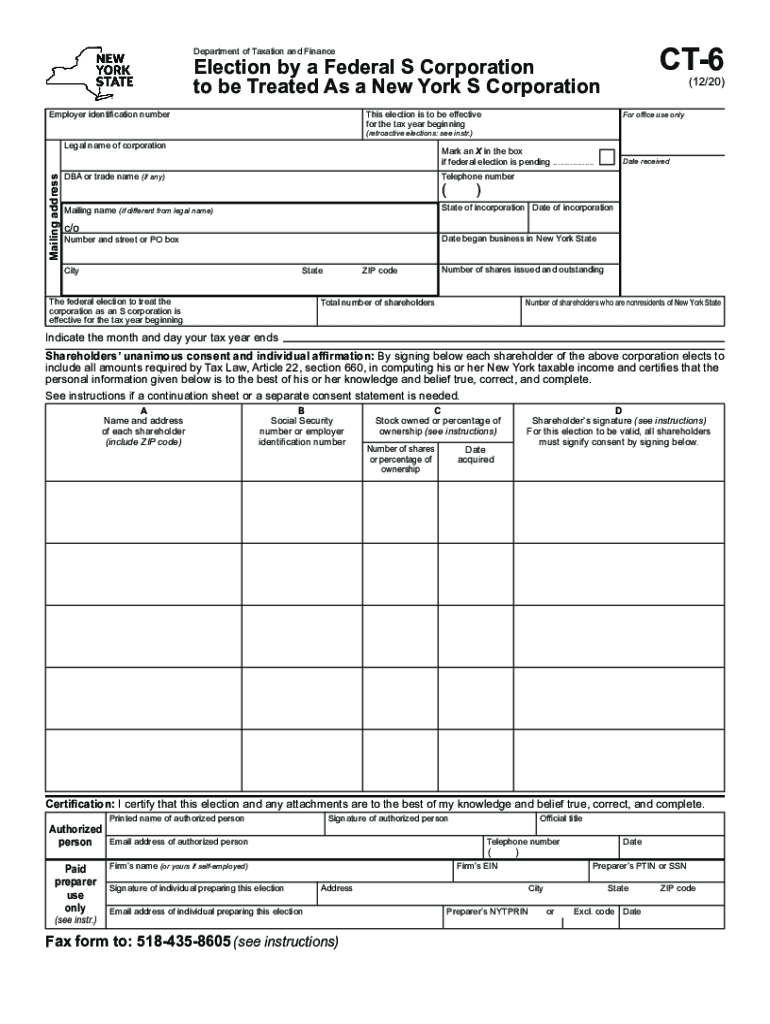
Form CT 6 Election by a Federal S Corporation to Be Treated as a New York S Corporation Revised 1220 2020-2026


Understanding the CT 6 Form for S Corporations
The CT 6 form, officially known as the Election By A Federal S Corporation To Be Treated As A New York S Corporation, is essential for businesses wishing to elect S corporation status in New York. This form allows a federal S corporation to be recognized as an S corporation under New York state law, enabling it to benefit from various tax advantages. The form is revised periodically, with the latest version being the one revised in December 2020. Understanding the purpose and implications of this form is crucial for compliance and optimal tax planning.
Steps to Complete the CT 6 Form
Completing the CT 6 form involves several key steps to ensure accuracy and compliance. First, gather all necessary information, including the corporation's federal Employer Identification Number (EIN), business name, and address. Next, fill out the form by providing details such as the date of the S corporation election and the number of shares issued. It is vital to ensure that all information is accurate and matches the corporation's records. After completing the form, review it carefully for any errors before submission.
Filing Deadlines for the CT 6 Form
Timely submission of the CT 6 form is essential to avoid penalties and ensure that the election is effective for the desired tax year. The form must typically be filed within two months and fifteen days after the beginning of the tax year for which the election is to take effect. For newly formed corporations, the form should be filed within the same timeframe. Missing the deadline may result in the corporation being treated as a regular corporation for tax purposes, which could lead to higher tax liabilities.
Eligibility Criteria for Using the CT 6 Form
To qualify for filing the CT 6 form, the corporation must meet specific eligibility criteria. It must be a federal S corporation, and all shareholders must be individuals, estates, or certain trusts. Additionally, the corporation should not have more than one class of stock. Understanding these criteria is crucial, as failing to meet them may result in the rejection of the form or unintended tax consequences.
Key Elements of the CT 6 Form
The CT 6 form contains several key elements that must be accurately completed. These include the corporation's name, address, and federal EIN, as well as the date the S corporation election is intended to take effect. The form also requires information about the shareholders, including their names and addresses. It is important to provide complete and accurate information, as errors can lead to delays or complications in processing the election.
Submission Methods for the CT 6 Form
The CT 6 form can be submitted through various methods, depending on the preferences of the business. Corporations can file the form online through the New York State Department of Taxation and Finance website, or they can submit it via mail. For those preferring in-person submissions, visiting a local tax office may also be an option. Each method has its own processing times, so businesses should consider their needs and deadlines when choosing a submission method.
Quick guide on how to complete form ct 6 election by a federal s corporation to be treated as a new york s corporation revised 1220
Complete Form CT 6 Election By A Federal S Corporation To Be Treated As A New York S Corporation Revised 1220 effortlessly on any device
Online document management has gained traction among businesses and individuals. It serves as an ideal eco-friendly alternative to traditional printed and signed documents, allowing you to access the proper forms and securely store them online. airSlate SignNow equips you with all the necessary tools to create, modify, and electronically sign your documents quickly and without delays. Manage Form CT 6 Election By A Federal S Corporation To Be Treated As A New York S Corporation Revised 1220 on any platform using the airSlate SignNow Android or iOS applications and simplify any document-related task today.
How to modify and electronically sign Form CT 6 Election By A Federal S Corporation To Be Treated As A New York S Corporation Revised 1220 with ease
- Find Form CT 6 Election By A Federal S Corporation To Be Treated As A New York S Corporation Revised 1220 and click Get Form to begin.
- Use the features we provide to complete your document.
- Emphasize key sections of the documents or redact sensitive information with tools specifically designed for that purpose by airSlate SignNow.
- Create your signature using the Sign tool, which takes mere seconds and holds the same legal significance as a conventional wet ink signature.
- Review all information and click on the Done button to secure your changes.
- Select how you wish to share your form, via email, SMS, or invitation link, or download it to your computer.
Eliminate concerns over lost or misplaced documents, tedious form searches, or mistakes that necessitate reprinting new document copies. airSlate SignNow meets your document management requirements in just a few clicks from any device you prefer. Modify and electronically sign Form CT 6 Election By A Federal S Corporation To Be Treated As A New York S Corporation Revised 1220 to ensure excellent communication at every stage of the document preparation process with airSlate SignNow.
Create this form in 5 minutes or less
Find and fill out the correct form ct 6 election by a federal s corporation to be treated as a new york s corporation revised 1220
Create this form in 5 minutes!
How to create an eSignature for the form ct 6 election by a federal s corporation to be treated as a new york s corporation revised 1220
The best way to generate an electronic signature for your PDF file in the online mode
The best way to generate an electronic signature for your PDF file in Chrome
The way to make an eSignature for putting it on PDFs in Gmail
The way to make an electronic signature straight from your smartphone
The way to make an electronic signature for a PDF file on iOS devices
The way to make an electronic signature for a PDF document on Android
People also ask
-
What is a New York S Corporation search?
A New York S Corporation search is a process to verify the business status and formation details of an S Corporation within the state of New York. This search helps potential partners and clients establish trust and ensure compliance with state regulations.
-
How can airSlate SignNow assist with my New York S Corporation search?
airSlate SignNow streamlines the process of making your New York S Corporation search easier by allowing you to eSign necessary documents quickly and efficiently. It provides a user-friendly interface that simplifies document management while ensuring compliance.
-
What features does airSlate SignNow offer for New York S Corporation searches?
airSlate SignNow offers features like customizable templates, secure cloud storage, and real-time tracking for documents needed in your New York S Corporation search. These features enhance efficiency and provide your business with reliable documentation.
-
Is airSlate SignNow affordable for small businesses needing New York S Corporation searches?
Yes, airSlate SignNow provides a cost-effective solution for small businesses and startups seeking New York S Corporation searches. With various pricing tiers, businesses can select the best plan that fits their budget and needs while utilizing reliable eSignature services.
-
What are the benefits of using airSlate SignNow for New York S Corporation searches?
Using airSlate SignNow for your New York S Corporation search provides numerous benefits, including increased efficiency, reduced paperwork, and enhanced security. It allows you to focus on growing your business rather than getting bogged down in administrative tasks.
-
Does airSlate SignNow integrate with other tools for New York S Corporation searches?
Absolutely! airSlate SignNow offers seamless integrations with various business tools and applications to facilitate your New York S Corporation search. This compatibility ensures that your workflows remain uninterrupted and efficient.
-
How secure is my data when performing a New York S Corporation search with airSlate SignNow?
airSlate SignNow prioritizes data security, employing encryption and advanced authentication methods to protect your information during your New York S Corporation search. You can trust that your sensitive documents are safe and secure.
Get more for Form CT 6 Election By A Federal S Corporation To Be Treated As A New York S Corporation Revised 1220
Find out other Form CT 6 Election By A Federal S Corporation To Be Treated As A New York S Corporation Revised 1220
- Sign Alaska Orthodontists Business Plan Template Free
- Sign North Carolina Life Sciences Purchase Order Template Computer
- Sign Ohio Non-Profit LLC Operating Agreement Secure
- Can I Sign Ohio Non-Profit LLC Operating Agreement
- Sign South Dakota Non-Profit Business Plan Template Myself
- Sign Rhode Island Non-Profit Residential Lease Agreement Computer
- Sign South Carolina Non-Profit Promissory Note Template Mobile
- Sign South Carolina Non-Profit Lease Agreement Template Online
- Sign Oregon Life Sciences LLC Operating Agreement Online
- Sign Texas Non-Profit LLC Operating Agreement Online
- Can I Sign Colorado Orthodontists Month To Month Lease
- How Do I Sign Utah Non-Profit Warranty Deed
- Help Me With Sign Colorado Orthodontists Purchase Order Template
- Sign Virginia Non-Profit Living Will Fast
- How To Sign Virginia Non-Profit Lease Agreement Template
- How To Sign Wyoming Non-Profit Business Plan Template
- How To Sign Wyoming Non-Profit Credit Memo
- Sign Wisconsin Non-Profit Rental Lease Agreement Simple
- Sign Wisconsin Non-Profit Lease Agreement Template Safe
- Sign South Dakota Life Sciences Limited Power Of Attorney Mobile