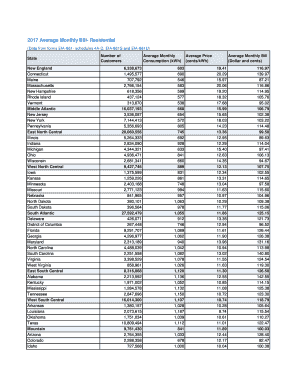
Energy Monthly Bill 2017


What is the Energy Monthly Bill
The energy monthly bill is a statement issued by utility companies that outlines the total electricity consumption for a given period, typically one month. This bill includes detailed information such as the total kilowatt-hours (kWh) used, the rate charged per kWh, and any additional fees or taxes. Understanding this bill is essential for managing energy costs and ensuring timely payments. It may also provide insights into energy usage patterns, allowing consumers to make informed decisions about their energy consumption.
How to Use the Energy Monthly Bill
Using the energy monthly bill effectively involves reviewing the details to understand your energy usage and costs. Start by checking the total amount due and the due date to avoid late fees. Next, analyze the breakdown of charges, including the base rate, taxes, and any additional fees. This information can help you identify trends in your energy consumption and areas where you might reduce usage. Additionally, many utility companies offer online portals where you can view past bills, track usage over time, and even set up payment reminders.
How to Obtain the Energy Monthly Bill
To obtain your energy monthly bill, you can typically choose between receiving a physical copy via mail or accessing it electronically through your utility provider's website. Most companies encourage online access, as it is faster and more environmentally friendly. To access your bill online, you will need to create an account on your utility provider's website, where you can log in to view and download your bills. If you prefer a paper copy, ensure that your provider has your current mailing address on file.
Steps to Complete the Energy Monthly Bill
Completing the energy monthly bill involves several straightforward steps. First, review the bill for accuracy, ensuring that the charges reflect your actual usage. If you notice discrepancies, contact your utility provider for clarification. Next, determine your payment method, which may include online payment, mailing a check, or in-person payment at designated locations. Finally, make the payment by the due date to avoid any penalties. Keeping a record of your payment confirmation is also advisable for your personal records.
Key Elements of the Energy Monthly Bill
The key elements of the energy monthly bill include the following:
- Account Information: Your account number and service address.
- Billing Period: The dates for which the bill is calculated.
- Usage Details: Total kWh consumed during the billing period.
- Rate Information: The rate charged per kWh and any tiered pricing.
- Additional Fees: Taxes, surcharges, or other fees that may apply.
- Total Amount Due: The total payment required by the due date.
Legal Use of the Energy Monthly Bill
The energy monthly bill serves as a legal document that can be used for various purposes, including verifying residency, applying for financial assistance programs, or establishing creditworthiness. When using the bill for legal purposes, ensure that it is current and accurately reflects your account status. Some organizations may require a recent bill to confirm your address or assess your eligibility for services. Always check the specific requirements of the institution requesting the bill to ensure compliance.
Quick guide on how to complete energy monthly bill
Complete Energy Monthly Bill effortlessly on any device
Digital document management has become increasingly favored by businesses and individuals alike. It offers an ideal eco-friendly alternative to traditional printed and signed materials, as you can access the necessary forms and securely store them online. airSlate SignNow provides you with all the tools needed to create, edit, and eSign your documents promptly without delays. Manage Energy Monthly Bill on any device with airSlate SignNow's Android or iOS applications and enhance any document-centric process today.
The easiest way to edit and eSign Energy Monthly Bill seamlessly
- Obtain Energy Monthly Bill and click on Get Form to begin.
- Utilize the tools we offer to complete your document.
- Highlight important sections of your documents or redact sensitive information using tools specifically designed for that purpose by airSlate SignNow.
- Generate your eSignature with the Sign tool, which takes seconds and has the same legal validity as a conventional wet ink signature.
- Review the details and click on the Done button to save your changes.
- Choose how you want to share your form, via email, SMS, invite link, or download it to your computer.
Eliminate worries about lost or misplaced documents, tedious form searches, or errors that necessitate printing new document copies. airSlate SignNow meets your document management needs in just a few clicks from any device of your preference. Edit and eSign Energy Monthly Bill and guarantee effective communication at every step of the form preparation process with airSlate SignNow.
Create this form in 5 minutes or less
Find and fill out the correct energy monthly bill
Create this form in 5 minutes!
How to create an eSignature for the energy monthly bill
The best way to generate an eSignature for your PDF file online
The best way to generate an eSignature for your PDF file in Google Chrome
How to make an eSignature for signing PDFs in Gmail
The best way to create an eSignature straight from your mobile device
How to create an electronic signature for a PDF file on iOS
The best way to create an eSignature for a PDF document on Android devices
People also ask
-
How can I reduce my monthly electricity bill using airSlate SignNow?
By streamlining document workflows with airSlate SignNow, businesses can enhance operational efficiency, potentially lowering costs tied to administrative tasks. This efficiency can lead to reduced overhead costs, which can indirectly contribute to a lower monthly electricity bill. Focus on digital signatures means fewer paper resources and less energy used in printing.
-
What features does airSlate SignNow offer to help manage our monthly electricity bill?
airSlate SignNow offers features such as document templates and automated reminders that facilitate quicker approvals and reduce delays in processing. This efficiency can help your business manage expenditures, including the monthly electricity bill. Additionally, cloud storage reduces the need for physical filing, further lowering costs.
-
Is airSlate SignNow a cost-effective solution for managing our monthly electricity bill?
Yes, airSlate SignNow provides a cost-effective approach to document management that can help you streamline your business processes. By minimizing paper use and improving communication efficiency between teams, you can potentially reduce unnecessary expenses reflected in your monthly electricity bill. This leads to both time and cost savings.
-
How can electronic signatures impact our monthly electricity bill?
Using electronic signatures with airSlate SignNow means less reliance on paper and printing, which can signNowly impact your monthly electricity bill. With reduced printing and storage needs, you consume less electricity. This eco-friendly approach not only saves costs but also benefits the environment.
-
What integrations does airSlate SignNow offer that can help with our expenses, including the monthly electricity bill?
airSlate SignNow integrates seamlessly with various software systems that you may already be using, such as CRMs and project management tools. These integrations allow for streamlined processes that help in tracking expenses related to your monthly electricity bill, providing better insights for your budget management.
-
Can airSlate SignNow help in tracking utility expenses like our monthly electricity bill?
While airSlate SignNow primarily focuses on document management and e-signatures, it can facilitate tracking workflows that involve utility expense approvals. By having a clear, organized digital history of transactions, you can better manage your monthly electricity bill and related payments. This enhances visibility into your utility spending.
-
What are the benefits of using airSlate SignNow for businesses concerned about their monthly electricity bill?
One of the key benefits of using airSlate SignNow is its ability to reduce operational costs, which can help in managing the monthly electricity bill more effectively. The platform allows businesses to go paperless, leading to signNow savings on resources and energy consumption. This not only cuts costs but also promotes sustainable business practices.
Get more for Energy Monthly Bill
Find out other Energy Monthly Bill
- How To eSign Hawaii Construction Word
- How Can I eSign Hawaii Construction Word
- How Can I eSign Hawaii Construction Word
- How Do I eSign Hawaii Construction Form
- How Can I eSign Hawaii Construction Form
- How To eSign Hawaii Construction Document
- Can I eSign Hawaii Construction Document
- How Do I eSign Hawaii Construction Form
- How To eSign Hawaii Construction Form
- How Do I eSign Hawaii Construction Form
- How To eSign Florida Doctors Form
- Help Me With eSign Hawaii Doctors Word
- How Can I eSign Hawaii Doctors Word
- Help Me With eSign New York Doctors PPT
- Can I eSign Hawaii Education PDF
- How To eSign Hawaii Education Document
- Can I eSign Hawaii Education Document
- How Can I eSign South Carolina Doctors PPT
- How Can I eSign Kansas Education Word
- How To eSign Kansas Education Document