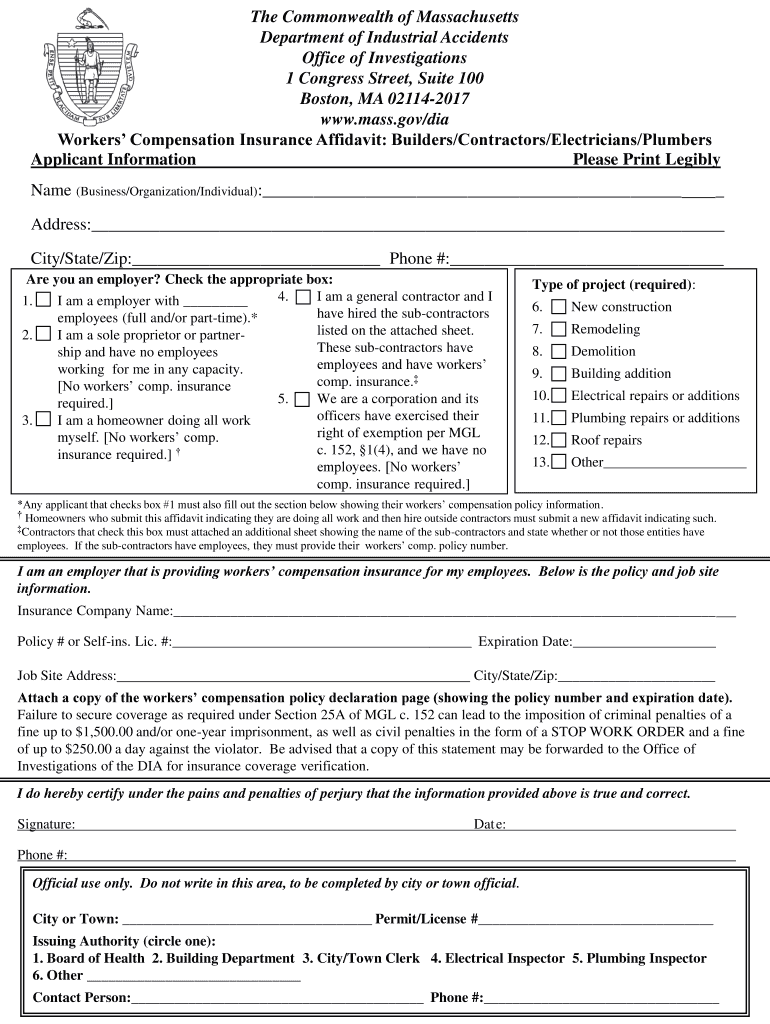
Workers Comp Affidavit 2013-2026


What is the Workers Comp Affidavit
The mass workers comp affidavit is a legal document that serves as a declaration of facts related to a worker's compensation claim. This affidavit is typically required by state authorities to ensure that all claims are valid and that the information provided is truthful. In the context of Massachusetts, the affidavit confirms that the claimant has not received any other compensation for the same injury and outlines the specifics of the incident that led to the claim. It is an essential component in the processing of workers' compensation claims, helping to protect both the claimant and the insurer.
How to use the Workers Comp Affidavit
Using the massachusetts workers compensation affidavit involves several steps to ensure its proper completion and submission. First, gather all necessary information regarding the incident, including details about the injury, medical treatment, and any other relevant documentation. Next, fill out the affidavit form accurately, ensuring that all statements are truthful and complete. Once completed, the affidavit must be signed, typically in the presence of a notary public, to verify its authenticity. After notarization, submit the affidavit to the appropriate workers' compensation board or insurance provider as part of your claim.
Steps to complete the Workers Comp Affidavit
Completing the ma workers comp affidavit requires careful attention to detail. Follow these steps to ensure accuracy:
- Collect all relevant information about the injury, including dates, locations, and witnesses.
- Obtain the official affidavit form from the appropriate state agency or your employer.
- Fill out the form, providing all requested details clearly and accurately.
- Review the completed affidavit for any errors or omissions.
- Sign the affidavit in the presence of a notary public to validate your statements.
- Submit the notarized affidavit to the designated workers' compensation office or insurance provider.
Key elements of the Workers Comp Affidavit
The mass workers comp affidavit contains several key elements that are crucial for its validity. These include:
- The claimant's personal information, such as name, address, and contact details.
- A detailed account of the incident leading to the claim, including dates and locations.
- Information about medical treatment received as a result of the injury.
- A declaration affirming that the information provided is accurate and truthful.
- The signature of the claimant and a notary public to confirm the affidavit's authenticity.
Legal use of the Workers Comp Affidavit
The legal use of the ma workers comp affidavit is critical in the workers' compensation process. It serves as a sworn statement that can be used in legal proceedings if disputes arise regarding the claim. The affidavit must comply with state laws and regulations, ensuring that it meets all legal requirements for admissibility in court. Failure to provide a properly completed affidavit can result in delays or denials of the workers' compensation claim, making it essential to follow the legal guidelines closely.
Required Documents
When preparing to submit the mass workers comp affidavit, several documents may be required to support your claim. These typically include:
- Medical records detailing the treatment received for the injury.
- Incident reports or documentation from the employer regarding the accident.
- Any prior correspondence with the insurance provider related to the claim.
- Proof of income or employment status, if applicable.
Quick guide on how to complete ma workmans comp affidavit form
Explore the simpler method to manage your Workers Comp Affidavit
The traditional approaches to filling out and authorizing paperwork consume an excessive amount of time compared to modern document management systems. You previously had to search for appropriate social forms, print them, fill in all the details, and send them via the postal service. You can now locate, fill out, and sign your Workers Comp Affidavit in a single internet browser tab using airSlate SignNow. Preparing your Workers Comp Affidavit is more straightforward than ever.
Steps to finalize your Workers Comp Affidavit with airSlate SignNow
- Access the category page you require and locate your state-specific Workers Comp Affidavit. Alternatively, utilize the search box.
- Verify that you have the correct version of the form by previewing it.
- Click Obtain form to enter editing mode.
- Fill in your document with the necessary information using the editing tools.
- Examine the entered information and select the Sign tool to confirm your form.
- Choose the most suitable method to create your signature: generate it, draw your signature, or upload an image of it.
- Click FINISHED to save your changes.
- Download the document to your device or proceed to Sharing options to send it electronically.
Robust online tools like airSlate SignNow make completing and submitting your forms easier. Try it out to see how long document management and authorization processes are actually meant to take. You will save a signNow amount of time.
Create this form in 5 minutes or less
FAQs
-
How do I fill out Form B under the Insolvency and Bankruptcy code? Does the affidavit require a stamp paper?
Affidavit is always on stamp paper
-
Do military members have to pay any fee for leave or fiancee forms?
NOOOOOOO. You are talking to a military romance scammer. I received an email from the US Army that directly answers your question that is pasted below please keep reading.I believe you are the victim of a military Romance Scam whereas the person you are talking to is a foreign national posing as an American Soldier claiming to be stationed overseas on a peacekeeping mission. That's the key to the scam they always claim to be on a peacekeeping mission.Part of their scam is saying that they have no access to their money that their mission is highly dangerous.If your boyfriend girlfriend/future husband/wife is asking you to do the following or has exhibited this behavior, it is a most likely a scam:Moves to private messaging site immediately after meeting you on Facebook or SnapChat or Instagram or some dating or social media site. Often times they delete the site you met them on right after they asked you to move to a more private messaging siteProfesses love to you very quickly & seems to quote poems and song lyrics along with using their own sort of broken language, as they profess their love and devotion quickly. They also showed concern for your health and love for your family.Promises marriage as soon as he/she gets to state for leave that they asked you to pay for.They Requests money (wire transfers) and Amazon, iTune ,Verizon, etc gift cards, for medicine, religious practices, and leaves to come home, internet access, complete job assignments, help sick friend, get him out of trouble, or anything that sounds fishy.The military does provide all the soldier needs including food medical Care and transportation for leave. Trust me, I lived it, you are probably being scammed. I am just trying to show you examples that you are most likely being connned.Below is an email response I received after I sent an inquiry to the US government when I discovered I was scammed. I received this wonderful response back with lots of useful links on how to find and report your scammer. And how to learn more about Romance Scams.Right now you can also copy the picture he gave you and do a google image search and you will hopefully see the pictures of the real person he is impersonating. this doesn't always work and take some digging. if you find the real person you can direct message them and alert them that their image is being used for scamming.Good Luck to you and I'm sorry this may be happening to you. please continue reading the government response I received below it's very informative. You have contacted an email that is monitored by the U.S. Army Criminal Investigation Command. Unfortunately, this is a common concern. We assure you there is never any reason to send money to anyone claiming to be a Soldier online. If you have only spoken with this person online, it is likely they are not a U.S. Soldier at all. If this is a suspected imposter social media profile, we urge you to report it to that platform as soon as possible. Please continue reading for more resources and answers to other frequently asked questions: How to report an imposter Facebook profile: Caution-https://www.facebook.com/help/16... < Caution-https://www.facebook.com/help/16... > Answers to frequently asked questions: - Soldiers and their loved ones are not charged money so that the Soldier can go on leave. - Soldiers are not charged money for secure communications or leave. - Soldiers do not need permission to get married. - Soldiers emails are in this format: john.doe.mil@mail.mil < Caution-mailto: john.doe.mil@mail.mil > anything ending in .us or .com is not an official email account. - Soldiers have medical insurance, which pays for their medical costs when treated at civilian health care facilities worldwide – family and friends do not need to pay their medical expenses. - Military aircraft are not used to transport Privately Owned Vehicles. - Army financial offices are not used to help Soldiers buy or sell items of any kind. - Soldiers deployed to Combat Zones do not need to solicit money from the public to feed or house themselves or their troops. - Deployed Soldiers do not find large unclaimed sums of money and need your help to get that money out of the country. Anyone who tells you one of the above-listed conditions/circumstances is true is likely posing as a Soldier and trying to steal money from you. We would urge you to immediately cease all contact with this individual. For more information on avoiding online scams and to report this crime, please see the following sites and articles: This article may help clarify some of the tricks social media scammers try to use to take advantage of people: Caution-https://www.army.mil/article/61432/< Caution-https://www.army.mil/article/61432/> CID advises vigilance against 'romance scams,' scammers impersonating Soldiers Caution-https://www.army.mil/article/180749 < Caution-https://www.army.mil/article/180749 > FBI Internet Crime Complaint Center: Caution-http://www.ic3.gov/default.aspx< Caution-http://www.ic3.gov/default.aspx> U.S. Army investigators warn public against romance scams: Caution-https://www.army.mil/article/130...< Caution-https://www.army.mil/article/130...> DOD warns troops, families to be cybercrime smart -Caution-http://www.army.mil/article/1450...< Caution-http://www.army.mil/article/1450...> Use caution with social networking Caution-https://www.army.mil/article/146...< Caution-https://www.army.mil/article/146...> Please see our frequently asked questions section under scams and legal issues. Caution-http://www.army.mil/faq/ < Caution-http://www.army.mil/faq/ > or visit Caution-http://www.cid.army.mil/ < Caution-http://www.cid.army.mil/ >. The challenge with most scams is determining if an individual is a legitimate member of the US Army. Based on the Privacy Act of 1974, we cannot provide this information. If concerned about a scam you may contact the Better Business Bureau (if it involves a solicitation for money), or local law enforcement. If you're involved in a Facebook or dating site scam, you are free to contact us direct; (571) 305-4056. If you have a social security number, you can find information about Soldiers online at Caution-https://www.dmdc.osd.mil/appj/sc... < Caution-https://www.dmdc.osd.mil/appj/sc... > . While this is a free search, it does not help you locate a retiree, but it can tell you if the Soldier is active duty or not. If more information is needed such as current duty station or location, you can contact the Commander Soldier's Records Data Center (SRDC) by phone or mail and they will help you locate individuals on active duty only, not retirees. There is a fee of $3.50 for businesses to use this service. The check or money order must be made out to the U.S. Treasury. It is not refundable. The address is: Commander Soldier's Records Data Center (SRDC) 8899 East 56th Street Indianapolis, IN 46249-5301 Phone: 1-866-771-6357 In addition, it is not possible to remove social networking site profiles without legitimate proof of identity theft or a scam. If you suspect fraud on this site, take a screenshot of any advances for money or impersonations and report the account on the social networking platform immediately. Please submit all information you have on this incident to Caution-www.ic3.gov < Caution-http://www.ic3.gov > (FBI website, Internet Criminal Complaint Center), immediately stop contact with the scammer (you are potentially providing them more information which can be used to scam you), and learn how to protect yourself against these scams at Caution-http://www.ftc.gov < Caution-http://www.ftc.gov > (Federal Trade Commission's website)
-
How can I fill out Google's intern host matching form to optimize my chances of receiving a match?
I was selected for a summer internship 2016.I tried to be very open while filling the preference form: I choose many products as my favorite products and I said I'm open about the team I want to join.I even was very open in the location and start date to get host matching interviews (I negotiated the start date in the interview until both me and my host were happy.) You could ask your recruiter to review your form (there are very cool and could help you a lot since they have a bigger experience).Do a search on the potential team.Before the interviews, try to find smart question that you are going to ask for the potential host (do a search on the team to find nice and deep questions to impress your host). Prepare well your resume.You are very likely not going to get algorithm/data structure questions like in the first round. It's going to be just some friendly chat if you are lucky. If your potential team is working on something like machine learning, expect that they are going to ask you questions about machine learning, courses related to machine learning you have and relevant experience (projects, internship). Of course you have to study that before the interview. Take as long time as you need if you feel rusty. It takes some time to get ready for the host matching (it's less than the technical interview) but it's worth it of course.
-
How can I make it easier for users to fill out a form on mobile apps?
I’ll tell you a secret - you can thank me later for this.If you want to make the form-filling experience easy for a user - make sure that you have a great UI to offer.Everything boils down to UI at the end.Axonator is one of the best mobile apps to collect data since it offers powerful features bundled with a simple UI.The problem with most of the mobile form apps is that they are overloaded with features that aren’t really necessary.The same doesn’t hold true for Axonator. It has useful features but it is very unlikely that the user will feel overwhelmed in using them.So, if you are inclined towards having greater form completion rates for your survey or any data collection projects, then Axonator is the way to go.Apart from that, there are other features that make the data collection process faster like offline data collection, rich data capture - audio, video, images, QR code & barcode data capture, live location & time capture, and more!Check all the features here!You will be able to complete more surveys - because productivity will certainly shoot up.Since you aren’t using paper forms, errors will drop signNowly.The cost of the paper & print will be saved - your office expenses will drop dramatically.No repeat work. No data entry. Time & money saved yet again.Analytics will empower you to make strategic decisions and explore new revenue opportunities.The app is dirt-cheap & you don’t any training to use the app. They come in with a smooth UI. Forget using, even creating forms for your apps is easy on the platform. Just drag & drop - and it’s ready for use. Anyone can build an app under hours.
-
How many people fill out Form 1099 each year?
There are a few different ways of estimating the numbers and thinking about this question. Data from the most recent years are not available—at least not from a reliable source with rigorous methodology—but here is what I can tell you:The most popular type of 1099 is Form 1099-MISC—the form used to report non-employee income including those for self-employed independent contractors (as well as various other types of “miscellaneous” income)Since 2015, there have been just under 16 million self-employed workers (including incorporated and unincorporated contractor businesses). And the data from the BLS seems to suggest this number has been largely consistent from one year to the next: Table A-9. Selected employment indicatorsNow, the total number of 1099-MISC forms has been inching up each year—along with W-2 form filings—and may have surpassed 100 million filing forms. RE: Evaluating the Growth of the 1099 Workforce But this data only goes to 2014 because, again, it’s hard to find reliable data from recent tax years.In terms of the total number of Form 1099s, you’d have to include Interest and Dividend 1099 forms, real estate and rental income, health and education savings accounts, retirement accounts, etc. I’m sure the total number of all 1099 forms surely ranges in the hundreds of millions.Finally, not everybody who is supposed to get a 1099 form gets one. So if you’re asking about the total number of freelancers, the estimates range from about 7.6 million people who primarily rely on self-employed 1099 income and 53 million people who have some type of supplemental income.If you’re someone who’s responsible for filing Form 1099s to the IRS and payee/recipients, I recommend Advanced Micro Solutions for most small-to-medium accounting service needs. It’s basic but very intuitive and cheap.$79 1099 Software Filer & W2 Software for Small Businesses
-
How is a search warrant and affidavit filled out by a peace officer?
The format of a search warrant is usually set by the court. In California it became a statewide thing. The front page is the actual warrant. It is a fill -in-the-blanks thing and may be available as a printed form or on the department report writing system as a Word template. The affidavit, which spells out the probable cause, may or may not be available as a template with headers and footers, or may just be a typed narrative. Then there is a statement of the officer’s training and experience (hero sheet) which shows why he or she is competent to investigate that crime, signNow their conclusions and know what must be searched for and seized.
Create this form in 5 minutes!
How to create an eSignature for the ma workmans comp affidavit form
How to generate an eSignature for your Ma Workmans Comp Affidavit Form in the online mode
How to create an eSignature for your Ma Workmans Comp Affidavit Form in Chrome
How to make an electronic signature for putting it on the Ma Workmans Comp Affidavit Form in Gmail
How to generate an eSignature for the Ma Workmans Comp Affidavit Form from your mobile device
How to make an electronic signature for the Ma Workmans Comp Affidavit Form on iOS
How to make an electronic signature for the Ma Workmans Comp Affidavit Form on Android
People also ask
-
What is a Workers Comp Affidavit and why is it important?
A Workers Comp Affidavit is a legal document confirming that an employer has workers' compensation insurance for their employees. It is essential for ensuring compliance with state laws and protecting both the employer and employees in case of workplace injuries. Using airSlate SignNow to create and sign your Workers Comp Affidavit streamlines the process, ensuring everything is properly documented and easily accessible.
-
How does airSlate SignNow help with Workers Comp Affidavit management?
AirSlate SignNow simplifies the management of your Workers Comp Affidavit by providing an intuitive platform to create, send, and eSign documents. Our solution allows for quick customization of affidavits, ensuring they meet local regulations. Additionally, you can track the status of your documents in real-time, making the process efficient and transparent.
-
Is airSlate SignNow cost-effective for managing Workers Comp Affidavits?
Yes, airSlate SignNow offers a cost-effective solution for managing your Workers Comp Affidavit needs. With flexible pricing plans tailored to suit different business sizes and budgets, you can handle all your document signing without breaking the bank. The savings on time and resources further enhance its value.
-
Can I integrate airSlate SignNow with my existing tools for Workers Comp Affidavits?
Absolutely! AirSlate SignNow integrates seamlessly with various business tools and software, allowing you to streamline your workflow for managing Workers Comp Affidavits. Whether you're using CRM systems, project management tools, or cloud storage, our integrations ensure a smooth transition and enhance productivity.
-
What features does airSlate SignNow offer for Workers Comp Affidavits?
AirSlate SignNow provides a host of features for efficiently handling Workers Comp Affidavits, including customizable templates, electronic signatures, and document tracking. Additionally, our platform ensures compliance with legal standards, making it easier to manage and store your affidavits securely. These features signNowly reduce the time spent on paperwork.
-
How secure is airSlate SignNow for handling Workers Comp Affidavits?
Security is a top priority at airSlate SignNow. We use advanced encryption methods and compliance with industry standards to ensure that your Workers Comp Affidavits and sensitive information are protected. You can trust that your documents are secure and only accessible to authorized users.
-
What types of businesses can benefit from using airSlate SignNow for Workers Comp Affidavits?
Any business that employs workers can benefit from using airSlate SignNow for their Workers Comp Affidavits. This includes small businesses, large corporations, and contractors who need to comply with workers' compensation laws. Our solution is scalable, making it suitable for various industries and business sizes.
Get more for Workers Comp Affidavit
Find out other Workers Comp Affidavit
- How Do I eSignature Washington Insurance Form
- How Do I eSignature Alaska Life Sciences Presentation
- Help Me With eSignature Iowa Life Sciences Presentation
- How Can I eSignature Michigan Life Sciences Word
- Can I eSignature New Jersey Life Sciences Presentation
- How Can I eSignature Louisiana Non-Profit PDF
- Can I eSignature Alaska Orthodontists PDF
- How Do I eSignature New York Non-Profit Form
- How To eSignature Iowa Orthodontists Presentation
- Can I eSignature South Dakota Lawers Document
- Can I eSignature Oklahoma Orthodontists Document
- Can I eSignature Oklahoma Orthodontists Word
- How Can I eSignature Wisconsin Orthodontists Word
- How Do I eSignature Arizona Real Estate PDF
- How To eSignature Arkansas Real Estate Document
- How Do I eSignature Oregon Plumbing PPT
- How Do I eSignature Connecticut Real Estate Presentation
- Can I eSignature Arizona Sports PPT
- How Can I eSignature Wisconsin Plumbing Document
- Can I eSignature Massachusetts Real Estate PDF