
This guide explains exactly which IRS forms accept electronic signatures in 2026, which methods are legally compliant, and how to complete the signing process without triggering a rejection.
Over 94% of individual tax returns were filed electronically in the 2025 filing season (IRS Filing Season Statistics, 2025), yet many taxpayers and tax professionals still face rejections because they used a non-compliant signature method or attempted to eSign a form that isn’t on the approved list. Think of IRS eSignature rules like a locked filing cabinet: the key exists, but only specific keys fit specific locks — and using the wrong one doesn’t just fail, it can delay your filing or invalidate your submission entirely. This guide gives you the right key for each lock.
- The IRS accepts electronic signatures on a specific list of forms — not all forms are eligible. Always verify before signing.
- The two main compliant methods are the Self-Select PIN (for e-filed returns) and IRS-compliant commercial software (for forms like 2848, 8821, and 1040-X).
- A valid IRS eSignature requires identity authentication, clear signer intent, and a complete audit trail—a scanned handwritten signature does not meet these requirements.
- Tax professionals (EROs) must follow IRS Publication 1345requirements, including record retention and identity proofing.
 Open
Open - Platforms compliant with the ESIGN Act and UETA—such as SignNow—provide the audit trail, authentication, and tamper-evident records the IRS requires.
Before you begin
Before you attempt to eSign any IRS form, confirm you have the following in place. Missing any one of these will cause the process to fail at the point of submission or review.
For individual taxpayers:
- The completed IRS form saved as a PDF or in a digital format accepted by your filing software
- Your Social Security Number, date of birth, and prior-year Adjusted Gross Income (AGI) for identity verification
- Access to an IRS-compliant eSignature tool or your tax software’s built-in PIN system
- A valid email address to receive and complete the signing request
For tax professionals (EROs—Electronic Return Originators):
- Authorization to act as an ERO under IRS e-file program rules
- Software that meets the requirements in IRS Publication 1345, including audit trail generation and identity proofingOpen
- A SignNow account—SignNow is compliant with both the ESIGN Act and UETA, which form the foundational legal basis for IRS acceptance of electronic signatures
- Completed and stored identity verification records for each taxpayer you represent
Plan requirement note: SignNow’s court-admissible audit trail and advanced recipient authentication — both required for IRS compliance—are available starting on the Business plan ($8/user/month, billed annually). Advanced signer authentication (required for higher-assurance IRS workflows) is available on the Enterprise plan ($30/user/month).
Step 1: Verify your form is eligible for an IRS electronic signature
Confirming form eligibility is the step that prevents the majority of IRS eSignature rejections — not every IRS form can be signed electronically, and the approved list changes as the IRS expands its digital programs.
The IRS has permanently extended eSignature acceptance for several key forms that were originally approved on a temporary basis during 2020–2021 (IRS Memorandum on Temporary E-Signature Options, Made Permanent). The table below covers the most commonly used forms.
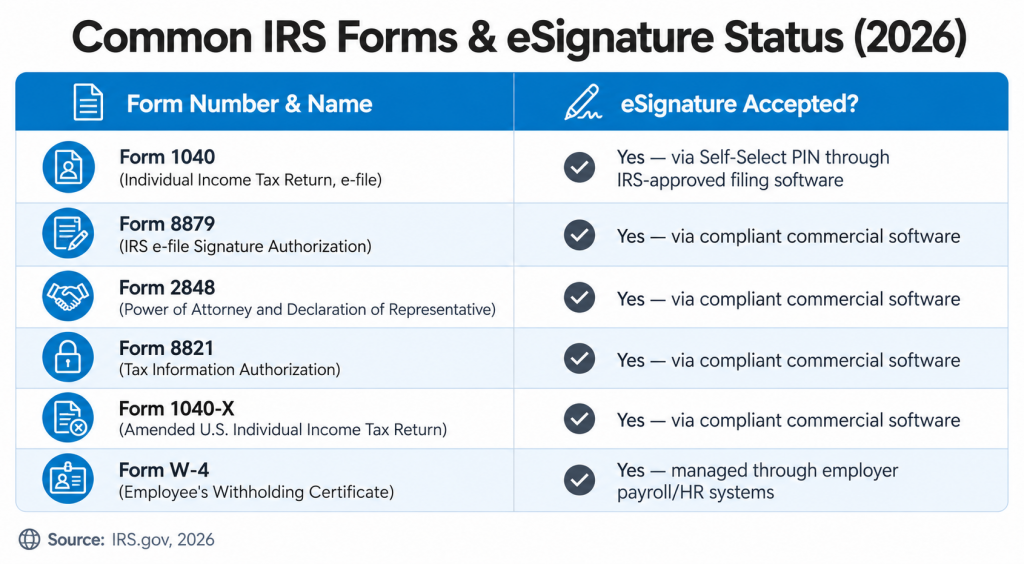
Critical point: This list is not exhaustive, and the IRS continues to expand approved forms. Before signing any form not listed above, verify current guidance directly at IRS.gov. The IRS does not accept eSignatures on all correspondence or enforcement documents — when in doubt, default to wet ink.
Step 2: Choose an IRS-compliant eSignature method
Selecting the correct signing method determines whether your IRS digital signature will be accepted or rejected—the method must match the form type and meet specific technical requirements.
Method 1: Self-select PIN. Used when e-filing Form 1040 through IRS-approved tax software (such as TurboTax, H&R Block, or professional tax platforms). The taxpayer creates a 5-digit PIN that serves as their electronic signature. Identity is verified using the prior year’s AGI. This method is built into the filing software and does not require a separate eSignature platform.
Method 2: IRS-compliant commercial eSignature software. Required for forms like 2848, 8821, and 1040-X that are submitted outside the standard e-file system. The IRS specifies that compliant software must provide:
- Identity authentication: Knowledge-based authentication (KBA) or equivalent — the signer must answer questions derived from public records that only the correct individual should know
- Demonstrated intent to sign: A clear affirmative action by the signer, not a pre-populated field
- Non-repudiation: The signature must be cryptographically bound to the document so that neither the signature nor the document can be altered after signing
- Comprehensive audit trail: A timestamped record capturing the signer’s full name, email address, IP address, and each action taken during the signing session
SignNow meets all four requirements. The platform generates a court-admissible audit trail that records full names, email addresses, IP addresses, and timestamps for every action — the exact data points specified in IRS Publication 1345 for ERO compliance. The platform’s advanced recipient authentication supports the identity verification step that the IRS requires before a signature is applied.
Which method applies to you:
| Scenario | Method |
|---|---|
| Filing Form 1040 via tax software | Self-Select PIN (built into software) |
| Tax professional collecting Form 8879 from client | Commercial eSignature software |
| Submitting Form 2848 (Power of Attorney) | Commercial eSignature software |
| Amending a return with Form 1040-X | Commercial eSignature software |
| Employer collecting Form W-4 | Employer HR/payroll system |
Step 3: eSign an IRS form using SignNow
This step covers the complete workflow for a tax professional (ERO) collecting a compliant IRS electronic signature on a form such as Form 2848, from document upload through audit trail generation.
Who does this: Tax professionals, EROs, or any authorized representative collecting signatures on IRS-accepted forms.
What they do: Upload the completed form, configure signing fields, authenticate the signer’s identity, and collect a legally binding signature with a full audit trail.
Where: In the SignNow web platform, accessible from any browser. When: Before submitting the signed form to the IRS, the signed PDF and audit trail must both be retained.
Why: The IRS requires a verifiable, tamper-evident signature record; a standard PDF signature or email confirmation does not satisfy this requirement.
How: Follow the numbered steps below.
- Log in to your SignNow account and click + Create. Select the completed IRS form PDF from your device or import it from a connected cloud storage service (Box, Google Drive, OneDrive, Dropbox, or Egnyte are all supported).
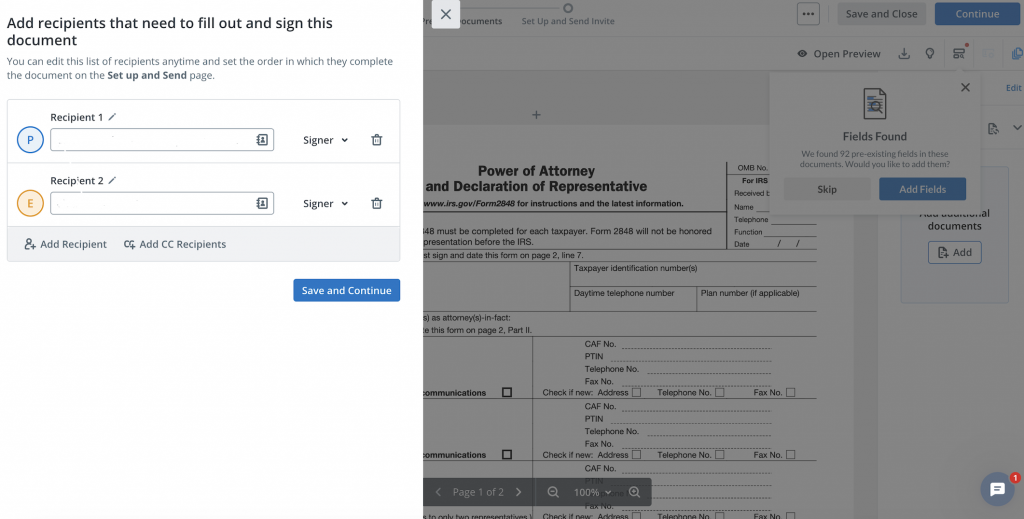
- Add signers. Once your document is uploaded, you can add recipients to sign your document. You can edit this list of recipients anytime and set the order in which they complete the document on the Set up and Send page.
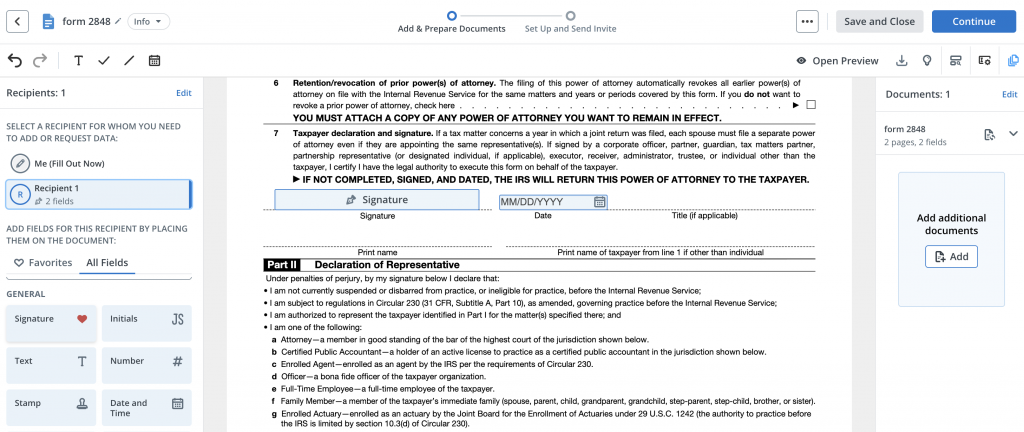
- Add fillable fields. In the right-hand Fields panel, drag a Signature field and a Date field onto the appropriate lines of the form. Assign fields to the recipients you add in the previous step.
- Set the signing order. Once all fields are set up, click Continue. Use the Signing Order toggle to define the sequence — SignNow will not send the document to the second signer until the first has completed their step.
- Configure recipient authentication. Click the Settings button next to each recipient email, then select the Authentication type from the dropdown (No Authentication, Password, Text Message, or Phone Call).
- Send invites. Choose to Send Invite to First Recipient, Schedule Send, or Invite via Link.

The audit trail works like a digital notary stamp on the back of the document. It doesn’t just capture a picture of a signature—it creates a tamper-proof record showing who signed, when they signed, their IP address at the time of signing, and how they proved their identity. Every action is timestamped to the second.

Troubleshooting common IRS eSignature problems
Each issue below can result in a rejected filing or a compliance gap. Address them before submitting any signed IRS document.
Problem 1: Scanned handwritten signature submitted as an eSignature.
A photograph or scan of a wet-ink signature is not a valid electronic signature under IRS rules. The legal validity of electronic signatures is established by the federal ESIGN Act, but the IRS adds its own specific technical requirements—including authentication, non-repudiation, and audit trail—that a scanned image cannot satisfy.
Solution: Use an IRS-compliant eSignature platform that captures a cryptographically bound signature with a full audit trail.
Problem 2: Free or consumer-grade eSignature tool used for IRS forms.
Not all eSignature tools meet IRS requirements. A tool that allows signing without identity verification, or that does not generate a detailed audit trail, is non-compliant for IRS purposes, regardless of whether it satisfies the general ESIGN Act standard.
Solution: Confirm that your chosen platform explicitly supports authentication and generates an audit trail that records IP address, timestamp, and signer identity for each action.
Problem 3: Attempting to eSign a form not on the approved list
Submitting an electronically signed form that the IRS has not approved for eSignature will result in rejection.
Solution: Cross-reference the current approved forms list at IRS.gov before collecting any signature. When in doubt, collect a wet-ink signature and submit by mail or fax per the form’s instructions.
Problem 4: Audit trail not retained after signing
IRS Publication 1345 requires EROs to retain signed documents and their associated audit trails for a minimum of three years. Deleting completed documents from your eSignature platform eliminates the compliance record.
Solution: Configure SignNow document storage to retain completed documents, or export signed PDFs with their appended audit trails to a dedicated records system immediately after signing.
Disclaimer: The information contained in this blog post is provided for general informational purposes only and does not constitute formal legal advice.
Conclusion: Simplify your tax workflow with compliant eSignatures
Tax professionals and finance teams that implement an IRS-compliant electronic signature workflow eliminate the back-and-forth of printing, mailing, and manually tracking signed forms — and they build a defensible compliance record in the process.
Kodi-Marie Evans, Director of NetSuite Operations at Xerox, put it directly: “SignNow provides us with the flexibility needed to get the right signatures on the right documents, in the right formats, based on our integration with NetSuite. This flexibility will assist us with reducing our turnaround time on signatures so that we can get to the business of doing business.”
For tax season specifically, that turnaround speed matters. A signed Form 2848 that arrives in hours rather than days means a tax professional can act on a client’s behalf without delay. A completed Form 8879 with a full audit trail means the ERO has the compliance documentation required by IRS Publication 1345—ready for review if needed, without any additional manual steps.
SignNow’s financial services eSignature solution is built for exactly this type of high-compliance document workflow. The platform is SOC 2 Type II certified, ESIGN and UETA compliant, and trusted by 28 million users — including 352 Fortune 500 companies. Start a SignNow free trial to process your first IRS form with a compliant audit trail today.
Glossary
- Audit Trail: A timestamped electronic record that documents every action taken on a document during the signing process, including the signer’s full name, email address, IP address, and the date and time of each action. The IRS requires EROs to generate and retain an audit trail for all electronically signed tax documents.
- ERO (Electronic Return Originator): An IRS-authorized tax professional or firm that submits e-filed tax returns on behalf of taxpayers. EROs must comply with IRS Publication 1345 requirements for identity verification, audit trails, and record retention when collecting electronic signatures.
- ESIGN Act (Electronic Signatures in Global and National Commerce Act): A federal law enacted in 2000 that establishes the legal validity of electronic signatures and electronic records in interstate commerce. The IRS operates within the ESIGN Act framework but adds its own specific technical requirements for tax document signatures.
- Self-Select PIN: A 5-digit personal identification number chosen by the taxpayer during the e-filing process for Form 1040. The PIN serves as the taxpayer’s electronic signature on the return and is verified against the prior year’s Adjusted Gross Income. This method is built into IRS-approved tax filing software and does not require a separate eSignature platform.
FAQ
1. Can I electronically sign Form 1040?
Yes, but not through a standalone eSignature platform. Form 1040 is signed electronically via the Self-Select PIN method built into IRS-approved e-filing software. The taxpayer creates a 5-digit PIN during the filing process, which serves as their IRS electronic signature. You cannot upload a completed 1040 PDF to an eSignature tool and submit it that way—the form must go through the e-file system.
2. What are the IRS eSignature requirements for Form 2848?
Form 2848 (Power of Attorney) can be signed electronically using compliant commercial software. The IRS requires that the software provide identity authentication (such as KBA), a clear expression of intent to sign, and a full audit trail. The signed form is then submitted through the IRS’s Tax Pro Account portal or by fax. Both the signed document and the audit trail must be retained by the ERO for a minimum of three years per IRS Publication 1345.
3. What is the difference between an electronic signature and a digital signature for IRS purposes?
An electronic signature is any electronic symbol or process attached to a document with the intent to sign — this includes typed names, PIN entries, and signatures captured through compliant software. A digital signature is a specific subset that uses Public Key Infrastructure (PKI) cryptography to mathematically bind the signature to the document. The IRS generally accepts electronic signatures for its approved forms; it does not require PKI-based digital signatures for standard tax document workflows, though PKI provides a higher level of tamper-evidence.
4. What rules apply to tax preparers collecting eSignatures from clients? Under IRS Publication 1345, EROs must use software that authenticates the taxpayer’s identity before collecting a signature, retains the signed document and audit trail for at least three years, and does not allow the preparer to sign on behalf of the taxpayer without explicit authorization. The taxpayer must actively complete the signing process themselves—a preparer cannot apply a signature for a client, even with verbal permission.
5. Does SignNow meet IRS eSignature requirements? SignNow complies with the ESIGN Act and UETA, which form the legal foundation for IRS acceptance of electronic signatures. The platform’s audit trail and compliance features—including detailed document history with IP addresses, timestamps, and signer identity records. For workflows requiring advanced identity verification, the Enterprise plan ($30/user/month) includes advanced recipient authentication options.
