


Electronic signatures are a crucial component in modern medical record management, offering enhanced security and efficiency. This guide provides a step-by-step approach to implementing electronic signature policies effectively within healthcare organizations.
- Define clear rules: Create a formal policy that specifies which documents can be signed electronically, such as patient consent forms and treatment authorizations, and the required authentication for each.
- Prioritize HIPAA compliance: Choose a HIPAA electronic e-Signature solution that offers a Business Associate Agreement (BAA) and provides strong security, including user authentication and comprehensive audit trails.
- Standardize your workflows: Use customizable templates for common forms like patient intake and disclosures to ensure consistency and improve data accuracy. This step simplifies how you manage documents and sign documents.
- Implement and train: Roll out electronic signatures in phases, starting with high-volume, low-risk forms. Train your staff on the new process, emphasizing identity verification and maintaining patient confidentiality.
Healthcare organizations constantly look for ways to improve efficiency without compromising patient care or data security. Transitioning from paper-based processes to electronic signatures is a significant step in this direction. A well-defined policy for electronic signatures helps healthcare providers streamline workflows, reduce administrative burdens, and enhance HIPAA compliance.
This guide explains how to create and implement an electronic signature policy for medical records. We will cover the key components of a strong policy, from understanding HIPAA requirements to selecting the right technology. By following these steps, your organization can confidently adopt HIPAA-compliant electronic signatures to boost efficiency while protecting sensitive patient data.
Understanding HIPAA and electronic signatures
The Health Insurance Portability and Accountability Act (HIPAA) sets the standard for protecting sensitive patient information. While HIPAA does not specify a particular technology for electronic signatures, its Security Rule outlines requirements that any e-Signature solution must meet. This makes choosing HIPAA-compliant e-Signature solutions essential for healthcare organizations.
Key HIPAA requirements include:
- User authentication: Verifying that a person is who they claim to be before granting access to protected health information (PHI).
- Access controls: Limiting access to PHI to authorized individuals only.
- Document integrity: Ensuring that electronic documents are not altered or destroyed in an unauthorized manner.
- Audit trails: Recording and examining activity in systems that contain or use PHI.
Federal laws like the Electronic Signatures in Global and National Commerce (ESIGN) Act and the Uniform Electronic Transactions Act (UETA) establish the legal validity of electronic signatures, making them as binding as handwritten ones. Your policy should ensure your chosen e-Signature software adheres to these laws and provides the technical safeguards needed for HIPAA compliance. This includes features like multi-factor authentication and tamper-proof audit trails.
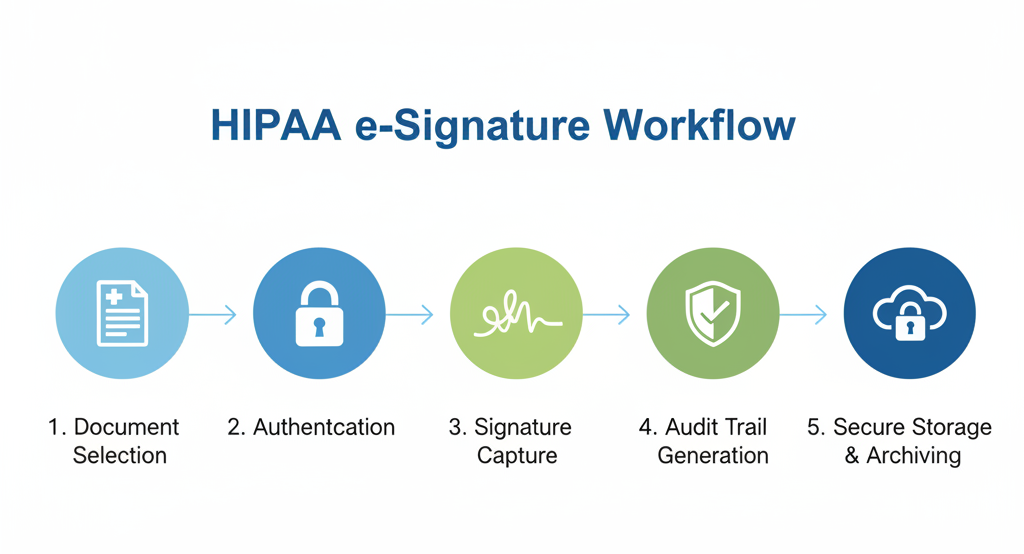
Creating your electronic signature policy: A step-by-step guide
A practical policy provides clear guardrails for your staff. It explains which documents can be signed electronically, what level of security is needed, and how the records are managed. A strong policy is the foundation for successfully using HIPAA-compliant e-Signatures.
1. Define the scope of your policy
First, determine what your policy will cover. Be specific about the business units, systems, and record types included. This clarity prevents confusion and ensures consistent application across your healthcare organization.
Your scope should outline:
- Systems: Identify all systems where electronic signatures will be used, such as your Electronic Health Record (EHR), patient portal, and document management platforms.
- Document types: List the documents eligible for electronic signatures, such as patient consent forms, new patient intake packets, and treatment authorizations. Also, note any documents that will remain on paper, if applicable.
- Signing methods: Specify whether the policy applies to remote signing (e.g., via email or a patient portal) and in-person signing (e.g., on a tablet or kiosk in your office).
2. Establish identity and authentication requirements
Verifying the signer’s identity is a core component of HIPAA compliance. Your policy must define the authentication methods required for different types of documents based on their risk level. This ensures you have strong proof of who signed the document.
Consider a tiered approach to authentication:
- Low-risk documents: For routine forms like a Notice of Privacy Practices (NPP) acknowledgment, a simple email link or patient portal login may be sufficient.
- Moderate-risk documents: For authorizations to release PHI or financial agreements, stronger methods are needed. Requiring a one-time passcode sent via SMS in addition to an email link (two-factor authentication) provides a higher level of assurance.
- High-risk documents: For sensitive documents like informed consent for major procedures, multi-factor authentication should be mandatory. This could involve combining a portal login with a unique code or biometric data.
SignNow supports robust user authentication options, including multi-factor authentication, to help healthcare providers meet HIPAA requirements and securely verify the signer’s identity.
3. Outline audit trail and record retention rules
HIPAA’s audit controls mandate that you track and record all activity involving PHI. HIPAA electronic e-Signature solutions automatically generate comprehensive audit trails for every document. These audit logs provide critical evidence for compliance audits.
Your policy should require that the audit trail for each signed document include:
- The signer’s name and email address or user ID.
- The IP address of the device used.
- A timestamp for every action (e.g., viewed, signed, completed).
- Completed actions in chronological order.

In addition to the audit trail, you must define rules for retaining the signed documents. Specify where legally-binding documents will be stored, such as in your EHR or a secure document archive. Your retention schedule should align with federal and state regulations. A platform like SignNow ensures that every signed document has a complete, tamper-proof audit trail and can be securely stored to meet your compliance requirements.
4. Detail vendor management and business associate agreements
When you use a third-party software provider for electronic signatures, you must have a Business Associate Agreement (BAA) in place. A BAA is a legal contract that requires the vendor to protect any PHI they handle on your behalf. This is a non-negotiable part of maintaining HIPAA compliance.
Before choosing an e-Signature solution, vet the software provider thoroughly. Your review process should confirm that the vendor offers:
- A Business Associate Agreement (BAA): Ensure the vendor is willing to sign a BAA. With SignNow, HIPAA compliance is enabled through a BAA.
- Advanced security measures: Look for features like data encryption in transit and at rest, secure data centers, and configurable access controls.
- Compliance certifications: Check if the platform complies with industry standards like SOC 2 Type II and GDPR.
Partnering with a trusted vendor that offers a HIPAA electronic e-Signature solution is crucial for protecting sensitive patient data and avoiding potential HIPAA violations.
Implementing your electronic signature policy
With a policy in place, the next step is implementation. A phased rollout can help your team adapt to new digital workflows smoothly.
1. Start with high-volume, low-risk workflows
Begin by digitizing a few key processes that are frequent but carry lower risk. This allows your team to get comfortable with the technology and process before moving on to more complex documents.
Good starting points include:
- New patient registration and intake forms.
- HIPAA Notice of Privacy Practices (NPP) acknowledgments.
- General consent for treatment forms.
- Internal HR documents that do not contain PHI.
By starting small, you can demonstrate quick wins and build momentum for broader adoption of electronic signatures across the organization.
2. Standardize and create templates
Consistency is key to efficiency and compliance. Standardize your forms by creating reusable templates for common documents like patient consent forms. Customizable templates ensure that all necessary information is captured every time you sign documents.
Using a platform like SignNow, you can build templates with pre-filled fields, required signature blocks, and standardized language. This not only speeds up document creation but also reduces the risk of human error. It also helps manage documents more effectively over their lifecycle.
3. Train your team and monitor adoption
Proper training is essential for a successful transition. Educate your healthcare professionals and administrative staff on the new electronic signature policy and workflows. Training should cover how to initiate signature requests, guide patients through the signing process, and verify a signer’s identity for remote transactions.
After launch, monitor the new process to identify any bottlenecks or areas for improvement. Track metrics like the number of unsigned documents, completion times, and user feedback. Regular monitoring helps ensure the new system is working as intended and that your organization remains compliant with HIPAA regulations.
Getting started with SignNow for HIPAA e-Signature workflows
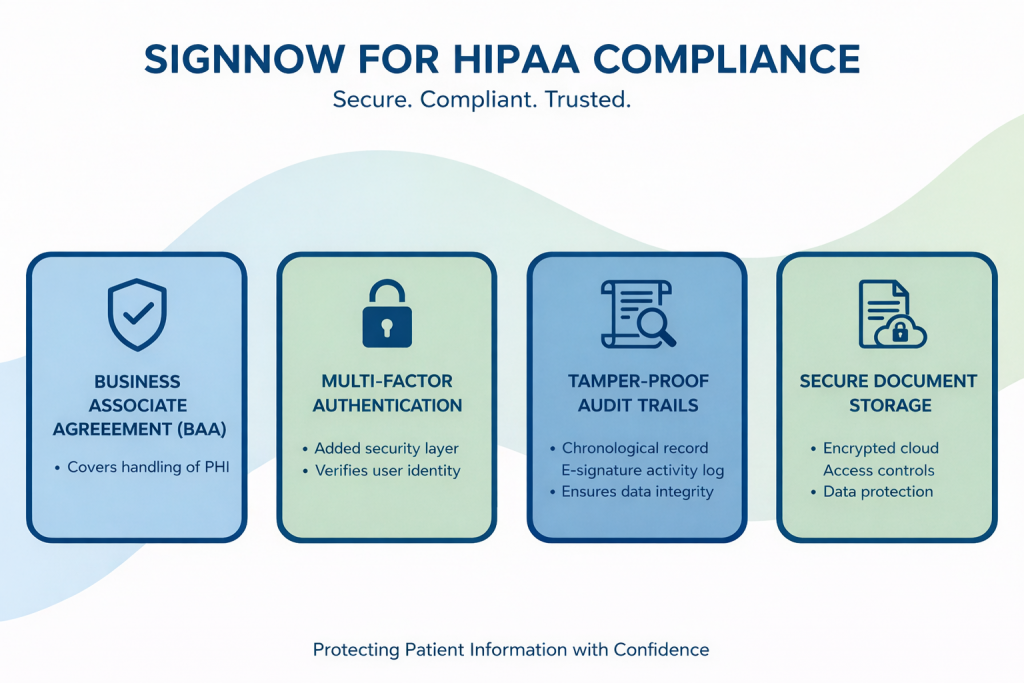
SignNow enables healthcare organizations to efficiently and securely implement HIPAA-compliant electronic signature workflows. To start using SignNow for your medical records, follow these steps:
- Create your SignNow account. Visit signnow.com to start a free trial or choose a plan that meets your organization’s needs. Registration is quick, requiring only basic business information.
- Request HIPAA compliance enablement. Contact SignNow sales to initiate a Business Associate Agreement (BAA). HIPAA compliance is activated only after the BAA is executed, ensuring that all subsequent documents and data flows meet regulatory requirements.
- Configure your security settings. Once your account is enabled for HIPAA compliance, access the admin panel to set up advanced security measures. This includes enabling multi-factor authentication, configuring user roles and permissions with strict access controls. Review the platform’s encryption settings to verify that data is secured both in transit and at rest.
- Establish templates and workflows. Upload your commonly used forms—such as patient consent forms, intake packets, and treatment authorizations. Use SignNow for customizable templates to standardize data capture and signature fields, reducing manual errors and ensuring document integrity across all electronic documents.
- Train your teams. Use SignNow’s support resources and documentation to educate staff about sending signature requests, managing documents, and verifying the signer’s identity. Training materials, guides, and onboarding sessions are available at the SignNow Help Center.
- Access ongoing support. For further guidance, integration help, or HIPAA-specific configuration questions, reach out to SignNow’s support team. Comprehensive documentation and dedicated customer support ensure your team can maintain compliance and address evolving regulations.
By following these steps, healthcare providers can seamlessly adopt electronic signatures, ensure their workflows meet all HIPAA requirements, and benefit from SignNow’s enterprise-grade security and regulatory compliance.
- Learn how Guardian Medical Direction used the SignNow API to increase the efficiency of its physician oversight by 20x.
Disclaimer: This article provides general information and does not constitute legal advice. You should consult with a legal professional to ensure your policies and procedures comply with all applicable laws and regulations, including HIPAA.
Final thoughts
Developing and implementing an electronic signature policy is a critical step for modern healthcare organizations. By moving away from paper-based processes, you can significantly boost operational efficiency, reduce administrative costs, and enhance the patient experience. A well-crafted policy, supported by a HIPAA-compliant electronic signature solution like SignNow, ensures you can achieve these benefits while protecting patient data and maintaining compliance.
With features like multi-factor authentication, comprehensive audit trails, and customizable templates, SignNow provides the tools healthcare providers need to securely manage and sign documents. The platform’s commitment to security, demonstrated through its willingness to sign a Business Associate Agreement (BAA) and its compliance with industry standards, makes it a trusted choice for electronic signatures in healthcare.
Ready to streamline your workflows and strengthen your HIPAA compliance? Start your free trial of SignNow today!
Glossary
- Business Associate Agreement (BAA): A business associate agreement is a written contract between a HIPAA-covered entity and a business associate. It is required by law for vendors who perform functions or activities on behalf of the covered entity that involve the use or disclosure of protected health information (PHI).
- Protected Health Information (PHI): PHI includes any individually identifiable health information that is transmitted or maintained in any form or medium. This includes demographic data, medical histories, test results, insurance information, and other data that could be used to identify a patient.
- Multi-Factor Authentication (MFA): Multi-factor authentication is a security process that requires users to provide two or more verification factors to gain access to a resource, such as an application or online account. It adds a critical second layer of security to user logins and transactions, making it much harder for unauthorized users to access sensitive data.
- Audit Trail: An audit trail, also known as an audit log, is a chronological record of the events and actions that occur within a system or related to a specific document. For electronic signatures, it captures who signed, when they signed, and how their identity was verified, providing essential evidence for compliance audits.
FAQ
1. Are electronic signatures legally binding for medical records?
Yes, electronic signatures are legally recognized in the United States under the ESIGN Act and UETA. When used within a HIPAA-compliant framework that includes proper user authentication and audit trails, electronic signatures on medical documents like patient consent forms are as legally binding as handwritten signatures. Your organization’s policy should ensure these standards are met for all electronic documents.
2. What makes an e-Signature software HIPAA compliant?
HIPAA electronic e-Signature solutions must support the technical safeguards outlined in the HIPAA Security Rule. This includes strong access controls, robust user authentication (like multi-factor authentication), data encryption, and the ability to generate tamper-proof audit trails for all document interactions. The software provider must also be willing to sign a Business Associate Agreement (BAA) to ensure the protection of any PHI they handle.
3. Do we need a BAA for our e-Signature software provider?
Yes, if your e-Signature vendor will create, receive, maintain, or transmit PHI on your behalf, you are required by HIPAA to have a Business Associate Agreement (BAA) in place. This legal contract ensures the vendor implements appropriate safeguards to protect patient data. Choosing a vendor like SignNow that provides a BAA is essential for maintaining compliance.
4. What is the difference between an electronic signature and a digital signature?
An electronic signature is a broad term for any electronic process that indicates acceptance of an agreement or record. A digital signature is a specific type of electronic signature that uses cryptography to embed a unique digital “fingerprint” into a document. While many HIPAA-compliant workflows can use standard electronic signatures with strong authentication, digital signatures offer a higher level of security and document integrity, which may be preferred for high-risk documents.
5. How can we implement electronic signatures without disrupting patient care?
A phased implementation is the best approach to avoid disruption. Start with a few simple, high-volume workflows, such as new patient intake forms, to help staff and patients acclimate to the new process. Using a user-friendly platform with features like customizable templates and mobile access can also make the transition smoother and improve the overall experience for everyone involved.
6. Can patients refuse to use electronic signatures?
Yes, under the ESIGN Act, consumers generally have the right to opt for paper-based processes. Your electronic signature policy should address this by outlining a clear procedure for handling requests for physical documents. This ensures you can accommodate patient preferences while still benefiting from the efficiencies of electronic workflows for the majority of cases.
