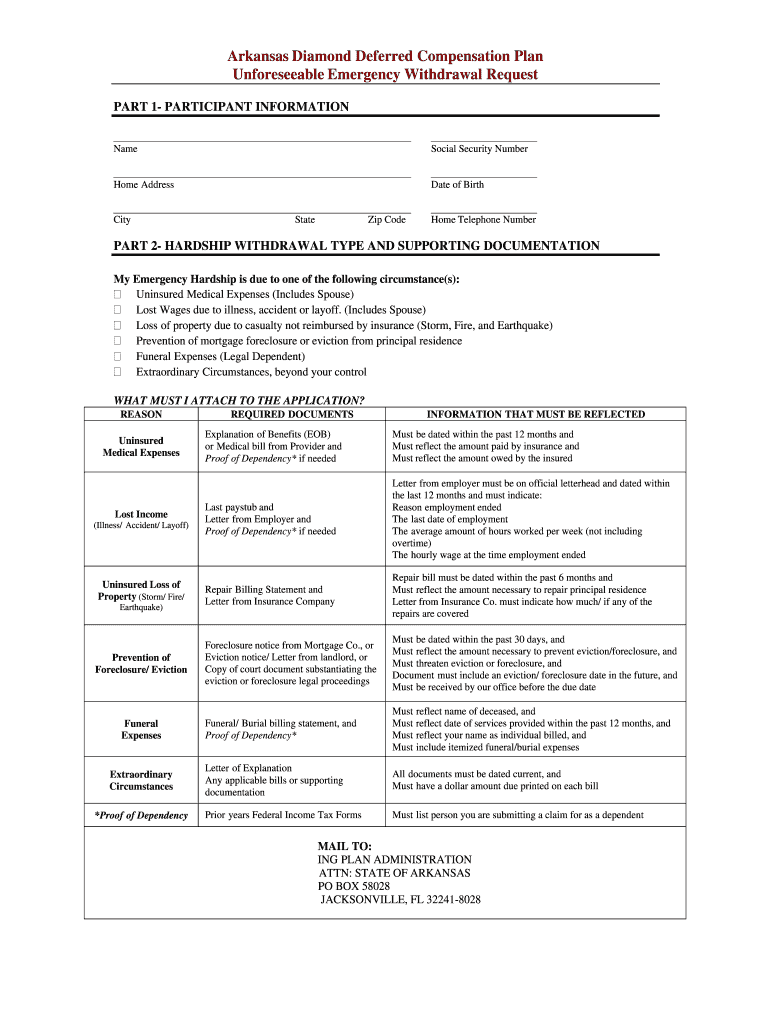
Ar Diamond Plan Form


What is the Arkansas Diamond Plan?
The Arkansas Diamond Plan is a deferred compensation plan designed for employees of the state of Arkansas. This plan allows participants to defer a portion of their salary to a future date, typically for retirement purposes. The funds are invested, and the growth is tax-deferred until withdrawal. This plan aims to enhance retirement savings and provide financial security for employees after their working years.
How to Use the Arkansas Diamond Plan
Using the Arkansas Diamond Plan involves several steps. First, eligible employees should review the plan details and understand the contribution limits and investment options available. Once familiar with the plan, employees can choose how much of their salary to defer. It is essential to consider personal financial goals and retirement needs when making this decision. After selecting the contribution amount, employees must complete the necessary enrollment forms to officially participate in the plan.
Steps to Complete the Arkansas Diamond Plan
Completing the Arkansas Diamond Plan involves a series of straightforward steps:
- Review the plan documentation to understand eligibility and benefits.
- Determine the amount of salary to defer based on financial goals.
- Fill out the enrollment form, providing necessary personal and employment information.
- Select investment options for the deferred funds, if applicable.
- Submit the completed form to the designated plan administrator.
After submission, participants should confirm their enrollment and monitor their contributions and investment performance regularly.
Legal Use of the Arkansas Diamond Plan
The Arkansas Diamond Plan is governed by specific legal frameworks that ensure its compliance with federal and state regulations. To be legally valid, the plan must adhere to the guidelines set forth by the Internal Revenue Service (IRS) regarding deferred compensation. This includes maintaining proper documentation and ensuring that all contributions are within the allowable limits. Participants should also be aware of any tax implications associated with withdrawals from the plan.
Eligibility Criteria
Eligibility for the Arkansas Diamond Plan typically includes state employees and certain other public sector workers. To qualify, individuals must be actively employed and meet specific criteria outlined in the plan documents. Factors such as employment status, length of service, and job classification may influence eligibility. It is advisable for potential participants to consult the plan administrator for detailed eligibility requirements.
Required Documents
To enroll in the Arkansas Diamond Plan, participants must provide several key documents. These may include:
- Proof of employment with the state of Arkansas.
- Completed enrollment form with personal and employment details.
- Any additional documentation required by the plan administrator, such as identification or tax forms.
Ensuring all required documents are accurately completed and submitted will facilitate a smooth enrollment process.
Quick guide on how to complete ar diamond deferred compensation plan form
Complete Ar Diamond Plan effortlessly on any device
Web-based document management has become increasingly popular among businesses and individuals. It offers an ideal eco-friendly alternative to conventional printed and signed documents, enabling you to find the right template and securely store it online. airSlate SignNow provides all the tools necessary for you to create, modify, and eSign your documents swiftly without delays. Manage Ar Diamond Plan across any platform with airSlate SignNow Android or iOS applications and enhance any document-driven process today.
How to edit and eSign Ar Diamond Plan with ease
- Locate Ar Diamond Plan and click on Get Form to begin.
- Utilize the tools we offer to fill out your document.
- Mark important sections of the documents or redact sensitive information with tools that airSlate SignNow specifically provides for that purpose.
- Create your signature using the Sign tool, which only takes seconds and holds the same legal validity as a traditional wet ink signature.
- Review the information and click on the Done button to save your changes.
- Select how you wish to send your form, via email, SMS, or invitation link, or download it to your computer.
Eliminate the hassle of lost or mislaid documents, tedious form searches, or errors that necessitate printing new document copies. airSlate SignNow fulfills your document management needs in just a few clicks from any device you prefer. Modify and eSign Ar Diamond Plan and guarantee exceptional communication at every stage of your form preparation process with airSlate SignNow.
Create this form in 5 minutes or less
FAQs
-
How should one account for the value of non-qualified deferred compensation and pension plans and its distributions when filling out the college tuition financial aid forms in FAFSA?
How should one account for the value of non-qualified deferred compensation and pension plans and its distributions when filling out the college tuition financial aid forms in FAFSA?Elective employee contributions to and all distributions from the non-qualified plans during the FAFSA’s base year are reported as income on the FAFSA. Employer contributions are not reported as income. If a reportable contribution or distribution is not reported in adjusted gross income (AGI), it is reported as untaxed income of the FAFSA. This is no different than the treatment of qualified retirement plans.A non-qualified plan should not be reported as an asset, if access to the plan is restricted until the employee signNowes retirement age. But, many non-qualified plans provide the employee with access to the plan after employment is terminated, not just when the employee signNowes retirement age. If so, the non-qualified plan should be reported as an asset on the FAFSA, to the extent that it has vested.
-
How can I fill out Google's intern host matching form to optimize my chances of receiving a match?
I was selected for a summer internship 2016.I tried to be very open while filling the preference form: I choose many products as my favorite products and I said I'm open about the team I want to join.I even was very open in the location and start date to get host matching interviews (I negotiated the start date in the interview until both me and my host were happy.) You could ask your recruiter to review your form (there are very cool and could help you a lot since they have a bigger experience).Do a search on the potential team.Before the interviews, try to find smart question that you are going to ask for the potential host (do a search on the team to find nice and deep questions to impress your host). Prepare well your resume.You are very likely not going to get algorithm/data structure questions like in the first round. It's going to be just some friendly chat if you are lucky. If your potential team is working on something like machine learning, expect that they are going to ask you questions about machine learning, courses related to machine learning you have and relevant experience (projects, internship). Of course you have to study that before the interview. Take as long time as you need if you feel rusty. It takes some time to get ready for the host matching (it's less than the technical interview) but it's worth it of course.
-
How do I fill out the form of DU CIC? I couldn't find the link to fill out the form.
Just register on the admission portal and during registration you will get an option for the entrance based course. Just register there. There is no separate form for DU CIC.
-
How do you know if you need to fill out a 1099 form?
Assuming that you are talking about 1099-MISC. Note that there are other 1099s.check this post - Form 1099 MISC Rules & RegulationsQuick answer - A Form 1099 MISC must be filed for each person to whom payment is made of:$600 or more for services performed for a trade or business by people not treated as employees;Rent or prizes and awards that are not for service ($600 or more) and royalties ($10 or more);any fishing boat proceeds,gross proceeds of $600, or more paid to an attorney during the year, orWithheld any federal income tax under the backup withholding rules regardless of the amount of the payment, etc.
Create this form in 5 minutes!
How to create an eSignature for the ar diamond deferred compensation plan form
How to generate an eSignature for your Ar Diamond Deferred Compensation Plan Form online
How to create an eSignature for your Ar Diamond Deferred Compensation Plan Form in Chrome
How to make an eSignature for signing the Ar Diamond Deferred Compensation Plan Form in Gmail
How to generate an eSignature for the Ar Diamond Deferred Compensation Plan Form right from your smart phone
How to generate an eSignature for the Ar Diamond Deferred Compensation Plan Form on iOS devices
How to create an electronic signature for the Ar Diamond Deferred Compensation Plan Form on Android devices
People also ask
-
What is the Ar Diamond Plan and how does it benefit my business?
The Ar Diamond Plan is an advanced offering from airSlate SignNow that empowers businesses with enhanced eSignature capabilities. This plan provides streamlined document management, advanced security features, and integration options, helping teams to collaborate more effectively and efficiently. With the Ar Diamond Plan, you can simplify workflows and reduce turnaround time on essential documents.
-
How much does the Ar Diamond Plan cost?
The cost of the Ar Diamond Plan varies based on the number of users and specific business needs. airSlate SignNow offers flexible pricing options designed to accommodate both small teams and larger enterprises. For the most accurate pricing information, it's best to contact our sales team or visit the airSlate SignNow pricing page.
-
What features are included in the Ar Diamond Plan?
The Ar Diamond Plan includes a wide range of features such as unlimited eSignatures, customizable templates, advanced reporting tools, and enhanced security options. Additionally, this plan offers integrations with popular business applications, ensuring that your document workflows are smooth and seamless. With the Ar Diamond Plan, you also gain access to priority customer support.
-
Is the Ar Diamond Plan suitable for small businesses?
Yes, the Ar Diamond Plan is designed to cater to businesses of all sizes, including small businesses. Its cost-effective solutions and user-friendly interface make it an excellent choice for teams looking to streamline their document processes without sacrificing quality. Small businesses can leverage the features of the Ar Diamond Plan to enhance productivity and improve customer satisfaction.
-
Can I integrate other applications with the Ar Diamond Plan?
Absolutely! The Ar Diamond Plan allows for seamless integrations with various third-party applications such as CRM systems, cloud storage services, and productivity tools. This flexibility enables businesses to create a customized workflow that fits their unique needs, making document management more efficient and effective.
-
What security measures are in place with the Ar Diamond Plan?
The Ar Diamond Plan prioritizes security with features such as bank-level encryption, secure cloud storage, and access controls. These measures ensure that your sensitive documents are protected against unauthorized access and potential bsignNowes. With the Ar Diamond Plan, you can confidently send and eSign documents, knowing that your information is safe.
-
How can the Ar Diamond Plan improve my document workflow?
The Ar Diamond Plan can signNowly enhance your document workflow by automating repetitive tasks, reducing turnaround times, and providing a centralized platform for document management. By utilizing customizable templates and eSignature capabilities, your team can collaborate more efficiently and focus on driving business results. This streamlined approach is a game-changer for organizations looking to boost productivity.
Get more for Ar Diamond Plan
Find out other Ar Diamond Plan
- How To Electronic signature Arkansas Construction Word
- How Do I Electronic signature Arkansas Construction Document
- Can I Electronic signature Delaware Construction PDF
- How Can I Electronic signature Ohio Business Operations Document
- How Do I Electronic signature Iowa Construction Document
- How Can I Electronic signature South Carolina Charity PDF
- How Can I Electronic signature Oklahoma Doctors Document
- How Can I Electronic signature Alabama Finance & Tax Accounting Document
- How To Electronic signature Delaware Government Document
- Help Me With Electronic signature Indiana Education PDF
- How To Electronic signature Connecticut Government Document
- How To Electronic signature Georgia Government PDF
- Can I Electronic signature Iowa Education Form
- How To Electronic signature Idaho Government Presentation
- Help Me With Electronic signature Hawaii Finance & Tax Accounting Document
- How Can I Electronic signature Indiana Government PDF
- How Can I Electronic signature Illinois Finance & Tax Accounting PPT
- How To Electronic signature Maine Government Document
- How To Electronic signature Louisiana Education Presentation
- How Can I Electronic signature Massachusetts Government PDF