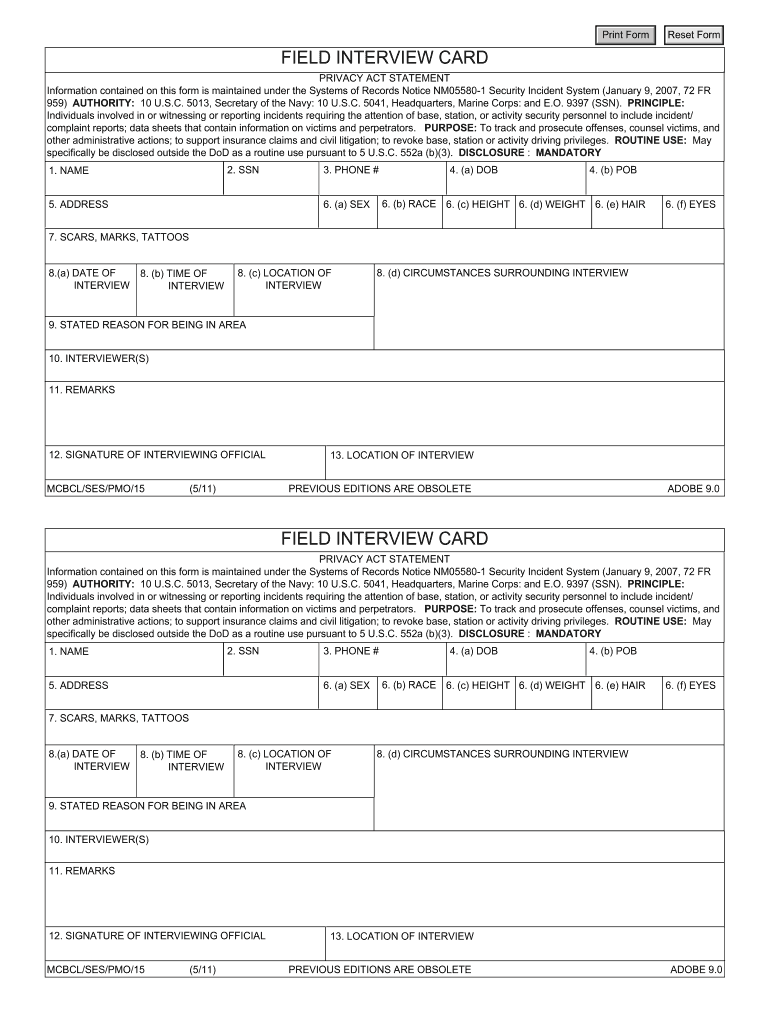
Field Interview Card Form


What is the Field Interview Card
The police field interview card is a document used by law enforcement officers to record information during field interviews with individuals. This card serves as a vital tool for police departments, providing a structured format to capture essential details about the person being interviewed, the circumstances of the encounter, and any relevant observations. The information collected can aid in investigations, crime prevention, and community relations.
How to use the Field Interview Card
Using the police field interview card involves several key steps. Officers typically fill out the card during an encounter with an individual, ensuring they document the date, time, location, and the reason for the interview. It is important to gather personal information, such as the individual's name, address, and contact details. Officers should also note any observations or behaviors that may be relevant to the situation. Once completed, the card can be stored in the department's records for future reference.
Steps to complete the Field Interview Card
Completing a police field interview card involves a systematic approach to ensure all necessary information is captured accurately. Here are the steps to follow:
- Begin by entering the date and time of the interview.
- Document the location where the interview takes place.
- Record the individual's full name, address, and contact information.
- Describe the reason for the interview and any relevant circumstances.
- Note any observations about the individual's behavior or appearance.
- Include the names of any witnesses or other involved parties.
- Sign and date the card to validate the information collected.
Legal use of the Field Interview Card
The police field interview card must be used in compliance with legal standards to ensure that the information collected is admissible in court if necessary. Officers should be trained on the legal implications of conducting field interviews, including respecting the rights of individuals. Proper documentation and adherence to department policies are crucial to maintaining the integrity of the information gathered.
Key elements of the Field Interview Card
Several key elements should be included in a police field interview card to ensure it serves its purpose effectively. These elements typically include:
- Date and time of the interview
- Location of the encounter
- Personal details of the individual being interviewed
- Reason for the interview
- Observations made by the officer
- Signatures of the officer and the individual, if applicable
Examples of using the Field Interview Card
Field interview cards can be used in various scenarios by law enforcement officers. For instance, an officer may use the card when approaching a group of individuals in a high-crime area to gather information about suspicious activities. Another example could involve an officer interviewing a witness to a crime, where the card serves to document the witness's account and contact information. These examples illustrate the versatility and importance of the field interview card in policing.
Quick guide on how to complete police field interview card form
Effortlessly Prepare Field Interview Card on Any Device
Digital document management has gained signNow traction among businesses and individuals. It offers an ideal eco-friendly alternative to traditional printed and signed documents, allowing you to easily locate the necessary form and securely store it online. airSlate SignNow provides you with all the tools required to create, edit, and eSign your documents quickly and without delays. Manage Field Interview Card on any device using airSlate SignNow's Android or iOS applications and streamline your document-related processes today.
The Easiest Way to Edit and eSign Field Interview Card with Ease
- Locate Field Interview Card and click Get Form to begin.
- Make use of the tools we provide to complete your form.
- Emphasize pertinent sections of the documents or redact sensitive details with tools that airSlate SignNow specifically offers for that purpose.
- Generate your eSignature using the Sign tool, which takes mere seconds and holds the same legal validity as a conventional wet ink signature.
- Review the information and click the Done button to save your adjustments.
- Choose your preferred delivery method for your form, whether by email, SMS, invitation link, or download it to your computer.
Say goodbye to lost or misplaced documents, tedious form searches, and mistakes that necessitate printing new document copies. airSlate SignNow meets your document management needs with just a few clicks from any device. Modify and eSign Field Interview Card to ensure excellent communication at every stage of the form preparation process with airSlate SignNow.
Create this form in 5 minutes or less
FAQs
-
How do I change my address in the Aadhar card?
You can change the following details in Aadhar Card:NameGenderDate of BirthAddressE-mail IDTHINGS TO REMEMBER BEFORE APPLYING FOR AADHAR CARD DETAILS CHANGE:Your Registered Mobile Number is mandatory in the online process.You need to submit Documents for change of – Name, Date of Birth and Address. However, Change in Gender and E-mail ID do not require any document.You have to fill details in both – English and Regional/Local language (Eg. Hindi, Oriya, Bengali etc)Aadhar Card Details are not changed instantly. It is changed after Verification and Validation by the authoritySTEPS TO AADHAR CARD DETAILS CHANGE ONLINE:Click Here for going to the link.Enter your Aadhar Number.Fill Text VerificationClick on Send OTP. OTP is sent on your Registered mobile number.Also Read: Simple Steps to Conduct Aadhar Card Status Enquiry by NameYou will be asked to choose the Aadhar Card Details that you want to change.You can select multiple fields. Select the field and Submit.In next window fill the Correct Detail in both – English and Local language (if asked) and Submit.For Example – Here one has to fill the Email IdNOTE – If you are changing – Name, Date of Birth or Address, you have to upload the scanned documents. Click Here to know the Documents or Check them here.Verify the details that you have filled. If all the details look good then proceed or you can go back and edit once again.You may be asked for BPO Service Provider Selection. Select the provider belonging to your region.At last – You will be given an Update Request Number. Download or Print the document and keep it safe. It is required in checking the status of the complaint in future.So this step completes the process of Aadhar Card details change online.CHECK THE STATUS OF YOUR AADHAR CARD DETAILS CHANGE REQUESTStep 1 – Go the website by Clicking HereStep 2 – Fill the Aadhaar No. and URN – Update Request NumberStep 3 – Click on “Get Status”You are done. The new window on the screen will show the status of your request for change in Aadhar Card Details.
-
What form do I need to fill for petitioning my aged out daughter's green card when I attend the consular interview for my GC, or will she be changed automatically to the F2 category?
You cannot petition your daughter until you become a permanent resident, and you do not become a permanent resident until you enter the US with your immigrant visa. Assuming your daughter really aged out (with the CSPA calculation), there is nothing you can do at the interview, because you cannot petition her because you are not a permanent resident yet.When you enter the US with your immigrant visa, you immediately become a US permanent resident, and you can immediately can file an I-130 petition for your unmarried daughter, with your immigrant visa stamped upon entry as proof of your permanent residence. She does not “automatically” have a petition; you must petition her yourself. Note that an unmarried over-21 child of a permanent resident is in the F2B category, which has a wait of around 7 years, and this is 7 years counting from when the petition you file for her is filed (after you enter the US), not the petition that you immigrated on.
-
Can I fill out a police form?
Do you mean a report ? In Indiana you can- after an incident , write your own version- the form should Be online. It’s been some years since I did this, so perhaps it’s changed
-
How can one fill a PAN card application with initials?
The PAN Card Application has specific guidelines that no initials be included for the First Name, Middle Name, and Last Name fields of the applicant, his/her father and mother.While initials are not permitted in the above mentioned fields, you have the option to choose how your name appears on the PAN Card. There you could have initials listed.For example, lets take the name Virat Kholi.First Name would be Virat.Last Name would be Kholi.Name on Card can be any of the following:Virat KholiViratK ViratVirat KIf you would like to check how the application turns out, you could submit an online PAN Card Application and download the pre-filled PDF form for free at Brokerage Free - New PAN ApplicationHope this information is helpful.Thanks.
Create this form in 5 minutes!
How to create an eSignature for the police field interview card form
How to make an electronic signature for your Police Field Interview Card Form in the online mode
How to create an electronic signature for the Police Field Interview Card Form in Chrome
How to make an eSignature for putting it on the Police Field Interview Card Form in Gmail
How to create an electronic signature for the Police Field Interview Card Form from your smart phone
How to generate an electronic signature for the Police Field Interview Card Form on iOS
How to generate an eSignature for the Police Field Interview Card Form on Android OS
People also ask
-
What is a Field Interview Card and how does it work?
A Field Interview Card is a digital form used to collect and manage information during field interviews. With airSlate SignNow, you can easily create, send, and eSign Field Interview Cards, streamlining the data collection process. The intuitive interface allows users to fill out the card on their mobile devices, ensuring that information is captured accurately and efficiently.
-
How can a Field Interview Card benefit my business?
Using a Field Interview Card can signNowly enhance your data collection efforts by providing a structured format for interviews. This leads to improved accuracy and quicker processing times. Additionally, airSlate SignNow's eSigning feature allows for immediate validation of collected information, ensuring compliance and efficiency in your workflows.
-
Is there a cost associated with using Field Interview Cards through airSlate SignNow?
Yes, airSlate SignNow offers various pricing plans tailored to fit different business needs. You can choose a plan that includes features for creating and managing Field Interview Cards. Pricing is competitive, and the platform provides a cost-effective solution for eSigning and document management.
-
Can I integrate Field Interview Cards with other tools my business uses?
Absolutely! airSlate SignNow allows for seamless integrations with a variety of business applications. You can connect Field Interview Cards with CRM systems, project management tools, and more, ensuring that your data flows smoothly across platforms and enhancing overall productivity.
-
What features should I look for in a Field Interview Card solution?
When selecting a Field Interview Card solution, look for features like customizable templates, mobile accessibility, and eSignature capabilities. airSlate SignNow offers these features, allowing you to create tailored Field Interview Cards that meet your specific needs. Additionally, automated workflows can help save time and reduce errors.
-
How secure is the data collected using Field Interview Cards?
Data security is a top priority for airSlate SignNow. All information collected through Field Interview Cards is encrypted and stored securely. The platform complies with industry standards, ensuring that your data remains safe and confidential throughout the collection and eSigning process.
-
Can I track the status of my Field Interview Cards?
Yes, airSlate SignNow provides tracking features that allow you to monitor the status of your Field Interview Cards in real-time. You can see when a card is sent, viewed, and signed, giving you complete visibility over your data collection process. This feature helps maintain accountability and ensures timely follow-ups.
Get more for Field Interview Card
- Cscs smartcard application form for craft and operative level occupations
- Please request a mandate form if you are registering a new correspondent
- Coif change of correspondent form
- Peace of mind dna test request form ireland
- Immigration dna profiling request form alphabiolabs
- Birmingham city university application form
- Football tournament form 445966692
- Dsar06 form unisa
Find out other Field Interview Card
- How Can I Electronic signature Maine Lawers PPT
- How To Electronic signature Maine Lawers PPT
- Help Me With Electronic signature Minnesota Lawers PDF
- How To Electronic signature Ohio High Tech Presentation
- How Can I Electronic signature Alabama Legal PDF
- How To Electronic signature Alaska Legal Document
- Help Me With Electronic signature Arkansas Legal PDF
- How Can I Electronic signature Arkansas Legal Document
- How Can I Electronic signature California Legal PDF
- Can I Electronic signature Utah High Tech PDF
- How Do I Electronic signature Connecticut Legal Document
- How To Electronic signature Delaware Legal Document
- How Can I Electronic signature Georgia Legal Word
- How Do I Electronic signature Alaska Life Sciences Word
- How Can I Electronic signature Alabama Life Sciences Document
- How Do I Electronic signature Idaho Legal Form
- Help Me With Electronic signature Arizona Life Sciences PDF
- Can I Electronic signature Colorado Non-Profit Form
- How To Electronic signature Indiana Legal Form
- How To Electronic signature Illinois Non-Profit Document