Project Notification 1996-2026


What is the Project Notification
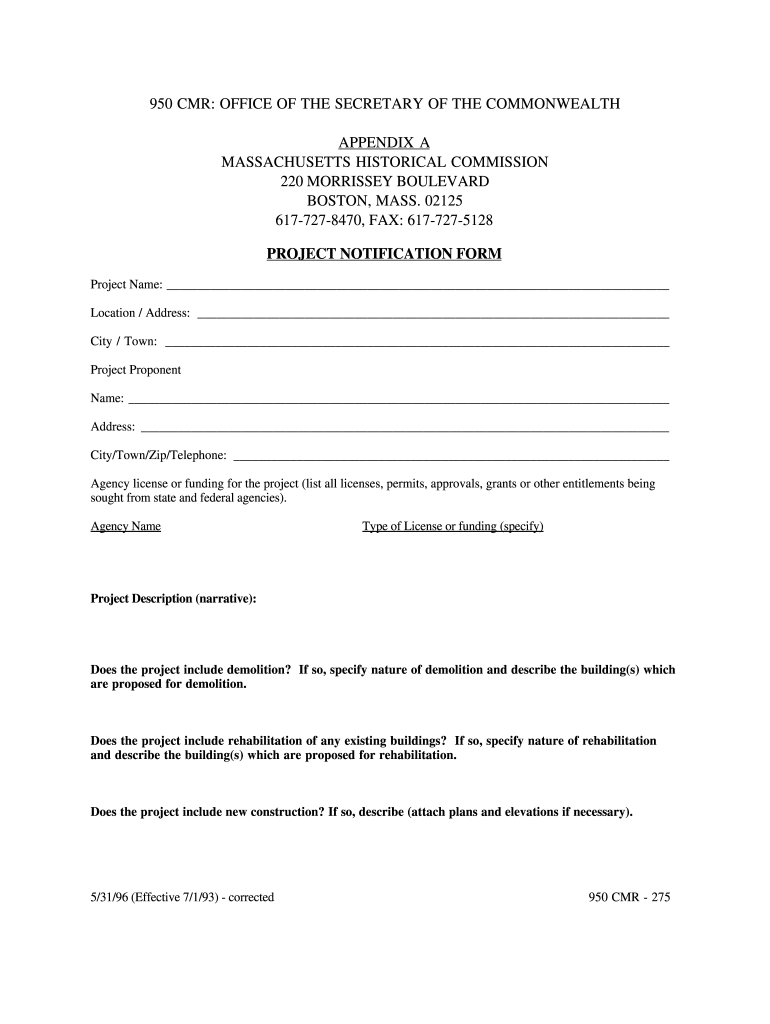
The Project Notification is a critical document used in various regulatory processes, particularly in the context of construction and development projects. It serves to inform relevant authorities about the details of a proposed project, ensuring compliance with local regulations and standards. The notification typically includes information about the project scope, location, and expected impact on the community and environment. Understanding the Project Notification is essential for anyone involved in project management or regulatory compliance.
Steps to complete the Project Notification
Filling out the Project Notification involves several key steps to ensure accuracy and compliance. Begin by gathering all necessary information regarding the project, including its purpose, location, and timeline. Next, carefully complete each section of the form, ensuring that all required fields are filled out completely. It is important to review the information for accuracy before submission. Lastly, submit the completed form through the designated method, whether online, by mail, or in person, depending on local regulations.
Legal use of the Project Notification
The legal use of the Project Notification is governed by various local and state regulations. It is essential that the form is completed accurately to avoid potential legal issues. This document may be required for obtaining permits or approvals from local authorities. Inaccuracies or omissions can lead to delays or penalties, making it crucial to ensure that all information provided is truthful and complete. Compliance with legal requirements helps maintain the integrity of the project and protects the interests of all stakeholders involved.
Key elements of the Project Notification
Key elements of the Project Notification include the project title, description, location, and the names of the parties involved. Additional details may encompass the anticipated start and completion dates, as well as any potential environmental impacts. Providing comprehensive information in these areas helps authorities assess the project's viability and compliance with applicable laws. Ensuring that all key elements are included and accurately represented is vital for a successful submission.
Form Submission Methods (Online / Mail / In-Person)
Submitting the Project Notification can be done through various methods, depending on local regulations and preferences. Common submission methods include:
- Online: Many jurisdictions offer online platforms for submitting the form, which can streamline the process and provide immediate confirmation of receipt.
- Mail: For those preferring traditional methods, mailing a physical copy of the completed form is often an option. Ensure that it is sent to the correct address and allow sufficient time for delivery.
- In-Person: Some local offices may require or allow in-person submissions, providing an opportunity to ask questions and receive immediate feedback.
Who Issues the Form
The Project Notification form is typically issued by local or state regulatory agencies responsible for overseeing construction and development projects. These agencies ensure that all projects comply with relevant laws and regulations. It is important to identify the correct agency for your specific project to ensure that the form is completed and submitted to the appropriate authority. This can vary by location, so checking local guidelines is essential.
Quick guide on how to complete form 950 cmr project notification form fillable
Prepare Project Notification effortlessly on any device
Online document management has become increasingly popular among businesses and individuals. It offers a perfect eco-friendly alternative to traditional printed and signed documents, as you can easily locate the correct form and securely store it online. airSlate SignNow provides all the tools necessary to create, modify, and eSign your documents quickly without delays. Handle Project Notification on any platform with airSlate SignNow Android or iOS applications and simplify any document-related process today.
How to modify and eSign Project Notification with ease
- Locate Project Notification and click Get Form to begin.
- Utilize the tools we provide to complete your form.
- Emphasize relevant sections of your documents or obscure sensitive data with tools that airSlate SignNow offers specifically for that purpose.
- Create your eSignature using the Sign tool, which takes mere seconds and carries the same legal validity as a conventional wet ink signature.
- Review the details and click on the Done button to save your changes.
- Choose how you want to send your form, via email, SMS, or invitation link, or download it to your computer.
Eliminate worries about lost or misplaced files, tedious form searches, or errors that require printing new copies. airSlate SignNow meets your document management needs in just a few clicks from your preferred device. Alter and eSign Project Notification and ensure remarkable communication at every stage of your form preparation process with airSlate SignNow.
Create this form in 5 minutes or less
FAQs
-
Is there a service that will allow me to create a fillable form on a webpage, and then email a PDF copy of each form filled out?
You can use Fill which is has a free forever plan.You can use Fill to turn your PDF document into an online document which can be completed, signed and saved as a PDF, online.You will end up with a online fillable PDF like this:w9 || FillWhich can be embedded in your website should you wish.InstructionsStep 1: Open an account at Fill and clickStep 2: Check that all the form fields are mapped correctly, if not drag on the text fields.Step 3: Save it as a templateStep 4: Goto your templates and find the correct form. Then click on the embed settings to grab your form URL.
-
I'm trying to fill out a free fillable tax form. It won't let me click "done with this form" or "efile" which?
From https://www.irs.gov/pub/irs-utl/... (emphasis mine):DONE WITH THIS FORM — Select this button to save and close the form you are currently viewing and return to your 1040 form. This button is disabled when you are in your 1040 formSo, it appears, and without them mentioning it while you're working on it, that button is for all forms except 1040. Thank you to the other response to this question. I would never have thought of just clicking the Step 2 tab.
-
How do I create a fillable HTML form online that can be downloaded as a PDF? I have made a framework for problem solving and would like to give people access to an online unfilled form that can be filled out and downloaded filled out.
Create PDF Form that will be used for download and convert it to HTML Form for viewing on your website.However there’s a lot of PDF to HTML converters not many can properly convert PDF Form including form fields. If you plan to use some calculations or validations it’s even harder to find one. Try PDFix Form Converter which works fine to me.
-
How can I fill out Google's intern host matching form to optimize my chances of receiving a match?
I was selected for a summer internship 2016.I tried to be very open while filling the preference form: I choose many products as my favorite products and I said I'm open about the team I want to join.I even was very open in the location and start date to get host matching interviews (I negotiated the start date in the interview until both me and my host were happy.) You could ask your recruiter to review your form (there are very cool and could help you a lot since they have a bigger experience).Do a search on the potential team.Before the interviews, try to find smart question that you are going to ask for the potential host (do a search on the team to find nice and deep questions to impress your host). Prepare well your resume.You are very likely not going to get algorithm/data structure questions like in the first round. It's going to be just some friendly chat if you are lucky. If your potential team is working on something like machine learning, expect that they are going to ask you questions about machine learning, courses related to machine learning you have and relevant experience (projects, internship). Of course you have to study that before the interview. Take as long time as you need if you feel rusty. It takes some time to get ready for the host matching (it's less than the technical interview) but it's worth it of course.
-
How do I fill out the form of DU CIC? I couldn't find the link to fill out the form.
Just register on the admission portal and during registration you will get an option for the entrance based course. Just register there. There is no separate form for DU CIC.
-
How do you know if you need to fill out a 1099 form?
Assuming that you are talking about 1099-MISC. Note that there are other 1099s.check this post - Form 1099 MISC Rules & RegulationsQuick answer - A Form 1099 MISC must be filed for each person to whom payment is made of:$600 or more for services performed for a trade or business by people not treated as employees;Rent or prizes and awards that are not for service ($600 or more) and royalties ($10 or more);any fishing boat proceeds,gross proceeds of $600, or more paid to an attorney during the year, orWithheld any federal income tax under the backup withholding rules regardless of the amount of the payment, etc.
-
How can I make it easier for users to fill out a form on mobile apps?
I’ll tell you a secret - you can thank me later for this.If you want to make the form-filling experience easy for a user - make sure that you have a great UI to offer.Everything boils down to UI at the end.Axonator is one of the best mobile apps to collect data since it offers powerful features bundled with a simple UI.The problem with most of the mobile form apps is that they are overloaded with features that aren’t really necessary.The same doesn’t hold true for Axonator. It has useful features but it is very unlikely that the user will feel overwhelmed in using them.So, if you are inclined towards having greater form completion rates for your survey or any data collection projects, then Axonator is the way to go.Apart from that, there are other features that make the data collection process faster like offline data collection, rich data capture - audio, video, images, QR code & barcode data capture, live location & time capture, and more!Check all the features here!You will be able to complete more surveys - because productivity will certainly shoot up.Since you aren’t using paper forms, errors will drop signNowly.The cost of the paper & print will be saved - your office expenses will drop dramatically.No repeat work. No data entry. Time & money saved yet again.Analytics will empower you to make strategic decisions and explore new revenue opportunities.The app is dirt-cheap & you don’t any training to use the app. They come in with a smooth UI. Forget using, even creating forms for your apps is easy on the platform. Just drag & drop - and it’s ready for use. Anyone can build an app under hours.
Create this form in 5 minutes!
How to create an eSignature for the form 950 cmr project notification form fillable
How to generate an eSignature for your Form 950 Cmr Project Notification Form Fillable online
How to make an eSignature for the Form 950 Cmr Project Notification Form Fillable in Google Chrome
How to create an eSignature for putting it on the Form 950 Cmr Project Notification Form Fillable in Gmail
How to generate an eSignature for the Form 950 Cmr Project Notification Form Fillable right from your smartphone
How to generate an eSignature for the Form 950 Cmr Project Notification Form Fillable on iOS
How to create an electronic signature for the Form 950 Cmr Project Notification Form Fillable on Android OS
People also ask
-
What is Project Notification in airSlate SignNow?
Project Notification in airSlate SignNow refers to the feature that allows users to receive alerts about document statuses and updates. This ensures that all parties involved in a project are informed in real-time, enhancing collaboration and efficiency. With Project Notification, you can track when documents are opened, signed, and completed.
-
How does airSlate SignNow handle Project Notification for document tracking?
airSlate SignNow provides robust Project Notification capabilities that keep you updated on your document's progress. You can set notifications to be sent via email or in-app, ensuring that all stakeholders are aware of important changes. This feature helps streamline project workflows and reduces delays.
-
Is there a cost associated with using Project Notification in airSlate SignNow?
Project Notification is included in the various pricing plans of airSlate SignNow, making it a cost-effective solution for businesses. Depending on your plan, you can access different features related to notifications and document management. Visit our pricing page to find the best fit for your organization's needs.
-
Can I customize Project Notification settings in airSlate SignNow?
Yes, airSlate SignNow allows you to customize Project Notification settings to suit your preferences. You can choose which notifications to receive and how you want to be alerted, ensuring you only get the updates that matter most to your project. This flexibility enhances your control over document management.
-
What are the benefits of using Project Notification with airSlate SignNow?
Using Project Notification with airSlate SignNow offers several benefits, including improved communication and faster turnaround times for document approvals. You'll stay informed about every step of the signing process, which helps in managing projects more effectively. This leads to increased productivity and reduced bottlenecks.
-
Does airSlate SignNow integrate with other tools for Project Notification?
Yes, airSlate SignNow integrates seamlessly with various third-party applications to enhance Project Notification capabilities. You can connect with tools like Slack, Microsoft Teams, and others to receive real-time alerts and updates directly within your preferred platforms. This integration makes managing projects more efficient.
-
How does Project Notification improve team collaboration in airSlate SignNow?
Project Notification enhances team collaboration by keeping all members updated on document status and changes. With timely alerts, team members can act quickly and coordinate their efforts, ensuring that projects progress smoothly. This level of communication is crucial for maintaining project timelines and achieving goals.
Get more for Project Notification
- Congratulations on taking the first steps towards a career with countdown form
- U 39 san francisco california revised cal puc sheet no 42929 form
- Directions the student is asked to read this introduction carefully fill out the bottom of this sheet form
- Varianceappeal request application 445724203 form
- False alarm reduction amp administration unit form
- 61523 e form
- Quick guide to illinois cdl testing form
- Protestappeal of a redetermination status michigan form
Find out other Project Notification
- How To eSign Illinois Legal Form
- How Do I eSign Nebraska Life Sciences Word
- How Can I eSign Nebraska Life Sciences Word
- Help Me With eSign North Carolina Life Sciences PDF
- How Can I eSign North Carolina Life Sciences PDF
- How Can I eSign Louisiana Legal Presentation
- How To eSign Louisiana Legal Presentation
- Can I eSign Minnesota Legal Document
- How Do I eSign Hawaii Non-Profit PDF
- How To eSign Hawaii Non-Profit Word
- How Do I eSign Hawaii Non-Profit Presentation
- How Do I eSign Maryland Non-Profit Word
- Help Me With eSign New Jersey Legal PDF
- How To eSign New York Legal Form
- How Can I eSign North Carolina Non-Profit Document
- How To eSign Vermont Non-Profit Presentation
- How Do I eSign Hawaii Orthodontists PDF
- How Can I eSign Colorado Plumbing PDF
- Can I eSign Hawaii Plumbing PDF
- How Do I eSign Hawaii Plumbing Form