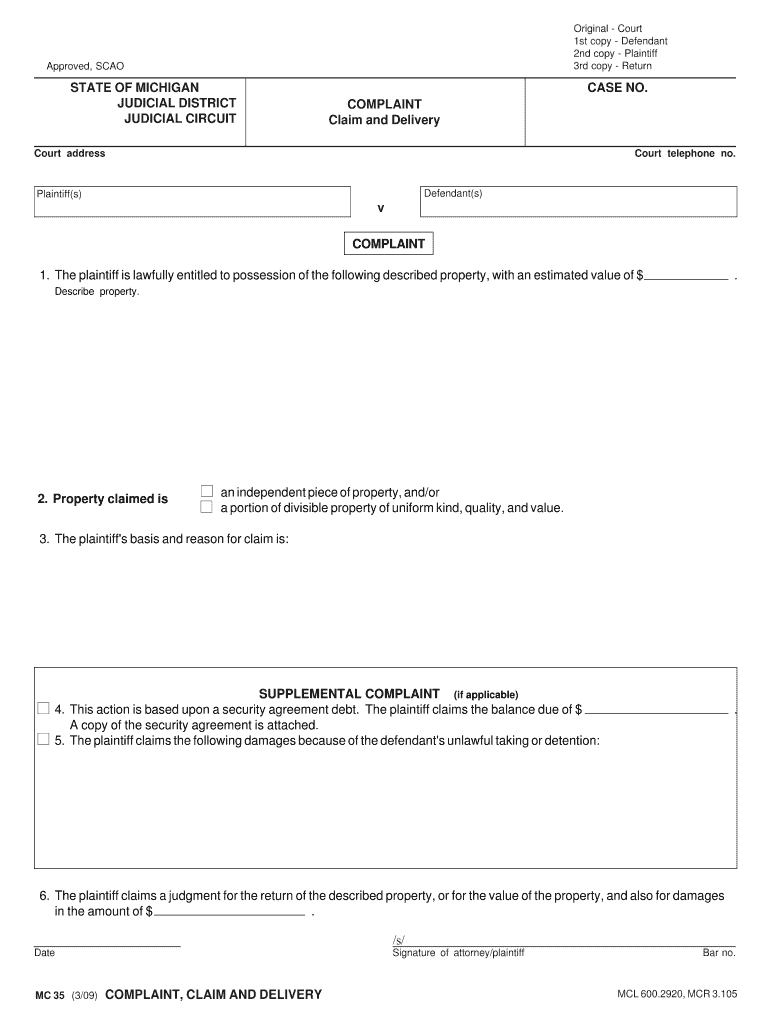
MC 35, Complaint, Claim and Delivery Michigan Courts Form


What is the MC 35, Complaint, Claim And Delivery Michigan Courts
The MC 35, Complaint, Claim And Delivery form is a legal document used in Michigan courts to initiate a claim for the recovery of specific personal property. This form is essential for individuals or entities seeking to reclaim property that they believe is wrongfully held by another party. The process typically involves filing the form with the appropriate court, outlining the details of the claim, and providing evidence to support the request for delivery of the property in question.
Steps to complete the MC 35, Complaint, Claim And Delivery Michigan Courts
Completing the MC 35 form requires careful attention to detail to ensure that all necessary information is accurately provided. Here are the steps to follow:
- Begin by downloading the MC 35 form from the Michigan courts website or obtaining a physical copy from the court clerk's office.
- Fill in your personal information, including your name, address, and contact details, as well as the details of the defendant.
- Clearly describe the property you are claiming, including its location and any relevant identification details.
- Provide a statement of the facts supporting your claim, explaining why you believe you are entitled to the property.
- Sign and date the form to certify that the information is true and correct to the best of your knowledge.
- Make copies of the completed form for your records and for service to the defendant.
Legal use of the MC 35, Complaint, Claim And Delivery Michigan Courts
The MC 35 form serves a critical legal function in the Michigan judicial system. It allows individuals to assert their rights over personal property and seek the court's intervention to recover it. For the form to be legally binding, it must be filed correctly and comply with Michigan laws governing property claims. This includes adhering to specific deadlines and ensuring that all parties involved are properly notified of the proceedings.
Key elements of the MC 35, Complaint, Claim And Delivery Michigan Courts
Understanding the key elements of the MC 35 form is vital for effective completion. These elements include:
- Claimant Information: The name and address of the person or entity filing the claim.
- Defendant Information: The name and address of the person or entity from whom the property is being claimed.
- Description of Property: Detailed information about the property in question, including any identifying features.
- Statement of Facts: A clear narrative explaining the circumstances surrounding the claim.
- Signature: The claimant's signature, affirming the truthfulness of the information provided.
Form Submission Methods (Online / Mail / In-Person)
The MC 35 form can be submitted through various methods, depending on the court's requirements. Typically, the submission options include:
- In-Person: Filing the form directly at the appropriate court clerk's office.
- Mail: Sending the completed form via postal service to the court, ensuring it is sent to the correct address.
- Online: Some courts may offer electronic filing options, allowing the form to be submitted digitally through their online portal.
State-specific rules for the MC 35, Complaint, Claim And Delivery Michigan Courts
Each state has specific rules governing the use of the MC 35 form. In Michigan, these rules dictate the filing process, deadlines, and requirements for serving the defendant. It is essential to familiarize yourself with these regulations to ensure compliance and avoid delays in your claim. Particular attention should be paid to the jurisdiction of the court, as this can affect where the form must be filed and the applicable legal standards.
Quick guide on how to complete mc 35 complaint claim and delivery michigan courts
Effortlessly Prepare MC 35, Complaint, Claim And Delivery Michigan Courts on Any Device
Digital document management has become increasingly prevalent among businesses and individuals. It offers an ideal eco-friendly substitute for conventional printed and signed papers, allowing you to obtain the correct form and secure it online. airSlate SignNow provides all the tools necessary to create, modify, and electronically sign your documents quickly and without delays. Manage MC 35, Complaint, Claim And Delivery Michigan Courts on any platform with the airSlate SignNow applications for Android or iOS and simplify any document-related task today.
Simple Steps to Modify and Electronically Sign MC 35, Complaint, Claim And Delivery Michigan Courts with Ease
- Find MC 35, Complaint, Claim And Delivery Michigan Courts and click Get Form to begin.
- Use the tools we offer to fill out your document.
- Emphasize important sections of your documents or obscure sensitive information with tools that airSlate SignNow specifically provides for that purpose.
- Create your signature using the Sign tool, which takes mere seconds and carries the same legal validity as a conventional wet ink signature.
- Review all the details and click the Done button to store your modifications.
- Choose how you wish to send your form, whether by email, text message (SMS), invitation link, or download it to your computer.
Say goodbye to lost or misplaced documents, tedious form searches, or errors that necessitate printing new copies. airSlate SignNow meets all your document management needs in just a few clicks from any device of your choosing. Modify and electronically sign MC 35, Complaint, Claim And Delivery Michigan Courts to ensure excellent communication at every stage of the document preparation process with airSlate SignNow.
Create this form in 5 minutes or less
Create this form in 5 minutes!
People also ask
-
What is the MC 35, Complaint, Claim And Delivery Michigan Courts form and how do I use it?
The MC 35, Complaint, Claim And Delivery Michigan Courts form is a legal document used to initiate a claim for the return of specific property. You can easily access this form through airSlate SignNow, allowing you to fill it out, sign, and send it digitally. This streamlined process saves you time and ensures accuracy in your legal submissions.
-
How does airSlate SignNow simplify the process of submitting the MC 35, Complaint, Claim And Delivery Michigan Courts?
airSlate SignNow simplifies the submission of the MC 35, Complaint, Claim And Delivery Michigan Courts by providing a user-friendly platform for completing and signing documents. With our electronic signature feature, you can quickly sign and send your form to the appropriate Michigan courts without the hassle of printing and scanning.
-
What are the pricing plans for using airSlate SignNow for my MC 35, Complaint, Claim And Delivery Michigan Courts documents?
airSlate SignNow offers various pricing plans that cater to different business needs, starting with a free trial. Each plan includes features designed to facilitate the eSigning of documents, including the MC 35, Complaint, Claim And Delivery Michigan Courts. You can select a plan that best suits your volume of use and required features.
-
Can I integrate airSlate SignNow with other software for managing my MC 35, Complaint, Claim And Delivery Michigan Courts documents?
Yes, airSlate SignNow integrates seamlessly with multiple applications, enhancing your workflow when dealing with the MC 35, Complaint, Claim And Delivery Michigan Courts. Whether you use CRM systems, cloud storage solutions, or other document management software, our platform can help streamline your processes and increase efficiency.
-
Are there any features in airSlate SignNow specifically designed for legal professionals handling MC 35, Complaint, Claim And Delivery Michigan Courts?
Absolutely! airSlate SignNow offers features designed for legal professionals, such as template creation for the MC 35, Complaint, Claim And Delivery Michigan Courts. You can create reusable templates to save time on repetitive tasks, ensuring compliance and accuracy in every submission.
-
How secure is my data when using airSlate SignNow for the MC 35, Complaint, Claim And Delivery Michigan Courts?
Security is a top priority at airSlate SignNow. We implement industry-standard encryption, ensuring that your MC 35, Complaint, Claim And Delivery Michigan Courts documents are protected during storage and transmission. This commitment to security allows you to manage your sensitive legal documents with confidence.
-
Can I track the status of my MC 35, Complaint, Claim And Delivery Michigan Courts submissions in airSlate SignNow?
Yes, with airSlate SignNow, you can easily track the status of your MC 35, Complaint, Claim And Delivery Michigan Courts submissions. Our platform provides real-time updates, notifying you when documents have been viewed, signed, or require your attention, ensuring you stay informed throughout the process.
Get more for MC 35, Complaint, Claim And Delivery Michigan Courts
- Fl all family 001 form
- Inmate roster spokane form
- Affidavit of fee 72 00 non refundable applicant for form
- Form 2550
- Caravan booking form template 1225758
- Medexprotect claim form existing customer 04 02 21 final docx
- Attempting to resolve problems with a dentist form
- Contract with direct sellersdistributors form
Find out other MC 35, Complaint, Claim And Delivery Michigan Courts
- Help Me With eSign Vermont Healthcare / Medical PPT
- How To eSign Arizona Lawers PDF
- How To eSign Utah Government Word
- How Can I eSign Connecticut Lawers Presentation
- Help Me With eSign Hawaii Lawers Word
- How Can I eSign Hawaii Lawers Document
- How To eSign Hawaii Lawers PPT
- Help Me With eSign Hawaii Insurance PPT
- Help Me With eSign Idaho Insurance Presentation
- Can I eSign Indiana Insurance Form
- How To eSign Maryland Insurance PPT
- Can I eSign Arkansas Life Sciences PDF
- How Can I eSign Arkansas Life Sciences PDF
- Can I eSign Connecticut Legal Form
- How Do I eSign Connecticut Legal Form
- How Do I eSign Hawaii Life Sciences Word
- Can I eSign Hawaii Life Sciences Word
- How Do I eSign Hawaii Life Sciences Document
- How Do I eSign North Carolina Insurance Document
- How Can I eSign Hawaii Legal Word