Claim FormVirginia Workers' Compensation Commission


What is the Claim Form Virginia Workers' Compensation Commission
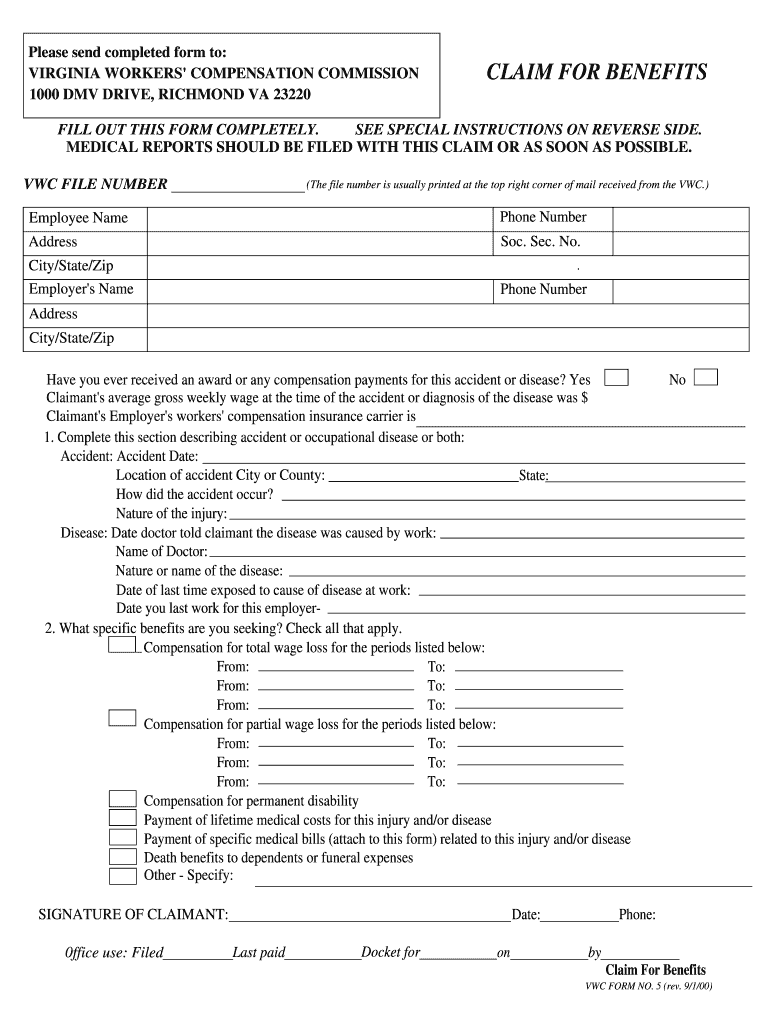
The Claim Form Virginia Workers' Compensation Commission is a legal document used by employees in Virginia to report workplace injuries or illnesses. This form is essential for initiating the workers' compensation process, allowing employees to seek benefits for medical expenses and lost wages resulting from work-related incidents. It serves as a formal notification to the Virginia Workers' Compensation Commission, ensuring that claims are processed in accordance with state regulations.
How to use the Claim Form Virginia Workers' Compensation Commission
Using the Claim Form Virginia Workers' Compensation Commission involves several key steps. First, ensure that you have all necessary information, including details about the incident, medical treatment received, and any witnesses. Complete the form accurately, providing clear and concise information. Once filled out, submit the form to your employer and the Virginia Workers' Compensation Commission. It is advisable to keep copies of all submitted documents for your records.
Steps to complete the Claim Form Virginia Workers' Compensation Commission
Completing the Claim Form Virginia Workers' Compensation Commission requires careful attention to detail. Follow these steps:
- Gather all relevant information about the injury, including date, time, and location.
- Document the nature of the injury and any medical treatment received.
- Fill out the form clearly, ensuring all sections are completed.
- Review the form for accuracy before submission.
- Submit the completed form to your employer and the Virginia Workers' Compensation Commission.
Legal use of the Claim Form Virginia Workers' Compensation Commission
The Claim Form Virginia Workers' Compensation Commission must be used in compliance with Virginia state laws governing workers' compensation. This includes adhering to deadlines for submission and ensuring that all information provided is truthful and complete. Failure to comply with legal requirements may result in delays in processing your claim or denial of benefits.
Required Documents
When submitting the Claim Form Virginia Workers' Compensation Commission, certain documents may be required to support your claim. These typically include:
- Medical records related to the injury.
- Incident reports or witness statements.
- Proof of employment and details about your job duties.
Having these documents ready can facilitate a smoother claims process and help substantiate your case.
Form Submission Methods
The Claim Form Virginia Workers' Compensation Commission can be submitted through various methods to ensure convenience for claimants. You may choose to:
- Submit the form online through the Virginia Workers' Compensation Commission's website.
- Send the completed form via mail to the appropriate office.
- Deliver the form in person at designated locations.
Each method has its own processing times, so consider your options carefully when submitting your claim.
Quick guide on how to complete claim formvirginia workers compensation commission
Prepare Claim FormVirginia Workers' Compensation Commission effortlessly on any device
Online document management has gained popularity among businesses and individuals alike. It offers a seamless eco-friendly substitute for traditional printed and signed documents, allowing you to locate the right form and securely store it online. airSlate SignNow provides you with all the tools necessary to create, modify, and eSign your documents quickly and without interruptions. Manage Claim FormVirginia Workers' Compensation Commission on any platform with airSlate SignNow's Android or iOS applications and enhance any document-related task today.
The simplest method to alter and eSign Claim FormVirginia Workers' Compensation Commission effortlessly
- Locate Claim FormVirginia Workers' Compensation Commission and click on Get Form to initiate.
- Utilize the tools we provide to complete your form.
- Emphasize important sections of your documents or redact sensitive information with the tools that airSlate SignNow specifically provides for that purpose.
- Create your signature using the Sign tool, which takes seconds and holds the same legal validity as a traditional handwritten signature.
- Review the details and click the Done button to save your modifications.
- Choose how you would like to send your form, whether by email, SMS, invitation link, or download it to your computer.
No more lost or misplaced files, tedious form searching, or mistakes that necessitate printing new document copies. airSlate SignNow addresses all your document management needs in a few clicks from any device you prefer. Edit and eSign Claim FormVirginia Workers' Compensation Commission and ensure outstanding communication at every stage of your form preparation process with airSlate SignNow.
Create this form in 5 minutes or less
Create this form in 5 minutes!
People also ask
-
What is the Claim FormVirginia Workers' Compensation Commission?
The Claim FormVirginia Workers' Compensation Commission is a vital document that employees must submit to claim workers' compensation benefits after an injury. This form gathers necessary information about the incident and the injured party's details, helping both employees and employers process claims efficiently.
-
How can airSlate SignNow help with the Claim FormVirginia Workers' Compensation Commission?
airSlate SignNow provides a seamless platform to create, send, and eSign the Claim FormVirginia Workers' Compensation Commission. This solution simplifies the document handling process, ensuring timely submissions and minimizing errors during completion, which is essential for an effective claims process.
-
Is there a cost associated with using airSlate SignNow for the Claim FormVirginia Workers' Compensation Commission?
Yes, airSlate SignNow offers various pricing plans tailored to suit different business needs, including options for handling the Claim FormVirginia Workers' Compensation Commission. These plans are designed to be cost-effective while providing comprehensive features to enhance document management and eSigning.
-
What features does airSlate SignNow offer for the Claim FormVirginia Workers' Compensation Commission?
airSlate SignNow includes features like customizable templates, secure eSigning, document tracking, and cloud storage, specifically useful for managing the Claim FormVirginia Workers' Compensation Commission. These tools streamline the workflow, ensuring that users can focus on their business while the platform handles document handling efficiently.
-
Can multiple users collaborate on the Claim FormVirginia Workers' Compensation Commission with airSlate SignNow?
Yes, airSlate SignNow allows multiple users to collaborate on the Claim FormVirginia Workers' Compensation Commission. This feature facilitates teamwork by enabling edits, comments, and real-time updates, ensuring that all necessary parties can contribute to the document creation and review process.
-
Does airSlate SignNow integrate with other software for the Claim FormVirginia Workers' Compensation Commission?
Absolutely! airSlate SignNow offers integrations with various software platforms, enhancing functionality for users completing the Claim FormVirginia Workers' Compensation Commission. These integrations allow for a smoother workflow and enable businesses to use their existing tools while managing documents effortlessly.
-
What are the benefits of using airSlate SignNow for the Claim FormVirginia Workers' Compensation Commission?
Using airSlate SignNow for the Claim FormVirginia Workers' Compensation Commission provides multiple benefits, including improved efficiency, reduced processing times, and enhanced security. By automating document workflows and eSigning, businesses can ensure compliance while serving employees swiftly.
Get more for Claim FormVirginia Workers' Compensation Commission
- Form rd 1910 5
- Federal information security management act usda
- Ups rush hour turnaround of boeing 757 ampamp 767 aircraft form
- Annual refresher training recordcertificate msha form
- Us fish and wildlife service form 3 200 64 permit application for fws
- Certificate of ownership for personally owned wildlife quotpet form
- Ol 599 registration service application check list dmv ca form
- John c marasco american association of motor vehicle form
Find out other Claim FormVirginia Workers' Compensation Commission
- eSign Texas Agreement contract template Fast
- eSign Massachusetts Basic rental agreement or residential lease Now
- How To eSign Delaware Business partnership agreement
- How Do I eSign Massachusetts Business partnership agreement
- Can I eSign Georgia Business purchase agreement
- How Can I eSign Idaho Business purchase agreement
- How To eSign Hawaii Employee confidentiality agreement
- eSign Idaho Generic lease agreement Online
- eSign Pennsylvania Generic lease agreement Free
- eSign Kentucky Home rental agreement Free
- How Can I eSign Iowa House rental lease agreement
- eSign Florida Land lease agreement Fast
- eSign Louisiana Land lease agreement Secure
- How Do I eSign Mississippi Land lease agreement
- eSign Connecticut Landlord tenant lease agreement Now
- eSign Georgia Landlord tenant lease agreement Safe
- Can I eSign Utah Landlord lease agreement
- How Do I eSign Kansas Landlord tenant lease agreement
- How Can I eSign Massachusetts Landlord tenant lease agreement
- eSign Missouri Landlord tenant lease agreement Secure