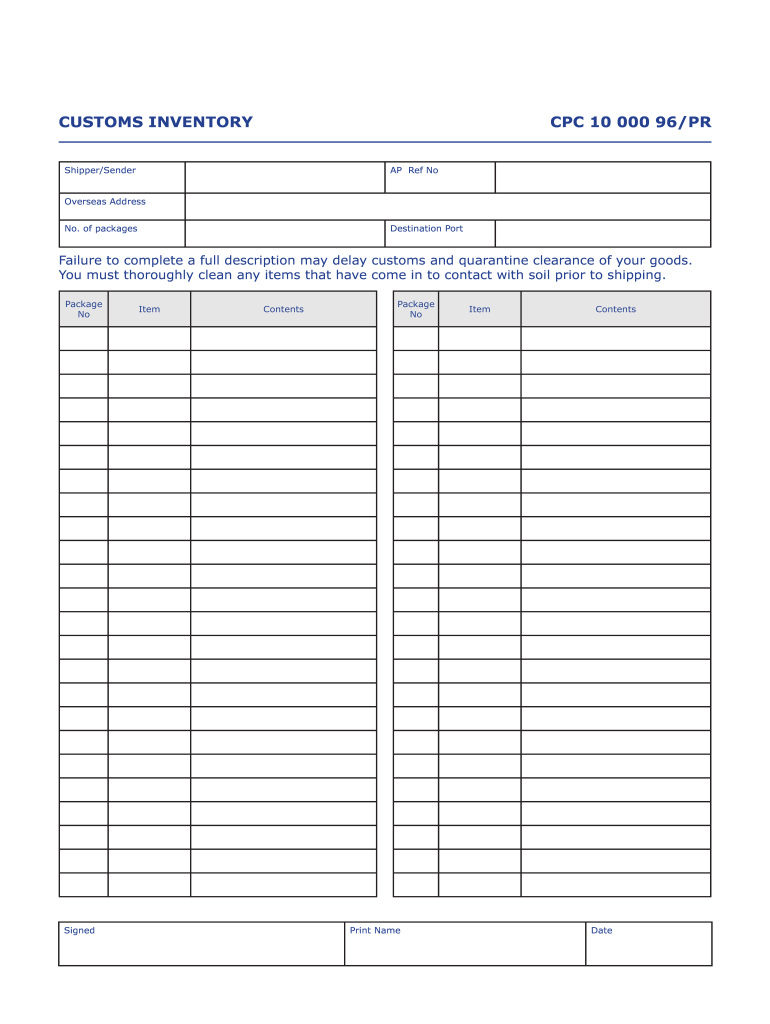
Customs Inventory Form


What is the Customs Inventory
The customs inventory serves as a crucial document for businesses and individuals involved in international shipping. It details the items being shipped, their values, and other pertinent information necessary for customs clearance. This inventory is essential for ensuring compliance with U.S. customs regulations and helps in the accurate assessment of duties and taxes. By providing a comprehensive list of goods, the customs inventory aids in preventing delays at ports and ensures that shipments are processed smoothly.
How to Use the Customs Inventory
Using the customs inventory effectively involves several steps. First, gather all necessary information about the items being shipped, including descriptions, quantities, and values. Next, fill out the shipping inventory template accurately, ensuring that all details align with the actual shipment. Once completed, this document should accompany the shipment to customs for review. It is also advisable to keep a copy for your records, as it may be required for future reference or audits.
Steps to Complete the Customs Inventory
Completing the customs inventory involves a systematic approach to ensure accuracy and compliance. Follow these steps:
- Identify all items being shipped, including their descriptions and quantities.
- Determine the value of each item, which may include purchase price or market value.
- Fill out the shipping inventory template, ensuring all fields are completed accurately.
- Review the completed inventory for any errors or omissions.
- Submit the customs inventory with your shipment and retain a copy for your records.
Legal Use of the Customs Inventory
The legal use of the customs inventory is vital for compliance with U.S. customs regulations. This document must be filled out truthfully and accurately, as discrepancies can lead to penalties or delays. The customs inventory serves as a legal declaration of the goods being shipped, and its accuracy is essential for determining applicable duties and taxes. Utilizing a trusted platform for eSigning and storing this document can enhance its legal standing and ensure compliance with regulations such as the ESIGN Act and UETA.
Key Elements of the Customs Inventory
Several key elements must be included in the customs inventory to ensure it meets regulatory requirements:
- Description of goods: A clear and concise description of each item.
- Quantity: The total number of each item being shipped.
- Value: The monetary value of each item, which may influence duty calculations.
- Country of origin: Where the goods were manufactured or produced.
- HS Code: The Harmonized System code that classifies the goods for customs purposes.
Examples of Using the Customs Inventory
Examples of using the customs inventory can vary based on the type of goods being shipped. For instance, a business exporting electronics would list each device, its specifications, and values, while an individual shipping personal belongings might categorize items by type, such as clothing or furniture. In both cases, ensuring that the customs inventory is detailed and accurate is critical to facilitate smooth customs processing and avoid potential penalties.
Quick guide on how to complete customs inventory cpc 10 000 96pr 1st contact shipping
The simplest method to obtain and sign Customs Inventory
Across the breadth of an entire organization, ineffective workflows tied to paper approvals can take up considerable working hours. Signing documents such as Customs Inventory is an integral aspect of operations in all sectors, thus the effectiveness of each contract’s lifecycle signNowly impacts the company's overall productivity. With airSlate SignNow, affixing your signature to your Customs Inventory can be remarkably straightforward and rapid. Through this platform, you will receive the most recent version of nearly any form. Even better, you can sign it immediately without needing to install external software on your computer or printing physical copies.
Steps to acquire and sign your Customs Inventory
- Explore our collection by category or use the search box to locate the document you need.
- Check the form preview by clicking Learn more to ensure it’s the correct one.
- Press Get form to start editing promptly.
- Fill out your form and include any necessary information using the toolbar.
- Once finished, click the Sign tool to sign your Customs Inventory.
- Select the signature method that suits you best: Draw, Create initials, or upload an image of your handwritten signature.
- Click Done to finalize editing and proceed to document-sharing options as needed.
With airSlate SignNow, you possess everything necessary to manage your documents efficiently. You can search for, complete, modify, and even distribute your Customs Inventory all from a single tab without difficulties. Optimize your workflows with one intelligent eSignature solution.
Create this form in 5 minutes or less
Create this form in 5 minutes!
How to create an eSignature for the customs inventory cpc 10 000 96pr 1st contact shipping
How to generate an electronic signature for your Customs Inventory Cpc 10 000 96pr 1st Contact Shipping in the online mode
How to make an eSignature for your Customs Inventory Cpc 10 000 96pr 1st Contact Shipping in Chrome
How to generate an electronic signature for signing the Customs Inventory Cpc 10 000 96pr 1st Contact Shipping in Gmail
How to generate an electronic signature for the Customs Inventory Cpc 10 000 96pr 1st Contact Shipping from your smart phone
How to generate an electronic signature for the Customs Inventory Cpc 10 000 96pr 1st Contact Shipping on iOS devices
How to generate an eSignature for the Customs Inventory Cpc 10 000 96pr 1st Contact Shipping on Android devices
People also ask
-
What is Customs Inventory in airSlate SignNow?
Customs Inventory in airSlate SignNow refers to a comprehensive tool that allows businesses to manage and document their inventory specifically for customs purposes. This feature ensures that all necessary paperwork is organized, accessible, and compliant with international shipping regulations, streamlining the customs clearance process.
-
How can airSlate SignNow help with managing my Customs Inventory?
airSlate SignNow simplifies the management of your Customs Inventory by providing an intuitive platform for creating, signing, and storing essential documents. The software automates workflows, reduces manual errors, and ensures that all inventory documentation is readily available for audits and inspections.
-
What are the pricing options for using Customs Inventory in airSlate SignNow?
Pricing for airSlate SignNow's Customs Inventory feature varies based on the plan you choose, with options tailored to meet the needs of small businesses to large enterprises. Each plan includes access to robust features that enhance the management of your customs documentation, enabling cost-effective solutions for your inventory management.
-
Are there any integrations available for Customs Inventory with airSlate SignNow?
Yes, airSlate SignNow offers seamless integrations with various platforms to enhance your Customs Inventory management. You can connect with popular software like CRM systems, ERP solutions, and cloud storage services, allowing for a smooth flow of information and improved efficiency in managing your inventory.
-
What are the benefits of using airSlate SignNow for Customs Inventory?
Using airSlate SignNow for Customs Inventory provides signNow benefits, including increased efficiency, reduced compliance risks, and enhanced document security. The platform's user-friendly interface ensures that you can easily create and manage all necessary customs documentation, helping your business stay compliant and organized.
-
Can I customize the templates for my Customs Inventory documents?
Absolutely! airSlate SignNow allows you to customize templates for your Customs Inventory documents to meet your specific requirements. This flexibility ensures that your documents are tailored to your business needs while maintaining compliance with customs regulations.
-
Is training available for using the Customs Inventory feature in airSlate SignNow?
Yes, airSlate SignNow provides comprehensive training resources to help users effectively utilize the Customs Inventory feature. Through video tutorials, webinars, and customer support, users can quickly learn how to manage their inventory documentation with confidence.
Get more for Customs Inventory
Find out other Customs Inventory
- How Can I eSignature New Jersey Police Document
- How Can I eSignature New Jersey Real Estate Word
- Can I eSignature Tennessee Police Form
- How Can I eSignature Vermont Police Presentation
- How Do I eSignature Pennsylvania Real Estate Document
- How Do I eSignature Texas Real Estate Document
- How Can I eSignature Colorado Courts PDF
- Can I eSignature Louisiana Courts Document
- How To Electronic signature Arkansas Banking Document
- How Do I Electronic signature California Banking Form
- How Do I eSignature Michigan Courts Document
- Can I eSignature Missouri Courts Document
- How Can I Electronic signature Delaware Banking PDF
- Can I Electronic signature Hawaii Banking Document
- Can I eSignature North Carolina Courts Presentation
- Can I eSignature Oklahoma Courts Word
- How To Electronic signature Alabama Business Operations Form
- Help Me With Electronic signature Alabama Car Dealer Presentation
- How Can I Electronic signature California Car Dealer PDF
- How Can I Electronic signature California Car Dealer Document