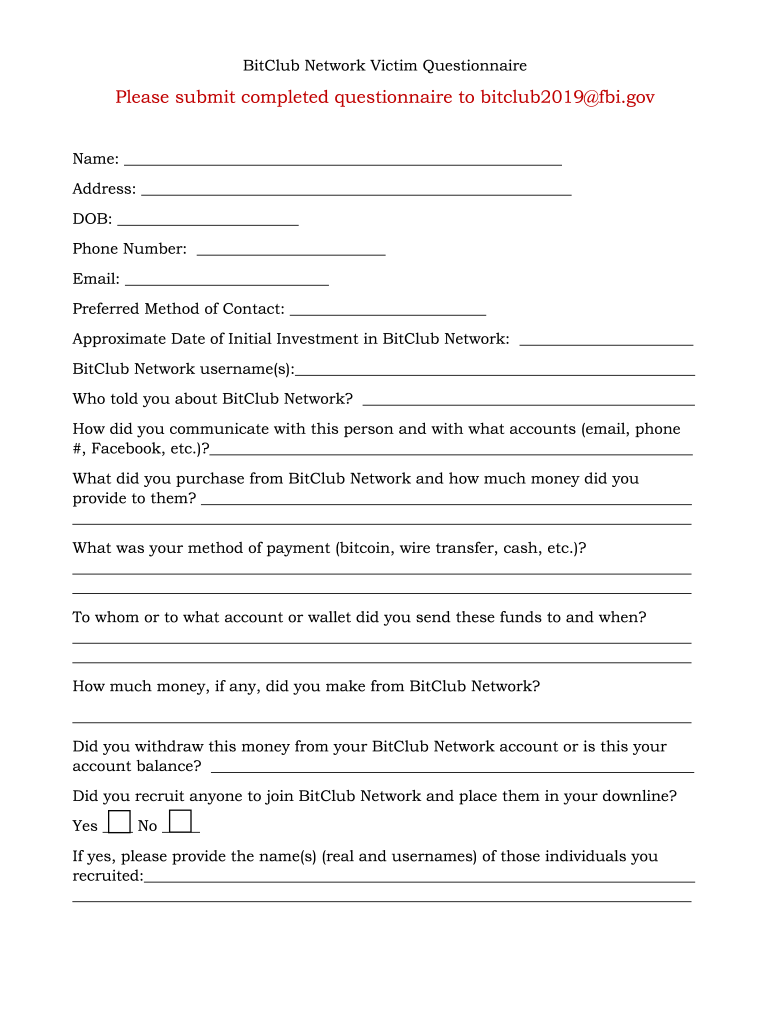
Bitclub Network Refund Form


What is the Bitclub Network Refund
The Bitclub Network refund refers to the process through which members of the Bitclub Network can reclaim their investments or earnings following the closure or alleged fraudulent activities of the platform. This refund is particularly relevant for individuals who invested in the network's cryptocurrency mining operations or other related services. Understanding the nature of the refund is crucial for those seeking to navigate the complexities of this situation.
How to obtain the Bitclub Network Refund
To obtain a refund from the Bitclub Network, individuals typically need to follow a series of steps that may include gathering relevant documentation, such as proof of investment and account details. Members should reach out to the designated support channels provided by the network, if available, to initiate the refund process. It is essential to keep records of all communications and submissions to ensure a smooth experience.
Steps to complete the Bitclub Network Refund
Completing the Bitclub Network refund process involves several key steps:
- Gather all necessary documentation, including investment receipts and account statements.
- Contact Bitclub Network support or the relevant authority managing the refunds.
- Submit a formal request for a refund, including all required information and documentation.
- Monitor the status of your refund request through the provided channels.
Legal use of the Bitclub Network Refund
The legal aspects of the Bitclub Network refund depend on various factors, including the jurisdiction in which the member resides. It is essential to understand local laws regarding cryptocurrency investments and refunds. Members may also want to consult with legal professionals to ensure that their rights are protected and that they comply with all applicable regulations during the refund process.
Key elements of the Bitclub Network Refund
Key elements that members should consider when seeking a Bitclub Network refund include:
- The timeline for submitting refund requests, which may be dictated by specific deadlines.
- The necessary documentation required to support the refund claim.
- Potential fees or deductions that may apply to the refund amount.
- The process for appealing a denied refund request, if applicable.
State-specific rules for the Bitclub Network Refund
State-specific rules regarding the Bitclub Network refund can vary significantly. Some states may have consumer protection laws that provide additional rights for investors. It is advisable for members to research their state's regulations concerning cryptocurrency investments and refunds to ensure compliance and to understand their rights fully.
Quick guide on how to complete bitclub network refund
Easily Prepare Bitclub Network Refund on Any Device
Managing documents online has become increasingly popular among businesses and individuals alike. It offers an ideal environmentally friendly substitute for traditional printed and signed documents, as you can access the necessary form and securely keep it online. airSlate SignNow equips you with all the tools required to create, modify, and electronically sign your documents swiftly without delays. Handle Bitclub Network Refund on any device with the airSlate SignNow Android or iOS applications and enhance any document-related process today.
How to Edit and Electronically Sign Bitclub Network Refund Effortlessly
- Locate Bitclub Network Refund and click Get Form to begin.
- Utilize the tools we provide to fill out your document.
- Emphasize pertinent sections of your documents or redact sensitive information with tools that airSlate SignNow supplies specifically for that purpose.
- Create your signature using the Sign tool, which only takes seconds and carries the same legal validity as a conventional ink signature.
- Verify the details and click the Done button to preserve your changes.
- Select how you would like to send your document, whether via email, SMS, invitation link, or download it to your computer.
Eliminate concerns about lost or misplaced documents, tedious form searches, or errors that necessitate printing additional document copies. airSlate SignNow meets your document management needs in just a few clicks from any device you prefer. Modify and electronically sign Bitclub Network Refund and ensure outstanding communication at every stage of your document preparation process with airSlate SignNow.
Create this form in 5 minutes or less
Create this form in 5 minutes!
How to create an eSignature for the bitclub network refund
How to create an electronic signature for a PDF online
How to create an electronic signature for a PDF in Google Chrome
How to create an e-signature for signing PDFs in Gmail
How to create an e-signature right from your smartphone
How to create an e-signature for a PDF on iOS
How to create an e-signature for a PDF on Android
People also ask
-
What is the bitclub network refund policy?
The bitclub network refund policy allows users to request refunds under specific circumstances. It is important to review the terms and conditions to understand your eligibility for a bitclub network refund. Typically, refunds may apply within a limited time frame after the purchase.
-
How can I request a bitclub network refund?
To request a bitclub network refund, you need to signNow out to customer support through the designated channels. Following the outlined steps on the website will ensure a smooth refund process. Make sure to provide any necessary documentation related to your purchase.
-
Are there any fees associated with the bitclub network refund process?
Typically, the bitclub network refund process does not have additional fees, but it may vary based on the payment method used. It's advisable to check the specific refund policy to learn more about any potential deductions. Understanding these details will help manage your expectations.
-
What documents do I need for a bitclub network refund?
To process your bitclub network refund, you will generally need to submit a copy of the transaction receipt and any relevant account information. Providing clear and concise documentation will expedite the refund process. Make sure to maintain all evidence of your transaction for reference.
-
How long does it take to receive a bitclub network refund?
The time to receive a bitclub network refund can vary depending on the processing time of the payment method used. Generally, refunds are processed within a few business days, but it may take up to two weeks to reflect in your account. Be patient and check with customer support for updates.
-
Can I still get a bitclub network refund after using the service?
In most cases, you can request a bitclub network refund even after using the service if you meet the stipulated criteria outlined in the refund policy. However, the terms may stipulate that refunds are only available under certain conditions. Thoroughly review these guidelines before proceeding.
-
What happens if my bitclub network refund is denied?
If your bitclub network refund request is denied, you will usually receive a reason for the denial. You have the option to appeal this decision by providing additional documentation or support. Understanding the reason behind the denial can help you strengthen your case.
Get more for Bitclub Network Refund
Find out other Bitclub Network Refund
- Can I Electronic signature Ohio Consumer Credit Application
- eSignature Georgia Junior Employment Offer Letter Later
- Electronic signature Utah Outsourcing Services Contract Online
- How To Electronic signature Wisconsin Debit Memo
- Electronic signature Delaware Junior Employment Offer Letter Later
- Electronic signature Texas Time Off Policy Later
- Electronic signature Texas Time Off Policy Free
- eSignature Delaware Time Off Policy Online
- Help Me With Electronic signature Indiana Direct Deposit Enrollment Form
- Electronic signature Iowa Overtime Authorization Form Online
- Electronic signature Illinois Employee Appraisal Form Simple
- Electronic signature West Virginia Business Ethics and Conduct Disclosure Statement Free
- Electronic signature Alabama Disclosure Notice Simple
- Electronic signature Massachusetts Disclosure Notice Free
- Electronic signature Delaware Drug Testing Consent Agreement Easy
- Electronic signature North Dakota Disclosure Notice Simple
- Electronic signature California Car Lease Agreement Template Free
- How Can I Electronic signature Florida Car Lease Agreement Template
- Electronic signature Kentucky Car Lease Agreement Template Myself
- Electronic signature Texas Car Lease Agreement Template Easy