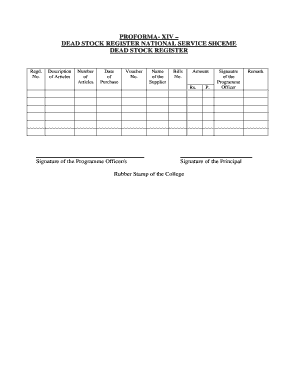
Dead Stock Register Form


What is the Dead Stock Register
The dead stock register is a crucial document used to track inventory items that are no longer sellable or usable. It serves as a record of items that have become obsolete, damaged, or expired. This register is particularly important for businesses and institutions, such as hospitals and schools, to maintain accurate inventory records and comply with regulatory requirements. By documenting dead stock, organizations can make informed decisions regarding disposal, write-offs, or potential recycling options.
How to Use the Dead Stock Register
Using the dead stock register involves several key steps. First, identify items that qualify as dead stock based on criteria such as age, condition, and usability. Next, enter these items into the register, including details like item description, quantity, date of acquisition, and reason for classification as dead stock. Regularly review and update the register to ensure accuracy and compliance with internal policies and external regulations. This practice helps organizations manage resources effectively and minimize losses associated with unsellable inventory.
Key Elements of the Dead Stock Register
A well-structured dead stock register should include essential elements to facilitate effective tracking and reporting. Key components typically include:
- Item Description: A clear description of each dead stock item.
- Quantity: The number of units classified as dead stock.
- Date of Acquisition: When the item was originally purchased or received.
- Reason for Classification: Explanation of why the item is considered dead stock.
- Disposal Method: How the item will be disposed of or written off.
- Comments: Additional notes or observations regarding the item.
Steps to Complete the Dead Stock Register
Completing the dead stock register involves a systematic approach. Follow these steps:
- Identify Dead Stock: Regularly assess inventory to determine which items are no longer sellable.
- Document Details: For each identified item, fill in the required fields in the register.
- Review Compliance: Ensure that the entries meet any relevant regulatory or organizational standards.
- Update Regularly: Periodically review and update the register to reflect changes in inventory status.
- Report Findings: Share the completed register with relevant stakeholders for transparency and decision-making.
Legal Use of the Dead Stock Register
The legal use of the dead stock register is essential for compliance with various regulations. Organizations must ensure that their documentation practices align with federal and state laws governing inventory management and financial reporting. Maintaining an accurate dead stock register can help protect businesses from potential legal issues related to mismanagement of inventory and financial discrepancies. Additionally, having a clear record can support audits and inspections by regulatory bodies.
Examples of Using the Dead Stock Register
There are various scenarios in which a dead stock register can be utilized effectively. For instance:
- In Retail: A clothing store may track unsold seasonal items that are no longer in demand.
- In Healthcare: A hospital can manage expired medical supplies to ensure compliance with health regulations.
- In Education: A school might document outdated textbooks that are no longer part of the curriculum.
These examples illustrate the versatility of the dead stock register across different sectors, highlighting its importance in effective inventory management.
Quick guide on how to complete dead stock register
Complete Dead Stock Register effortlessly on any device
Digital document management has gained traction among businesses and individuals. It offers a stellar eco-friendly substitute to traditional printed and signed papers, as you can obtain the necessary form and securely store it online. airSlate SignNow provides all the tools you require to create, edit, and eSign your documents quickly without delays. Handle Dead Stock Register on any device using airSlate SignNow Android or iOS applications and enhance any document-driven workflow today.
How to edit and eSign Dead Stock Register smoothly
- Obtain Dead Stock Register and click Get Form to begin.
- Utilize the tools we provide to fill out your document.
- Highlight key sections of your documents or redact sensitive information with tools that airSlate SignNow offers specifically for that purpose.
- Create your signature using the Sign tool, which takes mere seconds and holds the same legal validity as a conventional wet ink signature.
- Verify the details and click on the Done button to save your modifications.
- Choose how you would like to send your form, either via email, text message (SMS), invitation link, or download it to your computer.
Say goodbye to lost or misfiled documents, tiresome form navigation, or errors that necessitate printing new document copies. airSlate SignNow manages all your document management needs in just a few clicks from any device you prefer. Edit and eSign Dead Stock Register and ensure outstanding communication at every stage of the form preparation process with airSlate SignNow.
Create this form in 5 minutes or less
Create this form in 5 minutes!
How to create an eSignature for the dead stock register
How to create an electronic signature for a PDF online
How to create an electronic signature for a PDF in Google Chrome
How to create an e-signature for signing PDFs in Gmail
How to create an e-signature right from your smartphone
How to create an e-signature for a PDF on iOS
How to create an e-signature for a PDF on Android
People also ask
-
What is a dead stock register?
A dead stock register is a tool that helps businesses track and manage inventory items that are not selling. By maintaining a dead stock register, companies can identify slow-moving items, analyze their inventory, and make informed decisions about discounts or promotions to clear out excess stock.
-
How can airSlate SignNow help with managing a dead stock register?
airSlate SignNow provides businesses with customizable templates and eSignature capabilities that can streamline the documentation process for managing a dead stock register. You can easily generate stock reports, sign off on inventory clearance documents, and ensure all team members are aligned on inventory management practices.
-
Is there a cost associated with using the dead stock register feature in airSlate SignNow?
airSlate SignNow offers various pricing plans, including a free trial, allowing users to explore the dead stock register functionalities at no initial cost. Depending on your business needs, you can choose a plan that suits your requirements while benefiting from features designed to improve inventory management.
-
What benefits does a dead stock register provide for businesses?
Using a dead stock register helps businesses minimize losses by identifying items that are not selling. By tracking these products, companies can optimize inventory levels, reduce carrying costs, and improve overall profitability by making better stocking decisions.
-
Can I integrate airSlate SignNow with other inventory management systems to manage my dead stock register?
Yes, airSlate SignNow offers integration capabilities with various inventory management systems. This means you can seamlessly connect your dead stock register with your existing platforms to centralize data and enhance collaboration across teams involved in inventory management.
-
What features should I look for in a dead stock register?
When choosing a dead stock register, look for features like customizable reporting, automated alerts for slow-moving items, and eSigning capabilities to streamline approvals. airSlate SignNow includes all these features, ensuring you have the tools needed to efficiently manage your inventory.
-
How does eSigning benefit the process of maintaining a dead stock register?
eSigning simplifies the documentation process associated with a dead stock register by allowing stakeholders to sign off on reports or inventory adjustments electronically. This speeds up communication, reduces paperwork, and promotes a more agile inventory management process, ultimately saving time and resources for businesses.
Get more for Dead Stock Register
Find out other Dead Stock Register
- Electronic signature Arizona Finance & Tax Accounting Promissory Note Template Computer
- Electronic signature California Finance & Tax Accounting Warranty Deed Fast
- Can I Electronic signature Georgia Education Quitclaim Deed
- Electronic signature California Finance & Tax Accounting LLC Operating Agreement Now
- Electronic signature Connecticut Finance & Tax Accounting Executive Summary Template Myself
- Can I Electronic signature California Government Stock Certificate
- Electronic signature California Government POA Simple
- Electronic signature Illinois Education Business Plan Template Secure
- How Do I Electronic signature Colorado Government POA
- Electronic signature Government Word Illinois Now
- Can I Electronic signature Illinois Government Rental Lease Agreement
- Electronic signature Kentucky Government Promissory Note Template Fast
- Electronic signature Kansas Government Last Will And Testament Computer
- Help Me With Electronic signature Maine Government Limited Power Of Attorney
- How To Electronic signature Massachusetts Government Job Offer
- Electronic signature Michigan Government LLC Operating Agreement Online
- How To Electronic signature Minnesota Government Lease Agreement
- Can I Electronic signature Minnesota Government Quitclaim Deed
- Help Me With Electronic signature Mississippi Government Confidentiality Agreement
- Electronic signature Kentucky Finance & Tax Accounting LLC Operating Agreement Myself