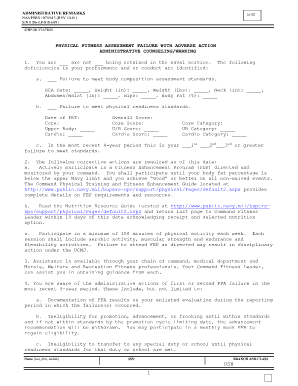
Page 13 2012


What is the Page 13
The Page 13, also known as the Navy Page 13 form, is an essential document used by the United States Navy for recording administrative remarks. This form is part of the NAVPERS 1070 series and serves as a means to document significant events, achievements, or disciplinary actions related to a service member's career. It is crucial for maintaining a comprehensive personnel record, which can impact promotions, evaluations, and other career-related decisions. The Page 13 is utilized by commanding officers and personnel specialists to ensure that all relevant information about a sailor is accurately captured and reported.
How to Use the Page 13
Using the Page 13 involves several key steps to ensure that the information recorded is both accurate and relevant. First, the commanding officer or authorized personnel must determine the need for a Page 13 entry based on specific events or actions. Once the decision is made, the appropriate sections of the form must be filled out, including details such as the date of the entry, the nature of the remark, and any supporting documentation. After completion, the form should be signed by the appropriate authority and placed in the service member's official record. It is important to follow proper procedures to ensure that the entry is legally valid and recognized by the Navy.
Steps to Complete the Page 13
Completing the Page 13 requires careful attention to detail. Here are the essential steps:
- Identify the purpose of the Page 13 entry, such as a commendation or disciplinary action.
- Gather any necessary documentation or evidence to support the entry.
- Fill out the form, ensuring all required fields are completed accurately.
- Review the entry for clarity and correctness, making any necessary adjustments.
- Obtain the necessary signatures from the commanding officer or authorized personnel.
- Submit the completed Page 13 to the appropriate personnel office for inclusion in the service member's record.
Legal Use of the Page 13
The legal use of the Page 13 is governed by Navy regulations, which stipulate how and when this form should be utilized. It is considered a legal document that can be referenced in official proceedings, including evaluations and disciplinary hearings. To ensure its legal validity, all entries must be factual, documented, and signed by the appropriate authority. Misuse or falsification of a Page 13 can lead to serious consequences, including disciplinary action against the individual responsible for the entry.
Key Elements of the Page 13
Several key elements must be included in a Page 13 to ensure it serves its intended purpose effectively:
- Date: The date of the entry must be clearly indicated.
- Type of Remark: Specify whether the entry is a commendation, disciplinary action, or other significant event.
- Description: Provide a detailed account of the event or action being documented.
- Signatures: Include signatures from the individual making the entry and the commanding officer.
- Supporting Documentation: Attach any relevant documents that support the remarks made in the entry.
Examples of Using the Page 13
Examples of using the Page 13 include documenting commendations for exceptional performance, noting disciplinary actions for violations of Navy regulations, or recording significant personal achievements such as completing a military course. Each entry should be clear and concise, providing enough context for future reference. For instance, a commendation might include details about a specific mission where the service member demonstrated outstanding leadership, while a disciplinary entry might outline the nature of the infraction and any corrective actions taken.
Quick guide on how to complete page 13
Accomplish Page 13 effortlessly on any device
Online document administration has gained traction among businesses and individuals alike. It serves as an ideal eco-friendly substitute for traditional printed and signed documents, as you can easily access the necessary form and securely store it online. airSlate SignNow equips you with all the tools required to create, adjust, and electronically sign your documents promptly without delays. Manage Page 13 on any device using the airSlate SignNow Android or iOS applications and enhance any document-based operation today.
The simplest way to modify and electronically sign Page 13 with ease
- Find Page 13 and click Get Form to begin.
- Utilize the tools we provide to complete your document.
- Emphasize important sections of the documents or obscure sensitive information with tools that airSlate SignNow offers specifically for this purpose.
- Generate your signature using the Sign tool, which takes moments and has the same legal validity as a conventional wet ink signature.
- Review all the details and click on the Done button to save your changes.
- Select your preferred method of sharing your form, whether by email, text message (SMS), or invite link, or download it to your computer.
Eliminate concerns about lost or mislaid files, tedious form searches, or errors that necessitate printing new document copies. airSlate SignNow fulfills all your document management requirements in just a few clicks from any device of your preference. Modify and electronically sign Page 13 and guarantee outstanding communication at every stage of the form preparation process with airSlate SignNow.
Create this form in 5 minutes or less
Find and fill out the correct page 13
Create this form in 5 minutes!
How to create an eSignature for the page 13
How to create an electronic signature for a PDF online
How to create an electronic signature for a PDF in Google Chrome
How to create an e-signature for signing PDFs in Gmail
How to create an e-signature right from your smartphone
How to create an e-signature for a PDF on iOS
How to create an e-signature for a PDF on Android
People also ask
-
What is a page 13 in the navy?
A page 13 in the navy refers to a document used to inform sailors about signNow changes or updates in their service record. This can include administrative actions like commendations, disciplinary actions, or changes to duty assignments. Understanding what a page 13 in the navy entails is crucial for maintaining an accurate service record and ensuring career progression.
-
How do I fill out a page 13 in the navy?
Filling out a page 13 in the navy involves following specific guidelines set by your command. You'll need to include details such as the reason for the page 13, supporting documentation, and appropriate signatures. It's essential to know what a page 13 in the navy requires to ensure that it is correctly processed and recorded.
-
What are the benefits of using airSlate SignNow for handling page 13 documents?
Using airSlate SignNow simplifies the process of sending and signing page 13 documents electronically. It offers a user-friendly interface, reducing the time spent on paperwork. By leveraging our platform, you can ensure your page 13 in the navy is securely handled and quickly approved.
-
Can airSlate SignNow integrate with military document management systems?
Yes, airSlate SignNow can integrate seamlessly with various military document management systems. This integration allows you to manage your page 13 in the navy and other important documents more efficiently. The ease of integration helps streamline your workflow and reduces administrative burdens.
-
What is the pricing structure for airSlate SignNow's eSigning services?
airSlate SignNow offers flexible pricing plans to fit various business needs. Our cost-effective solutions ensure that you can manage and sign your page 13 in the navy and other documents without breaking the bank. Check our website for detailed information on pricing tiers and subscribe to a plan that suits your requirements.
-
How secure is the transmission of page 13 documents using airSlate SignNow?
The transmission of page 13 documents using airSlate SignNow is highly secure. We employ industry-standard encryption and compliance measures to safeguard your information. With airSlate SignNow, you can be confident that your page 13 in the navy is protected against unauthorized access.
-
Is there customer support available for airSlate SignNow users?
Absolutely, customer support is readily available for all airSlate SignNow users. If you have questions about what a page 13 in the navy entails or how to use our features, our support team is here to assist you. We strive to provide timely and effective help to ensure you have the best experience possible.
Get more for Page 13
Find out other Page 13
- How To Integrate Sign in Banking
- How To Use Sign in Banking
- Help Me With Use Sign in Banking
- Can I Use Sign in Banking
- How Do I Install Sign in Banking
- How To Add Sign in Banking
- How Do I Add Sign in Banking
- How Can I Add Sign in Banking
- Can I Add Sign in Banking
- Help Me With Set Up Sign in Government
- How To Integrate eSign in Banking
- How To Use eSign in Banking
- How To Install eSign in Banking
- How To Add eSign in Banking
- How To Set Up eSign in Banking
- How To Save eSign in Banking
- How To Implement eSign in Banking
- How To Set Up eSign in Construction
- How To Integrate eSign in Doctors
- How To Use eSign in Doctors