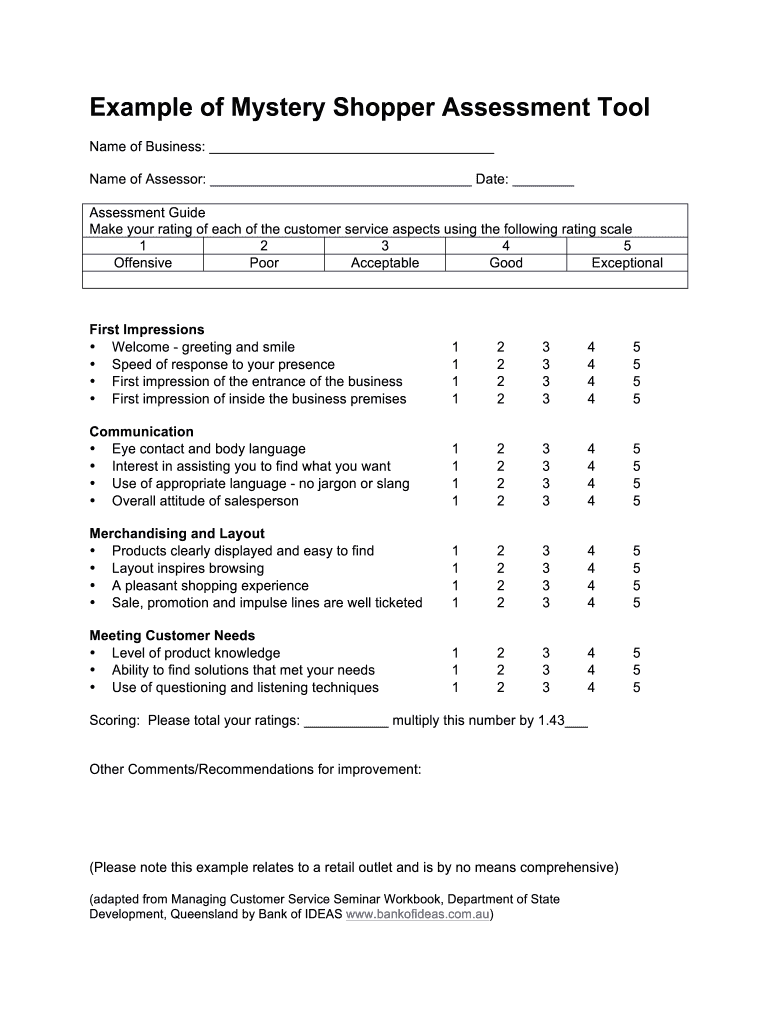
Mystery Shopper Assessment Form


What is the Mystery Shopper Assessment Form
The Mystery Shopper Assessment Form is a structured document used by companies like Texas Roadhouse to evaluate customer service and operational standards. This form allows secret shoppers to provide detailed feedback on their dining experience, covering aspects such as service quality, cleanliness, and menu accuracy. By utilizing this form, businesses can gain insights into customer perceptions and identify areas for improvement.
How to use the Mystery Shopper Assessment Form
To effectively use the Mystery Shopper Assessment Form, follow these steps:
- Review the form carefully before your visit to understand the criteria you will be assessing.
- During your visit, take notes on your experience, focusing on the specific areas outlined in the form.
- After your visit, fill out the form with your observations, ensuring you provide detailed and honest feedback.
- Submit the completed form according to the instructions provided, whether online or in person.
Steps to complete the Mystery Shopper Assessment Form
Completing the Mystery Shopper Assessment Form involves several key steps:
- Gather necessary information, such as the date and time of your visit.
- Assess various elements, including staff interactions, food quality, and overall atmosphere.
- Be specific in your comments; use examples to illustrate your points.
- Double-check your form for completeness before submission to ensure all sections are filled out.
Key elements of the Mystery Shopper Assessment Form
The Mystery Shopper Assessment Form typically includes several key elements:
- Service Evaluation: Ratings and comments on staff friendliness and efficiency.
- Food Quality: Assessment of taste, presentation, and temperature of the food served.
- Cleanliness: Observations regarding the restaurant's hygiene and maintenance.
- Overall Experience: A summary of your visit, including any notable positives or negatives.
Legal use of the Mystery Shopper Assessment Form
Using the Mystery Shopper Assessment Form legally requires adherence to specific guidelines. It is essential to ensure that the form is filled out truthfully and accurately to avoid any legal repercussions. Misrepresentation or false reporting can lead to penalties for both the secret shopper and the business involved. Always keep in mind the importance of integrity in your assessments.
How to obtain the Mystery Shopper Assessment Form
The Mystery Shopper Assessment Form can typically be obtained through the Texas Roadhouse secret shopper program. Interested individuals may need to apply to become a secret shopper, and upon approval, they will receive access to the necessary forms and guidelines. This process often involves registering on a designated platform or contacting the company's customer service for further instructions.
Quick guide on how to complete example of mystery shopper assessment tool form
A brief guide on how to create your Mystery Shopper Assessment Form
Finding the correct template can turn into a difficulty when you are required to provide official international documentation. Even if you possess the necessary form, it can be cumbersome to swiftly complete it per all the specifications if you opt for printed copies rather than managing everything digitally. airSlate SignNow is the web-based electronic signature tool that assists you in overcoming these obstacles. It allows you to select your Mystery Shopper Assessment Form and promptly fill it out and sign it on-site without needing to reprint papers each time you make a mistake.
Here are the actions you need to take to create your Mystery Shopper Assessment Form with airSlate SignNow:
- Select the Import Form button to upload your document to our editor instantly.
- Begin with the first blank section, enter your information, and proceed with the Next feature.
- Complete the empty fields using the Cross and Check tools from the toolbar above.
- Opt for the Highlight or Line options to emphasize the most signNow information.
- Click on Image and upload one if your Mystery Shopper Assessment Form requires it.
- Utilize the right-side panel to add extra sections for you or others to complete if needed.
- Review your responses and validate the form by clicking Date, Initials, and Sign.
- Draw, type, or upload your eSignature, or capture it using a camera or QR code.
- Conclude editing by selecting the Complete button and choosing your file-sharing preferences.
When your Mystery Shopper Assessment Form is ready, you can distribute it however you prefer - send it to your recipients via email, SMS, fax, or even print it directly from the editor. You can also securely keep all your finalized documents in your account, organized in folders according to your liking. Don’t squander time on manual form filling; try airSlate SignNow!
Create this form in 5 minutes or less
FAQs
-
How can I fill out Google's intern host matching form to optimize my chances of receiving a match?
I was selected for a summer internship 2016.I tried to be very open while filling the preference form: I choose many products as my favorite products and I said I'm open about the team I want to join.I even was very open in the location and start date to get host matching interviews (I negotiated the start date in the interview until both me and my host were happy.) You could ask your recruiter to review your form (there are very cool and could help you a lot since they have a bigger experience).Do a search on the potential team.Before the interviews, try to find smart question that you are going to ask for the potential host (do a search on the team to find nice and deep questions to impress your host). Prepare well your resume.You are very likely not going to get algorithm/data structure questions like in the first round. It's going to be just some friendly chat if you are lucky. If your potential team is working on something like machine learning, expect that they are going to ask you questions about machine learning, courses related to machine learning you have and relevant experience (projects, internship). Of course you have to study that before the interview. Take as long time as you need if you feel rusty. It takes some time to get ready for the host matching (it's less than the technical interview) but it's worth it of course.
-
How do I fill out the form of DU CIC? I couldn't find the link to fill out the form.
Just register on the admission portal and during registration you will get an option for the entrance based course. Just register there. There is no separate form for DU CIC.
-
I have a class lesson assessment form that I need to have filled out for 75 lessons. The form will be exactly the same except for the course number. How would you do this?
Another way would be to use the option of getting pre-filled answers with the course numbers entered. A custom URL is created and the form would collect the answers for all of the courses in the same spreadsheet. Not sure if that creates another problem for you, but you could sort OR filter the sheet once all the forms had been submitted. This is what the URL would look like for a Text Box https://docs.google.com/forms/d/1Ia6-paRijdUOn8U2L2H0bF1yujktcqgDsdBJQy2yO30/viewform?entry.14965048=COURSE+NUMBER+75 The nice thing about this is you can just change the part of the URL that Contains "COURSE+NUMBER+75" to a different number...SO for course number 1 it would be https://docs.google.com/forms/d/1Ia6-paRijdUOn8U2L2H0bF1yujktcqgDsdBJQy2yO30/viewform?entry.14965048=COURSE+NUMBER+1This is what the URL would look like for a Text Box radio button, same concept. https://docs.google.com/forms/d/1Ia6-paRijdUOn8U2L2H0bF1yujktcqgDsdBJQy2yO30/viewform?entry.14965048&entry.1934317001=Option+1 OR https://docs.google.com/forms/d/1Ia6-paRijdUOn8U2L2H0bF1yujktcqgDsdBJQy2yO30/viewform?entry.14965048&entry.1934317001=Option+6The Google Doc would look like this Quora pre-filled form I'm not sure if this helps at all or makes too complicated and prone to mistakes.
-
How can I get a lot of people to fill out my Google form survey for a research paper?
First of all, to get a lot of responses for your survey don't forget to follow main rules of creating a survey. Here are some of them:Create and design an invitation page, sett the information about why it is so important for you to get the answers there; also write the purpose of your survey.Make your survey short. Remember that people spend their time answering questions.Preset your goal, decide what information you want to get in the end. Prepare list of questions, which would be the most important for you.Give your respondents enough time to answer a survey.Don't forget to say "Thank you!", be polite.Besides, if you want to get more responses, you can use these tips:1.The first one is to purchase responses from survey panel. You can use MySurveyLab’s survey panel for it. In this case you will get reliable and useful results. You can read more about it here.2.If you don’t want to spent money for responses, you can use the second solution. The mentioned tool enables sharing the survey via different channels: email (invitations and e-mail embedded surveys, SMS, QR codes, as a link.You can share the link on different social media, like Twitter, Facebook, Facebook groups, different forums could be also useful, Pinterest, LinkedIn, VKontakte and so on… I think that if you use all these channels, you could get planned number of responses.Hope to be helpful! Good luck!
Create this form in 5 minutes!
How to create an eSignature for the example of mystery shopper assessment tool form
How to generate an eSignature for the Example Of Mystery Shopper Assessment Tool Form in the online mode
How to make an electronic signature for your Example Of Mystery Shopper Assessment Tool Form in Chrome
How to generate an eSignature for putting it on the Example Of Mystery Shopper Assessment Tool Form in Gmail
How to make an electronic signature for the Example Of Mystery Shopper Assessment Tool Form right from your smartphone
How to generate an electronic signature for the Example Of Mystery Shopper Assessment Tool Form on iOS
How to create an electronic signature for the Example Of Mystery Shopper Assessment Tool Form on Android OS
People also ask
-
What is a Mystery Shopper Assessment Form?
A Mystery Shopper Assessment Form is a tool used to evaluate customer service and operational standards through anonymous assessments. With airSlate SignNow, you can create and send these forms quickly, enabling you to gather valuable feedback and improve your business operations.
-
How can I use the Mystery Shopper Assessment Form in my business?
You can use the Mystery Shopper Assessment Form to assess various aspects of your business, such as customer service, product quality, and store cleanliness. By utilizing airSlate SignNow's easy-to-use platform, you can efficiently distribute these forms to your mystery shoppers and collect their insights in real-time.
-
What features does the airSlate SignNow offer for the Mystery Shopper Assessment Form?
airSlate SignNow provides a range of features for the Mystery Shopper Assessment Form, including customizable templates, electronic signatures, and real-time tracking. These features enhance the form's effectiveness, allowing you to streamline your assessment process and improve the quality of feedback collected.
-
Is the Mystery Shopper Assessment Form customizable?
Yes, the Mystery Shopper Assessment Form is fully customizable with airSlate SignNow. You can tailor the questions, format, and branding to suit your specific needs, ensuring that the assessments align perfectly with your business objectives and customer expectations.
-
What are the benefits of using a Mystery Shopper Assessment Form?
Using a Mystery Shopper Assessment Form helps businesses identify strengths and weaknesses in their customer service. This valuable feedback enables you to implement targeted improvements, ultimately enhancing customer satisfaction and loyalty, which are vital for long-term success.
-
How much does it cost to use the Mystery Shopper Assessment Form with airSlate SignNow?
The pricing for using the Mystery Shopper Assessment Form with airSlate SignNow varies depending on your chosen plan. airSlate SignNow offers cost-effective solutions that provide signNow value, making it easier for businesses of all sizes to implement and manage their assessment processes.
-
Can I integrate the Mystery Shopper Assessment Form with other applications?
Yes, airSlate SignNow allows seamless integration of the Mystery Shopper Assessment Form with various applications. This capability enables you to connect your assessment data with CRM systems, email marketing tools, and more, enhancing your overall data management and analysis.
Get more for Mystery Shopper Assessment Form
Find out other Mystery Shopper Assessment Form
- How Can I Electronic signature Oklahoma Doctors Document
- How Can I Electronic signature Alabama Finance & Tax Accounting Document
- How To Electronic signature Delaware Government Document
- Help Me With Electronic signature Indiana Education PDF
- How To Electronic signature Connecticut Government Document
- How To Electronic signature Georgia Government PDF
- Can I Electronic signature Iowa Education Form
- How To Electronic signature Idaho Government Presentation
- Help Me With Electronic signature Hawaii Finance & Tax Accounting Document
- How Can I Electronic signature Indiana Government PDF
- How Can I Electronic signature Illinois Finance & Tax Accounting PPT
- How To Electronic signature Maine Government Document
- How To Electronic signature Louisiana Education Presentation
- How Can I Electronic signature Massachusetts Government PDF
- How Do I Electronic signature Montana Government Document
- Help Me With Electronic signature Louisiana Finance & Tax Accounting Word
- How To Electronic signature Pennsylvania Government Document
- Can I Electronic signature Texas Government PPT
- How To Electronic signature Utah Government Document
- How To Electronic signature Washington Government PDF