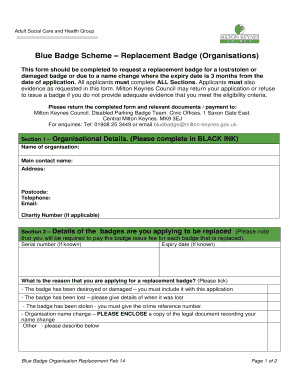
Blue Badge Milton Keynes Form


What is the Blue Badge Milton Keynes
The Blue Badge Milton Keynes is a parking permit designed to assist individuals with disabilities. This program allows eligible individuals to park closer to their destinations, ensuring greater accessibility. The Blue Badge is recognized across the United Kingdom, providing benefits such as parking in designated spaces and extended parking durations in certain areas. It is essential for those who have mobility challenges, enabling them to maintain independence while navigating public spaces.
Eligibility Criteria
To qualify for the Blue Badge Milton Keynes, applicants must meet specific eligibility criteria. Generally, individuals must have a permanent disability that severely limits their mobility. This includes conditions such as visual impairments, physical disabilities, or cognitive impairments that affect the ability to travel independently. Additionally, applicants may need to provide medical documentation and evidence of their condition to support their application.
Steps to Complete the Blue Badge Milton Keynes
Completing the Blue Badge renewal form involves several steps to ensure a smooth application process. First, gather all necessary documentation, including proof of identity and any medical evidence required. Next, fill out the Blue Badge renewal form accurately, ensuring all information is complete. Once the form is filled out, submit it according to the specified submission methods, which may include online, by mail, or in person. Finally, keep a record of your submission and any correspondence related to your application for future reference.
Required Documents
When applying for the Blue Badge Milton Keynes, specific documents are required to support your application. These typically include:
- Proof of identity, such as a driver's license or passport.
- Medical evidence demonstrating the nature of your disability.
- Proof of residency in Milton Keynes.
- Any previous Blue Badge documentation, if applicable.
It is essential to ensure that all documents are current and accurately reflect your situation to avoid delays in processing your application.
Form Submission Methods
The Blue Badge renewal form can be submitted through various methods to accommodate different preferences. Applicants can choose to:
- Submit the form online through the Milton Keynes Council website.
- Send the completed form by mail to the designated council office.
- Deliver the form in person at the local council office.
Each method has its advantages, with online submissions often being the quickest way to ensure your application is received and processed.
Legal Use of the Blue Badge Milton Keynes
The legal use of the Blue Badge Milton Keynes is governed by specific regulations that outline where and how the badge can be used. Holders are permitted to park in designated Blue Badge spaces and may also park on single or double yellow lines for a limited time, provided it does not obstruct traffic. Misuse of the Blue Badge, such as using it when the holder is not present, can result in penalties, including fines or revocation of the badge.
Quick guide on how to complete blue badge milton keynes
Effortlessly Prepare Blue Badge Milton Keynes on Any Device
Digital document management has gained traction among businesses and individuals. It offers an excellent eco-friendly substitute for conventional printed and signed papers, allowing you to obtain the appropriate format and securely store it online. airSlate SignNow equips you with all the necessary tools to create, modify, and eSign your documents rapidly without delays. Manage Blue Badge Milton Keynes on any device using airSlate SignNow Android or iOS applications and enhance any document-related process today.
The Easiest Way to Edit and eSign Blue Badge Milton Keynes with Ease
- Obtain Blue Badge Milton Keynes and click on Get Form to begin.
- Utilize the tools we provide to complete your form.
- Emphasize important sections of your documents or obscure sensitive information with tools specifically designed for that purpose by airSlate SignNow.
- Create your eSignature with the Sign tool, which takes seconds and holds the same legal validity as a traditional handwritten signature.
- Review the information and click on the Done button to save your edits.
- Choose your preferred method for delivering your form, whether by email, text message (SMS), invitation link, or download it to your computer.
Say goodbye to lost or misplaced documents, tedious form navigation, or mistakes that necessitate printing new copies. airSlate SignNow meets your document management needs in just a few clicks from any device you choose. Modify and eSign Blue Badge Milton Keynes and ensure outstanding communication at every stage of your form preparation process with airSlate SignNow.
Create this form in 5 minutes or less
Create this form in 5 minutes!
How to create an eSignature for the blue badge milton keynes
How to create an electronic signature for a PDF online
How to create an electronic signature for a PDF in Google Chrome
How to create an e-signature for signing PDFs in Gmail
How to create an e-signature right from your smartphone
How to create an e-signature for a PDF on iOS
How to create an e-signature for a PDF on Android
People also ask
-
What is the process to renew a blue badge in Milton Keynes?
To renew a blue badge in Milton Keynes, you need to complete an application form available on the council's website. Be prepared to provide evidence of your eligibility and any supporting documents required for your application. Once submitted, you'll receive confirmation once your blue badge is processed.
-
How much does it cost to renew a blue badge in Milton Keynes?
The cost to renew a blue badge in Milton Keynes is currently set at a nominal fee, which can be found on the official Milton Keynes council website. This renew blue badge Milton Keynes fee is subject to periodic reviews, so it's advisable to check the site for the latest information before applying.
-
What are the benefits of renewing my blue badge in Milton Keynes?
Renewing your blue badge in Milton Keynes allows you to enjoy parking advantages, including free parking in designated areas and extended parking duration. This convenience can greatly enhance mobility for those who need assistance due to disability. Additionally, having a renewed badge offers peace of mind knowing you can access these facilities with ease.
-
Can I renew my blue badge online in Milton Keynes?
Yes, you can renew your blue badge online in Milton Keynes through the council's dedicated service platform. This option provides a convenient way to manage your application and track its status. Ensure all required documents are ready in digital format to streamline the renewal process.
-
What documents do I need to renew my blue badge in Milton Keynes?
To renew your blue badge in Milton Keynes, you typically need proof of identity, proof of residency, and any medical documentation that highlights your eligibility. It’s important to check the specific requirements outlined on the Milton Keynes council website. Proper documentation helps ensure a smooth and fast renewal process.
-
How long does it take to process a blue badge renewal in Milton Keynes?
The processing time to renew a blue badge in Milton Keynes can vary, but it's usually completed within a few weeks. You may check the current timelines on the Milton Keynes council website for the most accurate updates. Staying informed can help manage your expectations during the renewal process.
-
Can I use my blue badge from another area in Milton Keynes?
While blue badges are generally valid across the UK, it's advisable to check specific regulations regarding their use in Milton Keynes. If you hold a badge from another area, ensure that it's still valid and meets local guidelines. This ensures compliance and avoids any parking fines or issues.
Get more for Blue Badge Milton Keynes
- Radical forgiveness acceptaance worksheet radical forgiveness acceptaance worksheet form
- Goaf gov in result 23 form
- Complete dominance mendelian genetics worksheet answer key form
- Sinhala keyboard layout form
- Aircraft inspection report biennial airworthiness form
- Starlarvae org embryology answer key form
- Chapter 9 test b geometry answers form
- Letter of financial support university of dayton form
Find out other Blue Badge Milton Keynes
- eSignature Minnesota Sports Rental Lease Agreement Free
- eSignature Minnesota Sports Promissory Note Template Fast
- eSignature Minnesota Sports Forbearance Agreement Online
- eSignature Oklahoma Real Estate Business Plan Template Free
- eSignature South Dakota Police Limited Power Of Attorney Online
- How To eSignature West Virginia Police POA
- eSignature Rhode Island Real Estate Letter Of Intent Free
- eSignature Rhode Island Real Estate Business Letter Template Later
- eSignature South Dakota Real Estate Lease Termination Letter Simple
- eSignature Tennessee Real Estate Cease And Desist Letter Myself
- How To eSignature New Mexico Sports Executive Summary Template
- Can I eSignature Utah Real Estate Operating Agreement
- eSignature Vermont Real Estate Warranty Deed Online
- eSignature Vermont Real Estate Operating Agreement Online
- eSignature Utah Real Estate Emergency Contact Form Safe
- eSignature Washington Real Estate Lease Agreement Form Mobile
- How Can I eSignature New York Sports Executive Summary Template
- eSignature Arkansas Courts LLC Operating Agreement Now
- How Do I eSignature Arizona Courts Moving Checklist
- eSignature Wyoming Real Estate Quitclaim Deed Myself