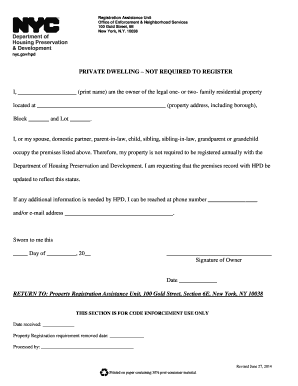
Private Dwelling Not Required to Register 2014


What is the Private Dwelling Not Required to Register
The private dwelling not required to register form is a document that allows individuals to declare their residential property status without the need for formal registration. This form is particularly relevant for homeowners who may not be required to register their property with local authorities due to specific exemptions or criteria. Understanding this form is essential for ensuring compliance with local housing regulations and for maintaining accurate property records.
How to Use the Private Dwelling Not Required to Register
Using the private dwelling not required to register form involves a straightforward process. First, gather all necessary information about your property, including its address, ownership details, and any relevant exemptions that apply. Next, fill out the form accurately, ensuring that all required fields are completed. Once the form is filled out, it can be submitted to the appropriate local authority, either online or via mail, depending on the submission methods available in your area.
Key Elements of the Private Dwelling Not Required to Register
Several key elements are essential when completing the private dwelling not required to register form. These include:
- Property Address: The complete address of the dwelling.
- Owner Information: Full name and contact details of the property owner.
- Exemption Criteria: Specific reasons why registration is not required, such as being a primary residence or meeting certain local criteria.
- Signature: The form must be signed by the property owner to validate the information provided.
Steps to Complete the Private Dwelling Not Required to Register
To complete the private dwelling not required to register form, follow these steps:
- Collect necessary information about your property and ownership.
- Obtain the form from your local authority's website or office.
- Fill out the form, ensuring all information is accurate and complete.
- Review the form for any errors or omissions.
- Sign the form to authenticate your submission.
- Submit the form according to your local authority's guidelines.
Legal Use of the Private Dwelling Not Required to Register
The legal use of the private dwelling not required to register form is crucial for homeowners who wish to maintain compliance with local housing laws. By submitting this form, property owners can clarify their status and avoid potential penalties associated with unregistered properties. It is essential to ensure that all information provided is truthful and accurate, as any discrepancies may lead to legal repercussions.
Quick guide on how to complete private dwelling not required to register
Complete Private Dwelling Not Required To Register easily on any device
Digital document management has gained popularity among companies and individuals. It offers an excellent eco-friendly alternative to conventional printed and signed documents, as you can access the necessary form and securely save it online. airSlate SignNow provides all the tools you need to generate, modify, and eSign your documents swiftly and without delays. Handle Private Dwelling Not Required To Register on any device with airSlate SignNow's Android or iOS applications and enhance any document-centered task today.
How to modify and eSign Private Dwelling Not Required To Register effortlessly
- Obtain Private Dwelling Not Required To Register and then click Get Form to begin.
- Utilize the tools we provide to finalize your document.
- Spotlight important sections of the documents or obscure sensitive information with tools that airSlate SignNow offers for that purpose.
- Create your eSignature using the Sign tool, which takes just seconds and carries the same legal validity as a traditional handwritten signature.
- Review all the details and then click the Done button to save your modifications.
- Choose how you wish to deliver your form, via email, text message (SMS), or invite link, or download it to your computer.
Eliminate the hassle of lost or mislaid files, tedious form searching, or errors that require printing new document copies. airSlate SignNow meets all your document management needs with just a few clicks from any device of your choosing. Modify and eSign Private Dwelling Not Required To Register and ensure excellent communication at every stage of the form preparation process with airSlate SignNow.
Create this form in 5 minutes or less
Find and fill out the correct private dwelling not required to register
Create this form in 5 minutes!
How to create an eSignature for the private dwelling not required to register
How to create an electronic signature for a PDF online
How to create an electronic signature for a PDF in Google Chrome
How to create an e-signature for signing PDFs in Gmail
How to create an e-signature right from your smartphone
How to create an e-signature for a PDF on iOS
How to create an e-signature for a PDF on Android
People also ask
-
What is the purpose of the private dwelling not required to register form?
The private dwelling not required to register form allows homeowners to confirm that their property is not subject to registration requirements, streamlining various administrative processes. It is essential for those looking to manage their properties without unnecessary bureaucratic hurdles. Utilizing airSlate SignNow, this form can be easily prepared and electronically signed.
-
How much does it cost to use the airSlate SignNow service for the private dwelling not required to register form?
airSlate SignNow offers flexible pricing plans that cater to different needs, ensuring you can manage the private dwelling not required to register form affordably. Pricing may vary based on features and usage, but it remains a cost-effective solution for individuals and businesses alike. Check our website for the most current pricing options.
-
What features does airSlate SignNow provide for managing the private dwelling not required to register form?
airSlate SignNow offers robust features for managing the private dwelling not required to register form, including document creation, eSignature capabilities, and workflow automation. You can easily customize templates and track the status of your documents in real-time. These features enhance efficiency and ensure secure handling of your forms.
-
Can I integrate airSlate SignNow with other software to manage the private dwelling not required to register form?
Yes, airSlate SignNow provides seamless integrations with various applications, allowing you to manage the private dwelling not required to register form alongside your existing tools. Whether you use CRM systems, cloud storage services, or project management platforms, integration is straightforward. This connectivity ensures a smooth workflow and enhanced productivity.
-
How does using airSlate SignNow benefit me when dealing with the private dwelling not required to register form?
By using airSlate SignNow for the private dwelling not required to register form, you benefit from a user-friendly interface and enhanced security features. The ability to sign documents electronically saves time and reduces paper waste, making the process more efficient. Furthermore, it provides legal binding assurance in electronic signatures.
-
Is there a mobile app for airSlate SignNow to handle the private dwelling not required to register form?
Yes, airSlate SignNow has a mobile app that allows you to manage the private dwelling not required to register form on the go. This functionality offers convenience and flexibility, enabling you to create, send, and sign documents anytime, anywhere. The mobile app maintains the same security and reliability as the desktop version.
-
What support options are available if I have questions about the private dwelling not required to register form?
airSlate SignNow provides comprehensive support options for any questions related to the private dwelling not required to register form. You can access online resources, including tutorials and FAQs, or contact our customer support team for immediate assistance. Our team is dedicated to helping you navigate your eSigning needs efficiently.
Get more for Private Dwelling Not Required To Register
Find out other Private Dwelling Not Required To Register
- eSign Nebraska Charity LLC Operating Agreement Secure
- How Do I eSign Nevada Charity Lease Termination Letter
- eSign New Jersey Charity Resignation Letter Now
- eSign Alaska Construction Business Plan Template Mobile
- eSign Charity PPT North Carolina Now
- eSign New Mexico Charity Lease Agreement Form Secure
- eSign Charity PPT North Carolina Free
- eSign North Dakota Charity Rental Lease Agreement Now
- eSign Arkansas Construction Permission Slip Easy
- eSign Rhode Island Charity Rental Lease Agreement Secure
- eSign California Construction Promissory Note Template Easy
- eSign Colorado Construction LLC Operating Agreement Simple
- Can I eSign Washington Charity LLC Operating Agreement
- eSign Wyoming Charity Living Will Simple
- eSign Florida Construction Memorandum Of Understanding Easy
- eSign Arkansas Doctors LLC Operating Agreement Free
- eSign Hawaii Construction Lease Agreement Mobile
- Help Me With eSign Hawaii Construction LLC Operating Agreement
- eSign Hawaii Construction Work Order Myself
- eSign Delaware Doctors Quitclaim Deed Free