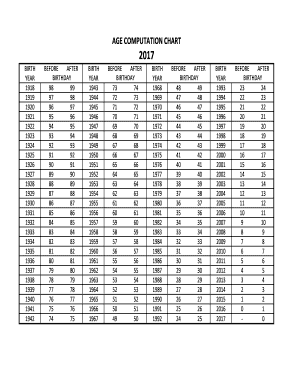
Age Computation Chart Form


What is the Age Computation Chart
The age computation chart is a vital tool used to determine the age of individuals based on their birth dates. It provides a clear and systematic way to calculate age in various contexts, such as legal documents, applications, and other formal requirements. This chart typically lists years and corresponding ages, allowing users to quickly find the age associated with a specific birth year. Utilizing the age computation chart ensures accuracy and consistency in age-related calculations, which is essential for compliance with various regulations.
How to use the Age Computation Chart
Using the age computation chart is straightforward. First, locate the year of birth on the chart. Next, trace horizontally across to find the corresponding age for the current year. This method allows for quick reference without complex calculations. For example, if someone was born in 1990 and the current year is 2024, the chart will indicate that the individual is 34 years old. This simple process can be beneficial for filling out forms or verifying age for legal purposes.
Legal use of the Age Computation Chart
The age computation chart is legally recognized in many contexts, particularly when it comes to age verification for contracts, applications, and other official documents. To ensure compliance, it is essential to use the chart accurately, as discrepancies in age can lead to legal issues. For instance, certain age-related regulations apply to employment, healthcare, and education, making it crucial to provide the correct age as per the chart. This tool helps maintain transparency and legality in various transactions and agreements.
Steps to complete the Age Computation Chart
Completing the age computation chart involves a few simple steps. Begin by entering the individual's date of birth in the designated area. Next, identify the current year and locate it on the chart. Cross-reference the birth year with the current year to determine the age. Ensure that all information is accurate to avoid any potential issues. Finally, review the completed chart to confirm that it aligns with the necessary requirements for the intended use, whether for legal documentation or personal reference.
Key elements of the Age Computation Chart
Several key elements define the age computation chart. These include the year of birth, the corresponding age, and any relevant notes regarding specific age-related regulations. The chart should be clear and easy to read, with distinct columns for years and ages. Additionally, it may include examples or scenarios to illustrate how to use the chart effectively. Understanding these elements is crucial for users to navigate the chart confidently and accurately.
Examples of using the Age Computation Chart
Examples of using the age computation chart can clarify its practical applications. For instance, a parent may use the chart to verify their child's age for school enrollment. Similarly, an employer might reference the chart to confirm the age of a job applicant to ensure compliance with labor laws. Additionally, individuals applying for government benefits may need to provide their age as calculated by the chart. These examples highlight the chart's importance across various situations where age verification is necessary.
Quick guide on how to complete age computation chart
Complete Age Computation Chart effortlessly on any device
Managing documents online has become increasingly popular with both businesses and individuals. It offers a perfect eco-friendly alternative to traditional printed and signed papers, allowing you to access the correct form and securely store it in the cloud. airSlate SignNow provides you with all the tools necessary to create, edit, and electronically sign your documents quickly without delays. Handle Age Computation Chart on any device with the airSlate SignNow mobile applications for Android or iOS and simplify any document-related task today.
How to modify and electronically sign Age Computation Chart with ease
- Obtain Age Computation Chart and then click Get Form to begin.
- Utilize the tools we provide to fill out your form.
- Mark important sections of your documents or redact sensitive data with tools specifically designed for that purpose by airSlate SignNow.
- Create your eSignature using the Sign tool, which only takes seconds and holds the same legal validity as a traditional handwritten signature.
- Review the information and then click on the Done button to save your changes.
- Choose how to send your form, whether by email, SMS, or invitation link, or download it to your computer.
Say goodbye to lost or misplaced documents, tedious form searches, or mistakes requiring new document copies. airSlate SignNow addresses your document management needs in just a few clicks from any device of your choosing. Edit and electronically sign Age Computation Chart to ensure excellent communication at every stage of the form preparation process with airSlate SignNow.
Create this form in 5 minutes or less
Create this form in 5 minutes!
How to create an eSignature for the age computation chart
How to create an electronic signature for a PDF online
How to create an electronic signature for a PDF in Google Chrome
How to create an e-signature for signing PDFs in Gmail
How to create an e-signature right from your smartphone
How to create an e-signature for a PDF on iOS
How to create an e-signature for a PDF on Android
People also ask
-
What is a computation chart in the context of airSlate SignNow?
A computation chart in airSlate SignNow is a visual representation of the data and calculations involved in your document workflows. It helps users understand complex processes by breaking them down into clear, manageable steps. This feature enhances clarity and efficiency in managing documents.
-
How can I create a computation chart using airSlate SignNow?
Creating a computation chart with airSlate SignNow is straightforward. Simply access the document editor, use the charting tool, and input your data. The platform provides intuitive guidance to help you map out the computations specific to your documents.
-
What are the benefits of using computation charts in airSlate SignNow?
Computation charts in airSlate SignNow offer several benefits, including improved visibility of complex calculations and streamlined document workflows. They aid in minimizing errors and help your team collaborate more effectively. This ultimately leads to increased productivity and savings.
-
Can airSlate SignNow integrate computation charts with other software?
Yes, airSlate SignNow supports integrations with various software solutions that can enhance how computation charts are used. This allows users to connect their data seamlessly across platforms for better analysis and reporting. Popular integrations include CRM tools and data management systems.
-
Is there a cost associated with using computation charts in airSlate SignNow?
The use of computation charts in airSlate SignNow is included in the platform's subscription plans. Pricing is competitive and designed to cater to different business needs, whether you are a startup or an enterprise. Explore our pricing page for detailed information.
-
Do computation charts help in reducing document processing time?
Absolutely! By utilizing computation charts in airSlate SignNow, users can visualize and streamline their processes, which signNowly reduces document processing time. This efficient approach ensures that all necessary calculations and data organization are handled quickly.
-
Are there templates available for computation charts in airSlate SignNow?
Yes, airSlate SignNow offers several templates for computation charts that can be easily customized to suit your requirements. These templates serve as a great starting point, allowing users to save time and effort while ensuring accuracy in their document workflows.
Get more for Age Computation Chart
- Grant bargain sell convey and assign unto quotassigneequot form
- By name of person acknowledged form
- For use by buyer form
- Contractor shall pay subcontractor the following amount form
- Within days after lessee has exercised this option as herein above provided a form
- Of the state of new hampshire form
- Need to expand form
- Control number nh006 d form
Find out other Age Computation Chart
- Can I eSignature Tennessee Police Form
- How Can I eSignature Vermont Police Presentation
- How Do I eSignature Pennsylvania Real Estate Document
- How Do I eSignature Texas Real Estate Document
- How Can I eSignature Colorado Courts PDF
- Can I eSignature Louisiana Courts Document
- How To Electronic signature Arkansas Banking Document
- How Do I Electronic signature California Banking Form
- How Do I eSignature Michigan Courts Document
- Can I eSignature Missouri Courts Document
- How Can I Electronic signature Delaware Banking PDF
- Can I Electronic signature Hawaii Banking Document
- Can I eSignature North Carolina Courts Presentation
- Can I eSignature Oklahoma Courts Word
- How To Electronic signature Alabama Business Operations Form
- Help Me With Electronic signature Alabama Car Dealer Presentation
- How Can I Electronic signature California Car Dealer PDF
- How Can I Electronic signature California Car Dealer Document
- How Can I Electronic signature Colorado Car Dealer Form
- How To Electronic signature Florida Car Dealer Word