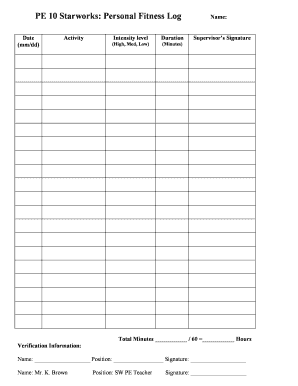
PE 10 Starworks Personal Fitness Log Form


What is the PE 10 Starworks Personal Fitness Log
The PE 10 Starworks Personal Fitness Log is a specialized form designed to help individuals track their fitness activities and progress over time. This log serves as a comprehensive record for personal use, allowing users to document workouts, nutrition, and overall health goals. It is particularly beneficial for individuals aiming to maintain accountability in their fitness journeys. The structured format of the log makes it easy to fill out and review, ensuring that users can monitor their achievements effectively.
How to use the PE 10 Starworks Personal Fitness Log
Using the PE 10 Starworks Personal Fitness Log involves several straightforward steps. First, users should begin by filling in their personal information, including name and contact details. Next, they can log daily activities, such as types of exercises performed, duration, and intensity. Additionally, users can note their dietary intake and any health observations. Regularly updating the log helps in identifying patterns and making necessary adjustments to fitness routines. This ongoing documentation fosters motivation and supports goal-setting.
Steps to complete the PE 10 Starworks Personal Fitness Log
To complete the PE 10 Starworks Personal Fitness Log, follow these steps:
- Start with your personal details, including your name, date, and contact information.
- Document each workout session, specifying the type of exercise, duration, and intensity level.
- Record your meals and snacks, noting portion sizes and nutritional content.
- Include any additional notes on your physical and mental well-being.
- Review and reflect on your entries weekly to assess progress and make necessary adjustments.
Legal use of the PE 10 Starworks Personal Fitness Log
The PE 10 Starworks Personal Fitness Log is intended for personal use and does not typically require legal validation. However, maintaining accurate records can be beneficial for various purposes, such as health assessments or consultations with fitness professionals. While the log itself is not a legally binding document, its contents can support claims related to health insurance or wellness programs that may require documentation of fitness activities.
Key elements of the PE 10 Starworks Personal Fitness Log
Key elements of the PE 10 Starworks Personal Fitness Log include:
- Personal Information: Name, contact details, and date.
- Workout Entries: Details about exercises, duration, and intensity.
- Nutrition Tracking: Records of meals, snacks, and nutritional information.
- Health Observations: Notes on physical and mental well-being.
- Progress Review: Sections for weekly reflections and adjustments.
Examples of using the PE 10 Starworks Personal Fitness Log
Examples of using the PE 10 Starworks Personal Fitness Log can vary based on individual goals. For instance, a user might track their weight loss journey by logging daily workouts and meals, noting changes in weight and energy levels. Another example could involve an athlete documenting training regimens leading up to a competition, allowing for adjustments based on performance feedback. These examples illustrate the log's versatility in supporting diverse fitness objectives.
Quick guide on how to complete pe 10 starworks personal fitness log
Prepare PE 10 Starworks Personal Fitness Log effortlessly on any device
Online document management has become increasingly favored by businesses and individuals. It serves as an ideal sustainable alternative to traditional printed and signed documents, as you can access the needed form and securely store it online. airSlate SignNow provides all the resources necessary to create, edit, and eSign your documents swiftly without delays. Manage PE 10 Starworks Personal Fitness Log on any device with airSlate SignNow Android or iOS applications and enhance any document-centric operation today.
The easiest way to edit and eSign PE 10 Starworks Personal Fitness Log with ease
- Obtain PE 10 Starworks Personal Fitness Log and click Get Form to begin.
- Utilize the tools we offer to fill in your form.
- Highlight pertinent sections of the documents or obscure sensitive information with tools that airSlate SignNow specifically provides for that purpose.
- Create your eSignature with the Sign tool, which only takes seconds and holds the same legal validity as a conventional wet ink signature.
- Review all the information and click on the Done button to save your changes.
- Choose your preferred method to send your form, whether by email, text message (SMS), or a shareable link, or download it to your computer.
Eliminate concerns about lost or misplaced files, tedious form searches, or mistakes that necessitate printing new document copies. airSlate SignNow meets all your document management needs in just a few clicks from any device of your choosing. Edit and eSign PE 10 Starworks Personal Fitness Log to ensure excellent communication at every step of your form preparation process with airSlate SignNow.
Create this form in 5 minutes or less
Create this form in 5 minutes!
How to create an eSignature for the pe 10 starworks personal fitness log
How to create an electronic signature for a PDF online
How to create an electronic signature for a PDF in Google Chrome
How to create an e-signature for signing PDFs in Gmail
How to create an e-signature right from your smartphone
How to create an e-signature for a PDF on iOS
How to create an e-signature for a PDF on Android
People also ask
-
What is a pe log in airSlate SignNow?
A pe log in airSlate SignNow refers to the detailed record of actions associated with electronic signatures and document management. This log helps businesses keep track of all signed documents, providing accountability and transparency in any transaction.
-
How can I access the pe log feature in airSlate SignNow?
You can access the pe log feature directly from your dashboard after logging into your airSlate SignNow account. It provides a comprehensive view of all document activities including sent, signed, and completed actions, ensuring that you can easily monitor your document flow.
-
Is there a cost associated with the pe log feature?
The pe log feature is included with all paid plans of airSlate SignNow, ensuring that teams can fully utilize our electronic signature capabilities. Pricing varies based on the selected plan, which offers additional benefits such as advanced integrations and custom branding.
-
What are the benefits of using airSlate SignNow's pe log?
The pe log offers several benefits, including increased security, improved compliance, and better document management for your organization. It allows you to track signatures and confirmations efficiently, promoting trust and reliability between parties.
-
Can I integrate the pe log with other software systems?
Yes, airSlate SignNow supports integrations with various software applications, allowing you to sync your pe log data with your CRM or other business tools. This integration streamlines operations and enhances overall productivity by keeping all necessary information in one place.
-
How does airSlate SignNow ensure the security of the pe log?
Security is a top priority at airSlate SignNow. The pe log is protected through advanced encryption and access controls, ensuring that only authorized users can view sensitive signing information and log history, thereby maintaining the integrity of your documents.
-
Can I customize the information displayed in the pe log?
airSlate SignNow allows you to customize certain aspects of the pe log to meet your specific business needs. You can filter logged actions, categorize documents, and even set notifications to enhance your document tracking experience.
Get more for PE 10 Starworks Personal Fitness Log
- Equinox employee termination form
- Oda lucs form
- Oregon replacement fillable form birth certificate
- Oregon advance directive form
- 2 130 1 form
- 1 of 1 standard boat slip rental agreement form
- Texas homestead exemption explained how to fill out form
- Form bb 1 rev state of hawaii basic business application
Find out other PE 10 Starworks Personal Fitness Log
- Electronic signature North Carolina Banking Claim Secure
- Electronic signature North Carolina Banking Separation Agreement Online
- How Can I Electronic signature Iowa Car Dealer Promissory Note Template
- Electronic signature Iowa Car Dealer Limited Power Of Attorney Myself
- Electronic signature Iowa Car Dealer Limited Power Of Attorney Fast
- How Do I Electronic signature Iowa Car Dealer Limited Power Of Attorney
- Electronic signature Kentucky Car Dealer LLC Operating Agreement Safe
- Electronic signature Louisiana Car Dealer Lease Template Now
- Electronic signature Maine Car Dealer Promissory Note Template Later
- Electronic signature Maryland Car Dealer POA Now
- Electronic signature Oklahoma Banking Affidavit Of Heirship Mobile
- Electronic signature Oklahoma Banking Separation Agreement Myself
- Electronic signature Hawaii Business Operations Permission Slip Free
- How Do I Electronic signature Hawaii Business Operations Forbearance Agreement
- Electronic signature Massachusetts Car Dealer Operating Agreement Free
- How To Electronic signature Minnesota Car Dealer Credit Memo
- Electronic signature Mississippi Car Dealer IOU Now
- Electronic signature New Hampshire Car Dealer NDA Now
- Help Me With Electronic signature New Hampshire Car Dealer Warranty Deed
- Electronic signature New Hampshire Car Dealer IOU Simple