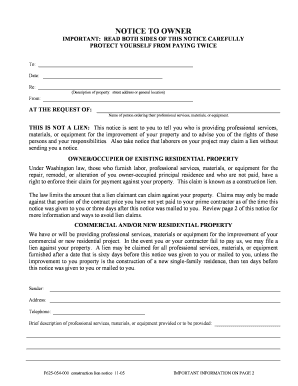
F625 054 000 Construction Lien Form


What is the F625 054 000 Construction Lien?
The F625 054 000 Construction Lien is a legal document used in Washington State to assert a claim against a property for unpaid work or materials provided during construction. This form serves as a formal notice to property owners and other interested parties that a lien has been placed on the property due to non-payment. The lien protects the rights of contractors, subcontractors, and suppliers by providing a legal avenue to seek payment for services rendered.
Key elements of the F625 054 000 Construction Lien
Understanding the key elements of the F625 054 000 Construction Lien is essential for its effective use. The form typically includes:
- Property Description: A detailed description of the property where the work was performed.
- Claimant Information: The name and contact details of the individual or business filing the lien.
- Owner Information: The name and address of the property owner.
- Amount Owed: A clear statement of the amount due for the work or materials provided.
- Date of Work: The dates during which the work was performed or materials were supplied.
Steps to complete the F625 054 000 Construction Lien
Completing the F625 054 000 Construction Lien involves several important steps:
- Gather all necessary information about the property, owner, and work performed.
- Fill out the form accurately, ensuring all required fields are completed.
- Sign the form, which may require notarization depending on local regulations.
- File the completed form with the appropriate county office, adhering to any filing deadlines.
- Provide copies of the filed lien to the property owner and any other relevant parties.
Legal use of the F625 054 000 Construction Lien
The legal use of the F625 054 000 Construction Lien is governed by Washington State laws. It is crucial to ensure compliance with these regulations to maintain the validity of the lien. The lien must be filed within a specific timeframe, typically within 90 days after the last work was performed or materials were supplied. Failure to adhere to these legal requirements may result in the lien being deemed invalid.
Filing Deadlines / Important Dates
Filing deadlines for the F625 054 000 Construction Lien are critical to its enforceability. In Washington State, the lien must be filed within 90 days of the last date of work or delivery of materials. If the lien is not filed within this period, the right to enforce the lien may be lost. It is advisable to track these dates carefully to ensure compliance.
Form Submission Methods (Online / Mail / In-Person)
The F625 054 000 Construction Lien can typically be submitted through various methods, including:
- Online Submission: Some counties may offer online filing options through their official websites.
- Mail: The completed form can be mailed to the appropriate county office, ensuring it is sent with sufficient time to meet filing deadlines.
- In-Person: Filing in person at the county recorder’s office is also an option, allowing for immediate confirmation of receipt.
Quick guide on how to complete f625 054 000 construction lien
Complete F625 054 000 Construction Lien seamlessly on any device
Managing online documents has gained popularity among businesses and individuals. It offers an ideal eco-friendly substitute for conventional printed and signed forms, as you can locate the necessary template and securely save it online. airSlate SignNow equips you with all the resources needed to create, modify, and electronically sign your documents swiftly without interruptions. Handle F625 054 000 Construction Lien on any device using airSlate SignNow's Android or iOS applications and enhance any document-driven process today.
The easiest way to modify and eSign F625 054 000 Construction Lien effortlessly
- Obtain F625 054 000 Construction Lien and click Get Form to begin.
- Utilize the tools we provide to fill out your document.
- Emphasize important sections of the documents or redact sensitive information using the tools available from airSlate SignNow specifically for that purpose.
- Generate your signature with the Sign feature, which takes seconds and carries the same legal validity as a traditional wet ink signature.
- Review the details and click the Done button to save your modifications.
- Choose how you'd like to submit your form, via email, SMS, or invite link, or download it to your computer.
Put aside concerns about lost or misplaced documents, tedious form searches, or errors that necessitate printing new copies. airSlate SignNow meets your document management needs in just a few clicks from any device you prefer. Modify and eSign F625 054 000 Construction Lien and guarantee efficient communication at every stage of your document preparation process with airSlate SignNow.
Create this form in 5 minutes or less
Create this form in 5 minutes!
How to create an eSignature for the f625 054 000 construction lien
How to create an electronic signature for a PDF online
How to create an electronic signature for a PDF in Google Chrome
How to create an e-signature for signing PDFs in Gmail
How to create an e-signature right from your smartphone
How to create an e-signature for a PDF on iOS
How to create an e-signature for a PDF on Android
People also ask
-
What is a notice of intent to lien in Washington State?
A notice of intent to lien in Washington State is a legal document that notifies a property owner of a claim against their property due to unpaid debts. This notice serves to protect the rights of contractors and subcontractors in case of non-payment for work performed. It is an essential document in the construction industry, ensuring that your financial interests are safeguarded.
-
How can airSlate SignNow help with my notice of intent to lien Washington State?
airSlate SignNow simplifies the process of creating, sending, and eSigning a notice of intent to lien Washington State. Our platform allows you to generate templates and manage document workflows seamlessly, ensuring timely responses and compliance. With features designed for efficiency, you can focus on your projects without worrying about the paperwork.
-
What features does airSlate SignNow offer for handling legal documents like notices of intent to lien?
airSlate SignNow features a user-friendly interface for drafting and managing documents such as notices of intent to lien Washington State. It includes customizable templates, electronic signatures, and secure document storage, making it easier to keep track of your legal documents. These features enhance workflow efficiency while maintaining legal compliance.
-
Is airSlate SignNow a cost-effective solution for issuing a notice of intent to lien?
Yes, airSlate SignNow offers a cost-effective solution for managing your notices of intent to lien Washington State. Our pricing plans are designed to cater to businesses of all sizes, ensuring you get excellent value for money. With our platform, you can save on paper, ink, and postal costs, while also accelerating your document processes.
-
What are the benefits of eSigning a notice of intent to lien Washington State?
eSigning a notice of intent to lien Washington State provides speed, security, and convenience. It allows for quicker turnaround times, ensuring that your notice is filed without delay, which is crucial in lien matters. Furthermore, electronic signatures are legally binding and greatly reduce the risk of paperwork loss or delays.
-
Can I integrate airSlate SignNow with other software for managing notices of intent to lien?
Absolutely! airSlate SignNow supports various integrations with popular business software, allowing you to manage your notices of intent to lien Washington State seamlessly. Whether you use project management tools or accounting software, our platform can enhance your workflow by providing a centralized document solution.
-
What is the process for sending a notice of intent to lien using airSlate SignNow?
To send a notice of intent to lien Washington State using airSlate SignNow, simply create or upload your document, customize it as needed, and add the recipients’ email addresses. Once you're ready, you can send the document for eSigning directly from our platform. The entire process is streamlined to ensure efficiency and compliance.
Get more for F625 054 000 Construction Lien
Find out other F625 054 000 Construction Lien
- How Do I Sign Hawaii Sports Presentation
- How Do I Sign Kentucky Sports Presentation
- Can I Sign North Carolina Orthodontists Presentation
- How Do I Sign Rhode Island Real Estate Form
- Can I Sign Vermont Real Estate Document
- How To Sign Wyoming Orthodontists Document
- Help Me With Sign Alabama Courts Form
- Help Me With Sign Virginia Police PPT
- How To Sign Colorado Courts Document
- Can I eSign Alabama Banking PPT
- How Can I eSign California Banking PDF
- How To eSign Hawaii Banking PDF
- How Can I eSign Hawaii Banking Document
- How Do I eSign Hawaii Banking Document
- How Do I eSign Hawaii Banking Document
- Help Me With eSign Hawaii Banking Document
- How To eSign Hawaii Banking Document
- Can I eSign Hawaii Banking Presentation
- Can I Sign Iowa Courts Form
- Help Me With eSign Montana Banking Form