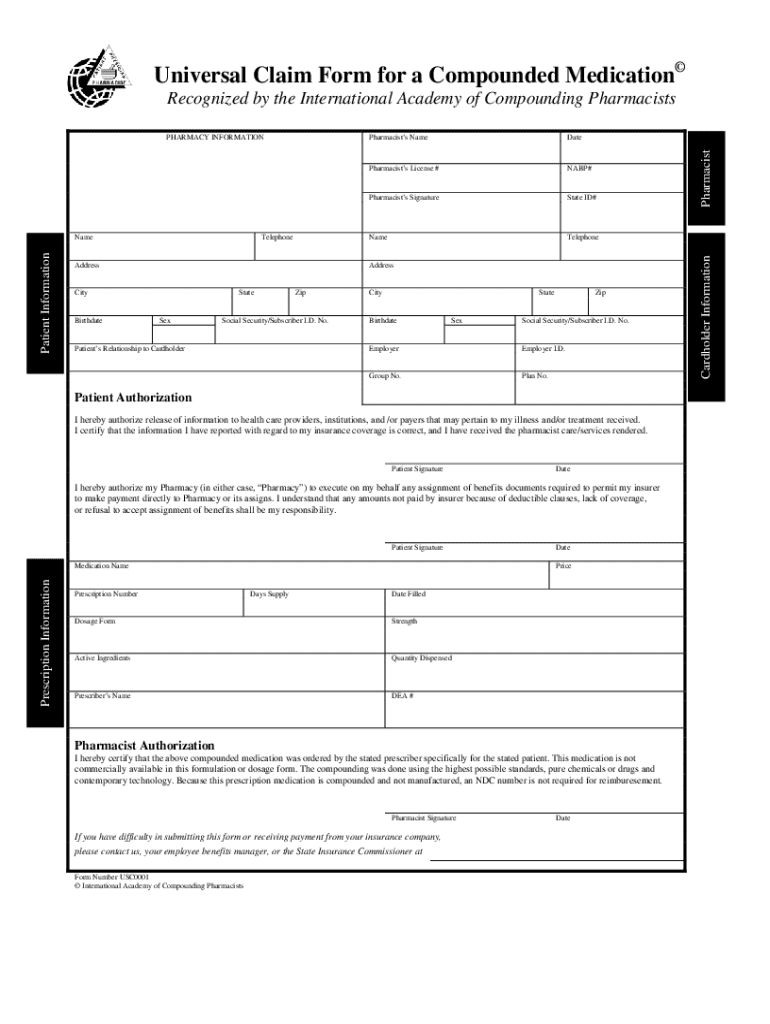
Universal Claim Form


What is the Universal Claim
The Universal Claim is a standardized form used to request reimbursement for medications and services provided by healthcare professionals. It serves as an essential tool for patients and healthcare providers to ensure that claims are processed efficiently and accurately. This form is particularly important for compounded medications, which may not be covered under standard claims processes. By using the Universal Claim, patients can streamline their reimbursement requests and ensure compliance with insurance requirements.
Steps to Complete the Universal Claim
Completing the Universal Claim involves several key steps to ensure accuracy and compliance. Follow these guidelines:
- Gather necessary information, including patient details, provider information, and specific medication details.
- Fill out the claim form completely, ensuring all required fields are completed accurately.
- Attach supporting documentation, such as receipts or prescriptions, to substantiate the claim.
- Review the completed form for any errors or omissions before submission.
- Submit the claim via the preferred method, whether online, by mail, or in person.
Legal Use of the Universal Claim
The Universal Claim must be used in accordance with relevant laws and regulations governing healthcare reimbursements. This includes adherence to the Health Insurance Portability and Accountability Act (HIPAA) to protect patient privacy. Additionally, understanding the specific insurance policies that apply to compounded medications is crucial. Ensuring that the claim is submitted correctly and in compliance with legal requirements can prevent delays in reimbursement and potential legal issues.
Key Elements of the Universal Claim
Understanding the key elements of the Universal Claim is vital for successful submissions. Important components include:
- Patient Information: Full name, date of birth, and insurance details.
- Provider Information: Name, address, and National Provider Identifier (NPI) number.
- Medication Details: Description of the compounded medication, including dosage and quantity.
- Billing Information: Itemized charges and total amount being claimed.
Examples of Using the Universal Claim
Utilizing the Universal Claim can vary based on individual circumstances. Common scenarios include:
- Submitting claims for compounded medications prescribed for specific health conditions.
- Requesting reimbursement for services provided by a compounding pharmacist.
- Filing claims for medications that are not available through standard retail pharmacies.
Required Documents
To successfully submit a Universal Claim, certain documents are typically required. These may include:
- A completed Universal Claim form.
- Receipts for the medications or services provided.
- Prescriptions or documentation from the healthcare provider.
Quick guide on how to complete form compounding
The optimal method to acquire and endorse Universal Claim
On a corporate scale, ineffective workflows related to document authorization can take up signNow working hours. Endorsing documents like Universal Claim is an inherent aspect of business operations, which is why the productivity of every agreement’s lifecycle has such a substantial impact on the company’s overall effectiveness. With airSlate SignNow, endorsing your Universal Claim can be as simple and rapid as possible. You’ll discover on this platform the latest version of nearly any form. Even better, you can endorse it instantly without needing to install external applications on your system or printing out physical copies.
Steps to acquire and endorse your Universal Claim
- Explore our library by category or use the search bar to locate the document you require.
- View the document preview by clicking Learn more to verify it’s the correct one.
- Click Get form to start editing immediately.
- Fill out your document and insert any required information using the toolbar.
- Once completed, click the Sign tool to endorse your Universal Claim.
- Choose the signature method that is most suitable for you: Draw, Generate initials, or upload a photo of your handwritten signature.
- Click Done to finish editing and proceed to document-sharing options as necessary.
With airSlate SignNow, you have everything required to handle your documentation efficiently. You can find, complete, edit, and even send your Universal Claim in one browser tab without any complications. Enhance your workflows by implementing a unified, intelligent eSignature solution.
Create this form in 5 minutes or less
FAQs
-
Have you ever done jury duty before or do you know how to get out of it?
I served on the jury for a criminal trial. At the time I was called to serve, I happened to be very unhappy at the job I had been working and was actually relieved to have a legitimate reason to spend two days out of the office. The truth is, it’s actually pretty easy to get out of jury duty once you know what kind of case is in the docket you are being considered for. All you have to do is declare that you have a bias that impairs you from being impartial toward one particular side or another.When my jury pool was up for selection, people said all kinds of weird things to get disqualified - I have ADD. I would be under extreme financial duress if I am not able to go to my job. I’m racist against the defendant. I am the same race as the person on trial so I don’t want to convict him. I use illegal drugs so I don’t want to sit on a trial for criminal drug possession. I’m an anarchist. I think all people with tattoos are guilty. I refuse to convict anyone because I was once in jail for something I didn’t do and it ruined my life. I am prone to having seizures and don’t want to be disruptive to the proceedings. I don’t trust police officers. My brother had a terrible addiction and it has scarred me dealing with it. There were just so many creative and sad excuses people made.The truth is, if you show up for your initial jury summons, the odds are actually pretty low that you will get assigned to a case, and even if you are selected for a jury, a large number of cases end up getting cancelled because the lawyers enter a plea agreement.So, if it’s important to you to get out of jury duty, you probably can. But we also need to remember, that getting a fair trial is one of the things that enables us to be free and if you are ever put on trial for something, then you are relying on people being there to serve on the jury for you. If nobody steps up to the responsibility, the system breaks down.That said, being on a jury certainly isn’t easy. I can tell you that none of us that serve truly wants to be there, and emotionally, you know that you have to live with the consequences of whatever decision you pass down. I didn’t realize that when I was selected, and when no one wanted to be foreperson of our jury, I volunteered because I think we could have easily wasted hours just on deciding that.The case was for a 22 year old legal immigrant from Mexico who had been found asleep in the backseat of a car outside a bar with less than 1 gram of cocaine in his pocket. Texas is very tough on drug related offenses and we were told that, if convicted, the defendant would automatically be sentenced to 2–1/2 years in prison. The young man did not speak English and he was working as part of a construction crew that was only in town for 1 job. The defense claimed that his coworkers had convinced him to go to a bar and loaned him the pair of jeans he was wearing and that he was not aware of the cocaine in the pocket.We heard testimony from the arresting officer, the lab analyst that measured and confirmed the presence and amount of cocaine. It took about 6 hours for the prosecution and defense to finish presenting their witnesses and cross examining. We weren’t sequestered so we were given an hour to leave the courthouse to go get lunch and come back to hear closing arguments. After closing arguments we were given the evidence to look at.The case was really pretty open-shut in terms of the facts presented, but we deliberated for two hours because we felt the gravity of what 2–1/2 years in prison would mean for the young man. Because he had been somewhat responsible by not driving off under the influence and wasn’t hurting anyone we considered whether or not the punishment was fair and how much doubt was considered reasonable. Assuming that he really had borrowed the jeans from his coworker, could he have not known the cocaine was in his pocket? We even looked at our own pockets to consider that.In the end, we found the defendant guilty because we thought from touching the tiny bag, he would have felt the tiny ziplock closure creating i little stiff spot. This man’s fate rested on a tiny interlocking strip of plastic that was less than an inch long and a few millimeters wide. As the foreperson, it was my job to announce the decision and sign the court document affirming that the court accepted the decision and ordered his sentence. Two and a half years of someone else’s life. Even knowing that I believed he was guilty, the pen felt heavy.I don’t think that I am likely to commit a crime or wind up on trial, but if somehow I do, I certainly hope that I get the kind of consideration that we gave this man that day. For that to happen, there have to be at least 12 people who answer the call. Maybe you should just do it.
-
Are shooting ranges and gun stores prone to cases of discrimination or prejudicial treatment of minorities?
“Are shooting ranges and gun stores prone to cases of discrimination or prejudicial treatment of minorities?”I have never seen prejudicial treatment of minorities.The reverse, if anything. We are well aware that the OFWG stereotype hurts us politically, so anyone young, female, non-white will be actively encouraged to participate.Once upon a time, my NRA instructor group in the Seattle area tried to signNow out to the gay community. There had been some high-profile hate crimes and my chief instructor thought the outsignNow might be well received. We put on a few courses, and they seemed to go well, but eventually they developed their own instructor cadre (trained by us) and went their own way. This was about the time Pink Pistols was getting started; we may have had a small hand in it. Anyway, none of us OFWG had any problem with it - we all thought it was a good deed as well as clever politics.The only time we ever ejected a student for political reasons, he was a White Supremacist. He was an attentive student and seemed ordinary enough, until over lunch he told us about his compound in Idaho and how much we would enjoy the clean air and lack of diversity - plus they needed instructors to build up their militia arm. We ejected him and called the FBI - never heard if anything came of it.The only incident I can recall that could even be construed as bias was as follows: I was talking to a gun store owner in South-Central Virginia, an area with a high crime rate and a high racial disparity in crime rates (translated to plain language: lots of young black men shooting each other, dealing drugs, and committing robberies). He said that when any other sort of customer came in, he would be polite to him and let him handle the merchandise, but for a young black male customer, he would ask him to fill out Form 4473 before he even talked to him. 95% of them walked out at that point, with or without calling him a racist first. Those were the ones who couldn’t pass a background check, and lying on the form is a 10-year Federal felony. The ones that could pass the background check, he treated like royalty. You could call that bias, or you could call that acknowledging statistical reality. There is no point in wasting time with a customer who is 95% likely to be disqualified.
-
Do military members have to pay any fee for leave or fiancee forms?
NOOOOOOO. You are talking to a military romance scammer. I received an email from the US Army that directly answers your question that is pasted below please keep reading.I believe you are the victim of a military Romance Scam whereas the person you are talking to is a foreign national posing as an American Soldier claiming to be stationed overseas on a peacekeeping mission. That's the key to the scam they always claim to be on a peacekeeping mission.Part of their scam is saying that they have no access to their money that their mission is highly dangerous.If your boyfriend girlfriend/future husband/wife is asking you to do the following or has exhibited this behavior, it is a most likely a scam:Moves to private messaging site immediately after meeting you on Facebook or SnapChat or Instagram or some dating or social media site. Often times they delete the site you met them on right after they asked you to move to a more private messaging siteProfesses love to you very quickly & seems to quote poems and song lyrics along with using their own sort of broken language, as they profess their love and devotion quickly. They also showed concern for your health and love for your family.Promises marriage as soon as he/she gets to state for leave that they asked you to pay for.They Requests money (wire transfers) and Amazon, iTune ,Verizon, etc gift cards, for medicine, religious practices, and leaves to come home, internet access, complete job assignments, help sick friend, get him out of trouble, or anything that sounds fishy.The military does provide all the soldier needs including food medical Care and transportation for leave. Trust me, I lived it, you are probably being scammed. I am just trying to show you examples that you are most likely being connned.Below is an email response I received after I sent an inquiry to the US government when I discovered I was scammed. I received this wonderful response back with lots of useful links on how to find and report your scammer. And how to learn more about Romance Scams.Right now you can also copy the picture he gave you and do a google image search and you will hopefully see the pictures of the real person he is impersonating. this doesn't always work and take some digging. if you find the real person you can direct message them and alert them that their image is being used for scamming.Good Luck to you and I'm sorry this may be happening to you. please continue reading the government response I received below it's very informative. You have contacted an email that is monitored by the U.S. Army Criminal Investigation Command. Unfortunately, this is a common concern. We assure you there is never any reason to send money to anyone claiming to be a Soldier online. If you have only spoken with this person online, it is likely they are not a U.S. Soldier at all. If this is a suspected imposter social media profile, we urge you to report it to that platform as soon as possible. Please continue reading for more resources and answers to other frequently asked questions: How to report an imposter Facebook profile: Caution-https://www.facebook.com/help/16... < Caution-https://www.facebook.com/help/16... > Answers to frequently asked questions: - Soldiers and their loved ones are not charged money so that the Soldier can go on leave. - Soldiers are not charged money for secure communications or leave. - Soldiers do not need permission to get married. - Soldiers emails are in this format: john.doe.mil@mail.mil < Caution-mailto: john.doe.mil@mail.mil > anything ending in .us or .com is not an official email account. - Soldiers have medical insurance, which pays for their medical costs when treated at civilian health care facilities worldwide – family and friends do not need to pay their medical expenses. - Military aircraft are not used to transport Privately Owned Vehicles. - Army financial offices are not used to help Soldiers buy or sell items of any kind. - Soldiers deployed to Combat Zones do not need to solicit money from the public to feed or house themselves or their troops. - Deployed Soldiers do not find large unclaimed sums of money and need your help to get that money out of the country. Anyone who tells you one of the above-listed conditions/circumstances is true is likely posing as a Soldier and trying to steal money from you. We would urge you to immediately cease all contact with this individual. For more information on avoiding online scams and to report this crime, please see the following sites and articles: This article may help clarify some of the tricks social media scammers try to use to take advantage of people: Caution-https://www.army.mil/article/61432/< Caution-https://www.army.mil/article/61432/> CID advises vigilance against 'romance scams,' scammers impersonating Soldiers Caution-https://www.army.mil/article/180749 < Caution-https://www.army.mil/article/180749 > FBI Internet Crime Complaint Center: Caution-http://www.ic3.gov/default.aspx< Caution-http://www.ic3.gov/default.aspx> U.S. Army investigators warn public against romance scams: Caution-https://www.army.mil/article/130...< Caution-https://www.army.mil/article/130...> DOD warns troops, families to be cybercrime smart -Caution-http://www.army.mil/article/1450...< Caution-http://www.army.mil/article/1450...> Use caution with social networking Caution-https://www.army.mil/article/146...< Caution-https://www.army.mil/article/146...> Please see our frequently asked questions section under scams and legal issues. Caution-http://www.army.mil/faq/ < Caution-http://www.army.mil/faq/ > or visit Caution-http://www.cid.army.mil/ < Caution-http://www.cid.army.mil/ >. The challenge with most scams is determining if an individual is a legitimate member of the US Army. Based on the Privacy Act of 1974, we cannot provide this information. If concerned about a scam you may contact the Better Business Bureau (if it involves a solicitation for money), or local law enforcement. If you're involved in a Facebook or dating site scam, you are free to contact us direct; (571) 305-4056. If you have a social security number, you can find information about Soldiers online at Caution-https://www.dmdc.osd.mil/appj/sc... < Caution-https://www.dmdc.osd.mil/appj/sc... > . While this is a free search, it does not help you locate a retiree, but it can tell you if the Soldier is active duty or not. If more information is needed such as current duty station or location, you can contact the Commander Soldier's Records Data Center (SRDC) by phone or mail and they will help you locate individuals on active duty only, not retirees. There is a fee of $3.50 for businesses to use this service. The check or money order must be made out to the U.S. Treasury. It is not refundable. The address is: Commander Soldier's Records Data Center (SRDC) 8899 East 56th Street Indianapolis, IN 46249-5301 Phone: 1-866-771-6357 In addition, it is not possible to remove social networking site profiles without legitimate proof of identity theft or a scam. If you suspect fraud on this site, take a screenshot of any advances for money or impersonations and report the account on the social networking platform immediately. Please submit all information you have on this incident to Caution-www.ic3.gov < Caution-http://www.ic3.gov > (FBI website, Internet Criminal Complaint Center), immediately stop contact with the scammer (you are potentially providing them more information which can be used to scam you), and learn how to protect yourself against these scams at Caution-http://www.ftc.gov < Caution-http://www.ftc.gov > (Federal Trade Commission's website)
-
How can I fill out Google's intern host matching form to optimize my chances of receiving a match?
I was selected for a summer internship 2016.I tried to be very open while filling the preference form: I choose many products as my favorite products and I said I'm open about the team I want to join.I even was very open in the location and start date to get host matching interviews (I negotiated the start date in the interview until both me and my host were happy.) You could ask your recruiter to review your form (there are very cool and could help you a lot since they have a bigger experience).Do a search on the potential team.Before the interviews, try to find smart question that you are going to ask for the potential host (do a search on the team to find nice and deep questions to impress your host). Prepare well your resume.You are very likely not going to get algorithm/data structure questions like in the first round. It's going to be just some friendly chat if you are lucky. If your potential team is working on something like machine learning, expect that they are going to ask you questions about machine learning, courses related to machine learning you have and relevant experience (projects, internship). Of course you have to study that before the interview. Take as long time as you need if you feel rusty. It takes some time to get ready for the host matching (it's less than the technical interview) but it's worth it of course.
-
What's it like being raised by an African mother?
Being raised by an African mum, there is a pretty good chance you will never ever throw a tantrum in her presence, much less direct it at her. That just doesn't fly. It would very likely earn you a slap across the face - a hot one! Whatever your objections to a situation, you will very humbly state them (if at all) taking great care not to annoy her in the process.You do get whipped. I got whipped with canes, drumsticks and electric cables. I am not as forgiving about it as most people who were raised African. The whole thing drove me into depression at age 12, so my parents stopped it. I still struggle with the depression and self-doubt. So, my own child doesn't get any whipping from me. But, not to be a complete sissy, I regularly threaten it - with a look that leaves no doubt that I actually will follow through. Yes, school is everything. I almost always topped my class but I still got my school report cards scrutinised like they were damn Al-Qaeda cables in the hands of the CIA. If unmarried, moving out is offensive to your mother. Yes, she is worried about all the unholy things you'll do when on your own but mostly she is offended that you don't deem her capable of taking care of you any more.Unless you intend to marry the boy in the next year or so, you don't introduce him to your mother (or father). Introduction in my culture is the equivalent of marriage. Once your mate has been introduced to your parents, you'd better stick with them for life. The introduction is as elaborate as your average wedding anyway. So, everybody you see from age 16 to marriage, you see clandestinely. Dates are probably short spates of time spent leaning against your father's fence with one of your hands in his, the other slapping mosquitoes. He doesn't ever set foot in your parents' compound and if your brothers see him standing at the fence before you do, they'll throw dirty dish water at him. Whatever happens, your mother should never ever know you have a boyfriend. If she does, that might be the first time you ever see her cry. Of course you do housework by hand from age 6. That includes dish washing, mopping the floors, laundry and if there is a patch of earth besides their house that can grow beans, digging too. You are told lots and lots of stories - tribal tales, Western Cinderella, family legends. Most likely all of them, including Cinderella, are told from memory not read from a book. You memorise them and tell them to your own children when the time comes. You see your grandparents for extended periods at least once a year. We have three school breaks of 3 - 6 weeks. Atleast one of those will be spent with your grandparents in the village. Your mother is most commonly known by your name if you are her first born child. Ex. Mama Tom or Mama Lydia. You and your siblings may never know her given name until you have to fill out a form at the end of your primary school. No matter how few the syllables in your name are, your mother and subsequently the whole family calls you by a shortened version of it. Mine calls me Lyd. When you are a woman yourself and have children, she will forcefully move you from your home back into hers for at least two months. That or she moves in for the same period of time. Then she will cook you at least five meals a day and force feed them to you if she has to, because, giving birth is seeing into the grave itself. You must be taken care of. Then for the rest of the child's life, she'll consider herself a party in a shared custody arrangement.Oh, your parents, if they can even barely afford it, will pay for your first university degree. Treating this as anything but the default could very easily cost your father his marriage.You'll grow to be totally comfortable with your place on the food chain because by 11 or so, you are slaughtering the chicken your mother later calls dinner. If you are a boy, you'll probably have slaughtered a goat by 16. Slaughter = grab a life-form, with your own hands wring its neck to a very unnatural angle, separate head from the rest of the body using your mother's sharpest kitchen knife. You know what's hard to find? An African who is also vegetarian.If there is a Tom and Jerry in your house, they come in 3D with red blood running their veins. And no games here: Tom catches Jerry. Period. You see, African mums don't play favoritism - not even with the house pet. If Tom neglects to clear the household of Jerry and all his cousins, he doesn't get otherwise fed and will soon find himself chased into the wild. So, your memories of watching Tom and Jerry may or maybe not be traumatic depending on whether or not you like some blood sputtering with your entertainment. To be on the safe side though, don't give a cat to a girl who was raised African.
-
How do I fill out the form of DU CIC? I couldn't find the link to fill out the form.
Just register on the admission portal and during registration you will get an option for the entrance based course. Just register there. There is no separate form for DU CIC.
-
How do you know if you need to fill out a 1099 form?
Assuming that you are talking about 1099-MISC. Note that there are other 1099s.check this post - Form 1099 MISC Rules & RegulationsQuick answer - A Form 1099 MISC must be filed for each person to whom payment is made of:$600 or more for services performed for a trade or business by people not treated as employees;Rent or prizes and awards that are not for service ($600 or more) and royalties ($10 or more);any fishing boat proceeds,gross proceeds of $600, or more paid to an attorney during the year, orWithheld any federal income tax under the backup withholding rules regardless of the amount of the payment, etc.
Create this form in 5 minutes!
How to create an eSignature for the form compounding
How to make an electronic signature for the Form Compounding in the online mode
How to create an electronic signature for your Form Compounding in Chrome
How to generate an electronic signature for putting it on the Form Compounding in Gmail
How to make an electronic signature for the Form Compounding straight from your mobile device
How to make an electronic signature for the Form Compounding on iOS devices
How to create an electronic signature for the Form Compounding on Android
People also ask
-
What is a Universal Claim in airSlate SignNow?
The Universal Claim in airSlate SignNow refers to a standardized form that allows users to submit claims efficiently across various platforms. This feature streamlines the claims process, making it easier for businesses to manage and track their submissions.
-
How does airSlate SignNow facilitate Universal Claims?
airSlate SignNow facilitates Universal Claims by providing a user-friendly interface that simplifies document preparation and eSigning. With customizable templates and automated workflows, businesses can ensure that their claims are processed quickly and accurately.
-
What are the pricing options for using airSlate SignNow for Universal Claims?
airSlate SignNow offers competitive pricing plans that cater to different business needs when it comes to handling Universal Claims. Pricing typically varies based on the number of users and features required, ensuring that businesses get a cost-effective solution tailored to their needs.
-
Can I integrate airSlate SignNow with other software for Universal Claims?
Yes, airSlate SignNow supports integrations with various software solutions, enhancing the efficiency of managing Universal Claims. This allows businesses to connect their existing systems, such as CRM and ERP platforms, to streamline the claims process.
-
What are the key features of airSlate SignNow for Universal Claims?
Key features of airSlate SignNow for Universal Claims include customizable templates, automated workflows, and secure eSigning capabilities. These features enable users to create and manage claims seamlessly, reducing the time and effort involved in the claims process.
-
How does airSlate SignNow ensure the security of Universal Claims?
airSlate SignNow employs advanced security measures to protect Universal Claims, including encryption and secure storage solutions. This ensures that sensitive information is safeguarded throughout the claims process, giving users peace of mind.
-
What benefits does airSlate SignNow provide for businesses handling Universal Claims?
By using airSlate SignNow for Universal Claims, businesses can improve efficiency, reduce processing time, and enhance accuracy. The platform’s user-friendly design and automation features allow teams to focus on strategic tasks rather than administrative paperwork.
Get more for Universal Claim
- Bd 9 pfsi change rep form 2 12 doc download cch accounting for income taxes pdf book
- Blank court motion forms 42777336
- Cotiviti discussion request form
- Meal waiver form california
- Glico claim form
- Heter iska form 271230644
- What is 10210 in money form
- Completing information on manufactured structures form 1066
Find out other Universal Claim
- How To Sign Alabama Legal LLC Operating Agreement
- Sign Alabama Legal Cease And Desist Letter Now
- Sign Alabama Legal Cease And Desist Letter Later
- Sign California Legal Living Will Online
- How Do I Sign Colorado Legal LLC Operating Agreement
- How Can I Sign California Legal Promissory Note Template
- How Do I Sign North Dakota Insurance Quitclaim Deed
- How To Sign Connecticut Legal Quitclaim Deed
- How Do I Sign Delaware Legal Warranty Deed
- Sign Delaware Legal LLC Operating Agreement Mobile
- Sign Florida Legal Job Offer Now
- Sign Insurance Word Ohio Safe
- How Do I Sign Hawaii Legal Business Letter Template
- How To Sign Georgia Legal Cease And Desist Letter
- Sign Georgia Legal Residential Lease Agreement Now
- Sign Idaho Legal Living Will Online
- Sign Oklahoma Insurance Limited Power Of Attorney Now
- Sign Idaho Legal Separation Agreement Online
- Sign Illinois Legal IOU Later
- Sign Illinois Legal Cease And Desist Letter Fast