Cms 1513 Form 1986-2026


What is the CMS 1513 Form
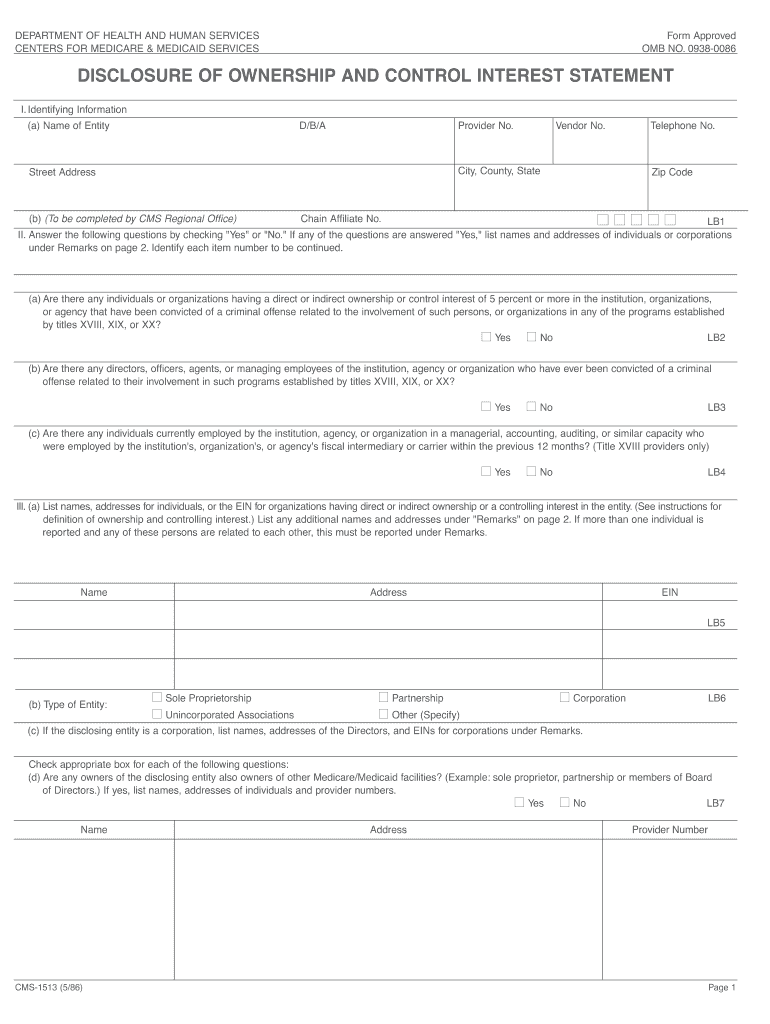
The CMS 1513 form, officially known as the Disclosure of Ownership form, is a critical document used in the healthcare sector. It is primarily utilized by healthcare providers to disclose ownership and control information to the Centers for Medicare & Medicaid Services (CMS). This form is essential for compliance with federal regulations, ensuring transparency in ownership structures, and maintaining the integrity of healthcare programs. By filling out this form, providers help CMS verify the legitimacy of ownership and control, which is crucial for the prevention of fraud and abuse in healthcare services.
How to Use the CMS 1513 Form
Using the CMS 1513 form involves several key steps that ensure accurate and complete submission. First, obtain the latest version of the form from a reliable source. Next, gather all necessary information regarding ownership and control, including details about individuals and organizations with significant ownership interests. Carefully fill out each section of the form, ensuring that all required fields are completed. After filling out the form, review it for accuracy before submission. Finally, submit the form to the appropriate CMS office, adhering to any specific instructions provided for your submission method.
Steps to Complete the CMS 1513 Form
Completing the CMS 1513 form requires attention to detail and adherence to specific guidelines. Follow these steps for successful completion:
- Download the CMS 1513 form from an official source.
- Read the instructions carefully to understand the requirements.
- Gather necessary documentation, including identification and ownership details.
- Fill in the form, ensuring all information is accurate and complete.
- Double-check for any errors or omissions.
- Sign and date the form as required.
- Submit the completed form according to CMS guidelines.
Legal Use of the CMS 1513 Form
The legal use of the CMS 1513 form is governed by federal regulations that mandate transparency in healthcare ownership. Providers must use this form to disclose any individuals or entities with significant ownership interests, ensuring compliance with the Affordable Care Act and other relevant laws. Accurate completion and timely submission of the form are essential to avoid penalties and maintain eligibility for Medicare and Medicaid programs. Understanding the legal implications of the information disclosed is crucial for all parties involved.
Required Documents
When completing the CMS 1513 form, certain documents may be required to support the information provided. These documents typically include:
- Identification documents for individuals listed on the form.
- Organizational documents, such as articles of incorporation for entities.
- Any previous disclosures or related forms that may be relevant.
- Proof of ownership interests, such as stock certificates or partnership agreements.
Having these documents ready can facilitate a smoother completion process and ensure compliance with CMS requirements.
Form Submission Methods
The CMS 1513 form can be submitted through various methods, depending on the specific requirements set by CMS. Common submission methods include:
- Online submission via the CMS portal, if available.
- Mailing the completed form to the designated CMS office.
- In-person submission at a local CMS office, if applicable.
It is important to verify the preferred submission method for your specific situation to ensure timely processing of the form.
Quick guide on how to complete disclosure of ownership and control interest statement form 1513
Uncover the simplest method to complete and sign your Cms 1513 Form
Are you still spending precious hours preparing your formal documents in hard copy instead of online? airSlate SignNow provides a superior approach to fill out and sign your Cms 1513 Form and similar forms for public services. Our intelligent electronic signature solution equips you with all the tools necessary to handle paperwork swiftly and in compliance with official standards - robust PDF editing, managing, securing, signing, and sharing functionalities are all accessible within an intuitive interface.
Only a few steps are necessary to complete the process of filling out and signing your Cms 1513 Form:
- Upload the fillable template to the editor using the Get Form button.
- Verify which details you need to input in your Cms 1513 Form.
- Move between the fields using the Next option to ensure nothing is overlooked.
- Utilize Text, Check, and Cross tools to fill in the blanks with your information.
- Update the content with Text boxes or Images from the top toolbar.
- Emphasize what is signNow or Blackout areas that are no longer relevant.
- Press Sign to create a legally binding electronic signature using any method you prefer.
- Add the Date beside your signature and wrap up your work with the Done button.
Store your finished Cms 1513 Form in the Documents folder within your account, download it, or export it to your preferred cloud storage. Our solution also provides versatile form sharing options. There’s no need to print your forms when submitting them to the appropriate public office - do it via email, fax, or by requesting a USPS “snail mail” delivery from your account. Give it a try today!
Create this form in 5 minutes or less
FAQs
-
I am about to start a new venture in the form of a website, and I have a few investors who are interested in making an investment in return for a stake in the company. How can I accurately figure out what percent of ownership to allocate to each person relative to his/her investment value?
Don't give up too much but also be realistic in estimating the profibility of your venture. If you think you'll have $50k in sales the first year and 100k in year two don't sell 50% of the company for a total of $10k. Make each split representative of how much each is investing. If you have an idea that everyone thinks is a $500k business then investor #1 at $10k should get approx 2% of the business, so on and so forth. This is a basic "presale" of estimated worth example but honestly all you should keep in mind is that they stakes should be proportionate at the outset to make sure there aren't grumblings of being treated unfairly. Don't sell one stake of 25% for less than another at 10%. And lastly always retain at the very minimum 51% of the business for yourself.
-
If you work for yourself doing government contracts and American Express asks for you to show them a current pay stub, how would you provide that? Is there a form that has an earnings statement that you can fill out yourself?
It seems to me you should just ask American Express if they have form you can fill out. It seems odd they would want to see an earnings statement, but if you need to show some sort of proof of income, typically in the absence of a pay stub, your most recently-filed tax return should suffice.I'd really ask them first before automatically sending them your tax returns though.
Create this form in 5 minutes!
How to create an eSignature for the disclosure of ownership and control interest statement form 1513
How to make an eSignature for the Disclosure Of Ownership And Control Interest Statement Form 1513 in the online mode
How to create an eSignature for your Disclosure Of Ownership And Control Interest Statement Form 1513 in Google Chrome
How to create an electronic signature for putting it on the Disclosure Of Ownership And Control Interest Statement Form 1513 in Gmail
How to create an eSignature for the Disclosure Of Ownership And Control Interest Statement Form 1513 from your smart phone
How to create an eSignature for the Disclosure Of Ownership And Control Interest Statement Form 1513 on iOS devices
How to create an eSignature for the Disclosure Of Ownership And Control Interest Statement Form 1513 on Android
People also ask
-
What is the Cms 1513 Form and why is it important?
The Cms 1513 Form is a crucial document used in healthcare settings to provide detailed information about services and claims. Understanding how to properly fill out the Cms 1513 Form can ensure timely processing and reimbursement from Medicare and other insurers. airSlate SignNow simplifies this process, allowing you to eSign and send the form efficiently.
-
How can airSlate SignNow help with filling out the Cms 1513 Form?
airSlate SignNow offers an intuitive platform that streamlines the process of completing the Cms 1513 Form. With our easy-to-use tools, you can fill out, sign, and send the form electronically, reducing paperwork and enhancing accuracy. This efficiency not only saves time but also minimizes errors associated with manual submissions.
-
Is there a cost associated with using airSlate SignNow for the Cms 1513 Form?
Yes, airSlate SignNow offers various pricing plans to accommodate different business needs, starting with a free trial. The subscription plans provide access to advanced features that can aid in managing the Cms 1513 Form and other documents seamlessly. Investing in our service can lead to signNow savings by improving workflow efficiency.
-
Can I integrate airSlate SignNow with other software for managing the Cms 1513 Form?
Absolutely! airSlate SignNow integrates with numerous applications, allowing you to manage your documents, including the Cms 1513 Form, within your existing workflows. This interoperability enhances productivity by reducing the need to switch between platforms, making it easier to keep track of your eSigned documents.
-
What features does airSlate SignNow offer for the Cms 1513 Form?
airSlate SignNow provides a variety of features tailored for the Cms 1513 Form, including customizable templates, eSignature capabilities, and document tracking. These features ensure that your forms are completed accurately and sent securely, streamlining the submission process. Additionally, you can access your documents anytime, anywhere.
-
How secure is the information on the Cms 1513 Form when using airSlate SignNow?
Security is a top priority at airSlate SignNow. We implement robust encryption and comply with industry standards to ensure that all data, including the Cms 1513 Form, is protected from unauthorized access. You can confidently use our platform knowing that your sensitive information remains secure.
-
Can airSlate SignNow assist in tracking the status of the Cms 1513 Form?
Yes, airSlate SignNow includes features that allow you to track the status of your Cms 1513 Form after sending it for eSignature. You will receive notifications on its progress, ensuring that you stay informed about when the form is signed and returned. This feature helps you manage your workflow effectively.
Get more for Cms 1513 Form
- Access lynx eligibility application for form
- Application colorado application for gas and form
- California notice of intent to lien form zlien
- Calcasieu urgent care application for employment form
- Downloadable pre printed puppy registered form
- Sellers mandatory disclosure statement form
- Cheer tyme sponsorship form
- Personal property insurance plan notice of loss form adams50
Find out other Cms 1513 Form
- Sign California Doctors Lease Termination Letter Online
- Sign Iowa Doctors LLC Operating Agreement Online
- Sign Illinois Doctors Affidavit Of Heirship Secure
- Sign Maryland Doctors Quitclaim Deed Later
- How Can I Sign Maryland Doctors Quitclaim Deed
- Can I Sign Missouri Doctors Last Will And Testament
- Sign New Mexico Doctors Living Will Free
- Sign New York Doctors Executive Summary Template Mobile
- Sign New York Doctors Residential Lease Agreement Safe
- Sign New York Doctors Executive Summary Template Fast
- How Can I Sign New York Doctors Residential Lease Agreement
- Sign New York Doctors Purchase Order Template Online
- Can I Sign Oklahoma Doctors LLC Operating Agreement
- Sign South Dakota Doctors LLC Operating Agreement Safe
- Sign Texas Doctors Moving Checklist Now
- Sign Texas Doctors Residential Lease Agreement Fast
- Sign Texas Doctors Emergency Contact Form Free
- Sign Utah Doctors Lease Agreement Form Mobile
- Sign Virginia Doctors Contract Safe
- Sign West Virginia Doctors Rental Lease Agreement Free