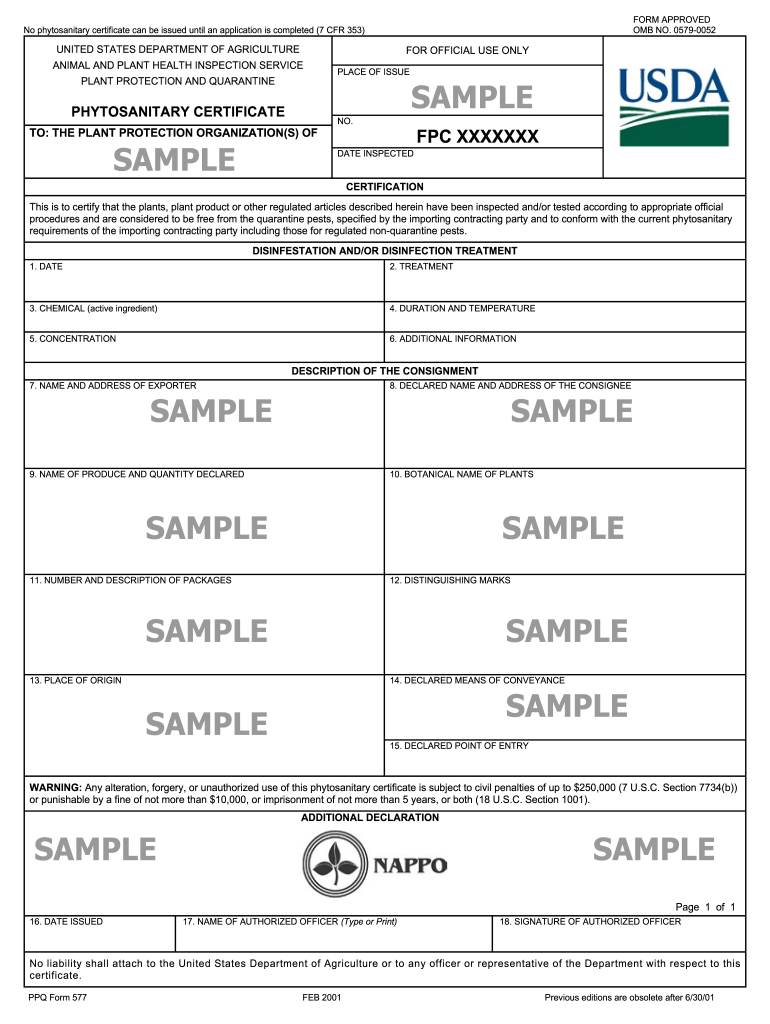
Usda Phytosanitary Certificate Form


What is the USDA Phytosanitary Certificate?
The USDA Phytosanitary Certificate is an official document issued by the United States Department of Agriculture (USDA) that certifies plants, plant products, and other regulated articles are free from pests and diseases. This certificate is essential for international trade, ensuring that exported goods meet the importing country's phytosanitary regulations. It serves as a guarantee to foreign authorities that the products comply with their health and safety standards, thereby facilitating smoother trade relations.
How to Obtain the USDA Phytosanitary Certificate
To obtain a USDA Phytosanitary Certificate, you must follow a specific application process. This typically involves:
- Contacting your local USDA Animal and Plant Health Inspection Service (APHIS) office to discuss your needs.
- Submitting a request for inspection of your plants or products.
- Paying any applicable fees associated with the inspection and certification process.
- Undergoing an inspection to verify that your items meet the necessary health standards.
- Receiving the certificate upon successful inspection, which can then be used for export purposes.
Steps to Complete the USDA Phytosanitary Certificate
Completing the USDA Phytosanitary Certificate involves several key steps:
- Gather all necessary documentation related to your plants or products.
- Ensure that your items are prepared for inspection, including proper packaging and labeling.
- Schedule an appointment with your local USDA APHIS office for an inspection.
- During the inspection, provide access to your products and any relevant records.
- Once the inspection is complete, if your items pass, the USDA will issue the certificate.
Legal Use of the USDA Phytosanitary Certificate
The USDA Phytosanitary Certificate is legally binding and must be used in accordance with international trade regulations. It is crucial for exporters to understand the legal implications of this certificate, as it serves as proof of compliance with phytosanitary requirements. Failure to provide a valid certificate can result in penalties, including the rejection of shipments or fines imposed by importing countries.
Key Elements of the USDA Phytosanitary Certificate
Several key elements are included in the USDA Phytosanitary Certificate, which are critical for its validity:
- The name and address of the exporter.
- The name and address of the consignee (importer).
- A detailed description of the plants or products being shipped.
- The origin of the products, including the country and state of production.
- Certification statements confirming the items are free from pests and diseases.
Examples of Using the USDA Phytosanitary Certificate
The USDA Phytosanitary Certificate is commonly used in various scenarios, including:
- Exporting fresh fruits and vegetables to international markets.
- Shipping nursery stock and ornamental plants abroad.
- Transferring seeds and plant materials for research or agricultural purposes.
Quick guide on how to complete ppq form 577 aphis aphis usda
Effortlessly Prepare Usda Phytosanitary Certificate on Any Device
Digital document management has gained traction among companies and individuals alike. It offers an ideal environmentally friendly alternative to traditional printed and signed documents, allowing you to locate the right form and securely save it online. airSlate SignNow equips you with all the tools necessary to create, modify, and eSign your documents promptly without delays. Manage Usda Phytosanitary Certificate on any device using airSlate SignNow's Android or iOS applications and enhance any document-related process today.
The Easiest Way to Modify and eSign Usda Phytosanitary Certificate Without Difficulty
- Obtain Usda Phytosanitary Certificate and then click Get Form to begin.
- Utilize the tools we provide to complete your form.
- Emphasize important sections of the documents or obscure sensitive data with tools that airSlate SignNow offers specifically for that purpose.
- Create your eSignature using the Sign tool, which takes mere seconds and carries the same legal validity as a conventional ink signature.
- Review all the details and then click the Done button to save your changes.
- Choose your preferred method to send your form, whether by email, SMS, or invitation link, or download it to your computer.
Eliminate concerns about lost or misplaced files, tedious form searches, or mistakes that necessitate printing new copies of documents. airSlate SignNow addresses your requirements in document management in just a few clicks from a device of your choice. Edit and eSign Usda Phytosanitary Certificate and guarantee excellent communication at every stage of the form preparation process with airSlate SignNow.
Create this form in 5 minutes or less
FAQs
-
How can I fill out Google's intern host matching form to optimize my chances of receiving a match?
I was selected for a summer internship 2016.I tried to be very open while filling the preference form: I choose many products as my favorite products and I said I'm open about the team I want to join.I even was very open in the location and start date to get host matching interviews (I negotiated the start date in the interview until both me and my host were happy.) You could ask your recruiter to review your form (there are very cool and could help you a lot since they have a bigger experience).Do a search on the potential team.Before the interviews, try to find smart question that you are going to ask for the potential host (do a search on the team to find nice and deep questions to impress your host). Prepare well your resume.You are very likely not going to get algorithm/data structure questions like in the first round. It's going to be just some friendly chat if you are lucky. If your potential team is working on something like machine learning, expect that they are going to ask you questions about machine learning, courses related to machine learning you have and relevant experience (projects, internship). Of course you have to study that before the interview. Take as long time as you need if you feel rusty. It takes some time to get ready for the host matching (it's less than the technical interview) but it's worth it of course.
-
How do I fill out the form of DU CIC? I couldn't find the link to fill out the form.
Just register on the admission portal and during registration you will get an option for the entrance based course. Just register there. There is no separate form for DU CIC.
-
How do you know if you need to fill out a 1099 form?
Assuming that you are talking about 1099-MISC. Note that there are other 1099s.check this post - Form 1099 MISC Rules & RegulationsQuick answer - A Form 1099 MISC must be filed for each person to whom payment is made of:$600 or more for services performed for a trade or business by people not treated as employees;Rent or prizes and awards that are not for service ($600 or more) and royalties ($10 or more);any fishing boat proceeds,gross proceeds of $600, or more paid to an attorney during the year, orWithheld any federal income tax under the backup withholding rules regardless of the amount of the payment, etc.
-
How can I make it easier for users to fill out a form on mobile apps?
I’ll tell you a secret - you can thank me later for this.If you want to make the form-filling experience easy for a user - make sure that you have a great UI to offer.Everything boils down to UI at the end.Axonator is one of the best mobile apps to collect data since it offers powerful features bundled with a simple UI.The problem with most of the mobile form apps is that they are overloaded with features that aren’t really necessary.The same doesn’t hold true for Axonator. It has useful features but it is very unlikely that the user will feel overwhelmed in using them.So, if you are inclined towards having greater form completion rates for your survey or any data collection projects, then Axonator is the way to go.Apart from that, there are other features that make the data collection process faster like offline data collection, rich data capture - audio, video, images, QR code & barcode data capture, live location & time capture, and more!Check all the features here!You will be able to complete more surveys - because productivity will certainly shoot up.Since you aren’t using paper forms, errors will drop signNowly.The cost of the paper & print will be saved - your office expenses will drop dramatically.No repeat work. No data entry. Time & money saved yet again.Analytics will empower you to make strategic decisions and explore new revenue opportunities.The app is dirt-cheap & you don’t any training to use the app. They come in with a smooth UI. Forget using, even creating forms for your apps is easy on the platform. Just drag & drop - and it’s ready for use. Anyone can build an app under hours.
-
When do I have to learn how to fill out a W-2 form?
Form W-2 is an obligatory form to be completed by every employer. Form W-2 doesn’t have to be filled out by the employee. It is given to inform the employee about the amount of his annual income and taxes withheld from it.You can find a lot of information here: http://bit.ly/2NjjlJi
-
How can I fill out a form to become a pilot in Nepal?
Obtain the forms. Read the forms. Add correct information.
Create this form in 5 minutes!
How to create an eSignature for the ppq form 577 aphis aphis usda
How to create an eSignature for your Ppq Form 577 Aphis Aphis Usda online
How to generate an electronic signature for your Ppq Form 577 Aphis Aphis Usda in Chrome
How to create an electronic signature for putting it on the Ppq Form 577 Aphis Aphis Usda in Gmail
How to make an eSignature for the Ppq Form 577 Aphis Aphis Usda from your mobile device
How to make an eSignature for the Ppq Form 577 Aphis Aphis Usda on iOS
How to generate an eSignature for the Ppq Form 577 Aphis Aphis Usda on Android devices
People also ask
-
What is a USDA Phytosanitary Certificate?
A USDA Phytosanitary Certificate is an official document issued by the United States Department of Agriculture that certifies that plants and plant products are pest-free and meet specific import requirements. It is crucial for international trade, ensuring compliance with the receiving country's regulations.
-
How do I obtain a USDA Phytosanitary Certificate?
To obtain a USDA Phytosanitary Certificate, you need to contact your local USDA Animal and Plant Health Inspection Service (APHIS) office. They will guide you through the application process, which may involve inspections and fees. Utilizing airSlate SignNow can streamline the signing and submission of documents required for this process.
-
What are the benefits of using airSlate SignNow for USDA Phytosanitary Certificates?
airSlate SignNow offers a user-friendly platform that allows you to easily eSign and send documents related to USDA Phytosanitary Certificates. This simplifies the process, saves time, and ensures that all necessary documents are securely managed and accessible, making it a cost-effective solution for businesses.
-
Is there a cost associated with obtaining a USDA Phytosanitary Certificate through SignNow?
While the USDA charges fees for the issuance of a Phytosanitary Certificate, using airSlate SignNow for document management can signNowly reduce administrative costs. SignNow offers competitive pricing plans that can help businesses save money while efficiently managing their documentation needs.
-
Can airSlate SignNow integrate with other software for USDA Phytosanitary Certificates?
Yes, airSlate SignNow can integrate with various software applications, enhancing your workflow for managing USDA Phytosanitary Certificates. These integrations allow you to streamline processes, such as importing data from other systems, ensuring that your documentation is both efficient and compliant.
-
What features does airSlate SignNow offer for handling USDA Phytosanitary Certificates?
airSlate SignNow provides features like customizable templates, eSignature capabilities, and secure document storage, all of which are essential for managing USDA Phytosanitary Certificates efficiently. These tools help you create, sign, and store your documents in one easy-to-use platform.
-
How can airSlate SignNow help with regulatory compliance for USDA Phytosanitary Certificates?
Using airSlate SignNow ensures that your documents related to USDA Phytosanitary Certificates are compliant with both federal and state regulations. The platform's audit trails and secure storage options help you maintain proper records, making compliance easier and more reliable.
Get more for Usda Phytosanitary Certificate
- Verkaufsvollmacht auto form
- Morgan stanley dtc number form
- Child support closure form
- Online upsmfac org diploma form
- Dd2216 form
- Affidavit regarding residence in trust idaho state tax tax idaho form
- Nfpa technical committee document proposal form tia hydrogenandfuelcellsafety
- Get the nfpa technical committee document form
Find out other Usda Phytosanitary Certificate
- eSign Hawaii Medical Power of Attorney Template Free
- eSign Washington Nanny Contract Template Free
- eSignature Ohio Guaranty Agreement Myself
- eSignature California Bank Loan Proposal Template Now
- Can I eSign Indiana Medical History
- eSign Idaho Emergency Contract Form Myself
- eSign Hawaii General Patient Information Fast
- Help Me With eSign Rhode Island Accident Medical Claim Form
- eSignature Colorado Demand for Payment Letter Mobile
- eSignature Colorado Demand for Payment Letter Secure
- eSign Delaware Shareholder Agreement Template Now
- eSign Wyoming Shareholder Agreement Template Safe
- eSign Kentucky Strategic Alliance Agreement Secure
- Can I eSign Alaska Equipment Rental Agreement Template
- eSign Michigan Equipment Rental Agreement Template Later
- Help Me With eSignature Washington IOU
- eSign Indiana Home Improvement Contract Myself
- eSign North Dakota Architectural Proposal Template Online
- How To eSignature Alabama Mechanic's Lien
- Can I eSign Alabama Car Insurance Quotation Form