Printable Work Week Planner Form


What is the Printable Work Week Planner
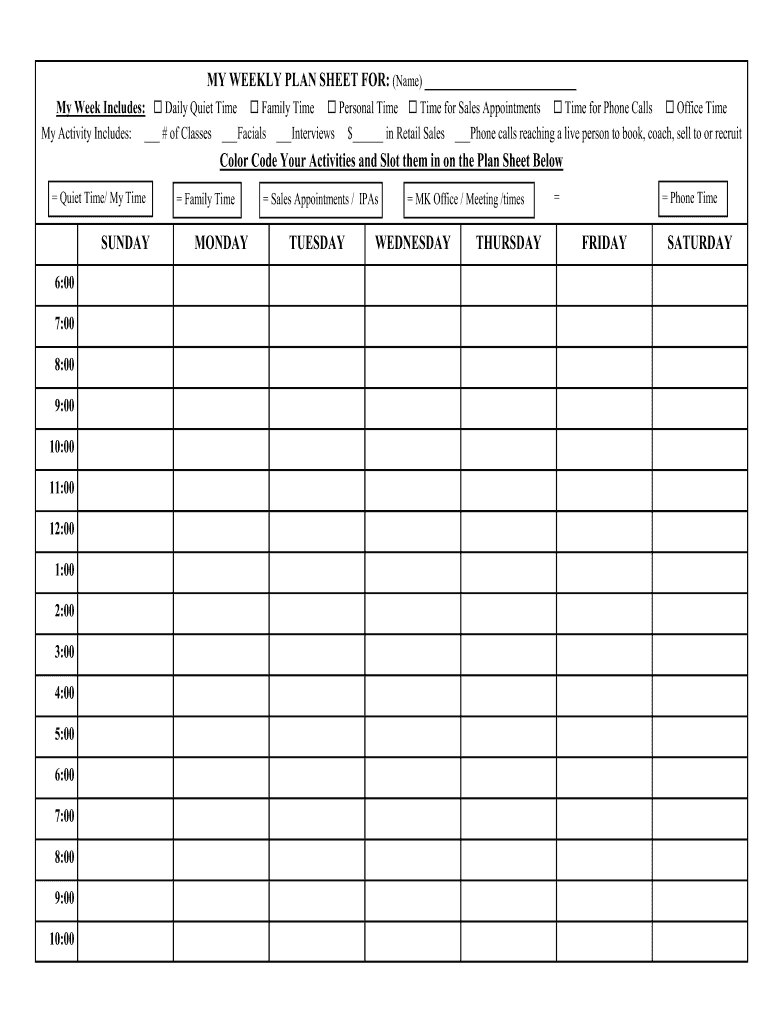
The Printable Work Week Planner is a structured tool designed for individuals to organize their weekly tasks and appointments effectively. This planner is particularly useful for Mary Kay consultants who want to manage their schedules, track sales, and plan client meetings. The planner typically includes sections for daily goals, to-do lists, and notes, allowing users to visualize their week at a glance. By utilizing this planner, Mary Kay representatives can enhance their productivity and ensure they stay on track with their business objectives.
How to use the Printable Work Week Planner
To use the Printable Work Week Planner effectively, start by downloading the template in PDF format. Once you have the planner, print it out and fill in your weekly goals, including appointments, tasks, and reminders. Each day should have designated space for specific activities, which helps in prioritizing tasks. Consider setting aside time each week to review your progress and adjust your plans as necessary. This proactive approach allows you to stay organized and focused on achieving your goals.
Steps to complete the Printable Work Week Planner
Completing the Printable Work Week Planner involves several straightforward steps:
- Download the planner template in PDF format.
- Print the planner on standard letter-sized paper.
- Write down your weekly goals at the top of the sheet.
- Fill in each day with specific tasks, appointments, and deadlines.
- Review your planner daily to stay on track and make adjustments as needed.
Key elements of the Printable Work Week Planner
The key elements of the Printable Work Week Planner include sections for daily tasks, weekly goals, and notes. Each day typically features space to write down appointments and to-do lists, while the weekly goals section allows users to outline their primary objectives for the week. Additionally, some planners may include motivational quotes or tips to inspire users throughout their week. These elements work together to create a comprehensive overview of your commitments and priorities.
Legal use of the Printable Work Week Planner
Using the Printable Work Week Planner is legal and compliant with general business practices. It serves as a personal organizational tool and does not require any special legal considerations. However, it is important to ensure that any business-related information recorded within the planner adheres to company policies and privacy regulations. By keeping accurate records and using the planner responsibly, users can maintain compliance with industry standards.
Examples of using the Printable Work Week Planner
Examples of using the Printable Work Week Planner include scheduling client meetings, tracking sales goals, and planning marketing activities. For instance, a Mary Kay consultant might use the planner to allocate time for product demonstrations, follow-up calls, and social media promotions. By visualizing these activities within the planner, representatives can better manage their time and ensure they meet their business objectives efficiently.
Quick guide on how to complete weekly plan sheet pamela shaw
Uncover how to navigate the Printable Work Week Planner implementation with this simple guide
Filing electronically and completing online forms is becoming more popular and is the preferred option for a diverse range of users. It provides several advantages over traditional printed documents, such as convenience, time savings, enhanced precision, and safety.
With tools like airSlate SignNow, you can search for, edit, sign, enhance, and send your Printable Work Week Planner without the hassle of endless printing and scanning. Follow this concise guide to begin and complete your form.
Utilize these steps to obtain and complete Printable Work Week Planner
- Begin by clicking the Get Form button to access your form in our editor.
- Pay attention to the green label on the left indicating required fields so you don’t miss them.
- Leverage our advanced features to annotate, alter, sign, secure, and enhance your form.
- Safeguard your document or transform it into a fillable form using the appropriate tab tools.
- Review the form and inspect it for mistakes or inconsistencies.
- Click DONE to complete the editing process.
- Rename your form or keep it as is.
- Choose the storage service you prefer to save your form, send it via USPS, or click the Download Now button to retrieve your file.
If Printable Work Week Planner isn’t what you needed, you can explore our extensive collection of pre-filled forms that you can complete effortlessly. Experience our solution today!
Create this form in 5 minutes or less
FAQs
-
How do you fill out a balance sheet for a business plan?
You can't just fill out a business plan as you need to construct it from the whole set of information that includes the profit and loss account and other items. A layman will not be able to do this properly so seek out a friend who can give you the advice on how to prepare a proper plan. Doing it in an amateur way will not impressed anyone.
-
Does the IRS require unused sheets of a form to be submitted? Can I just leave out the section of a form whose lines are not filled out?
This is what a schedule C I submitted earlier looks like :http://onemoredime.com/wp-conten... So I did not submit page 2 of the schedule C - all the lines on page 2 (33 through 48) were blank.
-
How can I fill out Google's intern host matching form to optimize my chances of receiving a match?
I was selected for a summer internship 2016.I tried to be very open while filling the preference form: I choose many products as my favorite products and I said I'm open about the team I want to join.I even was very open in the location and start date to get host matching interviews (I negotiated the start date in the interview until both me and my host were happy.) You could ask your recruiter to review your form (there are very cool and could help you a lot since they have a bigger experience).Do a search on the potential team.Before the interviews, try to find smart question that you are going to ask for the potential host (do a search on the team to find nice and deep questions to impress your host). Prepare well your resume.You are very likely not going to get algorithm/data structure questions like in the first round. It's going to be just some friendly chat if you are lucky. If your potential team is working on something like machine learning, expect that they are going to ask you questions about machine learning, courses related to machine learning you have and relevant experience (projects, internship). Of course you have to study that before the interview. Take as long time as you need if you feel rusty. It takes some time to get ready for the host matching (it's less than the technical interview) but it's worth it of course.
-
How do I fill out the form of DU CIC? I couldn't find the link to fill out the form.
Just register on the admission portal and during registration you will get an option for the entrance based course. Just register there. There is no separate form for DU CIC.
-
How do you know if you need to fill out a 1099 form?
Assuming that you are talking about 1099-MISC. Note that there are other 1099s.check this post - Form 1099 MISC Rules & RegulationsQuick answer - A Form 1099 MISC must be filed for each person to whom payment is made of:$600 or more for services performed for a trade or business by people not treated as employees;Rent or prizes and awards that are not for service ($600 or more) and royalties ($10 or more);any fishing boat proceeds,gross proceeds of $600, or more paid to an attorney during the year, orWithheld any federal income tax under the backup withholding rules regardless of the amount of the payment, etc.
Create this form in 5 minutes!
How to create an eSignature for the weekly plan sheet pamela shaw
How to make an electronic signature for your Weekly Plan Sheet Pamela Shaw in the online mode
How to create an electronic signature for the Weekly Plan Sheet Pamela Shaw in Google Chrome
How to create an electronic signature for putting it on the Weekly Plan Sheet Pamela Shaw in Gmail
How to generate an eSignature for the Weekly Plan Sheet Pamela Shaw straight from your smartphone
How to make an eSignature for the Weekly Plan Sheet Pamela Shaw on iOS
How to generate an eSignature for the Weekly Plan Sheet Pamela Shaw on Android
People also ask
-
What is a Mary Kay weekly plan sheet?
The Mary Kay weekly plan sheet is a planning tool designed for Mary Kay consultants to organize their weekly business activities effectively. It includes sections for scheduling appointments, tracking sales, and setting goals, helping consultants stay focused and productive throughout the week.
-
How can the Mary Kay weekly plan sheet improve my productivity?
By utilizing the Mary Kay weekly plan sheet, you can streamline your tasks and manage your time more efficiently. This structured approach allows you to prioritize important activities, leading to increased productivity and better results in your Mary Kay business.
-
Is the Mary Kay weekly plan sheet available for free?
The Mary Kay weekly plan sheet may be provided by various sources, including official Mary Kay resources and independent consultants. While some options are available for free, others may come at a cost, so it's best to explore your options to find the version that suits your needs.
-
How can I integrate the Mary Kay weekly plan sheet into my routine?
To integrate the Mary Kay weekly plan sheet into your routine, dedicate a specific time each week to fill it out and review your goals. Make it a habit by keeping it accessible, and refer to it daily to track your progress and adjust your actions as needed.
-
What features does the Mary Kay weekly plan sheet include?
The Mary Kay weekly plan sheet typically includes features such as time blocks for scheduling, sections for tracking sales and client follow-ups, and goal-setting areas. These features are designed to help you create a comprehensive view of your weekly business activities.
-
Can I customize the Mary Kay weekly plan sheet?
Yes, you can customize the Mary Kay weekly plan sheet to fit your personal style and workflow. Whether you prefer a digital format or a printed sheet, adapting the layout to reflect your preferences can enhance your planning experience.
-
Are there digital versions of the Mary Kay weekly plan sheet?
Yes, many consultants offer digital versions of the Mary Kay weekly plan sheet, which can be used on various devices for added convenience. These digital sheets may include interactive features that allow for easy updates and tracking throughout the week.
Get more for Printable Work Week Planner
Find out other Printable Work Week Planner
- How Can I Electronic signature Oklahoma Doctors Document
- How Can I Electronic signature Alabama Finance & Tax Accounting Document
- How To Electronic signature Delaware Government Document
- Help Me With Electronic signature Indiana Education PDF
- How To Electronic signature Connecticut Government Document
- How To Electronic signature Georgia Government PDF
- Can I Electronic signature Iowa Education Form
- How To Electronic signature Idaho Government Presentation
- Help Me With Electronic signature Hawaii Finance & Tax Accounting Document
- How Can I Electronic signature Indiana Government PDF
- How Can I Electronic signature Illinois Finance & Tax Accounting PPT
- How To Electronic signature Maine Government Document
- How To Electronic signature Louisiana Education Presentation
- How Can I Electronic signature Massachusetts Government PDF
- How Do I Electronic signature Montana Government Document
- Help Me With Electronic signature Louisiana Finance & Tax Accounting Word
- How To Electronic signature Pennsylvania Government Document
- Can I Electronic signature Texas Government PPT
- How To Electronic signature Utah Government Document
- How To Electronic signature Washington Government PDF