32bj Pension Direct Deposit 2016-2026


What is the 32bj Pension Direct Deposit
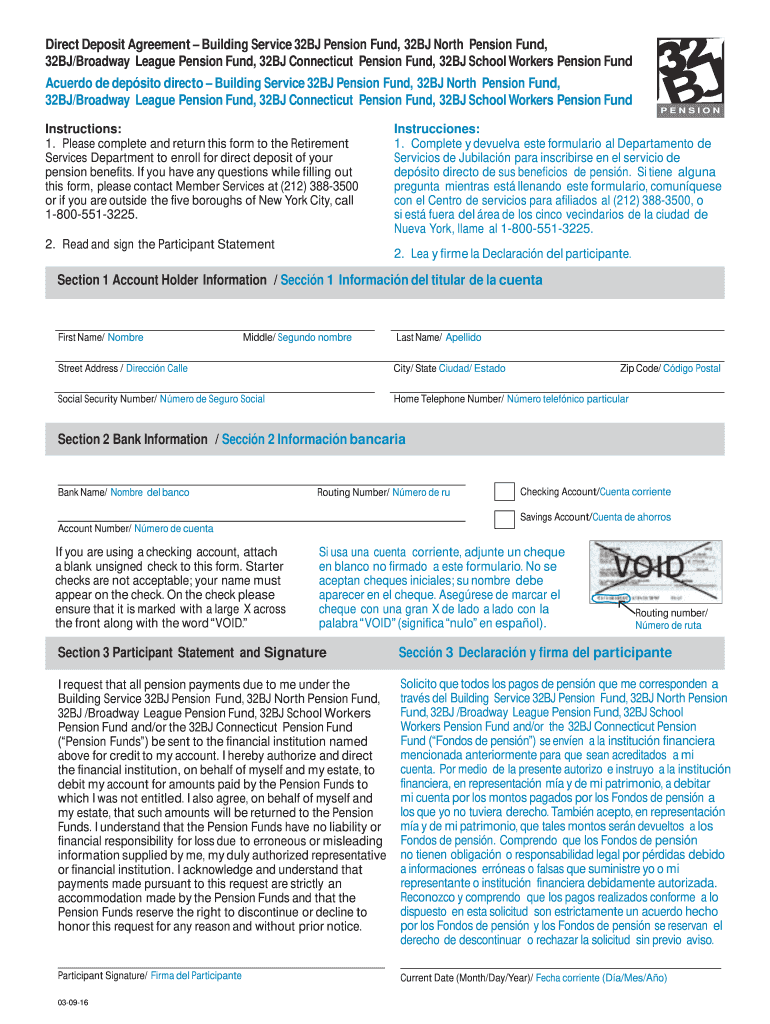
The 32bj pension direct deposit is a method for receiving pension benefits directly into a bank account, streamlining the payment process for retirees and beneficiaries of the Building Service 32BJ Pension Fund. This system eliminates the need for physical checks, providing a secure and efficient way to access funds. By opting for direct deposit, recipients can enjoy timely payments without the risk of lost or stolen checks, enhancing financial management and convenience.
How to Use the 32bj Pension Direct Deposit
Using the 32bj pension direct deposit involves a few straightforward steps. First, beneficiaries must fill out the necessary forms to enroll in the direct deposit program. This typically includes providing personal banking information, such as the account number and routing number. Once the form is completed, it should be submitted to the pension fund for processing. After approval, pension payments will be automatically deposited into the designated account on scheduled payment dates.
Steps to Complete the 32bj Pension Direct Deposit
Completing the 32bj pension direct deposit requires careful attention to detail. Follow these steps:
- Obtain the direct deposit enrollment form from the Building Service 32BJ Pension Fund.
- Fill out the form with accurate personal information, including your bank account details.
- Review the form for any errors to ensure all information is correct.
- Submit the completed form to the pension fund via the specified method, whether online or by mail.
- Confirm with the pension fund that your enrollment has been processed and that future payments will be made via direct deposit.
Legal Use of the 32bj Pension Direct Deposit
The legal framework governing the use of the 32bj pension direct deposit ensures that electronic payments are recognized as valid and enforceable. Compliance with federal regulations, such as the Electronic Signatures in Global and National Commerce (ESIGN) Act, is essential. This legislation affirms that electronic signatures and records hold the same legal weight as traditional paper documents, provided that the parties involved consent to use electronic means for transactions.
Required Documents for the 32bj Pension Direct Deposit
To successfully enroll in the 32bj pension direct deposit program, certain documents are typically required. These may include:
- A completed direct deposit enrollment form.
- A voided check or bank statement to verify account details.
- Identification documents, such as a driver’s license or Social Security card, may also be requested for verification purposes.
Eligibility Criteria for the 32bj Pension Direct Deposit
Eligibility for the 32bj pension direct deposit is generally determined by the terms of the Building Service 32BJ Pension Fund. Typically, individuals who are beneficiaries of the pension fund and have completed the necessary enrollment forms can qualify. It is important to review specific eligibility requirements, which may vary based on individual circumstances, such as employment history and retirement status.
Quick guide on how to complete 32bj pension direct deposit form
Effortlessly Prepare 32bj Pension Direct Deposit on Any Device
The management of online documents has gained popularity among businesses and individuals. It offers an ideal eco-friendly substitute for traditional printed and signed papers, allowing you to locate the necessary form and securely store it online. airSlate SignNow provides all the tools required to swiftly create, edit, and eSign your documents without delays. Manage 32bj Pension Direct Deposit on any device using the airSlate SignNow apps for Android or iOS and enhance any document-centric operation today.
How to Modify and eSign 32bj Pension Direct Deposit with Ease
- Obtain 32bj Pension Direct Deposit and select Get Form to begin.
- Utilize the tools we provide to fill out your form.
- Emphasize important sections of your documents or obscure sensitive information with tools specifically designed for that purpose by airSlate SignNow.
- Create your signature using the Sign tool, which takes mere seconds and holds the same legal validity as a conventional wet ink signature.
- Review the information and click the Done button to save your modifications.
- Select how you wish to share your form, via email, SMS, invite link, or download it to your computer.
Eliminate concerns about lost or misplaced documents, tiring form searches, or errors that necessitate reprinting new document copies. airSlate SignNow meets your document management requirements in just a few clicks from any device you prefer. Edit and eSign 32bj Pension Direct Deposit and ensure seamless communication at every stage of the form preparation process with airSlate SignNow.
Create this form in 5 minutes or less
FAQs
-
Is it fishy if a company wants you to fill out the direct deposit form before you receive any paper work about being hired?
Hi, To give a little more context, if you are worried about completing a direct deposit form, which should be for receiving remuneration of your wages, then request a your employment contract and tell them you will complete the direct deposit form after the employment has been received. Always be open and honest with a potential em0ployer and set parameters for your employment relationship from the get go. you would like to follow procedures. Every Employer will respect you more for that. I do not think it is fishy but a little odd
-
How can I open a basic UK bank account to direct deposit my UK state pension when I don't live in the UK?
Original question: How can I open a basic UK bank account to direct deposit my UK state pension when I don't live in the UK?You don’t need to. From the UK State Pension website State Pension if you retire abroadBank accounts your pension can be paid intoYour State Pension can be paid into:a bank in the country you’re living ina bank or building society in the UKYou can use:an account in your namea joint accountsomeone else’s account - if you have their permission and keep to the terms and conditions of the accountYou’ll need the international bank account number (IBAN) and bank identification code (BIC) numbers if you have an overseas account.You’ll be paid in local currency - the amount you get may change due to exchange rates.
-
Do military members have to pay any fee for leave or fiancee forms?
NOOOOOOO. You are talking to a military romance scammer. I received an email from the US Army that directly answers your question that is pasted below please keep reading.I believe you are the victim of a military Romance Scam whereas the person you are talking to is a foreign national posing as an American Soldier claiming to be stationed overseas on a peacekeeping mission. That's the key to the scam they always claim to be on a peacekeeping mission.Part of their scam is saying that they have no access to their money that their mission is highly dangerous.If your boyfriend girlfriend/future husband/wife is asking you to do the following or has exhibited this behavior, it is a most likely a scam:Moves to private messaging site immediately after meeting you on Facebook or SnapChat or Instagram or some dating or social media site. Often times they delete the site you met them on right after they asked you to move to a more private messaging siteProfesses love to you very quickly & seems to quote poems and song lyrics along with using their own sort of broken language, as they profess their love and devotion quickly. They also showed concern for your health and love for your family.Promises marriage as soon as he/she gets to state for leave that they asked you to pay for.They Requests money (wire transfers) and Amazon, iTune ,Verizon, etc gift cards, for medicine, religious practices, and leaves to come home, internet access, complete job assignments, help sick friend, get him out of trouble, or anything that sounds fishy.The military does provide all the soldier needs including food medical Care and transportation for leave. Trust me, I lived it, you are probably being scammed. I am just trying to show you examples that you are most likely being connned.Below is an email response I received after I sent an inquiry to the US government when I discovered I was scammed. I received this wonderful response back with lots of useful links on how to find and report your scammer. And how to learn more about Romance Scams.Right now you can also copy the picture he gave you and do a google image search and you will hopefully see the pictures of the real person he is impersonating. this doesn't always work and take some digging. if you find the real person you can direct message them and alert them that their image is being used for scamming.Good Luck to you and I'm sorry this may be happening to you. please continue reading the government response I received below it's very informative. You have contacted an email that is monitored by the U.S. Army Criminal Investigation Command. Unfortunately, this is a common concern. We assure you there is never any reason to send money to anyone claiming to be a Soldier online. If you have only spoken with this person online, it is likely they are not a U.S. Soldier at all. If this is a suspected imposter social media profile, we urge you to report it to that platform as soon as possible. Please continue reading for more resources and answers to other frequently asked questions: How to report an imposter Facebook profile: Caution-https://www.facebook.com/help/16... < Caution-https://www.facebook.com/help/16... > Answers to frequently asked questions: - Soldiers and their loved ones are not charged money so that the Soldier can go on leave. - Soldiers are not charged money for secure communications or leave. - Soldiers do not need permission to get married. - Soldiers emails are in this format: john.doe.mil@mail.mil < Caution-mailto: john.doe.mil@mail.mil > anything ending in .us or .com is not an official email account. - Soldiers have medical insurance, which pays for their medical costs when treated at civilian health care facilities worldwide – family and friends do not need to pay their medical expenses. - Military aircraft are not used to transport Privately Owned Vehicles. - Army financial offices are not used to help Soldiers buy or sell items of any kind. - Soldiers deployed to Combat Zones do not need to solicit money from the public to feed or house themselves or their troops. - Deployed Soldiers do not find large unclaimed sums of money and need your help to get that money out of the country. Anyone who tells you one of the above-listed conditions/circumstances is true is likely posing as a Soldier and trying to steal money from you. We would urge you to immediately cease all contact with this individual. For more information on avoiding online scams and to report this crime, please see the following sites and articles: This article may help clarify some of the tricks social media scammers try to use to take advantage of people: Caution-https://www.army.mil/article/61432/< Caution-https://www.army.mil/article/61432/> CID advises vigilance against 'romance scams,' scammers impersonating Soldiers Caution-https://www.army.mil/article/180749 < Caution-https://www.army.mil/article/180749 > FBI Internet Crime Complaint Center: Caution-http://www.ic3.gov/default.aspx< Caution-http://www.ic3.gov/default.aspx> U.S. Army investigators warn public against romance scams: Caution-https://www.army.mil/article/130...< Caution-https://www.army.mil/article/130...> DOD warns troops, families to be cybercrime smart -Caution-http://www.army.mil/article/1450...< Caution-http://www.army.mil/article/1450...> Use caution with social networking Caution-https://www.army.mil/article/146...< Caution-https://www.army.mil/article/146...> Please see our frequently asked questions section under scams and legal issues. Caution-http://www.army.mil/faq/ < Caution-http://www.army.mil/faq/ > or visit Caution-http://www.cid.army.mil/ < Caution-http://www.cid.army.mil/ >. The challenge with most scams is determining if an individual is a legitimate member of the US Army. Based on the Privacy Act of 1974, we cannot provide this information. If concerned about a scam you may contact the Better Business Bureau (if it involves a solicitation for money), or local law enforcement. If you're involved in a Facebook or dating site scam, you are free to contact us direct; (571) 305-4056. If you have a social security number, you can find information about Soldiers online at Caution-https://www.dmdc.osd.mil/appj/sc... < Caution-https://www.dmdc.osd.mil/appj/sc... > . While this is a free search, it does not help you locate a retiree, but it can tell you if the Soldier is active duty or not. If more information is needed such as current duty station or location, you can contact the Commander Soldier's Records Data Center (SRDC) by phone or mail and they will help you locate individuals on active duty only, not retirees. There is a fee of $3.50 for businesses to use this service. The check or money order must be made out to the U.S. Treasury. It is not refundable. The address is: Commander Soldier's Records Data Center (SRDC) 8899 East 56th Street Indianapolis, IN 46249-5301 Phone: 1-866-771-6357 In addition, it is not possible to remove social networking site profiles without legitimate proof of identity theft or a scam. If you suspect fraud on this site, take a screenshot of any advances for money or impersonations and report the account on the social networking platform immediately. Please submit all information you have on this incident to Caution-www.ic3.gov < Caution-http://www.ic3.gov > (FBI website, Internet Criminal Complaint Center), immediately stop contact with the scammer (you are potentially providing them more information which can be used to scam you), and learn how to protect yourself against these scams at Caution-http://www.ftc.gov < Caution-http://www.ftc.gov > (Federal Trade Commission's website)
-
How can you get a Chase direct deposit form?
A Google search of "Chase Direct Deposit Form" provided this document: Chase Checking Account Direct Deposit & Direct Deposit Form Just download the form.
-
How do I fill out a deposit slip?
You go to the bank of your choice, preferably where you have an account, and ask for a deposit slip. You then technically do a “fill in the blank” and then write the number of notes of relevant denomination note. Like thisCredit: http://mindpowerindia.com/sbi.phpNow go and deposit your Rs. 500 and Rs. 1000 notes, if you are in India :-)EDIT: As rightly pointed out by Lara Taylor sorry for being judgemental.
Create this form in 5 minutes!
How to create an eSignature for the 32bj pension direct deposit form
How to create an eSignature for your 32bj Pension Direct Deposit Form online
How to generate an eSignature for your 32bj Pension Direct Deposit Form in Chrome
How to generate an electronic signature for putting it on the 32bj Pension Direct Deposit Form in Gmail
How to make an eSignature for the 32bj Pension Direct Deposit Form from your smart phone
How to create an eSignature for the 32bj Pension Direct Deposit Form on iOS
How to generate an eSignature for the 32bj Pension Direct Deposit Form on Android devices
People also ask
-
What is 32bj Pension Direct Deposit?
The 32bj Pension Direct Deposit is a convenient electronic payment system that allows members to receive their pension benefits directly into their bank accounts. This method ensures timely and secure access to funds without the need for physical checks. With airSlate SignNow, you can easily manage and sign the necessary documents for setting up your 32bj Pension Direct Deposit.
-
How can I set up my 32bj Pension Direct Deposit with airSlate SignNow?
To set up your 32bj Pension Direct Deposit, simply create an account with airSlate SignNow and follow the guided steps to fill out the required forms. You will need to provide your bank details and complete any necessary consent forms electronically. Our platform makes it easy to eSign and submit everything you need for a smooth setup.
-
What are the benefits of using 32bj Pension Direct Deposit?
Using 32bj Pension Direct Deposit provides several benefits, including immediate access to your funds, enhanced security, and reduced risk of lost or stolen checks. Additionally, it simplifies the payment process, allowing you to manage your finances more efficiently. With airSlate SignNow, you can effortlessly complete the documentation required for this service.
-
Is there a fee for using 32bj Pension Direct Deposit?
Typically, there are no fees associated with receiving your pension payments through 32bj Pension Direct Deposit. However, it’s always advisable to check with your pension plan provider and your bank for any potential charges. airSlate SignNow offers a cost-effective solution for managing your eSigning needs without additional costs.
-
Can I change my bank account for my 32bj Pension Direct Deposit?
Yes, you can change your bank account for your 32bj Pension Direct Deposit at any time. To do this, simply log into your airSlate SignNow account, fill out the necessary forms to update your banking information, and eSign them for processing. Ensure you submit the updated information well in advance of your next payment.
-
What documents do I need to set up 32bj Pension Direct Deposit?
To set up your 32bj Pension Direct Deposit, you typically need to provide your bank account details, a completed authorization form, and identification verification documents. airSlate SignNow simplifies this process, allowing you to gather and eSign all necessary documents securely online.
-
Does airSlate SignNow integrate with other financial services for 32bj Pension Direct Deposit?
Yes, airSlate SignNow integrates seamlessly with various financial services and tools, making it easier to manage your 32bj Pension Direct Deposit alongside your other financial transactions. Our platform supports multiple integrations that enhance your experience and streamline document management.
Get more for 32bj Pension Direct Deposit
- Tri care plus enrollment application read agency form
- T6 form 646019714
- Www swf wc usace army milnavarroinformationdisclaimer and waiver of liability united states army
- Request for excused absence for educational reasons wake county form
- Form nz dl19 fill online printable fillable
- Joint account holder access letter form
- Woodbine georgia 31569 form
- Community involvement activity record form
Find out other 32bj Pension Direct Deposit
- eSign Arizona Engineering Proposal Template Later
- eSign Connecticut Proforma Invoice Template Online
- eSign Florida Proforma Invoice Template Free
- Can I eSign Florida Proforma Invoice Template
- eSign New Jersey Proforma Invoice Template Online
- eSign Wisconsin Proforma Invoice Template Online
- eSign Wyoming Proforma Invoice Template Free
- eSign Wyoming Proforma Invoice Template Simple
- How To eSign Arizona Agreement contract template
- eSign Texas Agreement contract template Fast
- eSign Massachusetts Basic rental agreement or residential lease Now
- How To eSign Delaware Business partnership agreement
- How Do I eSign Massachusetts Business partnership agreement
- Can I eSign Georgia Business purchase agreement
- How Can I eSign Idaho Business purchase agreement
- How To eSign Hawaii Employee confidentiality agreement
- eSign Idaho Generic lease agreement Online
- eSign Pennsylvania Generic lease agreement Free
- eSign Kentucky Home rental agreement Free
- How Can I eSign Iowa House rental lease agreement