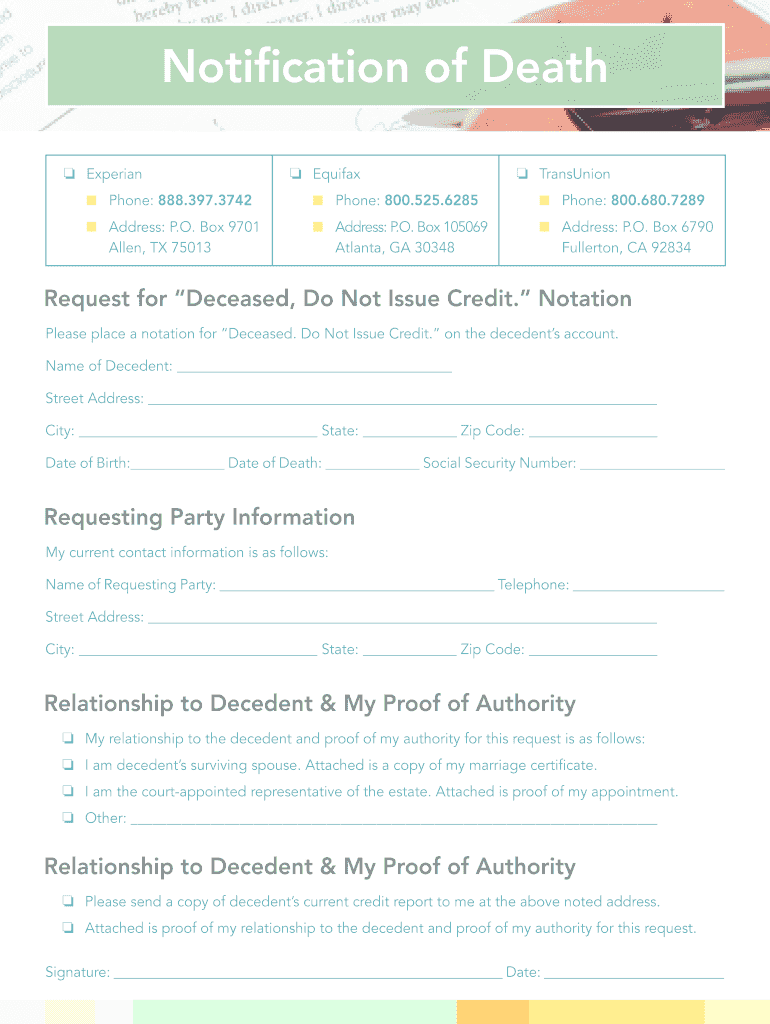
Request for Deceased Do Not Issue Cr Edit Notation Form


What is the Request For Deceased Do Not Issue Credit Notation
The Request For Deceased Do Not Issue Credit Notation is a formal document used to notify credit bureaus that an individual has passed away. This request aims to prevent the issuance of credit in the deceased person's name, which can help protect their estate from potential fraud. The notation serves as an important safeguard for families and executors managing the deceased's financial affairs.
How to use the Request For Deceased Do Not Issue Credit Notation
To effectively use the Request For Deceased Do Not Issue Credit Notation, the executor or authorized representative must fill out the necessary form and submit it to the relevant credit bureaus. This process typically involves providing proof of death, such as a death certificate, along with identification of the requester. Completing this request ensures that the deceased's credit report is marked appropriately, preventing new credit accounts from being opened in their name.
Steps to complete the Request For Deceased Do Not Issue Credit Notation
Completing the Request For Deceased Do Not Issue Credit Notation involves several key steps:
- Gather required documents, including the death certificate and proof of identity.
- Obtain the correct form from the relevant credit bureau.
- Fill out the form accurately, ensuring all information is complete.
- Submit the form along with the required documentation via mail or online, depending on the bureau's submission guidelines.
- Follow up with the credit bureau to confirm that the notation has been applied.
Legal use of the Request For Deceased Do Not Issue Credit Notation
The legal use of the Request For Deceased Do Not Issue Credit Notation is crucial for ensuring compliance with financial regulations. It protects the deceased's estate from unauthorized credit activity and helps maintain the integrity of their credit history. By submitting this request, the executor fulfills their legal obligation to manage the deceased's financial affairs responsibly.
Required Documents
When submitting the Request For Deceased Do Not Issue Credit Notation, certain documents are typically required:
- A certified copy of the death certificate.
- Identification of the requester, such as a driver's license or passport.
- Any additional documentation requested by the credit bureau, such as proof of relationship to the deceased.
Form Submission Methods (Online / Mail / In-Person)
The Request For Deceased Do Not Issue Credit Notation can usually be submitted through various methods, depending on the credit bureau's policies:
- Online: Some bureaus offer an online submission option, allowing for quicker processing.
- Mail: The traditional method involves sending the completed form and documents via postal service.
- In-Person: Certain bureaus may allow for in-person submissions at designated locations.
Quick guide on how to complete request for deceased do not issue cr edit notation
The optimal method to locate and authorize Request For Deceased Do Not Issue Cr Edit Notation
On the scale of a whole organization, inefficient workflows surrounding paper approvals can take up signNow working hours. Signing documents like Request For Deceased Do Not Issue Cr Edit Notation is an inherent part of operations in any enterprise, which is why the effectiveness of each agreement’s lifecycle critically influences the organization’s overall performance. With airSlate SignNow, endorsing your Request For Deceased Do Not Issue Cr Edit Notation is as simple and quick as possible. You will discover on this platform the most recent version of almost any form. Even better, you can sign it instantly without needing to install external software on your computer or printing any physical copies.
Steps to acquire and endorse your Request For Deceased Do Not Issue Cr Edit Notation
- Explore our library by category or make use of the search box to locate the document you require.
- View the document preview by clicking Learn more to confirm it’s the correct one.
- Click Get form to begin editing immediately.
- Complete your document and incorporate any necessary details using the toolbar.
- Once finished, click the Sign tool to endorse your Request For Deceased Do Not Issue Cr Edit Notation.
- Choose the signature method that suits you best: Draw, Create initials, or upload a photo of your handwritten signature.
- Click Done to complete your editing and proceed to sharing options as necessary.
With airSlate SignNow, you have everything you need to manage your documentation effectively. You can discover, fill out, modify, and even share your Request For Deceased Do Not Issue Cr Edit Notation within a single tab without any hassle. Enhance your processes by employing a singular, intelligent eSignature solution.
Create this form in 5 minutes or less
FAQs
-
How do I respond to a request for a restraining order? Do I need to fill out a form?
As asked of me specifically;The others are right, you will likely need a lawyer. But to answer your question, there is a response form to respond to a restraining order or order of protection. Worst case the form is available at the courthouse where your hearing is set to be heard in, typically at the appropriate clerk's window, which may vary, so ask any of the clerk's when you get there.You only have so many days to respond, and it will specify in the paperwork.You will also have to appear in court on the date your hearing is scheduled.Most courts have a department that will help you respond to forms at no cost. I figure you are asking because you can't afford an attorney which is completely understandable.The problem is that if you aren't represented and the other person is successful in getting a temporary restraining order made permanent in the hearing you will not be allowed at any of the places the petitioner goes, without risking arrest.I hope this helps.Not given as legal advice-
-
While filling out my SSC CGL form, I accidentally uploaded a signature that was not mine. What should I do? I am not allowed to edit it.
Well if you have done the final submission then there is no more editing possible however you dont need to worry now you have to actually apply a fresh form with all your correct informations n dont do mistakes like uploading sombody else's photo or signature and submit this fresh form as per the SSC system on multiple application submission the last application would be considered valid n your application before this one would be automatically deemed invalid and your fresh application would be considered valid n on the basis of this fresh application you will get your admit card generated from SSC when they are available on website so dont worry and apply fresh with all your correct informations
-
How should one fill out Form 1120 for a company with no activity and no income and that has not issued shares?
You put all zeros in for revenue and expenses. Even though the corporation has not formally issued shares, someone or several individuals or entities own the common stock of the corporation and you need to report anyone who owns more than 20% of the corporation.
-
How do I fill out the SS-4 form for a new Delaware C-Corp to get an EIN?
You indicate this is a Delaware C Corp so check corporation and you will file Form 1120.Check that you are starting a new corporation.Date business started is the date you actually started the business. Typically you would look on the paperwork from Delaware and put the date of incorporation.December is the standard closing month for most corporations. Unless you have a signNow business reason to pick a different month use Dec.If you plan to pay yourself wages put one. If you don't know put zero.Unless you are fairly sure you will owe payroll taxes the first year check that you will not have payroll or check that your liability will be less than $1,000. Anything else and the IRS will expect you to file quarterly payroll tax returns.Indicate the type of SaaS services you will offer.
-
What colleges do I not need to apply for if I have filled out the JEE Main form?
As you know jee is prestigous exam in india for engineering colleges.I have reasearch a lot on colleges criteria and i have got following conculosion .●All nits ,iiits,some state offred admission by jee main ,jmi (central university),all admited students from jee main●For jmi you need to apply seprate form which may be available from january●For colleges likr DTU,NSIT and other delhi colleges you need to apply seprate councelling form which is available after jee main exam●Some colleges of westbengal offer admission on jee main which you need to participate in their councelling●You should give wbjee because jadavpur university is top 10 engineering college of india offer admission on the basis of wbjee●You should apply seprate form and seat in seprate exam of top private engineering colleges like BITS,VITEE,●You can apply cusat for coachin university●You can apply other state engineering exam as your flexibilityRemarks:If you are able enough to get 200 in jee main then you not need to worry about these engineering collegesBut in my point of you should apply for wbjee because jadavpur university is top university you can check itIf you need any further information you can ask me#BEST OF LUCK
-
How do I fill out Form 16 if I'm not eligible for IT returns and just want to receive the TDS cut for the 6 months that I've worked?
use File Income Tax Return Online in India: ClearTax | e-Filing Income Tax in 15 minutes | Tax filing | Income Tax Returns | E-file Tax Returns for 2014-15It is free and simple.
Create this form in 5 minutes!
How to create an eSignature for the request for deceased do not issue cr edit notation
How to generate an electronic signature for the Request For Deceased Do Not Issue Cr Edit Notation online
How to make an electronic signature for your Request For Deceased Do Not Issue Cr Edit Notation in Chrome
How to create an electronic signature for signing the Request For Deceased Do Not Issue Cr Edit Notation in Gmail
How to make an eSignature for the Request For Deceased Do Not Issue Cr Edit Notation right from your mobile device
How to generate an electronic signature for the Request For Deceased Do Not Issue Cr Edit Notation on iOS devices
How to create an eSignature for the Request For Deceased Do Not Issue Cr Edit Notation on Android OS
People also ask
-
What is a Request For Deceased Do Not Issue Cr Edit Notation?
A Request For Deceased Do Not Issue Cr Edit Notation is a formal request that informs financial institutions not to issue credit in the name of a deceased individual. This process is crucial for preventing identity theft and protecting the deceased's financial history. With airSlate SignNow, you can easily create and eSign this document, ensuring compliance with necessary regulations.
-
How can airSlate SignNow help me with my Request For Deceased Do Not Issue Cr Edit Notation?
airSlate SignNow streamlines the process of drafting and signing a Request For Deceased Do Not Issue Cr Edit Notation. Our intuitive platform allows you to create templates, gather signatures, and securely store your documents. This ensures a hassle-free experience while managing sensitive requests.
-
Is there a cost associated with using airSlate SignNow for my Request For Deceased Do Not Issue Cr Edit Notation?
Yes, airSlate SignNow offers various pricing plans to accommodate different user needs. Whether you are an individual or a business, you can choose a plan that fits your budget while providing access to features that simplify the creation of documents like the Request For Deceased Do Not Issue Cr Edit Notation.
-
What features does airSlate SignNow offer for managing legal documents?
airSlate SignNow provides a range of features including customizable templates, advanced eSignature capabilities, and secure document storage. These tools are particularly useful when preparing a Request For Deceased Do Not Issue Cr Edit Notation, making the process efficient and compliant with legal standards.
-
Can I integrate airSlate SignNow with other applications for my Request For Deceased Do Not Issue Cr Edit Notation?
Absolutely! airSlate SignNow seamlessly integrates with various applications such as Google Drive, Dropbox, and CRM systems. This integration allows you to streamline your workflow when managing documents like the Request For Deceased Do Not Issue Cr Edit Notation.
-
How secure is my data when using airSlate SignNow for sensitive documents?
Security is a top priority for airSlate SignNow. We utilize bank-level encryption to protect your data while you create and manage your Request For Deceased Do Not Issue Cr Edit Notation. Additionally, our compliance with industry standards ensures that your documents remain confidential and secure.
-
Can I track the status of my Request For Deceased Do Not Issue Cr Edit Notation sent for signature?
Yes, airSlate SignNow provides real-time tracking for all documents sent for signature, including your Request For Deceased Do Not Issue Cr Edit Notation. You will receive notifications about the status of your document, ensuring you are always informed about its progress.
Get more for Request For Deceased Do Not Issue Cr Edit Notation
Find out other Request For Deceased Do Not Issue Cr Edit Notation
- Electronic signature Utah Outsourcing Services Contract Online
- How To Electronic signature Wisconsin Debit Memo
- Electronic signature Delaware Junior Employment Offer Letter Later
- Electronic signature Texas Time Off Policy Later
- Electronic signature Texas Time Off Policy Free
- eSignature Delaware Time Off Policy Online
- Help Me With Electronic signature Indiana Direct Deposit Enrollment Form
- Electronic signature Iowa Overtime Authorization Form Online
- Electronic signature Illinois Employee Appraisal Form Simple
- Electronic signature West Virginia Business Ethics and Conduct Disclosure Statement Free
- Electronic signature Alabama Disclosure Notice Simple
- Electronic signature Massachusetts Disclosure Notice Free
- Electronic signature Delaware Drug Testing Consent Agreement Easy
- Electronic signature North Dakota Disclosure Notice Simple
- Electronic signature California Car Lease Agreement Template Free
- How Can I Electronic signature Florida Car Lease Agreement Template
- Electronic signature Kentucky Car Lease Agreement Template Myself
- Electronic signature Texas Car Lease Agreement Template Easy
- Electronic signature New Mexico Articles of Incorporation Template Free
- Electronic signature New Mexico Articles of Incorporation Template Easy