Permanently Switch Shift Sheet Form


What is the Permanently Switch Shift Sheet
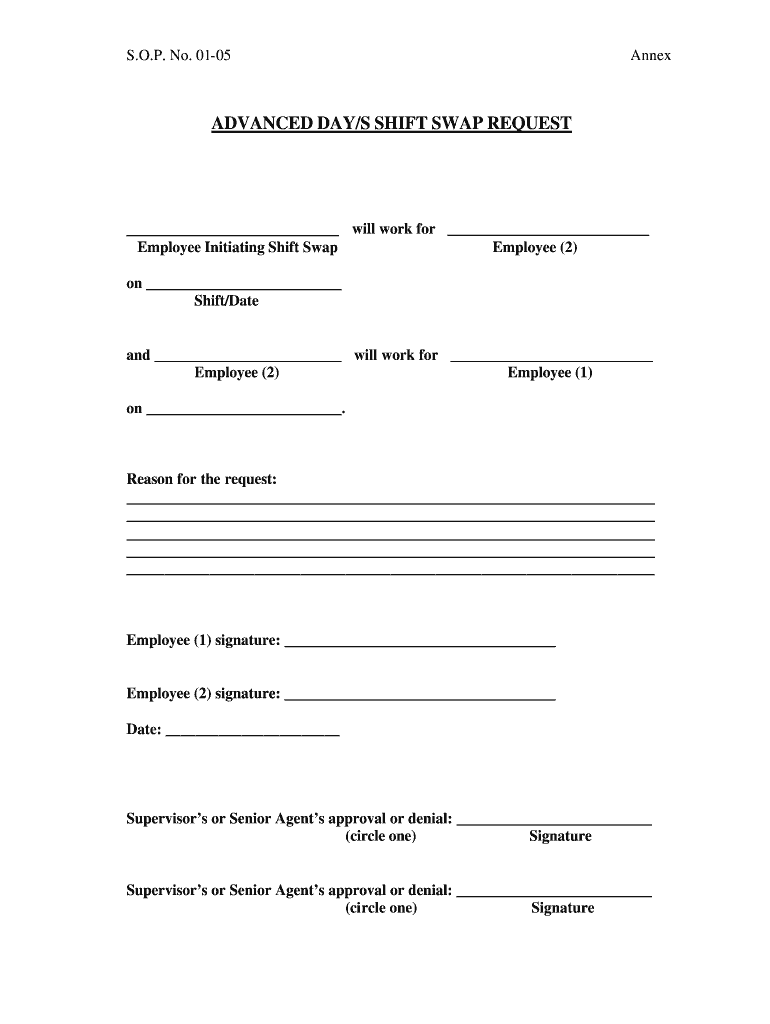
The Permanently Switch Shift Sheet is a formal document used by employees to request a permanent change in their scheduled work shifts. This form is essential for maintaining clear communication between employees and management regarding shift assignments. It outlines the details of the current shift, the desired shift, and the reasons for the request. By utilizing this sheet, both employees and employers can ensure that shift changes are documented properly, minimizing misunderstandings and ensuring compliance with workplace policies.
How to Use the Permanently Switch Shift Sheet
To effectively use the Permanently Switch Shift Sheet, employees should follow a structured approach. First, obtain the template from the appropriate source, such as the company’s human resources department or an internal database. Next, fill out the required fields, including the employee's name, current shift details, requested shift details, and any relevant comments. Once completed, submit the form to the designated supervisor or manager for review. Keeping a copy of the submitted form is advisable for personal records.
Steps to Complete the Permanently Switch Shift Sheet
Completing the Permanently Switch Shift Sheet involves several key steps:
- Access the Template: Obtain the shift swap form template from your workplace resources.
- Fill in Personal Information: Include your name, position, and contact information.
- Detail Current Shift: Specify your current shift schedule, including days and hours.
- Request New Shift: Clearly state the desired shift schedule, including any specific days or times.
- Provide Justification: Briefly explain the reason for the shift change request.
- Submit the Form: Send the completed form to your supervisor or HR department for approval.
Key Elements of the Permanently Switch Shift Sheet
Several important elements should be included in the Permanently Switch Shift Sheet to ensure clarity and effectiveness:
- Employee Information: Name, employee ID, and department.
- Current Shift Details: Days and times currently worked.
- Requested Shift Details: Proposed new shift schedule.
- Reason for Change: A brief explanation for the requested shift change.
- Signature: Employee signature and date to confirm the request.
Legal Use of the Permanently Switch Shift Sheet
Using the Permanently Switch Shift Sheet legally involves adhering to workplace policies and regulations. It is crucial that the form is filled out accurately and submitted through the proper channels within the organization. This ensures that the request is officially recognized and documented. Additionally, maintaining compliance with labor laws regarding work hours and shift changes is essential to avoid potential disputes or misunderstandings.
Examples of Using the Permanently Switch Shift Sheet
Examples of scenarios where the Permanently Switch Shift Sheet may be utilized include:
- An employee who has a new childcare commitment may request to switch from a day shift to a night shift.
- A worker needing to accommodate educational pursuits may seek to change their schedule to allow for classes.
- Employees looking to balance personal health issues might request a shift change to reduce stress or fatigue.
Quick guide on how to complete advanced days shift swap request employee initiating
The optimal method to obtain and endorse Permanently Switch Shift Sheet
At the level of an entire organization, ineffective workflows regarding document approval can drain numerous working hours. Signing documents like Permanently Switch Shift Sheet is an inherent aspect of operations across all sectors, which is why the effectiveness of each agreement’s lifecycle signNowly impacts the overall performance of the company. With airSlate SignNow, endorsing your Permanently Switch Shift Sheet can be as simple and swift as possible. This platform provides you with the latest version of nearly any form. Even better, you can sign it instantly without the necessity of installing external software on your computer or printing physical copies.
Steps to obtain and endorse your Permanently Switch Shift Sheet
- Navigate through our library by category or use the search bar to locate the document you require.
- View the form preview by selecting Learn more to confirm it’s the correct one.
- Click Get form to begin editing right away.
- Fill out your form and input any necessary details using the toolbar.
- Once completed, select the Sign tool to endorse your Permanently Switch Shift Sheet.
- Opt for the signature method that suits you best: Draw, Create initials, or upload a picture of your handwritten signature.
- Click Done to conclude editing and proceed to document-sharing options as required.
With airSlate SignNow, you possess everything you need to manage your documents effectively. You can find, complete, edit, and even dispatch your Permanently Switch Shift Sheet in one tab effortlessly. Enhance your workflows with a single, intelligent eSignature solution.
Create this form in 5 minutes or less
FAQs
-
How do I respond to a request for a restraining order? Do I need to fill out a form?
As asked of me specifically;The others are right, you will likely need a lawyer. But to answer your question, there is a response form to respond to a restraining order or order of protection. Worst case the form is available at the courthouse where your hearing is set to be heard in, typically at the appropriate clerk's window, which may vary, so ask any of the clerk's when you get there.You only have so many days to respond, and it will specify in the paperwork.You will also have to appear in court on the date your hearing is scheduled.Most courts have a department that will help you respond to forms at no cost. I figure you are asking because you can't afford an attorney which is completely understandable.The problem is that if you aren't represented and the other person is successful in getting a temporary restraining order made permanent in the hearing you will not be allowed at any of the places the petitioner goes, without risking arrest.I hope this helps.Not given as legal advice-
-
There is curfew in my area and Internet service is blocked, how can I fill my exam form as today is the last day to fill it out?
Spend less time using your blocked Internet to ask questions on Quora, andTravel back in time to when there was no curfew and you were playing Super Mario Kart, and instead, fill out your exam form.
-
After filling out Form 6, how many days does it require to get your voter ID? Should I download it online?
I think it takes 2-3 months to verify your application and further other process then will get registered as voter in electoral roll. Then the voter Id will dispatch to you through BLO of your part of constituency.If you fill the form 6 on nvsp.in then you can check or track the status of your application.You will not supposed to get the digital copy of your voter Id online.I hope this will help you…..
Create this form in 5 minutes!
How to create an eSignature for the advanced days shift swap request employee initiating
How to create an eSignature for your Advanced Days Shift Swap Request Employee Initiating online
How to generate an electronic signature for the Advanced Days Shift Swap Request Employee Initiating in Chrome
How to make an electronic signature for signing the Advanced Days Shift Swap Request Employee Initiating in Gmail
How to create an electronic signature for the Advanced Days Shift Swap Request Employee Initiating straight from your smart phone
How to make an electronic signature for the Advanced Days Shift Swap Request Employee Initiating on iOS devices
How to make an electronic signature for the Advanced Days Shift Swap Request Employee Initiating on Android OS
People also ask
-
What is a Permanently Switch Shift Sheet and how does it work?
A Permanently Switch Shift Sheet is a digital document designed for employees to request and approve shift changes seamlessly. With airSlate SignNow, you can easily create, send, and eSign these sheets, ensuring a smooth process for managing shift swaps. This tool simplifies communication and documentation, making it easier for businesses to track and manage employee schedules.
-
How can I implement a Permanently Switch Shift Sheet in my business?
Implementing a Permanently Switch Shift Sheet is straightforward with airSlate SignNow. Simply create a customizable template that fits your company's needs, then share it with your team for eSigning. This digital solution ensures that all requests are documented and approved efficiently, reducing the chances of miscommunication among staff.
-
What features does the Permanently Switch Shift Sheet include?
The Permanently Switch Shift Sheet includes features like customizable fields, electronic signatures, and real-time tracking of document status. These features allow employees to fill out their shift change requests easily and have them approved quickly, streamlining the overall process. Additionally, you can integrate this tool with other systems to enhance its functionality.
-
Is there a cost associated with using the Permanently Switch Shift Sheet?
Yes, there is a cost associated with using the Permanently Switch Shift Sheet through airSlate SignNow. However, the pricing is competitive and offers various plans to suit different business sizes and needs. Investing in this solution can lead to signNow time savings and improved efficiency in managing employee schedules.
-
Can I integrate the Permanently Switch Shift Sheet with other software?
Absolutely! The Permanently Switch Shift Sheet can be seamlessly integrated with various software applications, such as HR management systems and payroll software. This integration ensures that all shift changes are recorded and updated in real-time, providing a comprehensive view of employee schedules without manual input.
-
What are the benefits of using a Permanently Switch Shift Sheet?
Using a Permanently Switch Shift Sheet offers numerous benefits, including reduced paperwork, faster approval processes, and enhanced communication among team members. With airSlate SignNow, the ability to eSign documents ensures that shift changes are official and easily accessible, promoting accountability and transparency within your workforce.
-
How secure is the information shared in the Permanently Switch Shift Sheet?
Security is a top priority with airSlate SignNow. The information shared in the Permanently Switch Shift Sheet is protected with encryption and secure access controls, ensuring that only authorized personnel can view or modify documents. This level of security helps maintain the confidentiality of employee schedules and personal information.
Get more for Permanently Switch Shift Sheet
- 6b6 subcontractor waiver and partial release of lien upon progress payment conditional form
- Medex eyeglass reimbursement form
- Iuoe pipeline agreement form
- Hif claim form
- Response to petition to modify child custody form
- Release of information searchdisclosure nd
- Cc dc cr 072a petition for expungement of records form
Find out other Permanently Switch Shift Sheet
- eSignature New Jersey High Tech Executive Summary Template Free
- eSignature Oklahoma Insurance Warranty Deed Safe
- eSignature Pennsylvania High Tech Bill Of Lading Safe
- eSignature Washington Insurance Work Order Fast
- eSignature Utah High Tech Warranty Deed Free
- How Do I eSignature Utah High Tech Warranty Deed
- eSignature Arkansas Legal Affidavit Of Heirship Fast
- Help Me With eSignature Colorado Legal Cease And Desist Letter
- How To eSignature Connecticut Legal LLC Operating Agreement
- eSignature Connecticut Legal Residential Lease Agreement Mobile
- eSignature West Virginia High Tech Lease Agreement Template Myself
- How To eSignature Delaware Legal Residential Lease Agreement
- eSignature Florida Legal Letter Of Intent Easy
- Can I eSignature Wyoming High Tech Residential Lease Agreement
- eSignature Connecticut Lawers Promissory Note Template Safe
- eSignature Hawaii Legal Separation Agreement Now
- How To eSignature Indiana Legal Lease Agreement
- eSignature Kansas Legal Separation Agreement Online
- eSignature Georgia Lawers Cease And Desist Letter Now
- eSignature Maryland Legal Quitclaim Deed Free