Pd551 2015-2026


What is the PD-551?
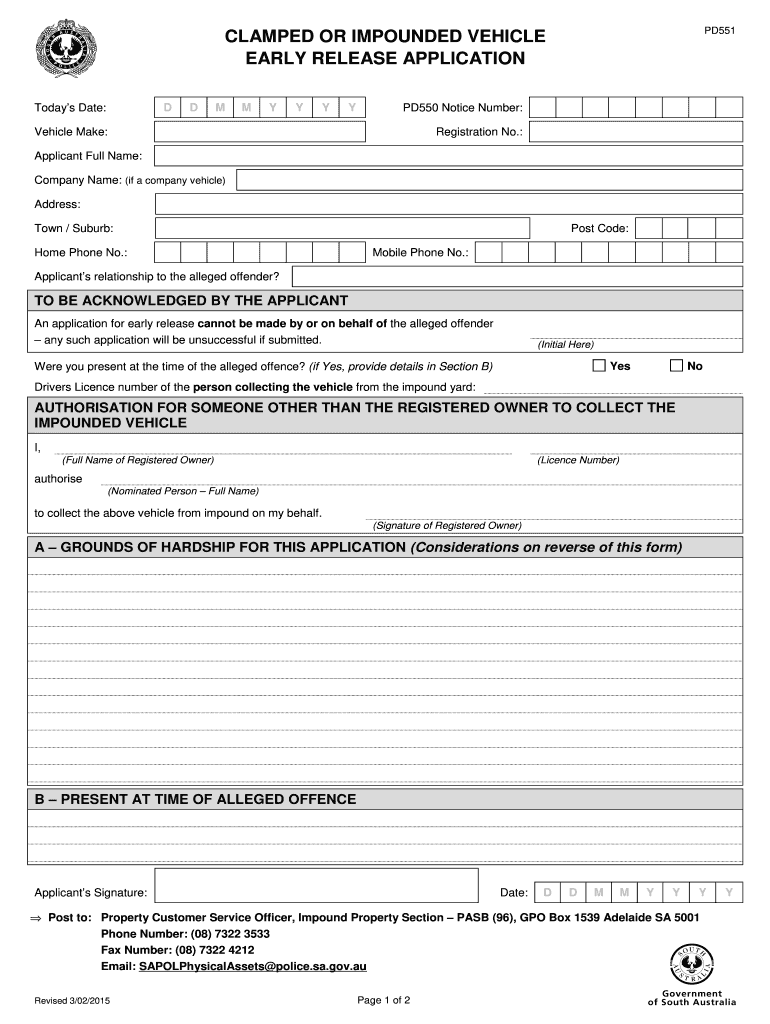
The PD-551, commonly referred to as the police release form, is a legal document used to authorize the release of an impounded vehicle from a police department. This form serves as proof that the owner has met all necessary requirements for the retrieval of their vehicle, including any fines or fees associated with the impoundment. Understanding the purpose and function of the PD-551 is essential for vehicle owners seeking to reclaim their property from law enforcement custody.
How to Obtain the PD-551
To obtain the PD-551, individuals typically need to visit their local police department or the specific agency that impounded their vehicle. Many departments provide the form directly at their offices. In some cases, the form may also be available online through the police department's official website. It is important to check with the relevant agency for specific instructions and any additional documentation that may be required to complete the release process.
Steps to Complete the PD-551
Completing the PD-551 involves several key steps:
- Gather necessary information, including the vehicle's make, model, and VIN (Vehicle Identification Number).
- Provide personal identification details, such as your name, address, and contact information.
- Include any relevant case or report numbers associated with the impoundment.
- Sign and date the form to certify that the information provided is accurate.
Once completed, the form should be submitted to the appropriate police department along with any required fees or documentation.
Legal Use of the PD-551
The PD-551 is a legally binding document that must be filled out accurately to ensure the release of the vehicle is recognized by law enforcement. Any inaccuracies or omissions may result in delays or denial of the release. Additionally, the form should be used only for its intended purpose—retrieving a vehicle from impoundment—and must comply with local laws and regulations governing vehicle releases.
Key Elements of the PD-551
Several key elements are essential to the PD-551:
- Owner Information: Details about the vehicle owner, including name and contact information.
- Vehicle Information: Specifics about the vehicle, such as make, model, year, and VIN.
- Impound Details: Information regarding the impoundment, including the date and location.
- Signature: The owner's signature is required to validate the form.
Ensuring these elements are correctly filled out is crucial for a smooth release process.
State-Specific Rules for the PD-551
Regulations governing the PD-551 can vary by state, reflecting local laws regarding vehicle impoundment and release procedures. It is important for vehicle owners to familiarize themselves with their state's specific requirements, as some jurisdictions may have additional forms or stipulations that must be met before a vehicle can be released. Checking with local law enforcement or the department of motor vehicles can provide clarity on these regulations.
Quick guide on how to complete pd551 clamped or impounded vehicle early release application
A concise manual on how to create your Pd551
Locating the appropriate template can be a struggle when you must produce formal international documentation. Even if you have the necessary form, it might be cumbersome to swiftly fill it out in accordance with all the stipulations if you utilize paper versions instead of handling everything digitally. airSlate SignNow is the web-based electronic signature platform that assists you in overcoming these obstacles. It enables you to obtain your Pd551 and promptly fill it out and sign it on-site without the need to reprint documents in case of errors.
Here are the actions you must take to create your Pd551 with airSlate SignNow:
- Click the Obtain Form button to instantly upload your document to our editor.
- Begin with the first empty field, enter your information, and continue with the Next tool.
- Complete the empty sections using the Cross and Check tools from the panel above.
- Choose the Highlight or Line options to emphasize the most crucial information.
- Click on Image and upload one if your Pd551 requires it.
- Make use of the right-side pane to add additional areas for you or others to fill out if necessary.
- Review your responses and confirm the template by clicking Date, Initials, and Sign.
- Draw, type, upload your eSignature, or capture it using a camera or QR code.
- Complete the form modifications by clicking the Done button and selecting your file-sharing preferences.
Once your Pd551 is ready, you can distribute it as you wish - send it to your recipients via email, SMS, fax, or even print it directly from the editor. You can also securely save all your completed documents in your account, organized in folders to suit your needs. Don’t squander time on manual form filling; give airSlate SignNow a try!
Create this form in 5 minutes or less
FAQs
-
The Mh CET 2017 application forms were released yesterday. Is it better to fill out the form now or later?
No hard and fast rule for that!It would be better if you fill it early as possible.Because later the traffic will go on increasing and these Government websites are more likely to crash when the traffic is high.fill the forms in initial days if you can..
-
How do I get admission to TU if I have qualified for the JEE Mains? I am from Assam, and I want to do so under the state quota. Will there be any state rank list to be released, or do I have fill out any form?
If you haven't filled up any form then I am not sure if you are gonna get any chance now….This is the procedure they follow--- after you have qualified in JEE-MAINS. You have to fill up a form through which they come to know that you have qualified. Then they give a list of student according to their ranks (both AIR & state ranks). Then according to that there's three list A,B & C in which there's all the quota and all. And they relaese one list in general. According to that list theu release a date of your counselling .Note- The form fillup is must.
Create this form in 5 minutes!
How to create an eSignature for the pd551 clamped or impounded vehicle early release application
How to create an electronic signature for your Pd551 Clamped Or Impounded Vehicle Early Release Application online
How to make an electronic signature for your Pd551 Clamped Or Impounded Vehicle Early Release Application in Google Chrome
How to make an electronic signature for putting it on the Pd551 Clamped Or Impounded Vehicle Early Release Application in Gmail
How to generate an electronic signature for the Pd551 Clamped Or Impounded Vehicle Early Release Application straight from your mobile device
How to create an eSignature for the Pd551 Clamped Or Impounded Vehicle Early Release Application on iOS devices
How to make an electronic signature for the Pd551 Clamped Or Impounded Vehicle Early Release Application on Android OS
People also ask
-
What is the Pd551 feature in airSlate SignNow?
The Pd551 feature in airSlate SignNow allows users to easily create and manage electronic signatures for their documents. This feature streamlines the signing process, making it quick and efficient, so you can focus on what matters most—growing your business.
-
How much does airSlate SignNow cost for the Pd551 package?
The Pd551 package in airSlate SignNow offers competitive pricing plans tailored to fit various business needs. You can choose from monthly and annual payment options, ensuring you get the best value for your investment in document management and e-signature solutions.
-
What are the key benefits of using the Pd551 solution?
Using the Pd551 solution from airSlate SignNow provides signNow benefits, including enhanced security, improved workflow efficiency, and reduced paperwork. By digitizing your document signing process, you can save time and resources while ensuring compliance and data integrity.
-
Can I integrate the Pd551 feature with other applications?
Yes, the Pd551 feature in airSlate SignNow seamlessly integrates with various applications and platforms. This integration capability allows you to enhance your existing workflows and utilize your favorite tools, making document management even more efficient.
-
Is the Pd551 feature suitable for small businesses?
Absolutely! The Pd551 feature in airSlate SignNow is designed to cater to businesses of all sizes, including small businesses. Its user-friendly interface and cost-effective pricing make it an ideal choice for those looking to enhance their document signing process without breaking the bank.
-
How secure is the Pd551 feature for document signing?
The Pd551 feature in airSlate SignNow prioritizes security, employing advanced encryption and authentication measures. This ensures that your documents are safe and secure, providing peace of mind as you conduct business transactions online.
-
What types of documents can I sign using the Pd551 feature?
With the Pd551 feature from airSlate SignNow, you can sign a wide range of documents, including contracts, agreements, and forms. It supports various file formats, ensuring that you can easily manage all your essential paperwork in one place.
Get more for Pd551
Find out other Pd551
- How Do I Electronic signature Michigan General contract template
- Electronic signature Maine Email Contracts Later
- Electronic signature New Mexico General contract template Free
- Can I Electronic signature Rhode Island Email Contracts
- How Do I Electronic signature California Personal loan contract template
- Electronic signature Hawaii Personal loan contract template Free
- How To Electronic signature Hawaii Personal loan contract template
- Electronic signature New Hampshire Managed services contract template Computer
- Electronic signature Alabama Real estate sales contract template Easy
- Electronic signature Georgia Real estate purchase contract template Secure
- Electronic signature South Carolina Real estate sales contract template Mobile
- Can I Electronic signature Kentucky Residential lease contract
- Can I Electronic signature Nebraska Residential lease contract
- Electronic signature Utah New hire forms Now
- Electronic signature Texas Tenant contract Now
- How Do I Electronic signature Florida Home rental application
- Electronic signature Illinois Rental application Myself
- How Can I Electronic signature Georgia Rental lease form
- Electronic signature New York Rental lease form Safe
- Electronic signature Kentucky Standard rental application Fast