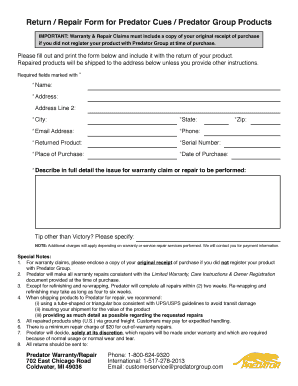
Return Repair Form for Predator Cues Predator Group Products


Understanding the Return Repair Form for Predator Cues Predator Group Products
The Return Repair Form for Predator Cues Predator Group Products is a crucial document used when customers need to return or repair their products. This form outlines the necessary information required to process the return efficiently, ensuring that both the customer and the company have a clear understanding of the return procedure. It typically includes details such as the product model, purchase date, and reason for return. Proper completion of this form helps facilitate a smooth transaction and ensures that warranty claims are handled appropriately.
How to Complete the Return Repair Form for Predator Cues Predator Group Products
Filling out the Return Repair Form accurately is essential for a successful return process. Begin by gathering all relevant information about your product, including the model number and purchase receipt. Next, clearly state the reason for the return or repair. It is important to be honest and detailed, as this information can affect warranty eligibility. After completing the form, review it for accuracy before submitting it. This careful attention to detail can help avoid delays in processing your return.
Legal Considerations for the Return Repair Form for Predator Cues Predator Group Products
When using the Return Repair Form, it is important to be aware of the legal implications involved. The form serves as a binding agreement between the customer and the company, outlining the terms of the warranty and the conditions under which returns are accepted. Compliance with relevant consumer protection laws is essential to ensure that both parties are protected. Understanding these legal aspects can help customers navigate the return process more effectively and safeguard their rights.
Key Elements of the Return Repair Form for Predator Cues Predator Group Products
The Return Repair Form includes several key elements that are vital for processing returns. These typically consist of:
- Customer Information: Name, address, and contact details.
- Product Details: Model number, serial number, and purchase date.
- Return Reason: A detailed explanation of why the product is being returned.
- Signature: The customer's signature to confirm the information provided is accurate.
Including all these elements ensures that the return process is efficient and that the warranty claim is valid.
Steps to Submit the Return Repair Form for Predator Cues Predator Group Products
Once the Return Repair Form is completed, customers can submit it through various methods. Typically, the submission options include:
- Online Submission: Many companies offer a digital platform for submitting forms, allowing for quick processing.
- Mail: Customers can print the form and send it via postal service to the designated return address.
- In-Person: Some customers may prefer to deliver the form directly to a local store or service center.
Choosing the right submission method can depend on personal preference and urgency.
Examples of Using the Return Repair Form for Predator Cues Predator Group Products
Understanding practical applications of the Return Repair Form can enhance customer experience. For instance, if a customer receives a defective product, they can fill out the form to initiate a return under warranty. Another example includes a situation where a product does not meet customer expectations, prompting a return for a refund or exchange. In both cases, the Return Repair Form is essential for documenting the transaction and ensuring compliance with warranty policies.
Quick guide on how to complete return repair form for predator cues predator group products
Complete Return Repair Form For Predator Cues Predator Group Products effortlessly on any device
Digital document management has gained traction with businesses and individuals alike. It offers an ideal eco-friendly alternative to traditional printed and signed documents, allowing you to access the right form and securely store it online. airSlate SignNow equips you with all the resources necessary to create, modify, and eSign your documents rapidly without any delays. Manage Return Repair Form For Predator Cues Predator Group Products on any device using airSlate SignNow's Android or iOS applications and enhance any document-related task today.
The easiest approach to modify and eSign Return Repair Form For Predator Cues Predator Group Products without hassle
- Find Return Repair Form For Predator Cues Predator Group Products and click on Get Form to begin.
- Utilize the tools we offer to complete your document.
- Emphasize important sections of the documents or obscure sensitive information with features that airSlate SignNow provides specifically for that purpose.
- Create your signature with the Sign tool, which takes mere seconds and holds the same legal validity as a conventional wet ink signature.
- Review the details and click on the Done button to save your modifications.
- Choose how you wish to send your form, via email, SMS, or invite link, or download it to your computer.
Forget about lost or mislaid files, tedious form searches, or mistakes that require printing new document copies. airSlate SignNow manages all your document management requirements in just a few clicks from a device of your choice. Edit and eSign Return Repair Form For Predator Cues Predator Group Products and ensure excellent communication at any point in your form preparation phase with airSlate SignNow.
Create this form in 5 minutes or less
Create this form in 5 minutes!
How to create an eSignature for the return repair form for predator cues predator group products
How to create an electronic signature for a PDF online
How to create an electronic signature for a PDF in Google Chrome
How to create an e-signature for signing PDFs in Gmail
How to create an e-signature right from your smartphone
How to create an e-signature for a PDF on iOS
How to create an e-signature for a PDF on Android
People also ask
-
What is the Return Repair Form For Predator Cues Predator Group Products?
The Return Repair Form For Predator Cues Predator Group Products is a document that customers fill out to initiate the return or repair process for their Predator Cues. This form is essential for ensuring that all necessary information is provided to facilitate a smooth return or repair experience.
-
How can I obtain the Return Repair Form For Predator Cues Predator Group Products?
You can easily download the Return Repair Form For Predator Cues Predator Group Products from our official website. Alternatively, you can request the form by contacting our customer service team, who will be happy to assist you.
-
Are there any fees associated with submitting the Return Repair Form For Predator Cues Predator Group Products?
Typically, there are no fees for submitting the Return Repair Form For Predator Cues Predator Group Products. However, customers are responsible for shipping costs incurred when sending the product back for repair or return, unless stated otherwise in our return policy.
-
What types of products are eligible for return using the Return Repair Form For Predator Cues Predator Group Products?
The Return Repair Form For Predator Cues Predator Group Products is applicable for all Predator Cues and accessories that are defective or not meeting customer expectations. Please refer to our policy for specific conditions and timelines regarding returns.
-
How will I know if my Return Repair Form For Predator Cues Predator Group Products has been processed?
Once you submit your Return Repair Form For Predator Cues Predator Group Products, you will receive a confirmation email. This email will include details regarding the status of your return or repair, and any next steps you may need to follow.
-
Do I need to provide a receipt when submitting the Return Repair Form For Predator Cues Predator Group Products?
Yes, it is important to include a copy of your receipt when submitting the Return Repair Form For Predator Cues Predator Group Products. This helps us verify the purchase and process your return or repair request more efficiently.
-
What should I do if I have a question about the Return Repair Form For Predator Cues Predator Group Products?
If you have any questions regarding the Return Repair Form For Predator Cues Predator Group Products, feel free to signNow out to our customer support team. They are available to provide assistance and clarify any doubts you may have.
Get more for Return Repair Form For Predator Cues Predator Group Products
Find out other Return Repair Form For Predator Cues Predator Group Products
- How To Sign Alaska Insurance Promissory Note Template
- Sign Arizona Insurance Moving Checklist Secure
- Sign New Mexico High Tech Limited Power Of Attorney Simple
- Sign Oregon High Tech POA Free
- Sign South Carolina High Tech Moving Checklist Now
- Sign South Carolina High Tech Limited Power Of Attorney Free
- Sign West Virginia High Tech Quitclaim Deed Myself
- Sign Delaware Insurance Claim Online
- Sign Delaware Insurance Contract Later
- Sign Hawaii Insurance NDA Safe
- Sign Georgia Insurance POA Later
- How Can I Sign Alabama Lawers Lease Agreement
- How Can I Sign California Lawers Lease Agreement
- Sign Colorado Lawers Operating Agreement Later
- Sign Connecticut Lawers Limited Power Of Attorney Online
- Sign Hawaii Lawers Cease And Desist Letter Easy
- Sign Kansas Insurance Rental Lease Agreement Mobile
- Sign Kansas Insurance Rental Lease Agreement Free
- Sign Kansas Insurance Rental Lease Agreement Fast
- Sign Kansas Insurance Rental Lease Agreement Safe