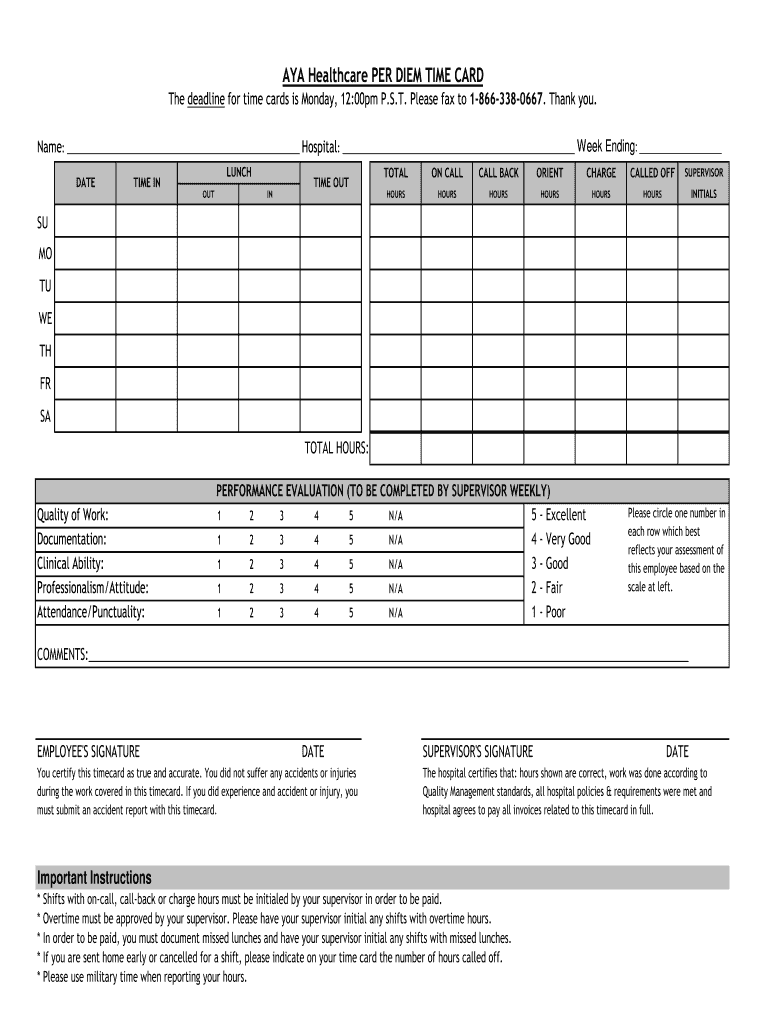
Aya Healthcare Timecard Form


What is the Aya Healthcare Timecard
The Aya Healthcare timecard is a crucial document used by healthcare professionals to accurately record their working hours and submit them for payroll processing. This timecard ensures that employees are compensated fairly for the hours they work, including regular hours, overtime, and any additional shifts. It is specifically designed for Aya Healthcare employees, reflecting the unique requirements and standards of the healthcare industry.
How to use the Aya Healthcare Timecard
Using the Aya Healthcare timecard involves several straightforward steps. First, employees must log into the designated online portal to access their timecard. Once logged in, they can input their hours worked for each day of the pay period. It is essential to ensure that all hours are accurately recorded, including start and end times, breaks, and any overtime hours. After entering the information, employees should review their entries for accuracy before submitting the timecard for approval. This process helps prevent payroll discrepancies and ensures timely payment.
Steps to complete the Aya Healthcare Timecard
Completing the Aya Healthcare timecard requires attention to detail. Here are the steps to follow:
- Log into the Aya Healthcare employee portal.
- Navigate to the timecard section.
- Enter the dates and hours worked for each day, ensuring to include any overtime.
- Double-check the entries for accuracy.
- Submit the timecard for approval by your supervisor.
Following these steps helps ensure that the timecard is completed correctly and submitted on time.
Legal use of the Aya Healthcare Timecard
The Aya Healthcare timecard must be used in compliance with labor laws and regulations. This includes accurately recording hours worked and adhering to state-specific labor laws regarding overtime and breaks. Employees should be aware of their rights and responsibilities concerning timekeeping and ensure that their timecards reflect their actual working hours. Misrepresentation of hours can lead to serious legal consequences, including penalties for both the employee and the employer.
Key elements of the Aya Healthcare Timecard
Several key elements are essential for the proper use of the Aya Healthcare timecard. These include:
- Employee Information: Name, employee ID, and position.
- Work Schedule: Dates and times for each shift worked.
- Hours Worked: Total hours for regular shifts and any overtime.
- Signatures: Required approvals from supervisors or managers.
These elements help ensure that the timecard is complete and compliant with payroll requirements.
Who Issues the Form
The Aya Healthcare timecard is issued by Aya Healthcare's human resources or payroll department. Employees can access their timecards through the company's online portal, where they can also find additional resources and support related to timekeeping and payroll. It is important for employees to familiarize themselves with the portal and the procedures for accessing and submitting their timecards.
Quick guide on how to complete download per diem timecard here travel nursing jobs
The optimal method to obtain and sign Aya Healthcare Timecard
On a company-wide scale, unproductive workflows related to paper approvals can consume a signNow amount of time. Signing documents such as Aya Healthcare Timecard is a fundamental aspect of operations in any organization, which is why the effectiveness of each agreement’s lifecycle signNowly impacts the overall efficiency of the company. With airSlate SignNow, signing your Aya Healthcare Timecard is as straightforward and rapid as possible. You’ll discover that this platform offers the latest version of almost any form. Even better, you can sign it instantly without needing to install any third-party applications on your computer or printing physical copies.
Steps to acquire and sign your Aya Healthcare Timecard
- Browse our collection by category or utilize the search bar to locate the document you require.
- Check the form preview by clicking Learn more to confirm it’s the correct one.
- Press Get form to start editing immediately.
- Fill out your form and insert any essential details using the toolbar.
- Once completed, click the Sign feature to sign your Aya Healthcare Timecard.
- Select the signature method that suits you best: Draw, Create initials, or upload an image of your handwritten signature.
- Click Done to finalize editing and move on to sharing options as needed.
With airSlate SignNow, you possess everything required to manage your documents efficiently. You can find, complete, modify, and even send your Aya Healthcare Timecard all in one tab without any complications. Enhance your workflows by utilizing a unified, intelligent eSignature solution.
Create this form in 5 minutes or less
Create this form in 5 minutes!
How to create an eSignature for the download per diem timecard here travel nursing jobs
How to generate an electronic signature for your Download Per Diem Timecard Here Travel Nursing Jobs in the online mode
How to make an electronic signature for the Download Per Diem Timecard Here Travel Nursing Jobs in Google Chrome
How to generate an eSignature for putting it on the Download Per Diem Timecard Here Travel Nursing Jobs in Gmail
How to generate an electronic signature for the Download Per Diem Timecard Here Travel Nursing Jobs right from your mobile device
How to create an electronic signature for the Download Per Diem Timecard Here Travel Nursing Jobs on iOS devices
How to generate an eSignature for the Download Per Diem Timecard Here Travel Nursing Jobs on Android
People also ask
-
What is the Aya Healthcare Timecard and how does it work?
The Aya Healthcare Timecard is a digital tool designed to streamline the time tracking process for healthcare professionals. By utilizing airSlate SignNow, users can easily send and eSign their timecards, ensuring accurate and prompt payroll processing. This seamless integration enhances efficiency and reduces administrative burdens.
-
How can I integrate the Aya Healthcare Timecard with existing systems?
Integrating the Aya Healthcare Timecard with your existing systems is straightforward with airSlate SignNow. The platform supports various integrations, allowing you to connect with popular payroll and HR software effortlessly. This ensures a cohesive workflow, making time tracking and management simpler.
-
What are the key features of the Aya Healthcare Timecard?
The Aya Healthcare Timecard offers several features such as easy document sharing, electronic signatures, and real-time updates. With airSlate SignNow, users can track their hours worked, submit timecards for approval, and receive instant notifications, all in one user-friendly interface. These features help ensure accuracy and save time.
-
Is the Aya Healthcare Timecard cost-effective for healthcare professionals?
Yes, the Aya Healthcare Timecard is a cost-effective solution for healthcare professionals looking to simplify their time management. airSlate SignNow provides flexible pricing plans that cater to various business sizes, allowing you to choose an option that fits your budget while reaping the benefits of efficient time tracking.
-
What benefits does the Aya Healthcare Timecard provide to organizations?
The Aya Healthcare Timecard enhances organizational efficiency by reducing the time spent on manual time tracking and payroll processing. By using airSlate SignNow, businesses can ensure timely payments and minimize errors, leading to a more productive workforce. This ultimately supports better employee satisfaction and retention.
-
Can I access the Aya Healthcare Timecard from mobile devices?
Absolutely! The Aya Healthcare Timecard is accessible from mobile devices, making it convenient for healthcare professionals on the go. With airSlate SignNow's mobile-friendly platform, users can easily submit their timecards and manage their schedules anytime, anywhere.
-
How does airSlate SignNow ensure the security of the Aya Healthcare Timecard?
AirSlate SignNow prioritizes user security by implementing robust encryption and authentication measures for the Aya Healthcare Timecard. This ensures that sensitive information remains confidential and secure during transmission and storage, giving users peace of mind while managing their timecards.
Get more for Aya Healthcare Timecard
- Form 20g drug license
- Uganda visa form
- Mch clinic form
- New hire request form managers resource handbook
- Bankmuscatonline 201331251 form
- Schedule ca 540 california adjustments residents schedule ca 540 california adjustments residents form
- Form 206 certificate of formation professional limited liability company
- Name address and telephone number sfsuperiorcourt 395300588 form
Find out other Aya Healthcare Timecard
- How Do I eSignature Alaska Life Sciences Presentation
- Help Me With eSignature Iowa Life Sciences Presentation
- How Can I eSignature Michigan Life Sciences Word
- Can I eSignature New Jersey Life Sciences Presentation
- How Can I eSignature Louisiana Non-Profit PDF
- Can I eSignature Alaska Orthodontists PDF
- How Do I eSignature New York Non-Profit Form
- How To eSignature Iowa Orthodontists Presentation
- Can I eSignature South Dakota Lawers Document
- Can I eSignature Oklahoma Orthodontists Document
- Can I eSignature Oklahoma Orthodontists Word
- How Can I eSignature Wisconsin Orthodontists Word
- How Do I eSignature Arizona Real Estate PDF
- How To eSignature Arkansas Real Estate Document
- How Do I eSignature Oregon Plumbing PPT
- How Do I eSignature Connecticut Real Estate Presentation
- Can I eSignature Arizona Sports PPT
- How Can I eSignature Wisconsin Plumbing Document
- Can I eSignature Massachusetts Real Estate PDF
- How Can I eSignature New Jersey Police Document