Delta County Building and Zoning 2010-2026


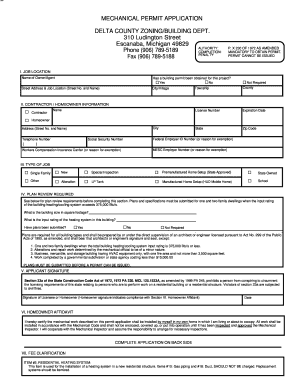
What is the MI Mechanical Permit Application?
The MI mechanical permit application is a crucial document required for obtaining permits related to mechanical systems within buildings in Michigan. This application ensures that all mechanical installations comply with state and local building codes, promoting safety and efficiency. Mechanical systems include heating, ventilation, air conditioning, and plumbing, which are essential for maintaining comfortable and functional living and working environments.
Steps to Complete the MI Mechanical Permit Application
Completing the MI mechanical permit application involves several key steps to ensure accuracy and compliance with regulations. Here’s a straightforward approach:
- Gather Required Information: Collect necessary details such as project address, property owner information, and contractor details.
- Complete the Application Form: Fill out the application accurately, providing all requested information regarding the mechanical work to be performed.
- Attach Supporting Documents: Include any required plans, specifications, or additional documentation that may be needed for your specific project.
- Submit the Application: Choose your submission method, whether online, by mail, or in person, and ensure that all forms are signed where necessary.
- Pay Applicable Fees: Verify the fee structure for the permit and ensure payment is made to avoid delays in processing.
Required Documents for the MI Mechanical Permit Application
When applying for the MI mechanical permit, certain documents are essential to facilitate the approval process. These typically include:
- Completed Application Form: Ensure all sections are filled out correctly.
- Detailed Project Plans: Provide drawings or schematics that outline the mechanical work to be done.
- Proof of Contractor Licensing: If applicable, include documentation showing that the contractor is licensed to perform the work.
- Site Plans: If necessary, submit site plans that indicate the location of the mechanical systems.
Form Submission Methods for the MI Mechanical Permit Application
The MI mechanical permit application can be submitted through various methods, allowing flexibility for applicants. Options typically include:
- Online Submission: Many municipalities offer online portals for submitting applications, which can expedite the process.
- Mail Submission: Applications can be sent via postal service to the relevant building department.
- In-Person Submission: Applicants can also visit their local building department to submit the application directly.
Eligibility Criteria for the MI Mechanical Permit Application
To qualify for the MI mechanical permit application, applicants must meet specific criteria. These may include:
- Property Ownership: The applicant must either own the property or have authorization from the owner to perform the work.
- Licensed Contractors: If a contractor is involved, they must hold a valid license to operate in Michigan.
- Compliance with Local Codes: The proposed mechanical work must adhere to local building codes and regulations.
Application Process & Approval Time for the MI Mechanical Permit Application
The application process for the MI mechanical permit typically follows a structured timeline. After submission, the review process begins, which may take anywhere from a few days to several weeks, depending on the complexity of the project and the workload of the building department. Key stages in the process include:
- Initial Review: The application is first checked for completeness and accuracy.
- Technical Review: Plans and specifications are evaluated to ensure compliance with codes.
- Approval or Rejection: The applicant will be notified of the decision, and if approved, a permit will be issued.
Quick guide on how to complete delta county building and zoning
Effortlessly Prepare Delta County Building And Zoning on Any Device
Managing documents online has become increasingly favored by businesses and individuals alike. It offers an ideal environmentally-friendly substitute to traditional printed and signed paperwork, as you can obtain the necessary form and securely archive it online. airSlate SignNow equips you with all the essential tools to generate, modify, and eSign your documents promptly without issues. Handle Delta County Building And Zoning on any system with airSlate SignNow's Android or iOS applications and ease any document-centric procedure today.
The simplest way to modify and eSign Delta County Building And Zoning seamlessly
- Locate Delta County Building And Zoning and click on Get Form to begin.
- Utilize the tools we provide to fill out your document.
- Highlight important sections of your documents or obscure sensitive details with tools that airSlate SignNow offers specifically for that purpose.
- Create your eSignature using the Sign feature, which takes moments and holds the same legal validity as a conventional wet ink signature.
- Review all the information and click on the Done button to save your modifications.
- Select how you would like to send your form, via email, SMS, or invitation link, or download it to your computer.
Say goodbye to lost or misplaced files, tedious document searches, or errors that necessitate printing new document versions. airSlate SignNow fulfills your document management needs in just a few clicks from any device you prefer. Edit and eSign Delta County Building And Zoning and ensure excellent communication at any step of the form preparation process with airSlate SignNow.
Create this form in 5 minutes or less
Create this form in 5 minutes!
How to create an eSignature for the delta county building and zoning
How to create an electronic signature for a PDF online
How to create an electronic signature for a PDF in Google Chrome
How to create an e-signature for signing PDFs in Gmail
How to create an e-signature right from your smartphone
How to create an e-signature for a PDF on iOS
How to create an e-signature for a PDF on Android
People also ask
-
What is a MI mechanical permit application?
A MI mechanical permit application is a formal request required by the state of Michigan to perform mechanical work, such as installation and modifications of heating, cooling, and ventilation systems. Completing this application ensures compliance with local building codes and regulations, which helps in maintaining safety and efficiency.
-
How can airSlate SignNow help with my MI mechanical permit application?
airSlate SignNow streamlines the process of completing and submitting your MI mechanical permit application by providing an easy-to-use electronic signature platform. This allows you to fill out your application online, gather necessary signatures, and submit documents quickly, saving you time and reducing errors in the application process.
-
Is there a cost associated with using airSlate SignNow for my MI mechanical permit application?
Yes, airSlate SignNow offers a cost-effective subscription model that suits various business needs, including processing your MI mechanical permit application. Pricing depends on your plan choice, with options ranging from basic to premium features that enhance document management and signing capabilities.
-
What features does airSlate SignNow offer for managing my MI mechanical permit application?
airSlate SignNow includes a variety of features tailored for efficient document management, such as customizable templates, automated reminders, and collaborative options for stakeholders involved in your MI mechanical permit application. These features work together to enhance workflow and simplify the signing process.
-
Can I save my MI mechanical permit application for future use?
Absolutely! With airSlate SignNow, you can save completed versions of your MI mechanical permit application for future reference and reuse. This feature allows you to streamline the application process for any subsequent projects, ensuring you have quick access to necessary documents.
-
Does airSlate SignNow integrate with other software for my MI mechanical permit application?
Yes, airSlate SignNow offers integration capabilities with other popular software solutions, which can enhance the efficiency of managing your MI mechanical permit application. Integrating with tools like Google Drive, Dropbox, and various CRMs allows for seamless document management and easier access to your applications and records.
-
How do I get started with my MI mechanical permit application using airSlate SignNow?
Getting started with airSlate SignNow for your MI mechanical permit application is simple. Sign up for an account on the airSlate website, select a plan that suits your needs, and then use our intuitive interface to create and manage your application easily. Our platform also offers helpful resources and customer support to guide you along the way.
Get more for Delta County Building And Zoning
Find out other Delta County Building And Zoning
- How To Integrate Sign in Banking
- How To Use Sign in Banking
- Help Me With Use Sign in Banking
- Can I Use Sign in Banking
- How Do I Install Sign in Banking
- How To Add Sign in Banking
- How Do I Add Sign in Banking
- How Can I Add Sign in Banking
- Can I Add Sign in Banking
- Help Me With Set Up Sign in Government
- How To Integrate eSign in Banking
- How To Use eSign in Banking
- How To Install eSign in Banking
- How To Add eSign in Banking
- How To Set Up eSign in Banking
- How To Save eSign in Banking
- How To Implement eSign in Banking
- How To Set Up eSign in Construction
- How To Integrate eSign in Doctors
- How To Use eSign in Doctors