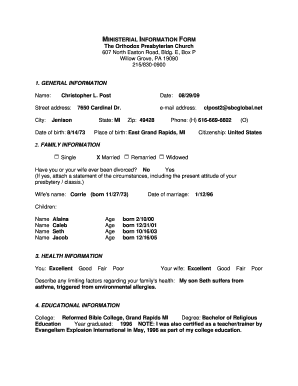
MINISTERIAL INFORMATION FORM the Orthodox Presbyterian


What is the Ministerial Information Form The Orthodox Presbyterian
The Ministerial Information Form The Orthodox Presbyterian is a vital document used within the Orthodox Presbyterian Church for various administrative purposes. This form is designed to collect essential information about ministers, including their qualifications, experience, and personal details. It serves as a comprehensive record that aids in the evaluation and placement of ministers within the church, ensuring that congregations are well-informed about their spiritual leaders.
How to use the Ministerial Information Form The Orthodox Presbyterian
Using the Ministerial Information Form The Orthodox Presbyterian involves several straightforward steps. First, obtain the form from the appropriate church authority or website. Next, fill out the required fields with accurate and up-to-date information. It is important to review the completed form for any errors before submission. Once finalized, the form can be submitted electronically or in paper format, depending on the guidelines provided by the church.
Steps to complete the Ministerial Information Form The Orthodox Presbyterian
Completing the Ministerial Information Form The Orthodox Presbyterian requires careful attention to detail. Follow these steps for successful completion:
- Gather all necessary personal and professional information, including educational credentials and previous ministry experience.
- Fill out each section of the form accurately, ensuring that all fields are completed as required.
- Review the form thoroughly for any mistakes or omissions.
- Sign and date the form to validate your submission.
- Submit the form according to the instructions provided, either electronically or by mail.
Legal use of the Ministerial Information Form The Orthodox Presbyterian
The Ministerial Information Form The Orthodox Presbyterian is legally recognized when completed and submitted according to established guidelines. To ensure its legal standing, it is essential to comply with relevant eSignature laws, such as the ESIGN Act and UETA. Utilizing a reliable electronic signing platform can enhance the form's legal validity, providing necessary authentication and security measures that protect both the signer and the church.
Key elements of the Ministerial Information Form The Orthodox Presbyterian
Several key elements are essential to the Ministerial Information Form The Orthodox Presbyterian. These include:
- Personal Information: Name, contact details, and demographic information.
- Educational Background: Details of theological education and any relevant certifications.
- Ministry Experience: A summary of previous roles, responsibilities, and achievements in ministry.
- References: Contact information for individuals who can vouch for the candidate's qualifications and character.
Form Submission Methods
The Ministerial Information Form The Orthodox Presbyterian can be submitted through various methods, depending on the church's requirements. Common submission methods include:
- Online Submission: Many churches offer a secure online portal for electronic submission.
- Mail: The form can be printed and mailed to the designated church office.
- In-Person: Some congregations may allow for in-person submission during church meetings or events.
Quick guide on how to complete ministerial information form the orthodox presbyterian
Complete MINISTERIAL INFORMATION FORM The Orthodox Presbyterian effortlessly on any device
Digital document management has become increasingly popular among businesses and individuals. It offers an ideal eco-friendly alternative to traditional printed and signed documents, allowing you to obtain the correct form and securely store it online. airSlate SignNow equips you with all the necessary tools to create, modify, and eSign your documents quickly without delays. Manage MINISTERIAL INFORMATION FORM The Orthodox Presbyterian on any device using airSlate SignNow Android or iOS applications and streamline any document-related task today.
How to modify and eSign MINISTERIAL INFORMATION FORM The Orthodox Presbyterian with ease
- Obtain MINISTERIAL INFORMATION FORM The Orthodox Presbyterian and then click Get Form to begin.
- Use the tools we offer to complete your form.
- Emphasize important sections of the documents or conceal sensitive information with tools that airSlate SignNow has specifically designed for that purpose.
- Generate your eSignature using the Sign tool, which takes mere seconds and carries the same legal validity as a conventional wet ink signature.
- Review the information and then click on the Done button to save your modifications.
- Choose how you wish to send your form, via email, SMS, an invitation link, or download it to your computer.
Eliminate concerns about lost or misplaced documents, tedious form navigation, or mistakes that necessitate printing additional copies. airSlate SignNow meets your document management needs in just a few clicks from any device you prefer. Modify and eSign MINISTERIAL INFORMATION FORM The Orthodox Presbyterian and guarantee exceptional communication throughout your form preparation journey with airSlate SignNow.
Create this form in 5 minutes or less
Create this form in 5 minutes!
How to create an eSignature for the ministerial information form the orthodox presbyterian
How to create an electronic signature for a PDF online
How to create an electronic signature for a PDF in Google Chrome
How to create an e-signature for signing PDFs in Gmail
How to create an e-signature right from your smartphone
How to create an e-signature for a PDF on iOS
How to create an e-signature for a PDF on Android
People also ask
-
What is the MINISTERIAL INFORMATION FORM The Orthodox Presbyterian?
The MINISTERIAL INFORMATION FORM The Orthodox Presbyterian is a crucial document for those involved in church leadership and governance. It facilitates the collection of essential information about candidates for ministry within the Orthodox Presbyterian Church, ensuring a smooth evaluation process.
-
How does airSlate SignNow support the MINISTERIAL INFORMATION FORM The Orthodox Presbyterian?
airSlate SignNow streamlines the process of completing and signing the MINISTERIAL INFORMATION FORM The Orthodox Presbyterian. Our platform allows users to electronically sign and send the form, ensuring that submissions are timely and efficient, while maintaining compliance with church protocols.
-
What are the key features of airSlate SignNow for the MINISTERIAL INFORMATION FORM The Orthodox Presbyterian?
Key features include robust eSignature functionality, customizable templates, and secure document storage. These features are particularly beneficial for managing the MINISTERIAL INFORMATION FORM The Orthodox Presbyterian, allowing users to track the document's status and ensure all necessary inputs are gathered.
-
Is there a cost associated with using airSlate SignNow for the MINISTERIAL INFORMATION FORM The Orthodox Presbyterian?
Yes, airSlate SignNow offers various pricing plans based on the features and the number of users required. The investment in our solution for the MINISTERIAL INFORMATION FORM The Orthodox Presbyterian ensures that your church has access to modern, efficient signing and document management capabilities.
-
Can airSlate SignNow integrate with other tools for handling the MINISTERIAL INFORMATION FORM The Orthodox Presbyterian?
Absolutely! airSlate SignNow can seamlessly integrate with various CRM and document management tools, enhancing your workflow. This integration allows for efficient handling of the MINISTERIAL INFORMATION FORM The Orthodox Presbyterian and ensures that your document processes are cohesive.
-
What benefits can I expect from using airSlate SignNow for the MINISTERIAL INFORMATION FORM The Orthodox Presbyterian?
Using airSlate SignNow for the MINISTERIAL INFORMATION FORM The Orthodox Presbyterian saves time and reduces paperwork. It ensures that all signatures are collected quickly, enhances document security, and improves overall communication within the church's governance structure.
-
Is the MINISTERIAL INFORMATION FORM The Orthodox Presbyterian customizable on airSlate SignNow?
Yes, the MINISTERIAL INFORMATION FORM The Orthodox Presbyterian can be customized to meet the unique needs of your church. This flexibility allows you to add specific fields, instructions, or branding, ensuring the document reflects your church's requirements and ethos.
Get more for MINISTERIAL INFORMATION FORM The Orthodox Presbyterian
Find out other MINISTERIAL INFORMATION FORM The Orthodox Presbyterian
- Electronic signature New Jersey Lease Renewal Free
- Electronic signature Texas Lease Renewal Fast
- How Can I Electronic signature Colorado Notice of Intent to Vacate
- eSignature Delaware Employee Compliance Survey Later
- eSignature Kansas Employee Compliance Survey Myself
- Can I Electronic signature Colorado Bill of Sale Immovable Property
- How Can I Electronic signature West Virginia Vacation Rental Short Term Lease Agreement
- How Do I Electronic signature New Hampshire Bill of Sale Immovable Property
- Electronic signature North Dakota Bill of Sale Immovable Property Myself
- Can I Electronic signature Oregon Bill of Sale Immovable Property
- How To Electronic signature West Virginia Bill of Sale Immovable Property
- Electronic signature Delaware Equipment Sales Agreement Fast
- Help Me With Electronic signature Louisiana Assignment of Mortgage
- Can I Electronic signature Minnesota Assignment of Mortgage
- Electronic signature West Virginia Sales Receipt Template Free
- Electronic signature Colorado Sales Invoice Template Computer
- Electronic signature New Hampshire Sales Invoice Template Computer
- Electronic signature Tennessee Introduction Letter Free
- How To eSignature Michigan Disclosure Notice
- How To Electronic signature Ohio Product Defect Notice