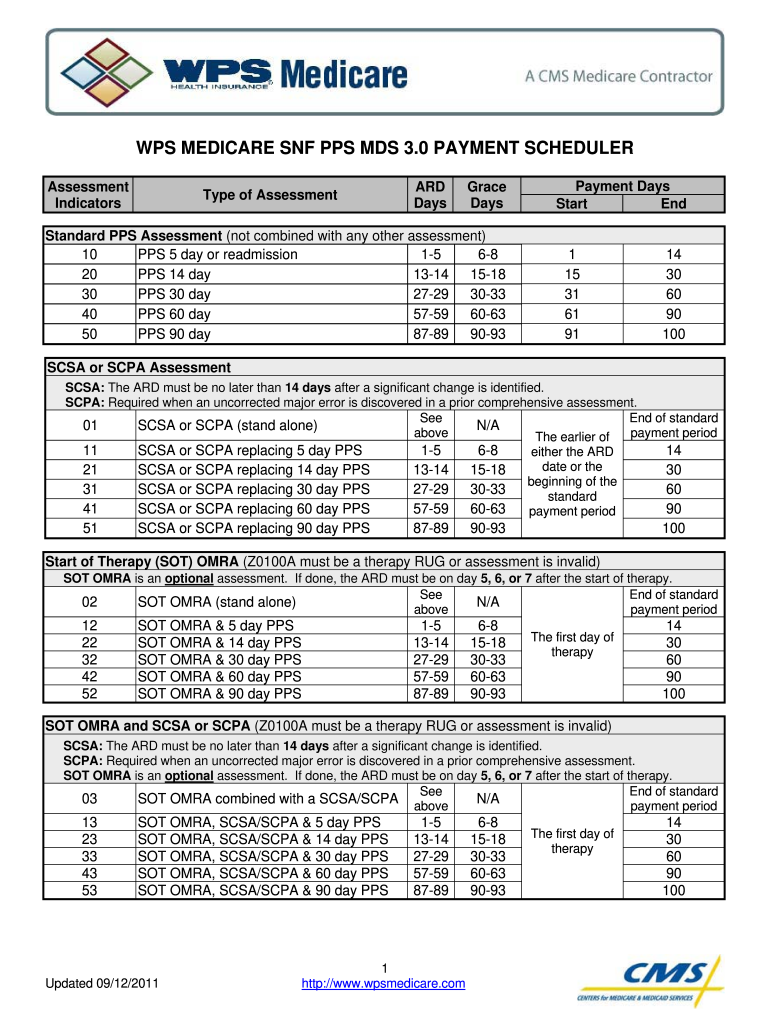
WPS MEDICARE SNF PPS MDS 3 Form


What is the WPS MEDICARE SNF PPS MDS 3?
The WPS Medicare SNF PPS MDS 3 is a standardized assessment tool used in skilled nursing facilities (SNFs) to evaluate the needs and conditions of residents. This instrument is essential for determining Medicare reimbursement rates under the Patient-Driven Payment Model (PDPM). The MDS 3.0 collects comprehensive data regarding a resident's health status, functional abilities, and preferences, allowing facilities to tailor care effectively. Understanding this tool is crucial for healthcare providers to ensure compliance with Medicare regulations and optimize patient outcomes.
Steps to complete the WPS MEDICARE SNF PPS MDS 3
Completing the WPS Medicare SNF PPS MDS 3 involves several systematic steps to ensure accuracy and compliance. Begin by gathering necessary medical records and information about the resident's health status. Next, follow these steps:
- Conduct a thorough assessment of the resident, including physical, mental, and social health.
- Document findings in the appropriate sections of the MDS 3.0 form.
- Review the completed form for accuracy and completeness.
- Submit the form electronically through the designated Medicare portal.
Each step is critical to ensure that the information provided reflects the resident's current condition and care needs, which in turn affects reimbursement rates.
Legal use of the WPS MEDICARE SNF PPS MDS 3
Legal compliance when using the WPS Medicare SNF PPS MDS 3 is vital for skilled nursing facilities. The assessment must be completed accurately and submitted within specified time frames to avoid penalties. The MDS 3.0 must adhere to the guidelines set forth by the Centers for Medicare & Medicaid Services (CMS) and comply with federal regulations regarding patient privacy and data security. Ensuring that the information is truthful and complete protects the facility from potential audits and legal repercussions.
Key elements of the WPS MEDICARE SNF PPS MDS 3
The WPS Medicare SNF PPS MDS 3 consists of several key elements that are essential for a comprehensive assessment. These elements include:
- Resident demographics, including age, gender, and admission date.
- Clinical assessments covering physical and mental health conditions.
- Functional status evaluations, which assess the resident's ability to perform daily activities.
- Social and environmental factors that may impact care needs.
These components are crucial for developing individualized care plans and ensuring appropriate reimbursement under Medicare guidelines.
Examples of using the WPS MEDICARE SNF PPS MDS 3
Practical examples of using the WPS Medicare SNF PPS MDS 3 can help illustrate its application in real-world scenarios. For instance, a skilled nursing facility may use the MDS 3.0 to assess a resident recovering from a hip replacement. The assessment would document the resident's mobility limitations and rehabilitation needs, guiding the care team in developing a tailored therapy plan. Another example includes evaluating cognitive impairments in residents, which can inform staff training and patient engagement strategies. These examples highlight the MDS 3.0's role in enhancing care quality and meeting regulatory requirements.
Filing Deadlines / Important Dates
Timeliness is critical when submitting the WPS Medicare SNF PPS MDS 3. Facilities must adhere to specific filing deadlines to ensure compliance and avoid penalties. The MDS 3.0 must be submitted within specified time frames following a resident's admission, discharge, or significant change in condition. Typically, the initial assessment is due within a designated number of days post-admission, while quarterly and annual assessments have their own deadlines. Keeping a calendar of these important dates helps facilities maintain compliance and ensure proper reimbursement.
Quick guide on how to complete wps medicare snf pps mds 3
Effortlessly Prepare WPS MEDICARE SNF PPS MDS 3 on Any Device
Digital document management has become increasingly popular among businesses and individuals. It offers an excellent eco-friendly alternative to traditional printed and signed paperwork, as you can easily locate the correct form and securely store it online. airSlate SignNow provides all the tools necessary to create, edit, and eSign your documents quickly without any delays. Manage WPS MEDICARE SNF PPS MDS 3 on any device with the airSlate SignNow Android or iOS applications and streamline any document-related process today.
How to edit and eSign WPS MEDICARE SNF PPS MDS 3 with ease
- Locate WPS MEDICARE SNF PPS MDS 3 and click on Get Form to initiate the process.
- Utilize the tools we offer to fill out your document.
- Emphasize pertinent sections of your documents or redact sensitive information with tools specifically designed by airSlate SignNow for that purpose.
- Create your signature using the Sign tool, which takes only seconds and holds the same legal validity as a traditional wet ink signature.
- Review the information and click on the Done button to save your changes.
- Select your preferred method of sharing your form, whether by email, SMS, invitation link, or download to your computer.
Forget about lost or misplaced files, tedious form hunting, or mistakes that necessitate printing new document copies. airSlate SignNow addresses your document management needs in just a few clicks from any chosen device. Edit and eSign WPS MEDICARE SNF PPS MDS 3 to ensure effective communication at every stage of the form preparation process with airSlate SignNow.
Create this form in 5 minutes or less
Create this form in 5 minutes!
How to create an eSignature for the wps medicare snf pps mds 3
How to generate an electronic signature for the Wps Medicare Snf Pps Mds 3 in the online mode
How to make an eSignature for your Wps Medicare Snf Pps Mds 3 in Google Chrome
How to create an eSignature for putting it on the Wps Medicare Snf Pps Mds 3 in Gmail
How to create an eSignature for the Wps Medicare Snf Pps Mds 3 from your smart phone
How to generate an eSignature for the Wps Medicare Snf Pps Mds 3 on iOS devices
How to create an eSignature for the Wps Medicare Snf Pps Mds 3 on Android OS
People also ask
-
What is WPS MEDICARE SNF PPS MDS 3 and how does it relate to airSlate SignNow?
WPS MEDICARE SNF PPS MDS 3 refers to the Medicare Skilled Nursing Facility Payment System and the Minimum Data Set version 3.0, which are critical for compliance in healthcare. airSlate SignNow offers solutions that streamline the documentation process for WPS MEDICARE SNF PPS MDS 3, ensuring that healthcare providers can easily manage their forms and signatures electronically.
-
How can airSlate SignNow help with WPS MEDICARE SNF PPS MDS 3 documentation?
airSlate SignNow simplifies the process of completing and submitting WPS MEDICARE SNF PPS MDS 3 documentation. With features like templates and e-signatures, healthcare providers can efficiently fill out, sign, and send forms, reducing errors and saving time in compliance.
-
Is airSlate SignNow cost-effective for managing WPS MEDICARE SNF PPS MDS 3 forms?
Yes, airSlate SignNow is designed to be a cost-effective solution for managing WPS MEDICARE SNF PPS MDS 3 forms. The pricing plans are tailored to fit various organizational needs, making it accessible for healthcare facilities of all sizes while ensuring compliance and efficiency.
-
What features does airSlate SignNow offer for WPS MEDICARE SNF PPS MDS 3 compliance?
airSlate SignNow offers several features that enhance compliance with WPS MEDICARE SNF PPS MDS 3, including secure electronic signatures, document tracking, and customizable templates. These features help ensure that all necessary documentation is completed accurately and submitted on time.
-
Can airSlate SignNow integrate with other healthcare systems for WPS MEDICARE SNF PPS MDS 3?
Yes, airSlate SignNow integrates seamlessly with various healthcare systems and software that are commonly used for WPS MEDICARE SNF PPS MDS 3. This integration capability allows for a smoother workflow, ensuring that data is consistent and readily available across platforms.
-
What are the benefits of using airSlate SignNow for WPS MEDICARE SNF PPS MDS 3 documentation?
Using airSlate SignNow for WPS MEDICARE SNF PPS MDS 3 documentation provides numerous benefits, including increased efficiency, reduced paperwork, and enhanced compliance. By automating the document signing process, healthcare providers can focus more on patient care rather than administrative tasks.
-
How secure is airSlate SignNow when handling WPS MEDICARE SNF PPS MDS 3 documents?
airSlate SignNow prioritizes security, especially when handling sensitive WPS MEDICARE SNF PPS MDS 3 documents. With features like encryption, secure cloud storage, and compliance with healthcare regulations, users can trust that their information remains private and protected.
Get more for WPS MEDICARE SNF PPS MDS 3
- Procedure checklist chapter 22 bathing providing a form
- Loyola jesuit college checklist 246619781 form
- Atto di assenso 474823779 form
- Firefighter time report 288 form
- Tka over the counter medication permission form
- Form 154
- 142 west 57th street new york ny sublease agreement form
- Homebuilder contract template form
Find out other WPS MEDICARE SNF PPS MDS 3
- How To Integrate Sign in Banking
- How To Use Sign in Banking
- Help Me With Use Sign in Banking
- Can I Use Sign in Banking
- How Do I Install Sign in Banking
- How To Add Sign in Banking
- How Do I Add Sign in Banking
- How Can I Add Sign in Banking
- Can I Add Sign in Banking
- Help Me With Set Up Sign in Government
- How To Integrate eSign in Banking
- How To Use eSign in Banking
- How To Install eSign in Banking
- How To Add eSign in Banking
- How To Set Up eSign in Banking
- How To Save eSign in Banking
- How To Implement eSign in Banking
- How To Set Up eSign in Construction
- How To Integrate eSign in Doctors
- How To Use eSign in Doctors