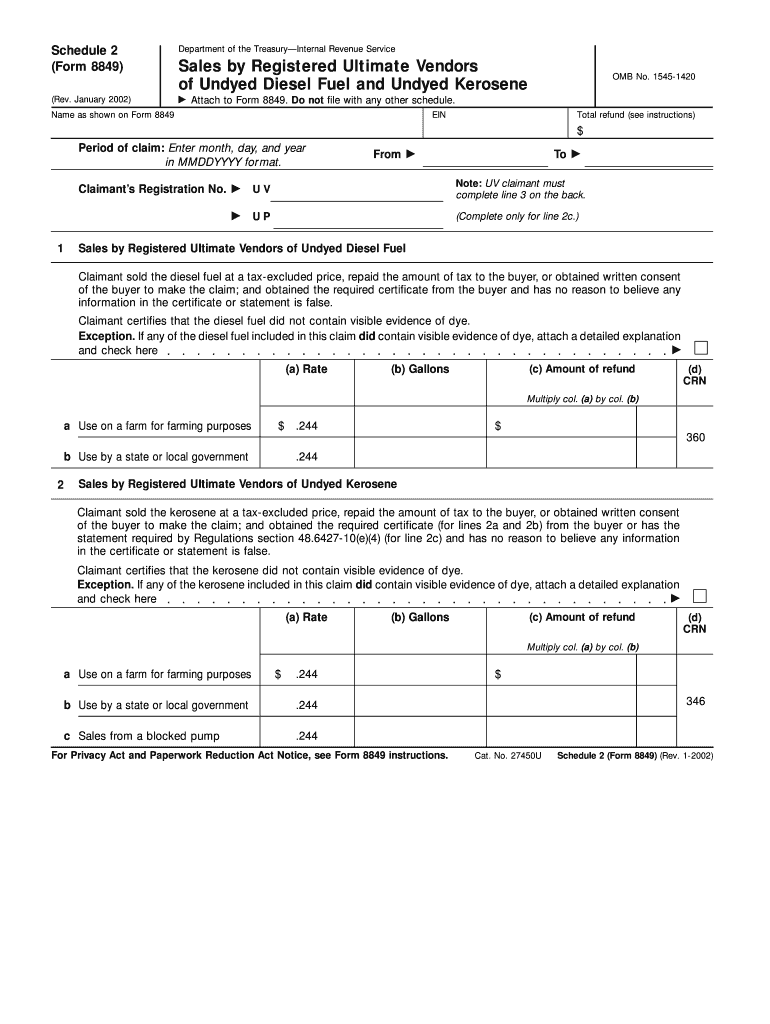
Form 8849 Schedule 2 Rev January , Fill in Version Sales by Registered Ultimate Vendors of Undyed Diesel Fuel and Undyed Kerosen


What is the Form 8849 Schedule 2 Rev January, Fill in Version Sales By Registered Ultimate Vendors Of Undyed Diesel Fuel And Undyed Kerosene
The Form 8849 Schedule 2 Rev January is a specific tax form used by registered ultimate vendors to report sales of undyed diesel fuel and undyed kerosene. This form is part of the larger Form 8849, which is used for claiming refunds of certain excise taxes. The Schedule 2 section specifically addresses the sales made by vendors who are authorized to sell these types of fuel without the dye that indicates the fuel is not subject to federal excise tax. Understanding this form is crucial for compliance with IRS regulations and for ensuring accurate tax reporting.
How to use the Form 8849 Schedule 2 Rev January
Using the Form 8849 Schedule 2 involves several key steps. First, ensure you are a registered ultimate vendor, as only those with this designation can fill out this form. Next, gather all necessary sales records for undyed diesel fuel and undyed kerosene sold during the reporting period. The form requires detailed information about each sale, including the quantity sold and the date of sale. Once completed, the form can be submitted to the IRS either electronically or by mail, depending on your preference and the IRS guidelines for submission.
Steps to complete the Form 8849 Schedule 2 Rev January
Completing the Form 8849 Schedule 2 involves several steps:
- Obtain the latest version of the form from the IRS website or through authorized tax software.
- Fill in your business information, including your name, address, and employer identification number (EIN).
- Document each sale of undyed diesel fuel and undyed kerosene, including quantities and sale dates.
- Calculate the total amount of excise tax to be refunded based on your sales.
- Review the completed form for accuracy before submission.
Key elements of the Form 8849 Schedule 2 Rev January
Key elements of the Form 8849 Schedule 2 include:
- Vendor Information: Details about the registered ultimate vendor, including business name and EIN.
- Sales Data: A comprehensive list of undyed diesel fuel and undyed kerosene sales, including quantities and dates.
- Refund Calculation: The total amount of excise tax being claimed for refund based on reported sales.
- Signature: The form must be signed by an authorized representative of the vendor, certifying the accuracy of the information provided.
IRS Guidelines
The IRS provides specific guidelines for completing and submitting the Form 8849 Schedule 2. Vendors must ensure they are familiar with the current tax laws regarding the sale of undyed fuels. This includes understanding which sales qualify for refunds and the documentation required to support claims. It is advisable to regularly check the IRS website for updates on forms and filing procedures to remain compliant with federal regulations.
Filing Deadlines / Important Dates
Filing deadlines for the Form 8849 Schedule 2 are crucial for vendors to avoid penalties. Generally, the form should be submitted within three years from the date of the sale to claim a refund. It is important to keep track of these deadlines and plan submissions accordingly. Vendors should also be aware of any specific deadlines set by the IRS for electronic submissions or paper filings, as these can vary year to year.
Quick guide on how to complete form 8849 schedule 2 rev january fill in version sales by registered ultimate vendors of undyed diesel fuel and undyed kerosene
Prepare [SKS] effortlessly on any device
Digital document management has gained immense traction among companies and individuals. It offers an ideal eco-friendly alternative to conventional printed and signed paperwork, allowing you to access the necessary form and securely store it online. airSlate SignNow equips you with all the tools required to create, modify, and eSign your documents swiftly without delays. Handle [SKS] on any device through airSlate SignNow's Android or iOS applications and enhance any document-related task today.
The easiest way to modify and eSign [SKS] with ease
- Obtain [SKS] and click on Get Form to begin.
- Utilize the tools we provide to complete your document.
- Emphasize important sections of the documents or redact sensitive information with tools that airSlate SignNow offers specifically for that purpose.
- Create your signature using the Sign function, which takes mere seconds and holds the same legal validity as a traditional wet ink signature.
- Review all the details and click on the Done button to save your changes.
- Choose how you wish to send your form, via email, SMS, invite link, or download it to your computer.
Forget about lost or mislaid documents, time-consuming form searching, or mistakes that necessitate reprinting new document copies. airSlate SignNow fulfills your requirements in document management in just a few clicks from any device you prefer. Alter and eSign [SKS] and ensure exceptional communication at every step of the form preparation process with airSlate SignNow.
Create this form in 5 minutes or less
Create this form in 5 minutes!
How to create an eSignature for the form 8849 schedule 2 rev january fill in version sales by registered ultimate vendors of undyed diesel fuel and undyed kerosene
How to create an electronic signature for a PDF online
How to create an electronic signature for a PDF in Google Chrome
How to create an e-signature for signing PDFs in Gmail
How to create an e-signature right from your smartphone
How to create an e-signature for a PDF on iOS
How to create an e-signature for a PDF on Android
People also ask
-
What is Form 8849 Schedule 2 Rev January, Fill in Version Sales By Registered Ultimate Vendors Of Undyed Diesel Fuel And Undyed Kerosene?
Form 8849 Schedule 2 Rev January is a specialized tax form used by registered ultimate vendors to report sales of undyed diesel fuel and undyed kerosene. This fill-in version simplifies the process of documenting transactions while ensuring compliance with IRS regulations. Using airSlate SignNow, you can easily complete and eSign this form, enhancing efficiency in your reporting.
-
How does airSlate SignNow help with filing Form 8849 Schedule 2 Rev January?
airSlate SignNow streamlines the process of filling out Form 8849 Schedule 2 Rev January by providing an intuitive interface and customizable templates. This allows businesses to quickly enter necessary data and make corrections as needed. Additionally, electronic signatures facilitate faster submission and approval, saving time and reducing errors.
-
Are there any costs associated with using airSlate SignNow for Form 8849 Schedule 2 Rev January?
Yes, airSlate SignNow offers various pricing plans to cater to different business needs, including features tailored specifically for managing documents like Form 8849 Schedule 2 Rev January. The cost may vary depending on the features required, but each plan is designed to be cost-effective. This ensures businesses can access the necessary tools without incurring excessive expenses.
-
What features does airSlate SignNow offer for Form 8849 Schedule 2 Rev January?
airSlate SignNow offers a range of features to assist with Form 8849 Schedule 2 Rev January, including document templates, electronic signatures, and status tracking. These features enable users to create, send, and track documents effortlessly until completion. Additionally, integration with other tools helps maintain a smooth workflow.
-
Can I store and manage my Form 8849 Schedule 2 Rev January documents using airSlate SignNow?
Absolutely! airSlate SignNow provides secure cloud storage for all your documents, including Form 8849 Schedule 2 Rev January. This allows you to easily access, manage, and retrieve your files whenever needed, ensuring that important tax documents are always organized and readily available.
-
Is it easy to collaborate with my team on Form 8849 Schedule 2 Rev January using airSlate SignNow?
Yes, airSlate SignNow facilitates team collaboration on Form 8849 Schedule 2 Rev January by allowing multiple users to comment, edit, and sign documents in real-time. This collaboration feature ensures that all team members can contribute and stay informed throughout the process, enhancing overall efficiency.
-
What integrations does airSlate SignNow offer for enhancing my Form 8849 Schedule 2 Rev January filing process?
airSlate SignNow integrates seamlessly with various popular business applications, such as CRMs and accounting software, allowing for a smooth workflow when filing Form 8849 Schedule 2 Rev January. These integrations reduce data entry errors and help maintain consistency across platforms, making document management more efficient.
Get more for Form 8849 Schedule 2 Rev January , Fill in Version Sales By Registered Ultimate Vendors Of Undyed Diesel Fuel And Undyed Kerosen
Find out other Form 8849 Schedule 2 Rev January , Fill in Version Sales By Registered Ultimate Vendors Of Undyed Diesel Fuel And Undyed Kerosen
- Sign Nebraska Healthcare / Medical Permission Slip Now
- Help Me With Sign New Mexico Healthcare / Medical Medical History
- Can I Sign Ohio Healthcare / Medical Residential Lease Agreement
- How To Sign Oregon Healthcare / Medical Living Will
- How Can I Sign South Carolina Healthcare / Medical Profit And Loss Statement
- Sign Tennessee Healthcare / Medical Business Plan Template Free
- Help Me With Sign Tennessee Healthcare / Medical Living Will
- Sign Texas Healthcare / Medical Contract Mobile
- Sign Washington Healthcare / Medical LLC Operating Agreement Now
- Sign Wisconsin Healthcare / Medical Contract Safe
- Sign Alabama High Tech Last Will And Testament Online
- Sign Delaware High Tech Rental Lease Agreement Online
- Sign Connecticut High Tech Lease Template Easy
- How Can I Sign Louisiana High Tech LLC Operating Agreement
- Sign Louisiana High Tech Month To Month Lease Myself
- How To Sign Alaska Insurance Promissory Note Template
- Sign Arizona Insurance Moving Checklist Secure
- Sign New Mexico High Tech Limited Power Of Attorney Simple
- Sign Oregon High Tech POA Free
- Sign South Carolina High Tech Moving Checklist Now