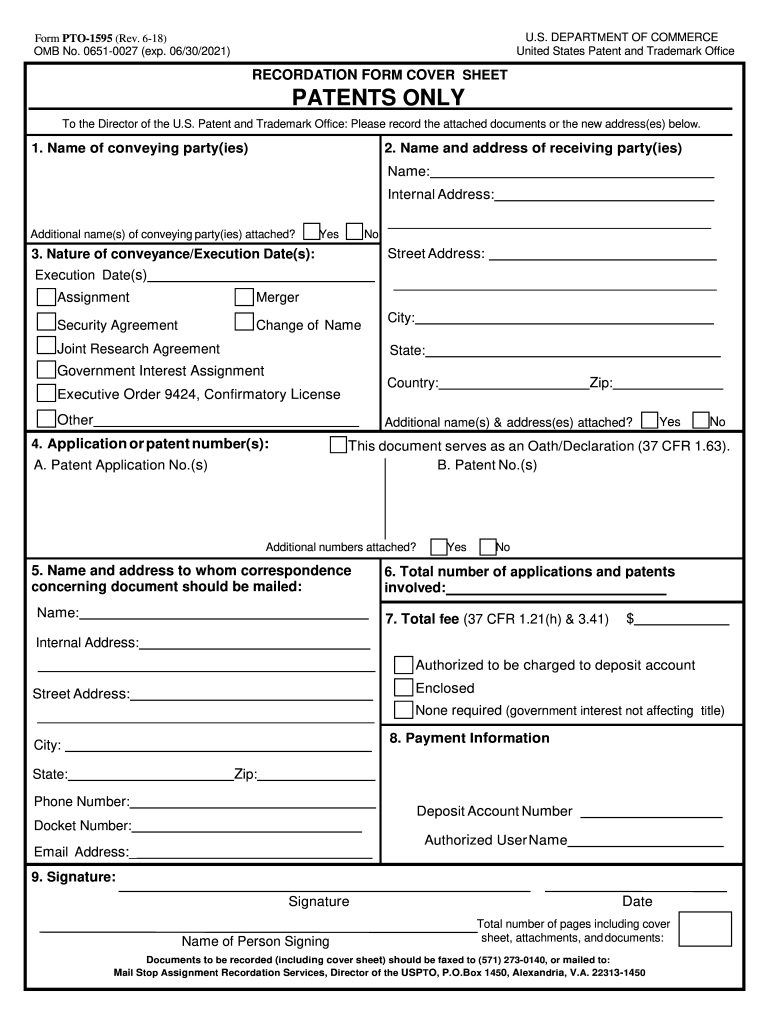
Pto 1595 2018-2026


What is the PTO 1595?
The PTO 1595 is a form used by the United States Patent and Trademark Office (USPTO) for the assignment of patent rights. This document facilitates the transfer of ownership of a patent from one party to another, ensuring that the new owner is legally recognized. The form captures essential details such as the names of the assignor and assignee, the patent number, and the date of the assignment. Properly completing this form is crucial for maintaining clear ownership records and protecting intellectual property rights.
How to Use the PTO 1595
Using the PTO 1595 involves several key steps to ensure that the assignment is legally valid. First, gather all necessary information about the patent, including its number and the parties involved. Next, fill out the form accurately, ensuring that all required fields are completed. It is important to have the assignor sign the document to validate the transfer. Once completed, the form can be submitted to the USPTO for recordation, which is essential for public notice of the assignment.
Steps to Complete the PTO 1595
Completing the PTO 1595 requires careful attention to detail. Follow these steps:
- Obtain the form from the USPTO website or through authorized sources.
- Enter the names and addresses of both the assignor and assignee.
- Provide the patent number and title of the invention.
- Include the date of execution and any additional required information.
- Ensure the assignor signs the document to confirm the assignment.
- Submit the completed form to the USPTO, either online or by mail.
Legal Use of the PTO 1595
The legal use of the PTO 1595 is essential for ensuring that patent assignments are recognized under U.S. law. This form must be filled out accurately to avoid disputes over ownership. It serves as a public record of the assignment, which can be referenced in legal proceedings. Failure to properly execute and submit the form may result in complications regarding patent rights and ownership claims.
Key Elements of the PTO 1595
Several key elements must be included in the PTO 1595 to ensure its validity:
- Assignor Information: Full name and address of the current patent owner.
- Assignee Information: Full name and address of the new patent owner.
- Patent Details: Patent number and title of the invention.
- Date of Assignment: The date when the assignment is executed.
- Signatures: The assignor must sign the form to validate the transfer.
Form Submission Methods
The PTO 1595 can be submitted to the USPTO through various methods. These include:
- Online Submission: Use the USPTO's electronic filing system for a quicker process.
- Mail: Send the completed form to the appropriate address listed on the USPTO website.
- In-Person: Deliver the form directly to the USPTO office if preferred.
Quick guide on how to complete to the director of the u
Discover the easiest method to complete and endorse your Pto 1595
Are you still spending time preparing your official paperwork on hard copies instead of doing it online? airSlate SignNow offers a superior way to complete and endorse your Pto 1595 and associated forms for public services. Our intelligent e-signature solution provides all the tools you need to handle documentation rapidly and in accordance with formal standards - effective PDF editing, managing, securing, signing, and sharing features all conveniently available through a user-friendly interface.
Only a few steps are needed to finish filling out and signing your Pto 1595:
- Upload the editable template to the editor using the Get Form button.
- Verify what details you must include in your Pto 1595.
- Navigate between the fields using the Next option to ensure nothing is missed.
- Utilize Text, Check, and Cross tools to complete the fields with your details.
- Modify the content with Text boxes or Images from the upper toolbar.
- Emphasize what is important or Blackout sections that are no longer relevant.
- Click on Sign to create a legally valid electronic signature using any method that suits you.
- Add the Date next to your signature and finalize your work with the Done button.
Store your finished Pto 1595 in the Documents folder within your account, download it, or export it to your preferred cloud storage. Our solution also offers versatile file sharing options. There’s no need to print your templates when you need to submit them to the appropriate public office - do it via email, fax, or by requesting a USPS “snail mail” delivery from your account. Give it a try today!
Create this form in 5 minutes or less
Find and fill out the correct to the director of the u
FAQs
-
Does attending an Ivy League school really matter?
Yes.A lot. Not because of bragging rights but because of some very solid reasons.But before I enumerate those reasons, please let me be clear on a couple of things -This applies to all top institutions and universities. Yes, there is a ‘halo effect’ around the Ivy League universities because with the exception of Cornell U. the other seven were the oldest ones (pre-dating the founding of the U.S. Republic.). But other top notch institutions are every bit as good or even better. Nobody in their right mind is going to argue for example that Brown U. is superior to Stanford U. or M.I.T., never mind that Brown is an Ivy League university.A lot of people will argue about how other factors like hard work, initiative and such matter. Yes they do, but it is completely missing the point. For the accurate analysis of the effect of any variable, you must hold all of the others constant (unless there are other variables which are inherently correlated to the one being examined, either directly or inversely).The question then is not “Will a lazy person who studied at Harvard U. do better than a diligent one who went to Penn State U.?” No. It is “Will there be a difference in consequences if that same person went to Harvard versus PSU?”To state that a given variable is influential to an outcome is neither to deny the importance of other ones nor to assert that said variable is the ONLY one which matters.With those out of the way now, permit me to list the very tangible advantages which go with studying and graduating from Ivy League universities as well as other top universities.These come systematically at three stages in chronological order - while at university, while graduating from it, afterwards in your career.While at university - The sheer amount of intellectual resources, both in terms of quantity and caliber of talent. Speaking from personal experience, I attended an Ivy League university (UPenn) as a student studying research in molecular biophysics. My department had over forty professors who were some of the top scientists on the planet. That now meant that I had a much bigger pool of options in terms of which research group to join but also as in the of quality of interaction and being forced to bring your A-game. This matters a lot when you are a serious scholar, both the number and the caliber of teachers and colleagues who you are surrounded by.Does that mean that a kid studying mathematics at say Oregon State U. cannot do well? No, it means that that same kid with that same level of drive and talent would be better off in the Department of Mathematics at Princeton U.At the point of graduating - Employers. This is a big one.A lot of top companies are very selective in which schools they recruit. This isn’t because they think that there is no talent in other lower ranked schools. No, from their viewpoint it is simply a matter of efficiency. That they would have to put in much more effort to ferret out top talent at a lower ranked school. It is also a powerful signal because employers recognize how hard it is to get into these schools, that you have to have had a certain level of intellect and to have worked with a great amount of diligence to have gotten into Harvard or Stanford.What’s more, the higher ranked the school, the more powerful the alumni network. Believe me, you graduate from a top university, and will find that its alumni fill several of the top ranks at big corporations. Once again, this is an advantage which cannot be overstated. Because the alumni are invariably very loyal to their institutions and you have much easier access to them. Now this also holds for fields like scientific research in academia. If you have a Ph.D in physics from M.I.T., you have a bigger chance of joining a big name research lab. Heck it even holds for entrepreneurs because a more powerful network of contacts means better access both to capital resources as well as knowledge of what talent to hire down the line.In your career further down the line - Alumni and former classmates.You get access to an exclusive club of contacts. A club both in literal and metaphorical terms. There is a UPenn Club in New York City. There is another just a block away from where I live now in Philadelphia. These aren’t just places where you go to have a glass of wine or smoke a cigar. They are ones where you meet people who can hook you up with all kinds of resources. Again, there are several with considerable initiative who can build such a circle through incessant networking, it’s just that this is now offered to you on a platter. Classmates who you studied with often come from rich and powerful families. Several top dogs at your workplace bond with you because you went to the same institution. My boss, a senior director of finance, graduated from UPenn. Another director of finance who I interact with graduated from the business school I went to. And the woman who runs the whole fast-track executive program at our firm also graduated from UPenn. You think that does not play to one’s advantage in terms of ground reality? I actually do not think it good for powerful executives to favor those from the schools which they attended. It is a form of nepotism in my view, but it is the plain truth nevertheless.In summary, the reputation and ranking of your university matters for reasons that go far beyond just stupid and superficial bragging rights.They have serious consequences in everything from the quality of the scholars who you interact with, your chances of employment and access to a powerful network right through life. I know and have experienced that as has my sister who also happens to be an Ivy League grad (Cornell U.) and several of my friends.No, it is not the only thing which matters. Woe be to such a society where too much emphasis is placed on what institution you attended to the point of an obsession.But the caliber and ranking of the institution which you attend matters. A lot.
-
What were the Tamil movies that impressed you in 2018?
Thanks for A2A Ajay AravindhAmong the various tamil movies released in 2018, few movies made were sincere to their genre and delivered the required bang for the buck by succeeding commercially and critically winning the accolades of the audiences and movie critics. Let me list down some of my favorites and impressive movies tamil from 2018,Iravukku Aayiram Kangal (2018)Director: Mu. MaranA cab driver finds himself in a tough spot after he is suspected of a murder. Multiple stories unfold while he tries to prove himself innocent.What impressed me about this movie was how the story was taken forward with a situation and circumstances told from the perspective of each character and how they get interlinked to each other driven the actions\reactions of the characters.NOTA (2018)Director: Anand ShankarAn inexperienced bachelor is appointed chief minister when his corrupt father retires.What impressed me about this movie was the director was very clear about what he is going to present on screen for the next 2 hours. The movie does not fall victim for the commercial cinema elements which are much used for pleasing the audiences, instead the movie accelerates forward in top gear doing complete justice to the story and script.Pariyerum Perumal (2018)Director: Mari SelvarajA law student from a lower caste begins a friendship with his classmate, a girl who belongs to a higher caste, and the men in her family start giving him trouble over this.What impressed me about this movie was how the caste discrimination and its venomous impacts were shown on the screen without pointing to any upper/lower caste. No names are used or even mentioned in the movie anywhere whereas the tensions and deep rooted casteism are conveyed through hard hitting emotional backlashes and brutal scenes.Ratsasan (2018)Director: RamkumarA rookie cop attempts to track down a serial killer who is murdering young school girls.What impressed me about this movie was how the director managed to keep the audience's attention hooked till the end with his gripping screenplay propelled with a haunting background score. Here the antagonist is not only menacing, but also brainy in parts such at many situations it makes one feel that anyone is vulnerable against him.96 (2018)Director: Prem KumarRam is a photographer and nature lover who travels all around India capturing moments. On a chance visit to his hometown Thanjavur, he goes into his school and begins to walk down memory lane to 1994 when he was a student harboring feelings for his classmate Janu.What impressed me about this movie was how the director managed to write and present the emotional encounters between the primary male and female without much melodrama and not succumbing to the normal romantic routines which many movies follow. Both characters feel for themselves, but the portrayal of the same is shown in a mature manner.Vada Chennai: Part 1 (2018)Director: VetrimaaranVada Chennai is the story of a fisherman from North Chennai who unknowingly becomes involved in a trap set by a mafia gang.What impressed me about this movie was the how the director managed to tell a simple story of revenge through non-linear screenplay and narration making more it more interesting with proper focus on each character and how each character play a vital role in the screenplay taking the story forward.The director deserves applause especially for the Interval Scene Sequence which is one of the best interval blocks i have seen in Indian Cinema which is brought to life through terrific background score and top notch cinematography.Kanaa (2018)Director: Arunraja KamarajA woman aims to excel in the intensely competitive world of cricket with the help of her supportive father.What impressed me about this movie was the how the director was able to parallel present two important issues persisting in the overall society without deviating to high intense melodrama in any of the issues which are presented in the movie. The importance of Farmers and their issues with the Battle which the Lead Female Character goes in her life for signNowing and aspiring her Cricket Career are handled in equilibrium.Seethakaathi (2018)Director: Balaji TharaneetharanSeethakaathi is a story, that chronicles the journey of Ayya, a legendary stage performer. The film showcases how an artiste and his art are immortal.What impressed me about this movie was the generous nature of the actor Vijay Sethupathi choosing this movie as his 25th movie knowing that the lead character which he played had less screen time in the movie, but the character’s nature and impact is what fuels the script and propels the story forward.Note: more movies may get added later.
-
How do I fill out the form of DU CIC? I couldn't find the link to fill out the form.
Just register on the admission portal and during registration you will get an option for the entrance based course. Just register there. There is no separate form for DU CIC.
-
What was the best revenge you've ever gotten?
Long back when I was in class 7, there was a guy in my school who used to trouble me a lot. I never did anything to him but still, he always used to tease me for no reason. He used to eat my lunch, tear my notebooks, write on my shirt with pens and do many more things. I was fed up with him.Moreover, it wasn’t only up to me. He was notorious among all girls. Except few, he had a history of misbehaving with every single girl. Frankly, he was an as***le.Alike many other girls, I also complained about it to my class teacher but she was a very soft-hearted lady. She never gave any strict punishment to him instead she always just told him to stop and that’s it. It wasn't sufficient for him in any way.I always sought a way to take revenge from him and teach him a good lesson.In the bus, I was accompanied by a senior girl who was a great friend of mine. She was a Prefect(a name given to a volunteer who helps teachers in conducting any activity in our school)One day while going home, she told me that coming Friday there will be a bag checking of all students.I asked her the reason, to which she replied that there are many students who are bringing mobile phones to school. Our Principal wants to catch them red-handed. And the punishment for the culprits will be tough.Her last line struck me hard. I saw this as an opportunity. After thinking for a while, I finally decided to implicate him in that.I knew that she would be one of the students checking the bags. So, the very next day I talked to her about this. I convinced her that he had troubled me a lot in the past and he deserves it. I told her to keep a mobile inside his bag on her own and then put the blame on him. That would do the job.But there was a big problem. According to her, mobile phones will be seized and won’t be returned. So if we put one of our phones then it will be a huge loss for us as we won’t get it back. We couldn’t afford it.So we started thinking of something else. Some offensive stuff.And then she came up with a great replacement of mobile phones - adult magazine.That was a great idea. It would be cheap and highly offensive as well. Moreover, he would be easily screwed if that would be recovered from his bag.Day before the checking she arranged an adult magazine with a girl wearing a bikini on its cover. Something similar to this:The cover was enough to fit the purpose and if looked inside, it had a semi-nude or bikini picture on almost every page. She chose the best one as we didn’t want to take any risk. What if the cover is vulgar but the pages inside are clean? He might somehow get away with it.The day of checking came. Before going for checking, she kept the magazine in her blazer. When the volunteers were asked to check the bags, all the student were in ground as morning assembly was going on. It was a pre-decided step to refrain students from hiding their phone anywhere else while the checking is going on.She did everything according to our plan. She first kept and then took out the magazine from his bag while pretending to check. Later she handed it over to the teacher informing her that this was found from his bag.As expected, all hell broke loose on him. He was humiliated and slapped in front of everyone. Then he was taken to the Principal’s office where he was suspended for two weeks. Meanwhile, he was crying and requesting constantly that he doesn’t know where that came from.Obviously, no one doubted her.After his suspension was over, the very first day when he arrived at school he was given a strict warning by the Principal that any further complain against him will get him rusticated from the school.From that day he was completely changed. He never did anything wrong to me or to anyone as far as I was in that school.This was the best revenge which I got.
-
Do military members have to pay any fee for leave or fiancee forms?
NOOOOOOO. You are talking to a military romance scammer. I received an email from the US Army that directly answers your question that is pasted below please keep reading.I believe you are the victim of a military Romance Scam whereas the person you are talking to is a foreign national posing as an American Soldier claiming to be stationed overseas on a peacekeeping mission. That's the key to the scam they always claim to be on a peacekeeping mission.Part of their scam is saying that they have no access to their money that their mission is highly dangerous.If your boyfriend girlfriend/future husband/wife is asking you to do the following or has exhibited this behavior, it is a most likely a scam:Moves to private messaging site immediately after meeting you on Facebook or SnapChat or Instagram or some dating or social media site. Often times they delete the site you met them on right after they asked you to move to a more private messaging siteProfesses love to you very quickly & seems to quote poems and song lyrics along with using their own sort of broken language, as they profess their love and devotion quickly. They also showed concern for your health and love for your family.Promises marriage as soon as he/she gets to state for leave that they asked you to pay for.They Requests money (wire transfers) and Amazon, iTune ,Verizon, etc gift cards, for medicine, religious practices, and leaves to come home, internet access, complete job assignments, help sick friend, get him out of trouble, or anything that sounds fishy.The military does provide all the soldier needs including food medical Care and transportation for leave. Trust me, I lived it, you are probably being scammed. I am just trying to show you examples that you are most likely being connned.Below is an email response I received after I sent an inquiry to the US government when I discovered I was scammed. I received this wonderful response back with lots of useful links on how to find and report your scammer. And how to learn more about Romance Scams.Right now you can also copy the picture he gave you and do a google image search and you will hopefully see the pictures of the real person he is impersonating. this doesn't always work and take some digging. if you find the real person you can direct message them and alert them that their image is being used for scamming.Good Luck to you and I'm sorry this may be happening to you. please continue reading the government response I received below it's very informative. You have contacted an email that is monitored by the U.S. Army Criminal Investigation Command. Unfortunately, this is a common concern. We assure you there is never any reason to send money to anyone claiming to be a Soldier online. If you have only spoken with this person online, it is likely they are not a U.S. Soldier at all. If this is a suspected imposter social media profile, we urge you to report it to that platform as soon as possible. Please continue reading for more resources and answers to other frequently asked questions: How to report an imposter Facebook profile: Caution-https://www.facebook.com/help/16... < Caution-https://www.facebook.com/help/16... > Answers to frequently asked questions: - Soldiers and their loved ones are not charged money so that the Soldier can go on leave. - Soldiers are not charged money for secure communications or leave. - Soldiers do not need permission to get married. - Soldiers emails are in this format: john.doe.mil@mail.mil < Caution-mailto: john.doe.mil@mail.mil > anything ending in .us or .com is not an official email account. - Soldiers have medical insurance, which pays for their medical costs when treated at civilian health care facilities worldwide – family and friends do not need to pay their medical expenses. - Military aircraft are not used to transport Privately Owned Vehicles. - Army financial offices are not used to help Soldiers buy or sell items of any kind. - Soldiers deployed to Combat Zones do not need to solicit money from the public to feed or house themselves or their troops. - Deployed Soldiers do not find large unclaimed sums of money and need your help to get that money out of the country. Anyone who tells you one of the above-listed conditions/circumstances is true is likely posing as a Soldier and trying to steal money from you. We would urge you to immediately cease all contact with this individual. For more information on avoiding online scams and to report this crime, please see the following sites and articles: This article may help clarify some of the tricks social media scammers try to use to take advantage of people: Caution-https://www.army.mil/article/61432/< Caution-https://www.army.mil/article/61432/> CID advises vigilance against 'romance scams,' scammers impersonating Soldiers Caution-https://www.army.mil/article/180749 < Caution-https://www.army.mil/article/180749 > FBI Internet Crime Complaint Center: Caution-http://www.ic3.gov/default.aspx< Caution-http://www.ic3.gov/default.aspx> U.S. Army investigators warn public against romance scams: Caution-https://www.army.mil/article/130...< Caution-https://www.army.mil/article/130...> DOD warns troops, families to be cybercrime smart -Caution-http://www.army.mil/article/1450...< Caution-http://www.army.mil/article/1450...> Use caution with social networking Caution-https://www.army.mil/article/146...< Caution-https://www.army.mil/article/146...> Please see our frequently asked questions section under scams and legal issues. Caution-http://www.army.mil/faq/ < Caution-http://www.army.mil/faq/ > or visit Caution-http://www.cid.army.mil/ < Caution-http://www.cid.army.mil/ >. The challenge with most scams is determining if an individual is a legitimate member of the US Army. Based on the Privacy Act of 1974, we cannot provide this information. If concerned about a scam you may contact the Better Business Bureau (if it involves a solicitation for money), or local law enforcement. If you're involved in a Facebook or dating site scam, you are free to contact us direct; (571) 305-4056. If you have a social security number, you can find information about Soldiers online at Caution-https://www.dmdc.osd.mil/appj/sc... < Caution-https://www.dmdc.osd.mil/appj/sc... > . While this is a free search, it does not help you locate a retiree, but it can tell you if the Soldier is active duty or not. If more information is needed such as current duty station or location, you can contact the Commander Soldier's Records Data Center (SRDC) by phone or mail and they will help you locate individuals on active duty only, not retirees. There is a fee of $3.50 for businesses to use this service. The check or money order must be made out to the U.S. Treasury. It is not refundable. The address is: Commander Soldier's Records Data Center (SRDC) 8899 East 56th Street Indianapolis, IN 46249-5301 Phone: 1-866-771-6357 In addition, it is not possible to remove social networking site profiles without legitimate proof of identity theft or a scam. If you suspect fraud on this site, take a screenshot of any advances for money or impersonations and report the account on the social networking platform immediately. Please submit all information you have on this incident to Caution-www.ic3.gov < Caution-http://www.ic3.gov > (FBI website, Internet Criminal Complaint Center), immediately stop contact with the scammer (you are potentially providing them more information which can be used to scam you), and learn how to protect yourself against these scams at Caution-http://www.ftc.gov < Caution-http://www.ftc.gov > (Federal Trade Commission's website)
-
What happens to all of the paper forms you fill out for immigration and customs?
Years ago I worked at document management company. There is cool software that can automate aspects of hand-written forms. We had an airport as a customer - they scanned plenty and (as I said before) this was several years ago...On your airport customs forms, the "boxes" that you 'need' to write on - are basically invisible to the scanner - but are used because then us humans will tend to write neater and clearer which make sit easier to recognize with a computer. Any characters with less than X% accuracy based on a recognition engine are flagged and shown as an image zoomed into the particular character so a human operator can then say "that is an "A". This way, you can rapidly go through most forms and output it to say - an SQL database, complete with link to original image of the form you filled in.If you see "black boxes" at three corners of the document - it is likely set up for scanning (they help to identify and orient the page digitally). If there is a unique barcode on the document somewhere I would theorize there is an even higher likelihood of it being scanned - the document is of enough value to be printed individually which costs more, which means it is likely going to be used on the capture side. (I've noticed in the past in Bahamas and some other Caribbean islands they use these sorts of capture mechanisms, but they have far fewer people entering than the US does everyday)The real answer is: it depends. Depending on each country and its policies and procedures. Generally I would be surprised if they scanned and held onto the paper. In the US, they proably file those for a set period of time then destroy them, perhaps mining them for some data about travellers. In the end, I suspect the "paper-to-data capture" likelihood of customs forms ranges somewhere on a spectrum like this:Third world Customs Guy has paper to show he did his job, paper gets thrown out at end of shift. ------> We keep all the papers! everything is scanned as you pass by customs and unique barcodes identify which flight/gate/area the form was handed out at, so we co-ordinate with cameras in the airport and have captured your image. We also know exactly how much vodka you brought into the country. :)
Create this form in 5 minutes!
How to create an eSignature for the to the director of the u
How to create an eSignature for your To The Director Of The U in the online mode
How to generate an eSignature for the To The Director Of The U in Google Chrome
How to create an eSignature for signing the To The Director Of The U in Gmail
How to make an eSignature for the To The Director Of The U right from your smartphone
How to create an eSignature for the To The Director Of The U on iOS devices
How to make an eSignature for the To The Director Of The U on Android
People also ask
-
What is airSlate SignNow's cover assignment feature?
airSlate SignNow's cover assignment feature allows users to manage document signing with ease. This functionality ensures that all necessary parties are clearly assigned to their roles, streamlining the signing process and enhancing accountability in your workflow.
-
How much does airSlate SignNow cost for businesses looking to use the cover assignment feature?
Pricing for airSlate SignNow varies based on the plan selected, with options suitable for businesses of all sizes. The cost-effective solution includes robust features like the cover assignment, making it a valuable investment for efficient document management.
-
What are the benefits of using the cover assignment in airSlate SignNow?
The cover assignment feature in airSlate SignNow signNowly improves the efficiency of document signing processes. It helps ensure that all stakeholders receive timely notifications, reducing delays and enhancing overall productivity.
-
Can I integrate airSlate SignNow with other applications while using the cover assignment feature?
Yes, airSlate SignNow offers integrations with various applications to enhance its cover assignment feature. This allows businesses to seamlessly connect their existing workflows and leverage other tools alongside their document signing processes.
-
Is it easy to set up the cover assignment feature in airSlate SignNow?
Yes, setting up the cover assignment feature in airSlate SignNow is user-friendly and straightforward. Users can quickly assign signers and roles, ensuring smooth document flows without requiring extensive technical expertise.
-
How does airSlate SignNow ensure security with the cover assignment feature?
airSlate SignNow prioritizes security by providing encrypted document paths and secure user authentication, especially when utilizing the cover assignment feature. This ensures that sensitive information remains protected while streamlining your signing processes.
-
Can airSlate SignNow's cover assignment feature help businesses comply with legal standards?
Absolutely! The cover assignment feature in airSlate SignNow is designed to keep your document signing compliant with legal standards. By clearly defining signer roles and maintaining a secure audit trail, businesses can confidently meet their compliance requirements.
Get more for Pto 1595
Find out other Pto 1595
- eSignature North Carolina Legal Cease And Desist Letter Safe
- How Can I eSignature Ohio Legal Stock Certificate
- How To eSignature Pennsylvania Legal Cease And Desist Letter
- eSignature Oregon Legal Lease Agreement Template Later
- Can I eSignature Oregon Legal Limited Power Of Attorney
- eSignature South Dakota Legal Limited Power Of Attorney Now
- eSignature Texas Legal Affidavit Of Heirship Easy
- eSignature Utah Legal Promissory Note Template Free
- eSignature Louisiana Lawers Living Will Free
- eSignature Louisiana Lawers Last Will And Testament Now
- How To eSignature West Virginia Legal Quitclaim Deed
- eSignature West Virginia Legal Lease Agreement Template Online
- eSignature West Virginia Legal Medical History Online
- eSignature Maine Lawers Last Will And Testament Free
- eSignature Alabama Non-Profit Living Will Free
- eSignature Wyoming Legal Executive Summary Template Myself
- eSignature Alabama Non-Profit Lease Agreement Template Computer
- eSignature Arkansas Life Sciences LLC Operating Agreement Mobile
- eSignature California Life Sciences Contract Safe
- eSignature California Non-Profit LLC Operating Agreement Fast